
一、簡介
This manual provides essential information for the safe and efficient operation of your Samsung 85-Inch Class Mini LED M80H Series Smart TV. Please read this manual thoroughly before using the product and retain it for future reference. The Samsung M80H Series TV features Mini LED technology with AI Mode, Supersize Picture Enhancer, Pure Spectrum Color, Motion Xcelerator 144Hz, Auto HDR Remastering, and the NQ4 AI Gen2 Processor for an enhanced view荷蘭國際集團的經驗。
2. 包裝內容
請確認包裝內所有組件齊全:
- Samsung 85-Inch M80H Series TV
- 電源線
- Remote Control (BT Simple Remote TM2280A with batteries)
- 站立
- 使用者手冊
- 保固卡

3. 設定
3.1 物理安裝
Carefully unpack the TV and its components. For stand installation, align the stand with the designated slots at the bottom of the TV and secure it according to the instructions provided in the separate stand assembly guide. For wall mounting, the TV supports a VESA standard of 400 x 300 mm.
3.2 連接
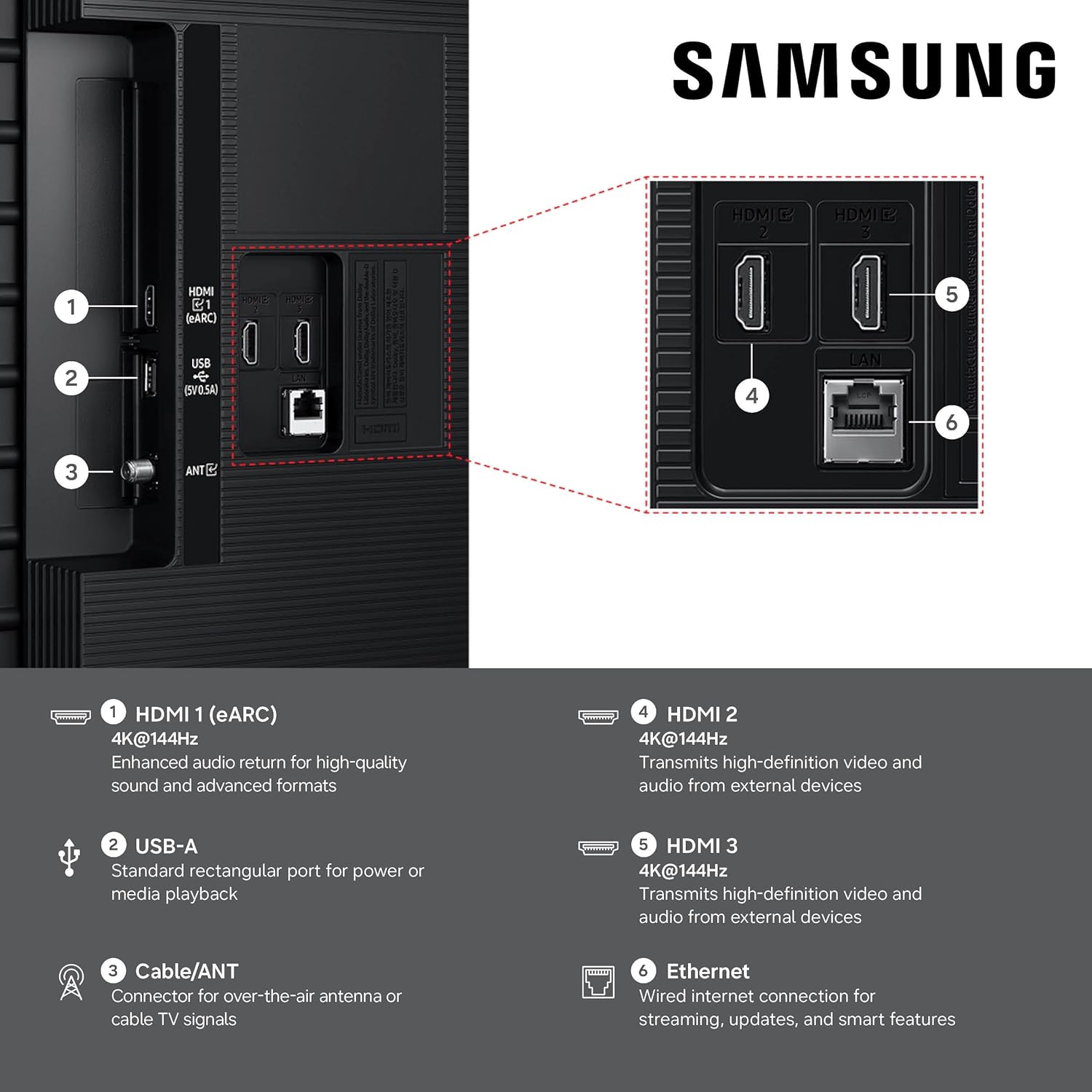
Connect your external devices to the TV's ports. Ensure the TV is powered off before making any connections.
- HDMI Ports (3 Total): Connect high-definition devices such as Blu-ray players, game consoles, or set-top boxes. HDMI 1 supports eARC for enhanced audio return.
- USB Port (1 Total): 連接USB儲存裝置進行媒體播放。
- 乙太網路 (LAN) 連接埠: 用於有線網路連線。
- 天線/有線電視輸入: 連接無線天線或有線電視訊號。
- 無線連接: The TV supports Bluetooth 5.3 and Wi-Fi for wireless connections.

4. 操作說明
4.1 電源開關
Connect the power cable to the TV and a wall outlet. Press the power button on the remote control or the TV to turn it on or off.
4.2遙控器
Use the included Bluetooth Simple Remote (TM2280A) to navigate the TV's interface, adjust volume, change channels, and access smart features. Ensure batteries are correctly inserted.
4.3 智慧電視功能(Tizen 作業系統)
Your Samsung M80H TV runs on the Tizen operating system, offering a personalized smart TV platform. Access popular internet applications such as Netflix, Amazon Prime, and YouTube. Alexa is built-in for voice control.
視覺人工智慧伴侶
Interact with your TV using voice commands to ask questions and access powerful AI features. The Vision AI Companion can provide information, recommend content, and help you find answers on the big screen.
三星電視+
Enjoy over 2,700 free streaming options, including more than 750 subscription-free channels, offering news, sports, movies, and more.
遊戲中心
A central hub for your favorite games from consoles, cloud services, and gaming apps. It provides personalized recommendations and allows for fine-tuning game settings with the Game Bar, including ultra-wide aspect ratios (21:9 and 32:9). FreeSync Premium reduces stuttering and tearing for a smoother gaming experience.
AI Sound Controller & Object Tracking Sound Lite
The AI Sound Controller allows you to adjust the balance of voices, music, and sound effects. Object Tracking Sound Lite provides motion-based sound, where audio is precisely placed in space for an immersive experience. Q-Symphony enables the TV and a compatible soundbar to work together for enhanced audio.
Additional AI Features
- AI 自訂模式: Automatically detects content type and optimizes picture settings.
- 真實深度增強器: Analyzes scenes and adjusts foreground contrast for lifelike depth.
- 即時翻譯: Identifies content language and provides instant subtitles in your preferred language.
- 生成壁紙: Create AI-generated on-screen images to match your mood or decor.
- 寵物照護: AI detects pet barking and alerts you, allowing custom rules for content.
- 儲存共享: Seamlessly share multimedia files across compatible Samsung devices.
- AI能量模式: Reduces power consumption by auto-adjusting brightness based on room lighting and user activity.
- 卡拉OK: 把你的電視變成卡拉OK機tage with the Samsung Daily+ feature.
5. 主要功能詳解
5.1 Mini LED with AI Mode
Mini LED technology utilizes thousands of tiny LEDs for precise backlighting, delivering brighter visuals with richer contrast. AI Mode intelligently analyzes and enhances each scene, improving clarity, color, and contrast for stunning image quality.
5.2 Supersize Picture Enhancer
This feature provides groundbreaking enhancements for larger screens, improving clarity, reducing noise, and delivering dramatic contrast. Content appears sharp and clear, optimized for the 85-inch display.

5.3 Pure Spectrum Color
Experience one billion true-to-life colors, powered by advanced color technology and Mini-LED precision. This results in rich reds, deep blues, and vibrant greens, making every scene realistic.

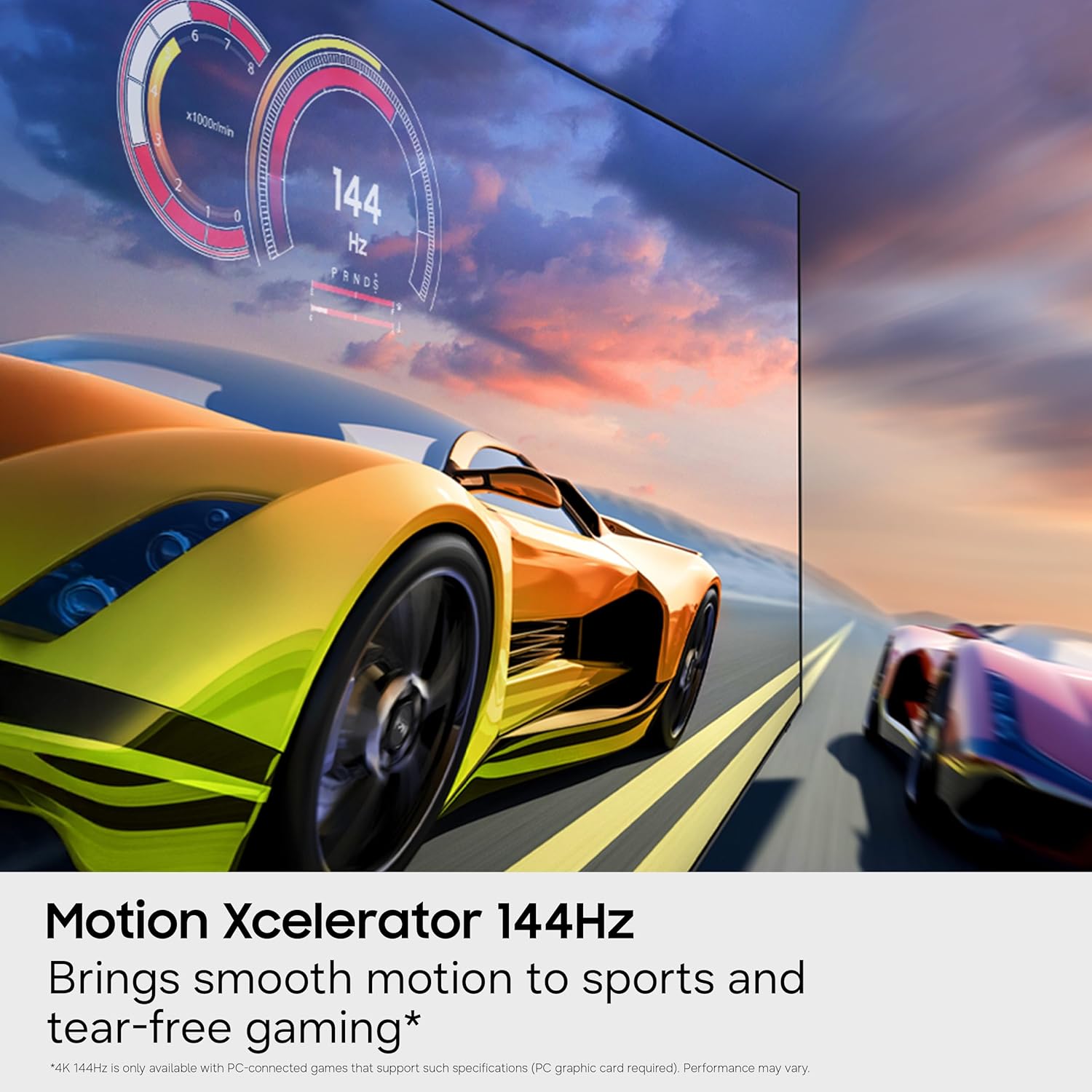
5.4 運動加速器 144Hz
Achieve ultra-smooth performance for fast-paced games and sports with a 144Hz refresh rate. Variable Refresh Rate (VRR) technology dynamically matches the display to the game, eliminating stutter and tearing for optimal responsiveness. Note: 4K 144Hz is only available with PC-connected games that support such specifications (PC graphics card required). Performance may vary.

5.5 自動 HDR 重製
This feature intelligently transforms Standard Dynamic Range (SDR) content to High Dynamic Range (HDR)-like quality. It delivers brighter highlights, more vibrant colors, and clearer details for a dazzling picture.
5.6 NQ4 AI Gen2 處理器
The NQ4 AI Gen2 Processor is the advanced powerhouse behind the TV's performance. It analyzes and enhances content in real-time, delivering sharper images, smoother motion, and more vibrant colors. This processor also contributes to advanced sound processing for a cinematic experience. Note: Utilizes AI-based formulas to upscale to 4K resolution. Resulting picture may vary based on source content.

5.7 官方產品視頻
觀看官方產品視頻,以獲得更直觀的了解。view of the Samsung M80H Series features.
6、維護保養
6.1 清潔電視機
要清潔螢幕,請用柔軟乾燥的超細纖維布輕輕擦拭。若要頑固污漬,請輕輕擦拭ampen the cloth with water or a screen-safe cleaning solution. Avoid using harsh chemicals, abrasive materials, or direct spraying of liquids onto the screen or frame. For the TV frame and stand, use a soft, dry cloth.
6.2一般護理
Ensure proper ventilation around the TV. Avoid placing the TV in direct sunlight or near heat sources. Disconnect the power cable during lightning storms or when the TV will be unused for extended periods.
7。 故障排除
7.1 沒有電源
- 檢查電源線是否牢固地連接到電視和牆壁插座。
- 透過插入其他裝置來驗證牆壁插座是否正常運作。
- 嘗試使用不同的電源插座。
7.2 無影像或影像品質差
- Ensure all video cables (HDMI, etc.) are securely connected to both the TV and the source device.
- 請檢查電視機上是否選擇了正確的輸入來源。
- 在電視選單中調整影像設定(亮度、對比、清晰度)。
- 如果使用天線,請檢查天線連接並進行頻道掃描。
7.3 無聲音或音質差
- 檢查電視音量,確保沒有靜音。
- 如果使用外部音訊設備(條形音箱、接收器),請確保它們已正確連接並已開啟。
- 檢查電視選單中的音訊輸出設定。
7.4 遙控器無法運作
- 更換遙控器內的電池。
- 確保遙控器和電視機之間沒有障礙物。
- If it's a Bluetooth remote, ensure it is paired with the TV.
7.5 Smart Features/Internet Connectivity Issues
- Check your Wi-Fi connection or Ethernet cable.
- 重新啟動路由器和數據機。
- Perform a network connection test in the TV's settings menu.
- Ensure your Samsung Account is logged in for network-based smart services.
8. 規格
| 型號名稱 | M80H |
| 型號 | UN85M80HAFXZA |
| 品牌 | 三星 |
| 螢幕尺寸 | 85英寸 |
| 顯示技術 | 迷你LED |
| 解決 | 4K(3840×2160) |
| 重新整理率 | 120Hz (Motion Xcelerator 144Hz for PC gaming) |
| 處理器 | NQ4人工智慧第二代處理器 |
| 作業系統 | 蒂森 |
| 連接性 | 3 HDMI Ports (1 eARC), 1 USB Port, Ethernet, Wi-Fi, Bluetooth 5.3 |
| VESA 安裝標準 | 400 x 300 毫米 |
| 產品尺寸(深 x 寬 x 高) | 12.8吋(深)x 74.4吋(寬)x 44.6吋(高)(含底座) |
| 物品重量 | 63.7磅(含支架) |
| 顏色 | 黑色的 |
9. 保固和支持
9.1 保固信息
Your Samsung M80H Series TV comes with a 1 年製造商保固. Please refer to the included Warranty Card for detailed terms and conditions. EU spare part availability duration is 7 years.
9.2 客戶支持
For technical assistance, troubleshooting beyond this manual, or warranty claims, please contact Samsung Customer Support. Contact information can be found on the Warranty Card or the official Samsung web地點。


