
1. 產品結束view
The ATK N9 Tri-Mode Gaming Headset is designed for gamers requiring flexible connectivity, clear audio, and reliable communication across multiple devices. It supports 3.5 mm wired, 2.4G wireless, and Bluetooth connections, allowing seamless switching between gaming consoles, PC, and mobile devices. Stereo-tuned dynamic drivers deliver balanced sound, enhancing in-game audio cues such as footsteps, gunfire, and environmental effects. The detachable noise-canceling microphone improves voice clarity for team communication, online gaming, and voice calls. Its over-ear design, with soft ear cushions and an adjustable headband, ensures a comfortable fit for extended gaming sessions. The headset is compatible with PS5, PS4, PC, Nintendo Switch, and mobile devices. For Xbox Series X|S, audio and microphone functions are supported via the 3.5 mm wired connection.

2. 包裝內容
確認您的包裹含有下列所有物品:
- ATK N9 Pro/White Gaming Headset
- 可拆卸式降噪麥克風
- USB-C 充電線
- 3.5毫米音訊線
- 2.4G Wireless USB Adapter
- 用戶手冊(本文檔)

3. 初始設定
3.1. 為耳機充電
Before first use, fully charge the headset using the provided USB-C charging cable. Connect the USB-C end to the headset's charging port and the USB-A end to a compatible USB power source (e.g., PC, wall adapter). The LED indicator will show charging status.
3.2. 安裝麥克風
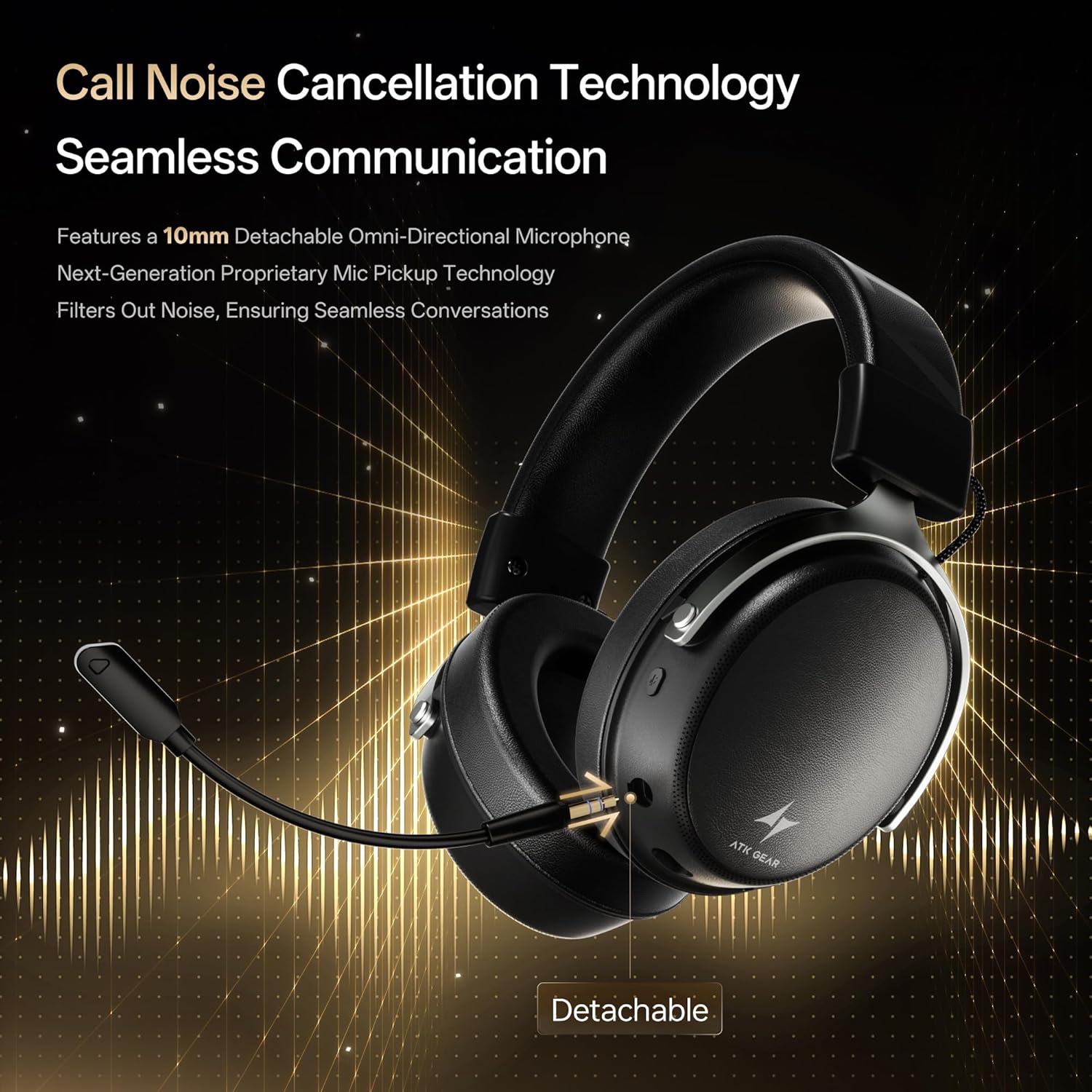
Insert the detachable boom microphone into the microphone port on the left earcup until it clicks into place. Ensure it is securely connected for optimal voice pickup.
3.3. 連接選項
The ATK N9 Pro/White headset offers three connectivity modes:
- 2.4G無線模式: For PC, PS4, PS5, and Nintendo Switch (docked mode).
- Plug the 2.4G wireless USB adapter into an available USB port on your device.
- 打開耳機電源。
- Switch the headset to 2.4G mode using the mode switch. The headset will automatically pair with the adapter.
- Adjust audio output settings on your device if necessary to select the headset.
- 藍牙模式: For mobile devices, PC, and Nintendo Switch (handheld mode).
- Power on the headset and switch to Bluetooth mode. The LED indicator will flash, indicating pairing mode.
- On your device, go to Bluetooth settings and select "ATK N9 Pro" from the list of available devices.
- 連線成功後,LED指示燈將會常亮。
- 3.5毫米有線模式: For Xbox Series X|S, PS4, PS5, PC, Nintendo Switch, and mobile devices.
- 將 3.5 公釐音訊線的一端連接到耳機的 3.5 公釐插孔。
- Connect the other end to the 3.5mm audio port on your device (e.g., controller, PC audio jack).
- 耳機將以有線模式運行,不具備無線功能。

4. 操作說明
4.1. 耳機控制
The ATK N9 Pro/White headset features intuitive controls located on the earcups:
- 電源按鈕: Press and hold to power on/off. Short press for play/pause (in 2.4G/Bluetooth mode).
- 模式切換: Toggle between 2.4G wireless, Bluetooth, and wired modes.
- Volume Up/Down Wheel: 旋轉調整音量。
- 麥克風靜音按鈕: 按下可將麥克風靜音/取消靜音。
- Spatial Audio Button: Press to activate/deactivate 3D Spatial Audio.
- Mic Monitoring Button: Press to enable/disable microphone monitoring (sidetone).
4.2. 麥克風的使用
The detachable noise-canceling microphone is designed for clear communication. Position the microphone approximately 1-2 inches from your mouth for optimal voice pickup. Use the microphone mute button on the headset to quickly mute your voice when needed.
4.3. 調整貼合度
The headset features an adjustable headband and soft ear cushions for comfort. Extend or retract the headband to achieve a snug yet comfortable fit. The earcups are designed to fully enclose your ears for passive noise isolation and comfort during long gaming sessions.
三、技術規格
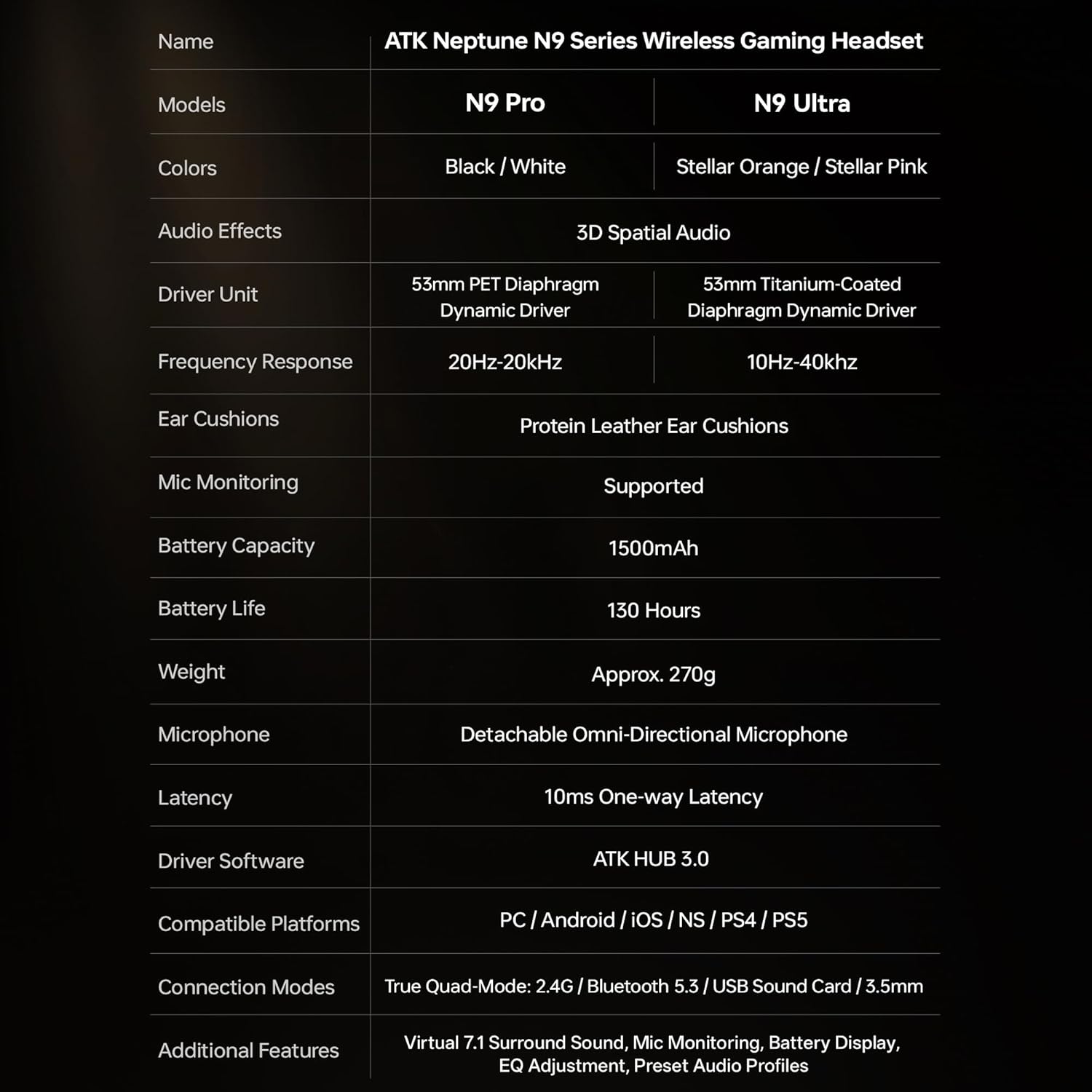
| 特徵 | 規格 |
|---|---|
| 型號名稱 | ATK N9 Pro |
| 連接性 | 3.5mm Wired, 2.4G Wireless, Bluetooth 5.3 |
| 驅動類型 | 動態驅動器 |
| 驅動器尺寸 | 53毫米 |
| 頻率範圍 | 20赫茲 - 20,000赫茲 |
| 阻抗 | 64歐姆 |
| 麥克風 | Detachable Noise-Canceling Omni-Directional |
| 電池容量 | 1500毫安培時 |
| 電池壽命 | 長達 130 小時 |
| 延遲(2.4G) | 10 Milliseconds (one-way) |
| 重量 | 270克 |
| 耳朵放置 | 耳罩式 |
| 相容設備 | PS5, PS4, PC, Nintendo Switch, Mobile Devices, Xbox Series X|S (wired) |
| 附加功能 | 3D Spatial Audio, Mic Monitoring, Volume Control |

6. 保養與維護
- 打掃: 使用柔軟的乾布清潔耳機。避免使用刺激性化學物質或研磨材料。
- 貯存: 請將耳機存放在陰涼乾燥處,避免陽光直射和極端溫度。
- 電池保養: 為延長電池壽命,請避免頻繁地將耳機電量完全耗盡。即使長時間不使用,也請定期充電。
- 耐水性: 此款耳機不防水,請避免接觸液體。
7。 故障排除
7.1. 無聲音/音量過低
- Ensure the headset is powered on and connected in the correct mode (2.4G, Bluetooth, or 3.5mm wired).
- 檢查耳機上的音量旋鈕和設備的音量設定。
- For wireless modes, ensure the headset is paired correctly and selected as the audio output device in your system settings.
- If using 3.5mm wired, ensure the cable is fully inserted into both the headset and the device.
7.2. 麥克風無法運作
- 確保麥克風牢固地連接到耳機上。
- 檢查耳機上的麥克風靜音按鈕是否已啟用。
- Verify that the headset microphone is selected as the input device in your device's sound settings.
- For Xbox Series X|S, ensure you are using the 3.5mm wired connection for microphone support.
7.3. 連線問題
- 2.4G 無線網路: Ensure the USB adapter is firmly plugged in. Try a different USB port.
- 藍牙: Ensure the headset is in pairing mode. Forget the device on your phone/PC and re-pair. Keep the headset within the 5-meter Bluetooth range.
- 一般的: Power cycle both the headset and your connected device.
8. 保固和支持
8.1. 保固信息
The ATK N9 Pro/White Gaming Headset comes with a 6 個月保固 自購買日起生效。本保固涵蓋正常使用情況下的製造缺陷和工藝問題。但不包括因誤用、意外事故、未經授權的改裝或正常磨損造成的損壞。
8.2. 客戶支持
For further assistance, technical support, or warranty claims, please contact ATK customer service through the retailer where the product was purchased or visit the official ATK web網站提供支持聯繫信息。