
一、簡介
This manual provides detailed instructions for the installation, operation, and maintenance of your Fazoxo 2K Wireless Outdoor Security Camera. Designed for home security, this solar-powered camera offers advanced features including 2K resolution, color night vision, motion detection, two-way audio, and robust weather resistance. Please read this manual thoroughly before use to ensure optimal performance and safety.
2. 包裝內容

Image: All components included in the Fazoxo 2K Security Camera package.
Your Fazoxo 2K Security Camera package includes the following items:
- Camera Body (2 units)
- 太陽能板(2 塊)
- USB 連接線(2 條)
- 使用說明書
- 安裝螺絲和錨栓
- Stand/Mounting Bracket (2 units)
3.產品特點
3.1 Solar-Powered for Extended Battery Life

Image: A Fazoxo camera connected to its solar panel, installed on a house exterior.
The camera is equipped with a high-efficiency solar panel designed to provide continuous supplemental power under adequate sunlight. This feature minimizes the need for manual recharging, offering a sustainable and low-maintenance surveillance solution for long-term outdoor installation.
3.2 2K UHD Clarity with Night Vision & 3x Digital Zoom

Image: Visual comparison demonstrating the superior detail of 2K resolution over 1080p.
Experience crisp, detailed video footage day and night with 2K Ultra HD resolution. The camera features standard infrared night vision for clear black-and-white images in low light, and a built-in spotlight mode that activates full-color night vision for more vivid details. The 3x digital zoom allows you to focus on specific areas of interest.
3.3 靈活的儲存選項

Image: Camera with indicators for both local microSD card storage and cloud storage options.
Event-triggered videos are securely backed up with a 7-day trial cloud storage. For extended coverage, you can upgrade to premium cloud plans (subscription required) or insert a microSD card (up to 128GB, not included) for local recording of motion events.
3.4 Smart AI Detection & Instant Alerts

Image: Visual representation of the camera's AI-powered motion detection distinguishing various objects.
Receive prompt phone notifications when motion is detected. Basic motion detection functions without a subscription. For smarter alerts that differentiate between people, vehicles, and pets, or to set custom activity zones, an optional subscription plan is available to unlock these advanced AI features.
3.5 Two-Way Audio & Real-Time Interaction

Image: Depiction of two-way audio functionality, allowing communication via the camera.
The built-in microphone and speaker allow you to communicate directly through the app. Greet visitors, deter unwanted guests, or check in on your family and pets from any location.
3.6 IP65 Weatherproof & Wire-Free Convenience

Image: Cameras enduring different weather conditions, demonstrating IP65 rating.
Built to withstand common weather conditions like rain, snow, and dust, this camera is suitable for many outdoor locations. Its solar-powered design and rechargeable battery offer significant installation flexibility without the need for power cords, making it a practical choice for homes, garages, sheds, or fences.
4. 設置指南
4.1 Easy Setup with VicoHome App

Image: Step-by-step visual guide for initial camera setup using the VicoHome app.
- 下載 VicoHome 應用程式: For security, only download the app from your phone's official app store. This ensures you're getting the authentic and safe version. You can find the app by scanning the QR code in your user manual or visiting vicohome.io/download.
- Power On and Activate Pairing Mode: Follow the instructions in the app to power on your camera and put it into pairing mode.
- Connect the Camera to the VicoHome App: Click "Add Camera Now" on the VicoHome App to add a new camera. Ensure your phone is connected to a 2.4GHz Wi-Fi network during setup.
4.2 安裝相機
The camera comes with a mounting bracket and screws for easy installation. Choose a location that provides optimal viewing coverage and sufficient sunlight for the solar panel. Secure the mounting bracket to a wall, ceiling, or other suitable surface using the provided screws. Attach the camera to the bracket and adjust its angle for the desired field of view. Ensure the solar panel is positioned to receive maximum direct sunlight.
Video: A user demonstrating the unboxing and easy installation process of the Fazoxo security camera, including mounting it to a surface.
Video: A user installing the solar-powered camera on a tree, highlighting its wire-free setup and solar panel connection.
5. 操作說明
5.1 直播 View 遠端監控

Image: Multiple camera feeds displayed simultaneously on a smartphone, demonstrating multi-camera monitoring.
Access live video streams from your camera anytime, anywhere through the VicoHome app. The app allows you to view multiple camera feeds simultaneously, ensuring comprehensive coverage of your property.
5.2 移動偵測和警報
The camera's motion detection feature will trigger an alarm and send instant notifications to your phone when activity is detected. Customize detection sensitivity and set specific activity zones within the app to reduce false alerts. Advanced AI analysis (subscription required) can distinguish between people, vehicles, and pets.
5.3 雙向音訊通信
Utilize the two-way audio feature to speak and listen through the camera. Press the microphone icon in the app to talk, and release to listen. This is useful for interacting with visitors or deterring intruders.
5.4 夜視模式
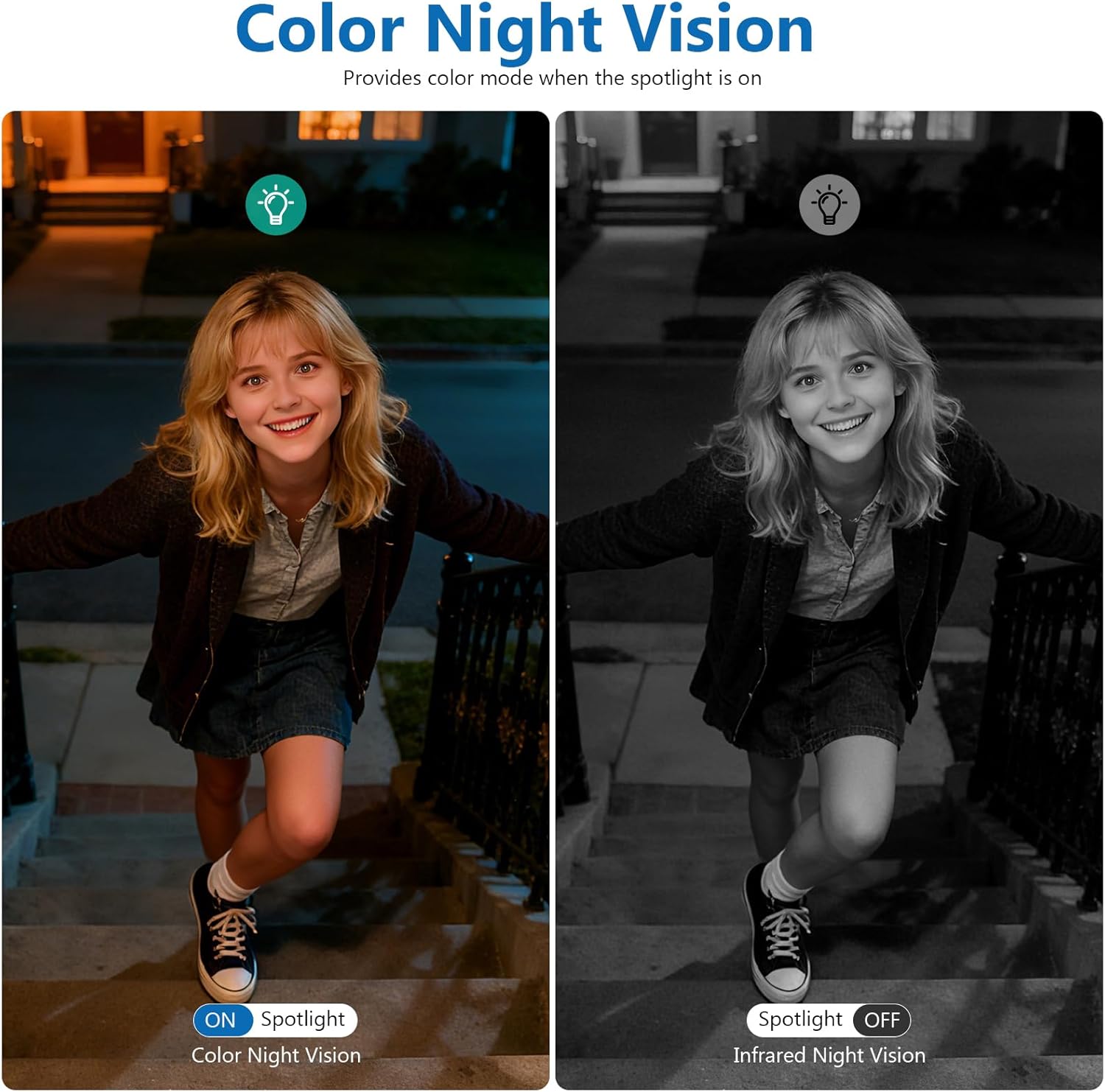
Image: Side-by-side comparison of standard infrared night vision and spotlight-activated color night vision.
The camera offers two night vision modes: standard infrared (black and white) and color night vision. Color night vision is activated when the built-in spotlight turns on, providing clearer and more detailed images in the dark.
5.5 儲存管理
Recorded videos are stored either on a local microSD card (not included) or in the cloud (7-day trial included, subscription for extended plans). Manage your recordings, view playback, and download clips directly from the VicoHome app.
Video: A demonstration of the camera's live feed and features within the VicoHome app, including clarity and motion alerts.
影片:一段短片展示了asing the camera's outdoor view and solar panel, emphasizing its ease of use.
6、維護保養
6.1 電池充電
The camera's internal battery is primarily charged by the solar panel. Ensure the solar panel is clean and free from obstructions to maximize charging efficiency. If prolonged periods of low sunlight occur, or if the camera's battery level drops significantly, you may need to manually charge the camera using the provided USB cable.
6.2 清潔
定期用柔軟的布清潔相機鏡頭和太陽能板。amp cloth to remove dust, dirt, or water spots. Avoid using harsh chemicals or abrasive materials that could damage the surfaces.
7。 故障排除
- 攝影機無法連接到Wi-Fi: Ensure your Wi-Fi network is 2.4GHz. Check Wi-Fi signal strength at the camera's location. Restart your router and camera.
- 視訊品質差: Check your Wi-Fi connection speed. Ensure the camera lens is clean. Adjust camera placement for optimal lighting.
- 電池無法充電: Ensure the solar panel is clean and receives direct sunlight for several hours daily. Check the connection between the solar panel and the camera.
- 未收到移動偵測警報: Verify motion detection settings in the VicoHome app. Check app notification permissions on your smartphone.
- 雙向音訊問題: Ensure microphone and speaker permissions are enabled for the VicoHome app on your smartphone. Check volume settings.
8. 規格
| 特徵 | 規格 |
|---|---|
| 型號名稱 | FAZOXO-CG6-2Solar |
| 室內/室外使用 | 戶外的 |
| 視訊擷取分辨率 | 1440p (2K) |
| 電源 | 太陽能供電,電池供電 |
| 連線協定 | Wi-Fi(僅 2.4GHz) |
| 控制器類型 | 維科之家應用程式 |
| 安裝類型 | 壁掛式、吸頂式 |
| 夜視範圍 | 33 英尺 |
| 國際防護等級 | IP65(防水) |
| 快閃記憶體支援的最大大小 | 128 GB (MicroSD, not included) |
| 特色 | 雙向音訊、內建照明燈、高清解析度、動作感應器、夜視功能 |
9. 保固和支持
For warranty information and technical support, please refer to the documentation included in your product packaging or visit the official Fazoxo website. You can also contact customer service through the VicoHome app for assistance.