
PUSOKEI B0FS1Z75ZP
PUSOKEI B0FS1Z75ZP 2G Unlocked Cell Phone for Seniors User Manual
Model: B0FS1Z75ZP
介紹
This manual provides detailed instructions for the PUSOKEI B0FS1Z75ZP 2G Unlocked Cell Phone. Please read this manual carefully before using your device to ensure proper operation and to maximize its features. This phone is designed for ease of use, featuring large buttons, a loud speaker, and a clear 2.0-inch display, making it suitable for seniors.
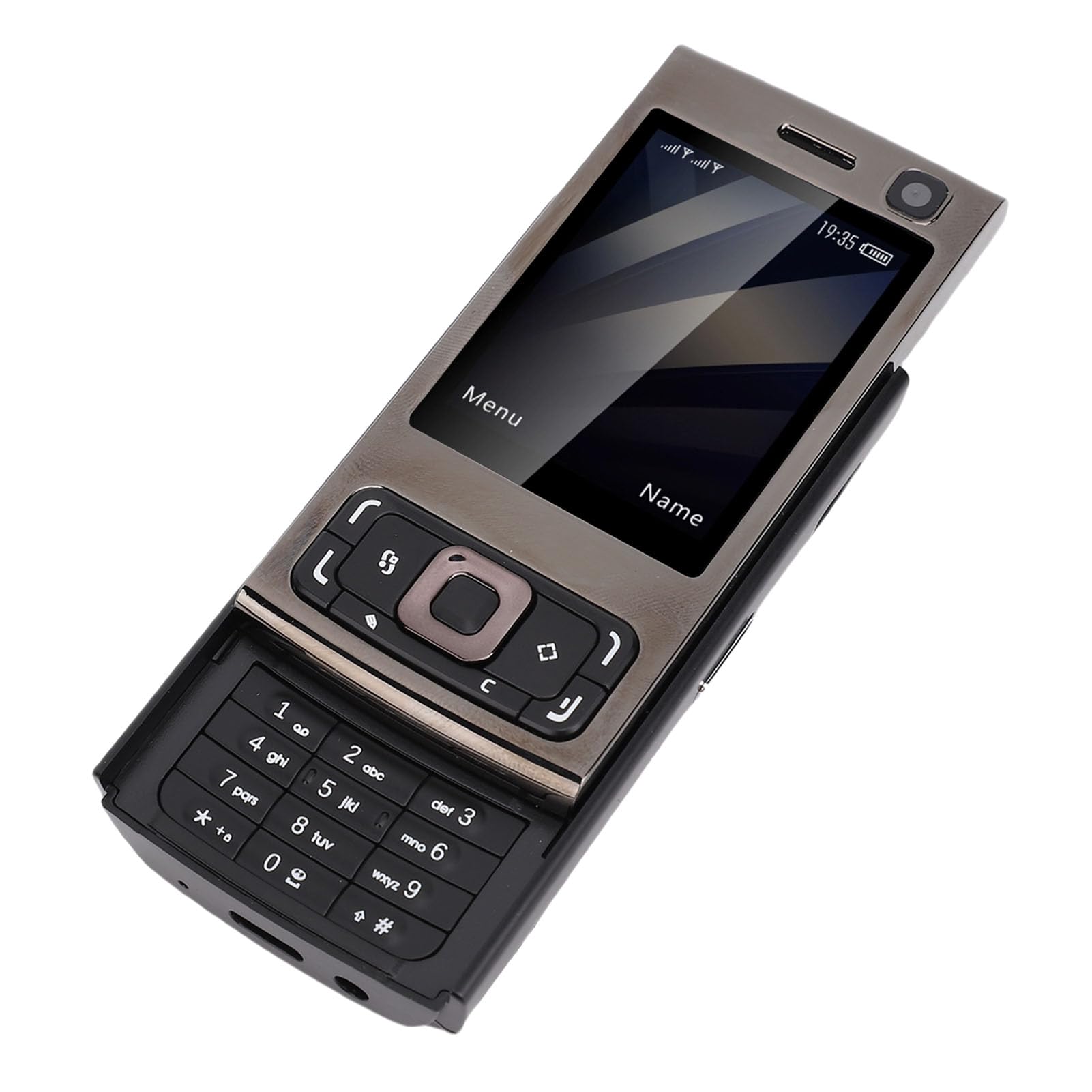
圖 1:正面和背面 view of the PUSOKEI B0FS1Z75ZP Cell Phone.
包裝內容
確認包裹內所有物品齊全:
- 1 部手機
- 1 x 充電線(Type-C)
- 1 x 掛繩
- 1 本使用手冊
- 1 節 1000mAh 鋰離子電池

Figure 2: PUSOKEI B0FS1Z75ZP Cell Phone, charging cable, and lanyard included in the package.
設定
1. SIM卡和記憶卡的安裝
The phone supports dual SIM cards (1 standard SIM + 1 Nano SIM) and one memory card (up to 16GB, not included). Ensure your SIM card supports 2G GSM networks (850/900/1800/1900 MHZ).
- 關機: Before inserting or removing cards, ensure the phone is powered off.
- 拆下後蓋: Gently slide or pry open the back cover of the phone.
- 插入SIM卡: Locate the SIM card slots. Insert your standard SIM card and Nano SIM card into their respective slots, ensuring the gold contacts face downwards and the cards are correctly oriented as indicated on the phone.
- 插入記憶卡: Locate the memory card slot. Insert a compatible memory card (MicroSD, up to 16GB) into the slot until it clicks into place.
- 更換後蓋: Carefully reattach the back cover until it is securely closed.
2. 電池安裝與充電
The phone comes with a 1000mAh Lithium-ion battery.
- 安裝電池: If the battery is not pre-installed, remove the back cover and insert the battery into the compartment, aligning the contacts.
- 初始費用: Connect the Type-C charging cable to the phone's charging port and the other end to a power adapter. Charge the phone fully before first use. The battery indicator on the screen will show charging status.
操作說明
1. 電源開關
- 開機: 按住電源/結束通話按鈕(通常為紅色),直到螢幕亮起。
- 關機: Press and hold the Power/End Call button until the power off options appear, then select "Power Off" or continue holding until the phone shuts down.
2. 基本導航
Use the navigation keys (up, down, left, right) and the central selection key to move through menus and confirm selections. The left and right soft keys perform functions indicated on the screen above them.

圖 3:正面 view of the phone showing the screen, navigation keys, and keypad.
3. 撥打和接聽電話
- 撥打電話: 使用鍵盤輸入電話號碼,然後按下呼叫按鈕(通常為綠色)。
- 接聽電話: 電話鈴響時,按「呼叫」鍵接聽。按下「結束通話」鍵拒接或結束通話。
- 揚聲器: The phone features a high-volume speaker for clear audio during calls.
4. Sending and Receiving Text Messages
- 進入“訊息”選單。
- Select "New Message" to compose a text. Enter the recipient's number and your message.
- Press "Send" to transmit the message.
- Received messages will appear in your inbox.
5 多媒體功能
- 相機: Access the camera from the main menu. Use the navigation keys to adjust settings and the central key to capture photos. The phone has an approximate 300,000 pixel camera.
- MP3/MP4播放器: Store music and video files on a memory card. Access the MP3/MP4 player from the multimedia menu to play your media.
- 調頻收音機: Plug in headphones (3.5mm jack) to use as an antenna, then access the FM Radio feature to listen to local stations.

Figure 4: The phone's screen showing icons for various functions including camera, MP3, and FM radio.
6. 附加功能
- 藍牙: Enable Bluetooth from the settings menu to connect to compatible devices like headsets.
- 警報: Set multiple alarms with custom tones.
- 日曆: View dates and add reminders.
- 手電筒: 開啟內置手電筒進行照明。
- 計算器: 進行基本算術運算。
- 遊戲: Access pre-installed games for entertainment.
- Internet Access/Browser: The phone supports basic internet access and a browser. Note that this is a 2G device, so internet speeds will be limited.
- 變聲功能: This feature allows you to change your voice to male, female, or child during calls. Access this option from the call menu.
7. Quick Dial for Family
You can set up to 9 family numbers for quick dialing. This allows you to call frequently contacted numbers without navigating through the phonebook.
- Go to "Settings" or "Phonebook" menu.
- Locate "Speed Dial" or "Family Numbers" option.
- Assign a number (e.g., 2-9) to a contact from your phonebook.
- To quick dial, simply press and hold the assigned number key.
8. Slider Mechanism
The phone features a slider design. Slide the top part of the phone upwards to reveal the keypad and unlock the screen. Slide it down to cover the keypad and lock the screen, making it compact and portable.

Figure 5: The phone shown in both closed and open (slider up) positions, highlighting its form factor.
維護
- 打掃: 請使用柔軟的乾布清潔手機螢幕和機身。避免使用液體清潔劑或研磨性材料。
- 貯存: 請將手機存放在陰涼乾燥處,避免陽光直射和極端溫度。
- 電池保養: Do not expose the battery to high temperatures or puncture it. If the phone will not be used for an extended period, charge it partially before storing.
- 避免水: This phone is not waterproof. Keep it away from water and high humidity.
故障排除
| 問題 | 可能的原因/解決方案 |
|---|---|
| 手機無法開機。 | Battery may be depleted. Charge the phone for at least 30 minutes. Ensure the battery is correctly installed. |
| 無法撥打或接聽電話。 |
|
| 通話品質差。 | Move to an area with better network reception. Ensure the speaker is not obstructed. |
| 無法連接網路。 | Ensure your SIM card has an active data plan for 2G networks. Check network settings. |
| 未偵測到記憶卡。 | Ensure the memory card is correctly inserted and formatted. The phone supports up to 16GB. |
規格
- 螢幕尺寸: Approx. 2.0 inches HD display
- Network Format: GSM: 850/900/1800/1900 MHZ (2G GSM only)
- SIM卡插槽: 1 x Standard SIM, 1 x Nano SIM
- 記憶卡支援: Up to 16GB (MicroSD, not included)
- 耳機插孔: 3.5毫米
- 藍牙: 4.0
- 相機: Approx. 300,000 pixels (0.3 MP)
- MP3/MP4播放器: 支援
- 電池: 1000mAh鋰離子電池
- 充電埠: C型
- 語言: English (Default), French, Spanish, Portuguese, Russian, Arabic, Persian
- 外形尺寸: 滑桿
- 物品重量: 6.4 盎司
- 包裝尺寸: 3.94 x 3.94 x 2.36 英寸
產品結束view 影片
觀看這段短視頻,以獲得更直觀的了解。view of the PUSOKEI Cell Phone for Seniors, showcasin它的設計和主要特點。
影片 1:簡要介紹view of the PUSOKEI Cell Phone for Seniors, demonstrating its physical appearance and slider mechanism.
保固和支持
For warranty information or technical support, please refer to the contact details provided with your purchase or visit the official PUSOKEI web網站。請保留您的購買收據作為購買憑證。
Ask a question about this manual
Ask about setup, troubleshooting, compatibility, parts, safety, or missing instructions. Manuals+ will review the question and use this page’s manual context to help answer it.