
介紹
This manual provides instructions for the WSTER Portable Bluetooth Speaker, model JC-810. This device is designed to deliver high-quality audio with features suitable for both indoor and outdoor environments. Please read this manual thoroughly before using the product to ensure proper operation and to maximize its lifespan.
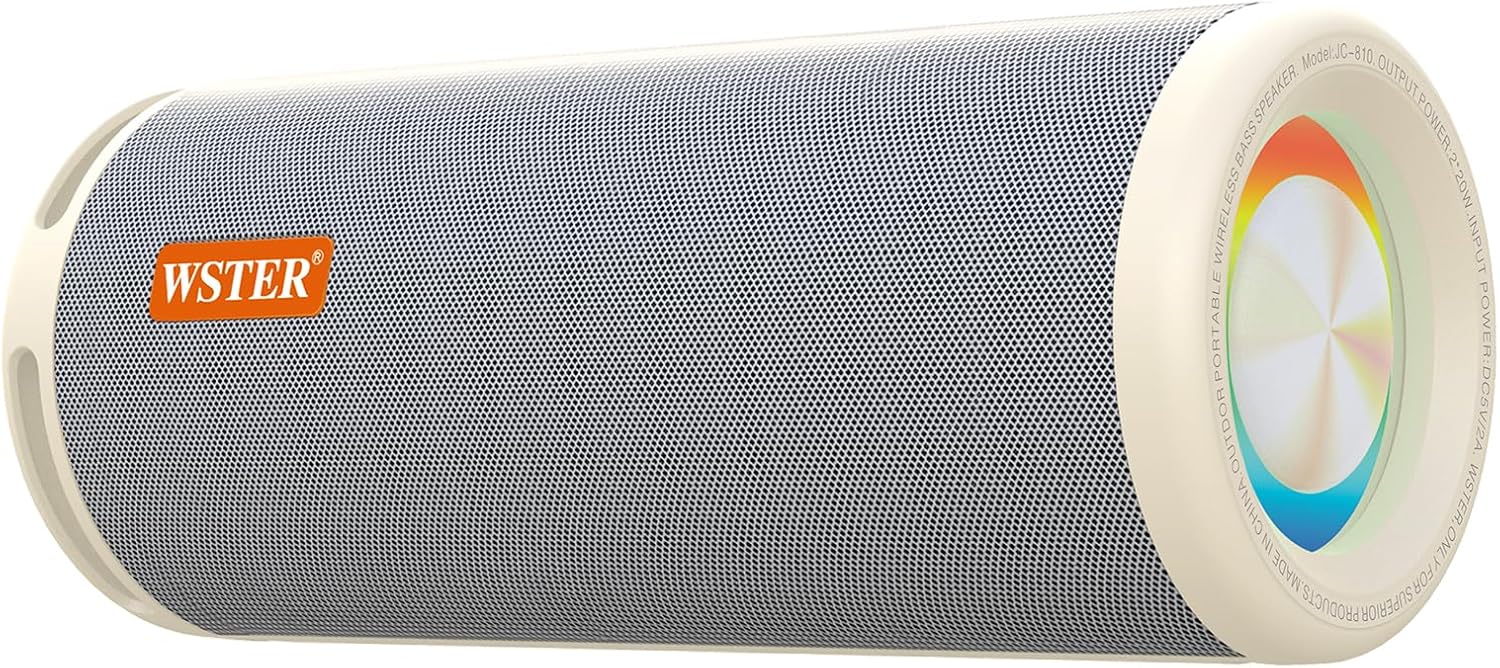
Figure 1: WSTER Portable Bluetooth Speaker JC-810 (White)
主要特點:
- 40-Watt High-Power Speaker: Delivers powerful bass and clear vocals.
- 真正的無線立體聲 (TWS): Connect two speakers for a stereo sound experience.
- 多種輸入介面: Supports USB, TF card, and Bluetooth connectivity.
- 實體控制按鈕: For easy operation of volume, playback, and mode.
- 耐用且便攜的設計: Suitable for various indoor and outdoor activities.
- LED 氣氛燈: Integrated lighting feature.
包裝內容
開箱後請確認所有物品齊全:
- WSTER Portable Bluetooth Speaker JC-810
- 電源線
- 快速入門指南
設定
1.為揚聲器充電
- 將提供的電源線連接到揚聲器上的充電埠。
- Plug the other end of the power cable into a compatible USB power adapter (not included) or a USB port.
- 充電指示燈會亮起。充飽電後,指示燈會熄滅或改變顏色。
2. 開機/關機
- 要開機,請按住 電源按鈕 until the indicator light turns on and you hear an audible prompt.
- 要關閉電源,請按住 電源按鈕 until the indicator light turns off and you hear an audible prompt.

Figure 2: Speaker control panel showing power button and input ports.
3.藍牙配對
- 確保揚聲器已開啟並處於藍牙配對模式(閃爍的 LED 指示)。
- 在您的行動裝置上,啟用藍牙並蒐索可用裝置。
- 選擇 ”JC-810從設備清單中選擇“”。
- 配對成功後,揚聲器會發出聲音確認,LED 指示燈將停止閃爍。
4. 真無線立體聲 (TWS) 配對
To achieve a stereo sound experience, you can pair two WSTER JC-810 speakers together:
- 確保兩個揚聲器都已開啟並且未連接到任何藍牙裝置。
- 在一個揚聲器上,按住 交易平台按鈕 (if available, or a designated pairing button) until you hear a pairing prompt.
- 在第二個揚聲器上重複此過程。
- 音箱會自動連線。連接後,一個音箱將作為主音箱(左聲道),另一個作為從音箱(右聲道)。
- 現在,請按照步驟 3 中的說明,透過藍牙將您的行動裝置連接到主揚聲器。
操作說明
1. 基本控制
| 按鈕/控制 | 功能 |
|---|---|
| 電源按鈕 | 按住可打開/關閉電源。 |
| 播放/暫停按鈕 | 按下可播放或暫停音頻。 |
| 提高音量 (+) | 按下可增大音量。按住可跳至下一曲。 |
| 音量減小 (-) | 按下可降低音量。按住可跳至上一曲。 |
| 模式按鈕 (M) | Press to switch between input modes (Bluetooth, USB, TF Card). |
| LED燈按鈕 | Press to cycle through LED light modes or turn off the light. |

圖 3:揚聲器展示asing the LED ambient light feature.
2. Using USB and TF Card Inputs
- 插入包含音訊檔案的磁碟機或TF(Micro SD)卡 file將 s 插入揚聲器上的對應連接埠。
- 按 模式按鈕 (M) to switch to USB or TF Card mode.
- 揚聲器將自動開始播放音訊。 file從插入的儲存設備中提取資料。

Figure 4: USB and TF card input ports for direct media playback.
3. LED Ambient Light Operation
The speaker features an integrated LED ambient light. Press the LED燈按鈕 到:
- 開啟/關閉LED燈。
- Cycle through different light modes or colors (if multiple modes are available).
維護
- 打掃: 請使用柔軟的乾布清潔揚聲器外殼。請勿使用研磨性清潔劑或溶劑。
- 貯存: 將揚聲器存放在陰涼乾燥處,避免陽光直射和極端溫度。
- 水暴露: 這款音箱不防水。請避免將其暴露於水或過度潮濕的環境中。
- 電池保養: 為獲得最佳電池壽命,請避免頻繁地將電池完全放電。即使長時間不使用,也請定期為揚聲器充電。
故障排除
| 問題 | 可能的解決方案 |
|---|---|
| 揚聲器無法開啟。 | 請確保電池已充滿電。連接電源線後再試一次。 |
| 無法透過藍牙配對。 |
|
| 沒有聲音或音量低。 |
|
| TWS 配對失敗。 |
|
| USB/TF卡無法播放。 |
|
規格
| 特徵 | 細節 |
|---|---|
| 型號名稱 | JC-810 |
| 品牌 | 韋斯特 |
| 揚聲器類型 | 便攜式音箱 |
| 連接技術 | 藍牙 |
| 無線通訊技術 | 藍牙 |
| 藍牙版本 | 5.3 |
| 音頻輸出模式 | 立體聲 |
| 揚聲器最大輸出功率 | 40瓦 |
| 頻率響應 | 18KHz |
| 特別報道 | LED燈,便攜式 |
| 材料 | 丙烯腈丁二烯苯乙烯 (ABS) |
| 顏色 | 白色的 |
| 產品尺寸 | 12.05 英吋深 x 4.8 英吋寬 x 4.8 英吋高 |
| 電池數量 | 2 顆非標準電池(已內含) |
| 包含的組件 | 電源線、快速入門指南 |

Figure 5: Product dimensions of the WSTER JC-810 speaker.
影片示範
Video 1: Demonstration of the WSTER Portable Bluetooth Speaker's design and sound capabilities, highlighting its suitability for outdoor use.
保固和支持
For warranty information or technical support, please refer to the contact details provided in the Quick Start Guide included with your product. You may also visit the official WSTER brand store on Amazon for additional resources and support options.


