
1. 介紹及結束view
This manual provides detailed instructions for the TELESIN Magnetic Camera Grip and Cooling Case, designed to enhance your iPhone 17 Pro Max photography and videography experience. It features a professional grip, efficient cooling, wireless charging, and customizable controls.
主要特點:
- Professional Cooling Design: Integrated 7600mm² graphene and grill design in the phone case enhances heat dissipation by 25%, maintaining stable iPhone 17 Pro Max performance during extended use.
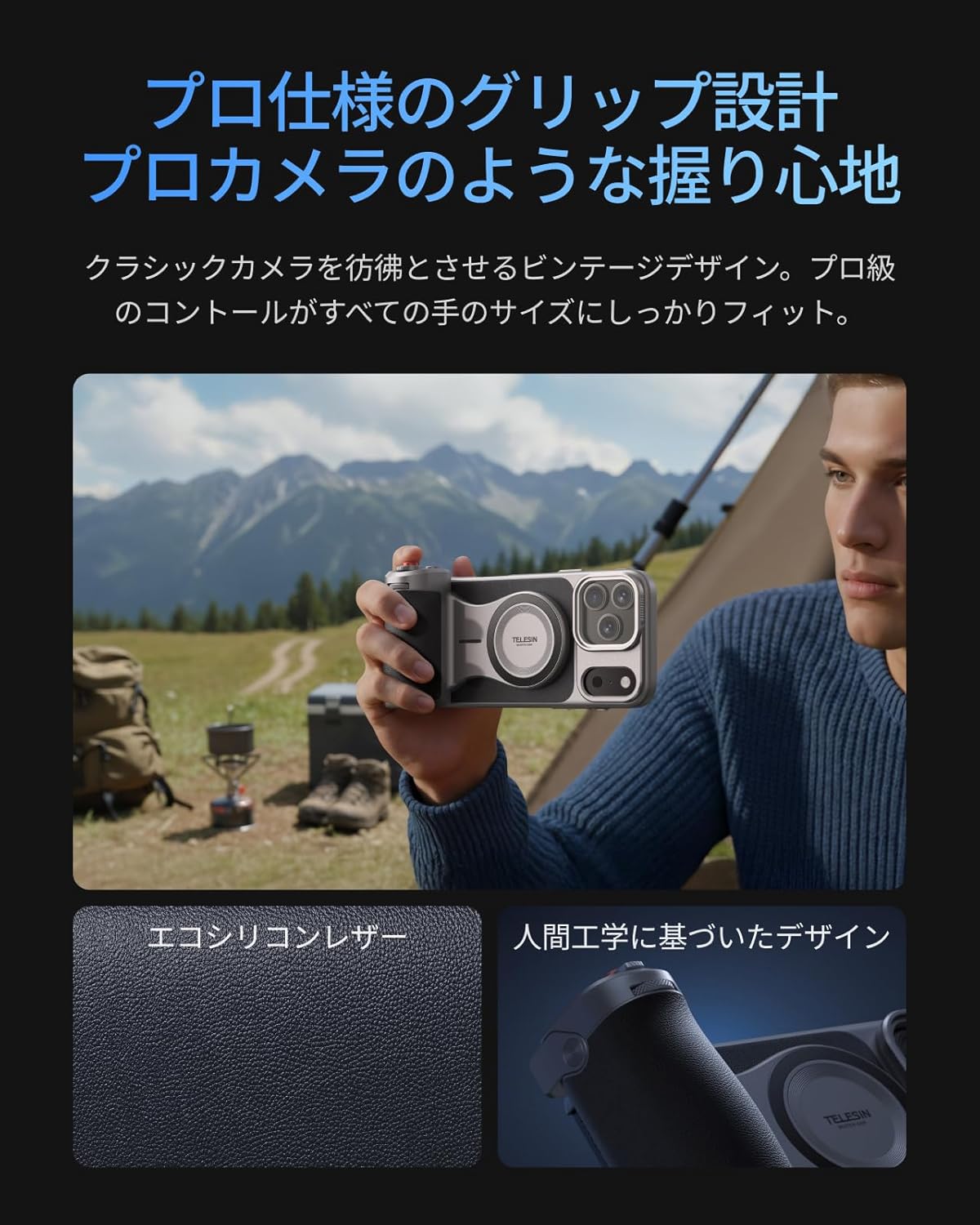
- 符合人體工學的握把: Inspired by classic cameras, the grip provides a comfortable and secure hold for all hand sizes, improving stability for shooting.
- Large Capacity Battery & Wireless Charging: The grip includes a built-in 3200mAh battery for extended iPhone power via wireless charging. It also supports wired power output to other devices.
- Reef Color APP & Customizable Fn Button: The dedicated 'Reef Color' app redefines camera functions, offering 8 master filters and detailed manual settings. The dial can be assigned functions like EV, shutter speed, or ISO. Firmware updates are available via OTA.
- 兩個-Stage Shutter & Zoom Dial: 具有兩個tage mechanical shutter button (half-press for focus, full-press for capture/record) and a smooth zoom dial for up to 8x optical zoom on iPhone 17 series telephoto lenses, reducing screen tap shake.
- MagSafe Compatibility & Accessory Support: Dual-sided MagSafe compatibility allows easy attachment of accessories like the TELESIN C03 magnetic fill light. A 1/4" screw hole supports tripods and microphones. The case's aluminum CNC slide rail and magnetic system allow for easy attachment of physical filters (UV/CPL/ND filters sold separately).
- Aluminum Thumb Rest & Accidental Touch Prevention: An aluminum alloy thumb rest with anti-slip texture provides a natural resting position for the thumb, preventing accidental screen touches and ensuring a firm grip.
2. 包裝內容
請確認您的包裹含有下列所有物品:
- TELESIN Master Grip x 1
- iPhone 17 Pro Max Phone Case x 1
- 腕帶 x 1
- 充電線(USB-C)x 1
- 使用說明書 x 1

Note: Smartphone light and UV filters are not included in this set. For smartphone light, please refer to ASIN: B0DHGHKB19. For UV filters, please refer to ASIN: B0FVKYMRLY.
3. 設定
3.1 App Installation and Permissions
- 搜尋 and download the 'Reef Color' app from your device's app store.
- Grant all necessary permissions (wireless data, photo library, camera, microphone) when prompted by the app.
- Review the beginner's guide within the app for an initial walkthrough.
3.2 設備連接
- Insert your iPhone 17 Pro Max into the provided cooling case.
- Power on the Master Grip by pressing and holding the power button until the indicator light flashes green.
- Open the 'Reef Color' app. Tap the '+' icon in the top-left corner to add a new device.
- Select 'Add New Device' and follow the on-screen prompts to pair the Master Grip via Bluetooth. The indicator light will turn solid green upon successful connection.

4. 操作說明
4.1 基本相機控制
Once connected, the Master Grip allows for intuitive control over your iPhone's camera functions:
- 快門按鈕: 半按對焦,全按拍照或開始/停止錄影。
- 變焦撥盤: Rotate the dial for smooth optical zoom control.
- 曝光調整: Use the dial to adjust exposure compensation (EV).
4.2 Customizable Buttons (Reef Color App)
The 'Reef Color' app allows you to customize the functions of the dial and Fn button:
- Tap the device icon in the top-left corner of the app to enter the device settings page.
- Select 'Dial' or 'Fn Key' to choose from various functions such as Exposure Adjust, Filter Switch, Filter Intensity, Switch Shooting Mode, Adjust ISO, or Adjust Shutter Speed.
- The 'Wake-Up Key' can be configured to switch focal length, switch camera (front/rear), or switch shooting mode (video/photo/LivePhoto).
4.3 進階應用功能
The Reef Color app provides advanced features for professional-grade photography:
- Master Filters: Choose from 8 master filters (e.g., FNC, Hass X, Leica M, Polaroid, CCD, FSA, EOS, Faded) to apply unique color tones and styles to your photos and videos.
- 手動設置: Access detailed manual controls for precise adjustments.
- OTA韌體更新: Keep your Master Grip updated with the latest features and performance improvements through over-the-air firmware updates via the app.

5、維護保養
To ensure the longevity and optimal performance of your TELESIN Magnetic Camera Grip and Cooling Case, follow these maintenance guidelines:
- 打掃: Use a soft, dry cloth to clean the grip and case. Avoid using harsh chemicals or abrasive materials.
- 貯存: 將設備存放在陰涼乾燥處,避免陽光直射和極端溫度。
- 電池保養: 為獲得最佳電池壽命,請避免頻繁地將手把電池完全放電。即使長時間不使用,也請定期充電。
- 小心處理: 雖然設備經久耐用,但請避免跌倒或使其受到強烈撞擊。
6。 故障排除
If you encounter any issues with your TELESIN Magnetic Camera Grip and Cooling Case, please refer to the following common solutions:
- 設備未連接:
- Ensure the Master Grip is powered on and the indicator light is flashing green.
- Check your iPhone's Bluetooth settings to ensure it's enabled and the grip is not already paired with another device.
- Restart both your iPhone and the Master Grip, then attempt to pair again.
- Ensure the 'Reef Color' app has all necessary permissions granted.
- 按鈕無響應:
- Verify that the Master Grip is successfully connected to the 'Reef Color' app.
- Check the app's device settings to ensure the buttons are assigned to desired functions.
- Ensure the app is the active camera application.
- 充電問題:
- 使用提供的 USB-C 充電線。
- Ensure the charging cable is securely connected to both the grip and a power source.
- If wireless charging to the iPhone is not working, ensure the iPhone is correctly aligned with the MagSafe area on the grip.
- Overheating (iPhone):
- The cooling case is designed to mitigate overheating. If your iPhone still overheats, ensure the case is properly installed and the cooling vents are not obstructed.
- Reduce background app usage on your iPhone during intensive tasks.
如果以上步驟未能解決問題,請聯絡客戶支援部門尋求進一步協助。
7. 規格
| 品牌名稱 | 崔辛 |
| 製造商型號 | TX-JP-P5-MCS-11-TIP |
| 相容設備 | iPhone 17 Pro 最大 |
| 包含的組件 | TELESIN Master Grip x1, Phone Case x1, Wrist Strap x1, Charging Cable x1, Instruction Manual x1 |
| 視頻採集格式 | MP4、MOV |
| 視訊解析度 | 4K(3840×2160) |
| 拍攝功能 | Photo, Video, Time-lapse, Slow Motion, Portrait, Night Mode, etc. |
| 曝光控制類型 | Av, Tv, M |
| 防水的 | 不 |
| View取景器類型 | 液晶螢幕 |
| 原產地 | 中國 |
8. 保固和支持
Your TELESIN Magnetic Camera Grip and Cooling Case comes with a 1年保固 自購買日起生效。本保固涵蓋正常使用情況下的製造缺陷和故障。
For warranty claims, technical support, or any inquiries, please contact TELESIN customer service through the retailer where you purchased the product or visit the official TELESIN web網站提供支持聯繫信息。
請保留您的購買憑證以用於保固驗證。