
介紹
This manual provides instructions for the operation and maintenance of your Generic S80 Pro AI Translation Device. Please read this manual thoroughly before using the device to ensure proper functionality and to maximize your user experience.

圖片:正面 view of the S80 Pro AI Translation Device, displaying its user interface with options for online, offline, photo translation, and simultaneous interpretation.
包裝內容
確認包裹內所有物品齊全:
- 1 x S80 Pro AI Translation Device
- 1 條 USB 線
- 1 x 英文使用說明書(本文檔)
設定
1. 為設備充電
Before first use, fully charge the device. Connect the provided USB cable to the device's charging port and plug the other end into a compatible USB power adapter (not included) or a computer's USB port. The charging indicator will show the charging status.
2. 開機/關機
- 開機: 按住電源按鈕(通常位於側面),直到螢幕亮起。
- 關機: 按住電源鍵,直到螢幕上出現關機選項。選擇“關機”關閉設備。
3. 初始設定和網路連接
Upon first power-on, follow the on-screen prompts to select your preferred language and connect to a Wi-Fi network. A stable internet connection is required for online translation features.
操作說明
超過view of Main Interface
The device features a 3-inch full touch screen. The main screen provides access to various translation modes and functions.

Image: The S80 Pro device displaying its main menu with options like Online Translation, Offline Translation, Photo Translate, and Simultaneous Interpretation.
1. Online Translation (138 Languages)
Connect the device to Wi-Fi. Select "Online Translation" from the main menu. Choose your source and target languages. Press and hold the designated button to speak, then release to hear the translation. This mode supports 138 languages including German, Russian, French, Korean, Japanese, Thai, Spanish, English, Traditional and Simplified Chinese, Portuguese, and Vietnamese.
2. Offline Translation (17 Languages)
The device includes built-in offline translation packages for 17 languages. This feature allows translation without an internet connection. Select "Offline Translation" from the main menu. Supported languages include Traditional Chinese, Simplified Chinese, English, Japanese, Korean, German, Russian, French, Thai, Spanish, Arabic, Portuguese, Vietnamese, Dutch, Italian, Cantonese, and Traditional Cantonese.
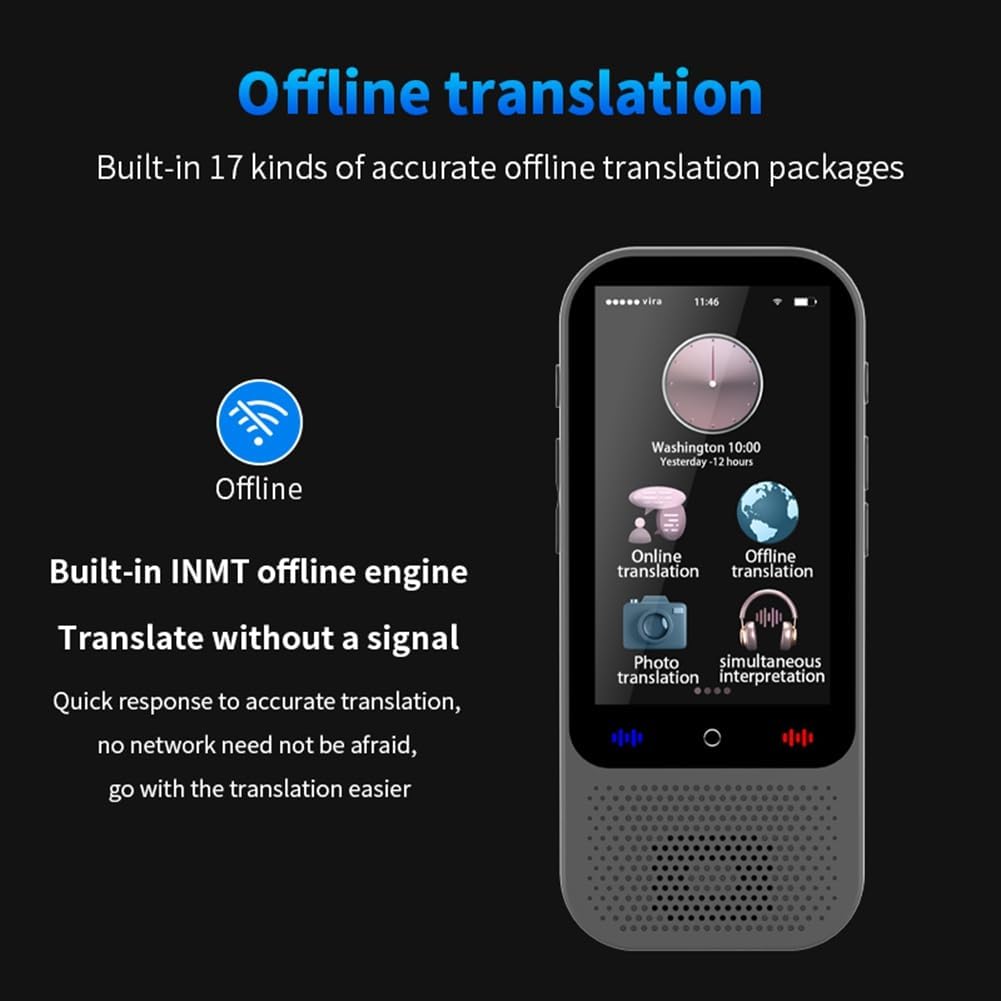
Image: The S80 Pro device screen showing the "Offline translation" option and text indicating support for 17 offline translation packages and an INMT offline engine.
3. Photo Translation (40 Languages)
Select "Photo Translation" from the main menu. Use the device's camera to capture text from signs, menus, or documents. The device will process the image and provide a translation. This feature supports 40 languages for online photo translation, including Traditional Chinese, Simplified Chinese, English, Japanese, Korean, German, Russian, French, Thai, Spanish, Arabic, Portuguese, Vietnamese, Dutch, Italian, Cantonese, Traditional Cantonese, Indonesian, Hungarian, Greek, Turkish, Slovenian, Slovak, Norwegian, Romanian, Lithuanian, Croatian, Finnish, and Filipino.

Image: The S80 Pro device displaying a photo translation in progress, showing an image on the left and its translated text on the right.
4. Voice Recording and Transcription
The device can record spoken language and transcribe it into text, offering translation for the transcribed content. This feature supports multiple languages for transcription and translation, facilitating note-taking and access to translated texts.
5 小組翻譯
Engage in group conversations with multiple participants speaking different languages. The device facilitates real-time translation within the group chat. This feature supports simultaneous chat for up to 117 people.

Image: The S80 Pro device screen displaying a group translation interface, showing a chat-like conversation with translated messages.
6. Mobile Translation (Scan Code Connection)
Connect the translator to your mobile phone by scanning a QR code. This allows for enhanced communication and translation capabilities, integrating with your smartphone for easier interaction.

Image: The S80 Pro device next to a smartphone screen, illustrating the mobile translation feature via scan code connection.
7.語言學習
The device offers features for Chinese and English language learning, allowing users to practice and improve their language skills.
8. 單位換算
Access the unit conversion function to convert various units of measurement, which can be useful for travel or daily tasks.
9. Exchange Rate Conversion
The device can convert exchange rates in real-time, providing convenience for international travel and transactions.
10. Bluetooth-Compatible Connection
The S80 Pro supports connection to wireless Bluetooth-compatible headsets and Bluetooth-compatible speakers for private listening or amp增強型音訊輸出。
11. ChatGPT 集成
The device is equipped with ChatGPT large model language processing technology, providing intelligent voice services such as weather information, time, and access to a travel encyclopedia.

Image: The S80 Pro device screen showing "ChatGPT" and text indicating its large model language processing technology for intelligent voice services.
維護
打掃
請用柔軟的乾布擦拭設備。請勿使用液體清潔劑或研磨性材料,因為它們可能會損壞螢幕或外殼。asing.
貯存
請將設備存放在陰涼乾燥處,避免陽光直射和極端溫度。如果長時間存放,請確保電池部分充電(約 50%),以延長電池壽命。
電池保養
To maintain battery health, avoid fully discharging the device frequently. Charge the device regularly, even if not in active use.
故障排除
- 設備未開機: Ensure the device is fully charged. If it still doesn't power on, try connecting it to a power source and attempting to power on again.
- 線上翻譯功能無法使用: Verify that the device is connected to a stable Wi-Fi network. Check network settings.
- 翻譯不準確: Ensure clear pronunciation when speaking. For photo translation, ensure the text is well-lit and clear.
- 螢幕無反應: 重啟設備。如果問題仍然存在,請聯絡客戶支援。
規格
| 貯存 | 1GB 記憶體 + 8GB ROM |
| 記憶體擴充 | Supports up to 32GB memory card (not included) |
| 展示 | 3-inch Full Touch Screen, 480x854 resolution |
| 電池類型 | 聚合物 |
| 電池容量 | 1500毫安培時 |
| 待機時間 | 最長 10 天 |
| 工作時間 | 長達 16 小時 |
| 聯網 | Wi-Fi, Offline Networking |
| 藍牙 | Supports wireless Bluetooth headsets and speakers |
| 方面 | 116.5×50×12.6毫米 |
| 單位重量 | 86.5克 |
| 顏色 | 黑色的 |
保固和支持
如需了解保固資訊或技術支持,請參閱購買時提供的文件或直接聯絡賣家。請保留購買收據作為購買憑證。