
一、簡介
This manual provides essential instructions for the safe and efficient operation of your Global Industrial LED Sign Projector, Model 641651. This 100-watt projector is designed for displaying safety and warning signs in industrial environments such as warehouses. It offers clear projection in various lighting conditions and can be mounted on ceilings or walls for stationary or rotational display.
2. 安全訊息
WARNING: Read all safety instructions before installation and operation.
- This projector is designed for indoor use in high-traffic areas or damp environments. It is not suitable for outdoor use.
- 在進行任何安裝、維護或清潔操作之前,請務必中斷電源。
- Do not look directly into the projector lens when the unit is powered on, as this may cause eye damage.
- 請將投影機遠離易燃物品。
- Ensure proper ventilation to prevent overheating. The unit features air cooling technology.
- Only use the provided power cord and accessories.
- Installation should be performed by qualified personnel if electrical wiring is involved.
3. 包裝內容
確認您的包裹含有下列所有物品:
- LED Sign Projector unit
- 遙控
- 5 英尺電源線
- Expansion screws for mounting
- 組裝指南(本手冊)

Image 3.1: Global Industrial LED Sign Projector with its power supply unit and connecting cables.
4. 設定
4.1 安裝投影機
The projector can be easily mounted to ceilings or walls using the provided expansion screws. Choose a location that allows for optimal projection distance and visibility, considering the desired projection size.
- Identify a suitable mounting surface (ceiling or wall) that can support the projector's weight.
- Use the projector's mounting bracket as a template to mark drilling points.
- Drill pilot holes and insert the expansion screws.
- Securely attach the projector's mounting bracket to the surface.
- Adjust the angle of the projector using the adjustable knob on the bracket to achieve the desired projection direction.

Image 4.1: The LED Sign Projector shown mounted on its adjustable stand.
4.2 電源連接
Connect the 5-foot power cord to the projector and then to a standard electrical outlet. Ensure the connection is secure.
5. 操作說明
5.1 開關機
Use the remote control to power the projector on or off. Point the remote control directly at the projector's receiver.
5.2 調整焦距
Rotate the lens ring on the front of the projector to adjust the focus of the projected image until it appears clear and sharp.

Image 5.1: Close-up of the projector's adjustable lens for focusing the image.
5.3 Projection Modes (Stationary/Rotational)
The projector offers options for both stationary and rotational projection. Refer to the remote control's instructions for switching between these modes and adjusting rotation speed, if applicable.
5.4 Projection Distance and Brightness
The projector can brightly display signs up to 82 feet in dark areas and up to 40 feet in brighter areas. Optimal clarity and brightness depend on ambient light conditions and projection surface.
6、維護保養
6.1 清潔
清潔前請確保投影機已關閉電源並拔掉電源線。
- 用柔軟的乾布擦拭投影機外殼。
- 對於鏡頭,請使用鏡頭清潔布和專用鏡頭清潔液,以避免刮傷。
- 請勿使用磨蝕性清潔劑或溶劑。
6.2 通風
The projector utilizes air cooling technology to prevent overheating. Ensure that the ventilation fins at the rear of the unit are not obstructed. Regularly check for dust buildup and gently clean with compressed air if necessary.

圖 6.1:後部 view of the projector highlighting the cooling fins for heat dissipation.
7。 故障排除
如果您的投影機出現問題,請參考以下常見問題和解決方案:
| 問題 | 可能的原因 | 解決方案 |
|---|---|---|
| 投影機無法開機。 | 無電源;遙控器電池電量低。 | Check power cord connection; ensure outlet is functional. Replace remote control batteries. |
| 圖片模糊。 | Focus not adjusted; lens dirty. | Rotate the lens ring to adjust focus. Clean the lens as per maintenance instructions. |
| 圖片昏暗或不清晰。 | Too much ambient light; projector too far from surface. | Reduce ambient light if possible. Move projector closer to the projection surface (within 82 ft in dark, 40 ft in bright areas). |
| 投影機過熱。 | 通氣受阻。 | Ensure ventilation fins are clear of obstructions. Clean dust from fins. |
8. 規格
| 特徵 | 細節 |
|---|---|
| 型號 | 641651 |
| 品牌 | 全球工業 |
| 力量 | 100瓦 |
| 顏色 | 黑色的 |
| 物品重量 | 4.18 磅(1.9 公斤) |
| 產品尺寸(長x寬x高) | 9.44 英吋 x 5.13 英吋 x 7.88 英吋(23.98 公分 x 13.03 公分 x 20.02 公分) |
| 風格 | 工業的 |
| 統一產品程式碼 | 707022514460 |
| Projection Distance (Dark Areas) | 長達 82 英尺 |
| Projection Distance (Brighter Areas) | 長達 40 英尺 |
| 冷卻技術 | 風冷 |
| 材料 | 重型鋁材 |
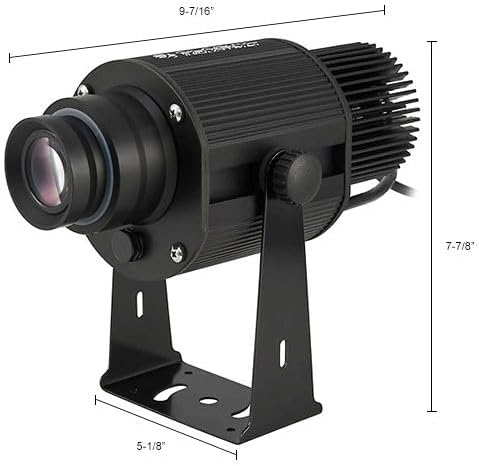
Image 8.1: Dimensional drawing of the LED Sign Projector.
9. 保固信息
Global Industrial products are manufactured to high-quality standards. For specific warranty terms and conditions, please refer to the warranty card included with your product or visit the official Global Industrial web網站。請保留您的購買收據,作為任何保固索賠的購買憑證。
10. 支持
If you require further assistance or have questions not covered in this manual, please contact Global Industrial customer support. You can find contact information on the Global Industrial web網站或透過您的購買憑證。
欲了解更多信息,請訪問 全球工業商店.