
SatelliteSale SS-RC-NOTUS-M2
SatelliteSale Notus M2 Remote Control User Manual
Model: SS-RC-NOTUS-M2 | Brand: SatelliteSale
一、簡介
This manual provides detailed instructions for the SatelliteSale Notus M2 Remote Control, a voice-activated Bluetooth replacement designed for Optimum Stream Devices. It covers setup, operation, maintenance, and troubleshooting to ensure optimal performance and user experience.

圖片:正面 view of the SatelliteSale Notus M2 Remote Control.
2. 包裝內容
確認包裹內所有物品齊全:
- 1 x SatelliteSale Notus M2 Remote Control
- 2顆AAA電池(已預先安裝或單獨提供)
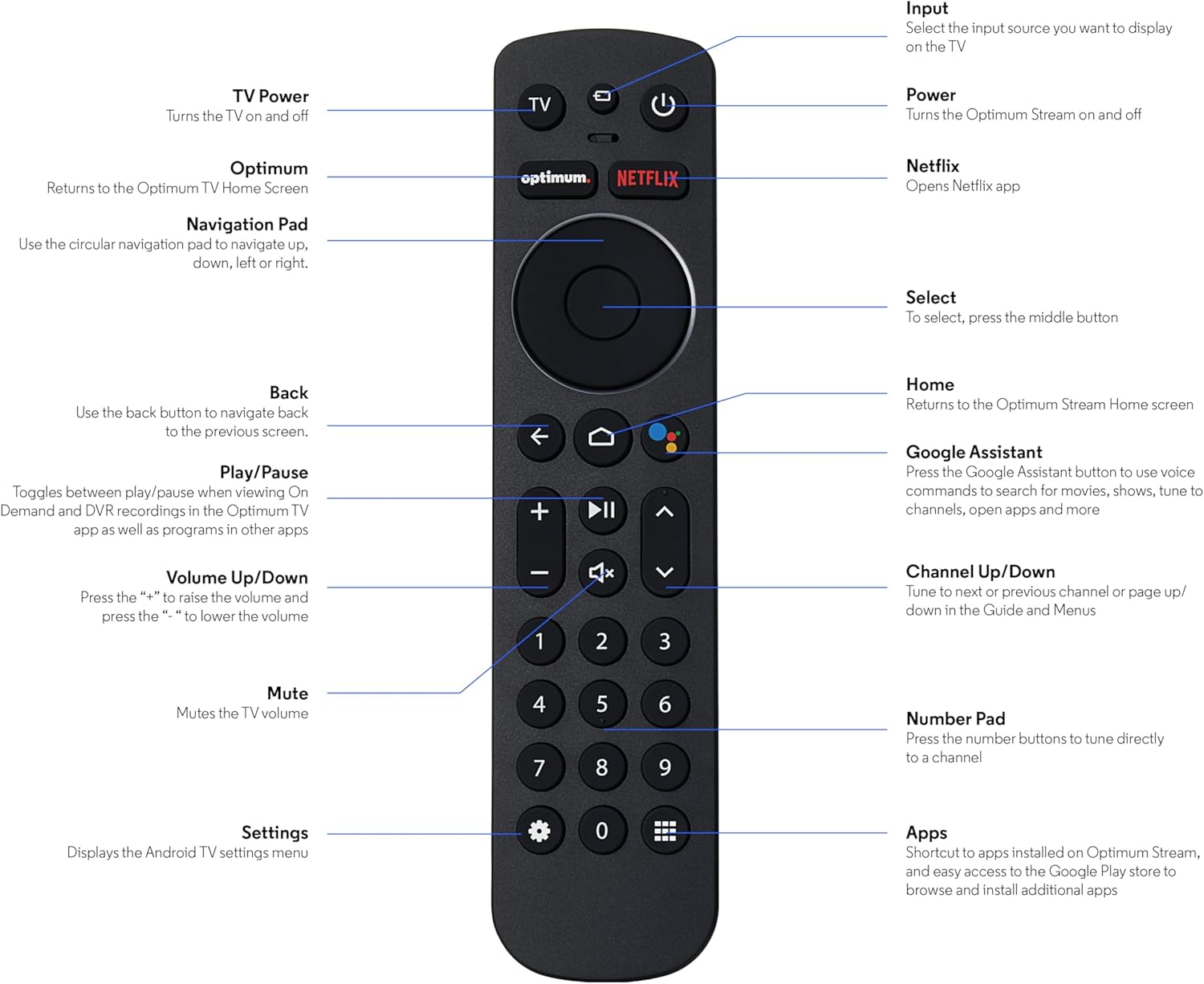
Image: The SatelliteSale Notus M2 Remote Control shown alongside two AAA batteries.
3 遙控器佈局和功能
Familiarize yourself with the buttons and their functions on your SatelliteSale Notus M2 Remote Control.

Image: Detailed diagram of the SatelliteSale Notus M2 Remote Control with labels for each button and its corresponding function.
- 電視功率: 打開和關閉電視。
- 輸入: Selects the input source to display on the TV.
- 力量: Turns the Optimum Stream device on and off.
- 最佳: Returns to the Optimum TV Home Screen.
- Netflix: Opens the Netflix application directly.
- 導航鍵(圓形): Use to navigate up, down, left, or right within menus.
- Select (Middle Button of Nav Pad): 確認選擇。
- 後退: 返回上一畫面。
- 家: Returns to the Optimum Stream Home screen.
- Google Assistant (Microphone Icon): Activates voice commands for search, playback control, and hands-free assistance.
- 播放/暫停: Toggles between play and pause for content.
- 音量調高/調低 (+/-): 調節電視音量。
- 沉默的: Mutes the TV volume.
- 頻道上/下(箭頭): Tunes to the next or previous channel, or navigates pages in guides and menus.
- 數字鍵盤(0-9): Directly tunes to a channel or enters numerical input.
- 設置(齒輪圖標): Displays the Android TV settings menu.
- Apps (Grid Icon): Provides shortcuts to installed apps on Optimum Stream and access to the Google Play Store.
4. 設定
4.1 電池安裝
The remote requires two AAA batteries. Ensure correct polarity when inserting.
- 找到遙控器背面的電池盒。
- 向下滑動電池蓋即可打開。
- 裝入兩顆 AAA 電池,注意電瓶倉內的 (+) 和 (-) 端子要對齊。
- 將電池蓋滑回原位,直到聽到喀嚓聲為止,即可重新裝回電池蓋。

影像: View 遙控器電池倉打開,顯示 AAA 電池的正確安裝方向。
4.2 Pairing Your Remote with Optimum Stream Device
Your remote is designed to be paired with your Optimum Stream device for full functionality, including Bluetooth connectivity and voice control. If your remote becomes unpaired or if you are setting up a new remote, follow these steps:

Image: An illustration explaining the importance of direct line of sight for initial pairing and the flexibility of remote placement after pairing.
重要提示: For initial pairing, the Optimum Stream box needs to be in direct line of sight of the remote. If your box is behind a TV or in a cabinet, you may need to temporarily relocate it so the remote can be directly pointed at the Stream box. Once pairing is complete, the Stream box can be moved out of sight as the remote uses Bluetooth.
- Ensure batteries are correctly installed in your remote.
- Turn on your TV and your Optimum Stream cable box.
- Press any button on the Stream remote to ensure you are on the Home Screen.
- 在主畫面上,選擇 設定 (齒輪圖示)
- 選擇 Device and Remote Settings > 遙控器及配件.
- 選擇 Add Stream Remote.
- 請依照螢幕上的指示完成配對過程。
- You will see an on-screen confirmation once the remote is successfully paired.

Image: Visual representation of pairing steps 1 through 5, showing the remote and on-screen prompts.

Image: Visual representation of pairing steps 6 through 9, detailing the final stages of the pairing process.
5. 操作說明
5.1 語音控制
The SatelliteSale Notus M2 remote features voice control for convenient operation. Press the microphone button (Google Assistant icon) and speak your command clearly. You can use voice commands to:
- 搜尋 content (movies, TV shows, actors).
- 控製播放(播放、暫停、快轉、快退)。
- 開放申請。
- Tune to specific channels.
- Get information (weather, sports scores).

Image: A person using the voice control feature of the remote, with sound waves emanating from the remote towards the TV screen.

圖:前任ample of a voice command, "Hey Google, turn on the Spider-Man movie," displayed on screen with the remote.
5.2 Bluetooth Wireless Connectivity
Once paired, the remote utilizes Bluetooth for communication with your Optimum Stream device. This means you do not need a direct line of sight to operate the device, allowing for greater flexibility in remote usage and device placement.
5.3 Dedicated Streaming App Buttons
The remote includes dedicated buttons for popular streaming applications, such as Netflix. Pressing these buttons provides one-touch access to your favorite entertainment platforms.
6、維護保養
- 打掃: 請使用柔軟的乾布清潔遙控器。請勿使用液體清潔劑或噴霧劑。
- 電池更換: Replace batteries when the remote's response becomes sluggish or it stops functioning. Always replace both batteries at the same time with new AAA batteries.
- 貯存: 將遙控器存放在陰涼乾燥處,避免陽光直射和極端溫度。
7。 故障排除
| 問題 | 可能的原因 | 解決方案 |
|---|---|---|
| 遙控器無響應。 | 電池電量耗盡或電量不足。 | 請將兩顆AAA電池都更換為新電池。 |
| Remote not controlling Optimum Stream device. | Remote is unpaired or pairing failed. | Follow the pairing instructions in Section 4.2. Ensure direct line of sight during initial pairing. |
| 語音控制功能無法使用。 | Remote not paired via Bluetooth, or microphone issue. | Ensure the remote is properly paired via Bluetooth (Section 4.2). Speak clearly and close to the microphone. |
| 按鈕黏滯或無反應。 | 紐扣下方有污垢或碎屑。 | 用柔軟的乾布清潔遙控器。避免沾染液體。 |
8. 規格
| 特徵 | 細節 |
|---|---|
| 型號 | SS-RC-NOTUS-M2 |
| 連接性 | 藍牙無線 |
| 特色 | Voice Activated (Google Assistant), Dedicated App Buttons, Ergonomic Design |
| 相容設備 | Optimum Stream Box (powered by Android TV) |
| 電源 | 2 顆 AAA 電池(內含) |
| 顏色 | 霧面黑 |
| 物品重量 | 3.66 盎司 |
| 包裝尺寸 | 7.28 x 1.89 x 1.22 英寸 |
9. 保固和支持
For warranty information or technical support, please refer to the official SatelliteSale web請造訪其網站或直接聯絡客服。請保留購買收據,以便進行保固索賠。
製造商: 衛星銷售
Ask a question about this manual
Ask about setup, troubleshooting, compatibility, parts, safety, or missing instructions. Manuals+ will review the question and use this page’s manual context to help answer it.