Samsung Family Hub French Door Refrigerator RM90F User Manual
Model: RM90F
一、簡介
This manual provides essential information for the safe and efficient operation, installation, and maintenance of your Samsung Family Hub French Door Refrigerator, model RM90F. Please read this manual thoroughly before using your appliance and keep it for future reference.
2. 安全訊息
Always follow basic safety precautions to reduce the risk of fire, electric shock, or injury when using your refrigerator. Keep children away from packaging materials. Ensure the appliance is properly grounded. Do not store explosive substances such as aerosol cans with a flammable propellant in this appliance. Do not use electrical appliances inside the food storage compartments unless they are of the type recommended by the manufacturer.
3. 設定
3.1 開箱及放置
Carefully remove all packaging materials. Position the refrigerator on a level, stable surface. Ensure adequate clearance around the appliance for proper ventilation. Refer to the dimensions diagram for precise measurements.
Figure 3.1: Refrigerator Dimensions. This diagram illustrates the overall dimensions of the refrigerator, including its height (1853 mm), width (912 mm), and depth (731 mm), along with internal measurements for installation planning.
3.2 電源連接
Connect the refrigerator to a dedicated 127 Volt AC outlet. Do not use extension cords or adapters. Ensure the power cord is not pinched or damaged.
3.3 水連接
For the ice maker and water dispenser to function, connect the refrigerator to a cold water supply line. It is recommended to use a qualified plumber for this installation to prevent leaks.
3.4 初始清潔
Before first use, clean the interior and exterior of the refrigerator with a soft cloth and mild detergent. Rinse and dry thoroughly.
4. 操作說明
4.1 Family Hub AI Home Display
The 9-inch AI Home display serves as a central control panel. Use it to manage recipes, track food inventory, access various applications, and control compatible smart home devices.
4.2 AI Vision Inside 2.0 Camera
The internal AI camera allows you to view the contents of your refrigerator remotely via the SmartThings Food app. It automatically identifies items, tracks expiration dates, suggests recipes based on available ingredients, and helps create shopping lists.
4.3 Multi-Pantry Drawer
This independently controlled drawer offers three preset temperature modes for optimal storage: 水果和蔬菜, 飲料, 或者 Meats & Fish. Select the appropriate mode for the items stored.
4.4 雙自動製冰機
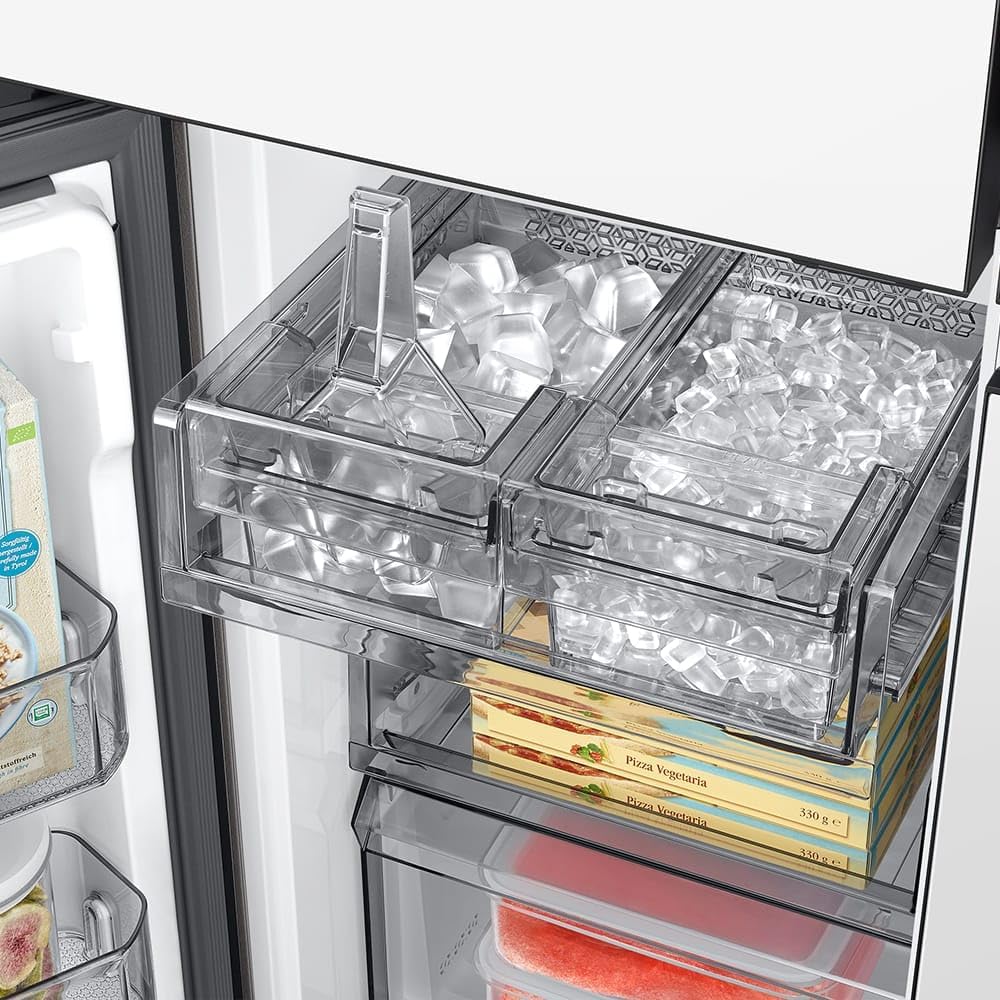
The Dual Auto Ice Maker produces two types of ice: cube ice and Ice Bites. It has a daily production capacity of 1.8 kg and can store up to 2.9 kg of ice.
Figure 4.4: Dual Auto Ice Maker. This image shows the transparent ice bins of the Dual Auto Ice Maker, containing both standard cube ice and smaller Ice Bites, ready for use.
4.5 Auto-Fill Water Pitcher & Internal Dispenser
In addition to the internal water dispenser, the refrigerator features an auto-fill pitcher. You can infuse water with fruits or herbs for flavored beverages. The pitcher is dishwasher safe.
Figure 4.5: Water Dispenser and Auto-Fill Pitcher. This image displays the open left door of the refrigerator, revealing the internal water dispenser and the convenient auto-fill water pitcher, along with stored beverages.
4.6 Automatic Door Opening
Approach the sensor, and with a light touch, the door will open automatically and completely.
4.7 溫度控制
Adjust the refrigerator and freezer temperatures using the controls on the Family Hub display or internal panel to suit your storage needs.
4.8 SpaceMax Technology
This technology allows for thinner walls, providing more internal storage capacity (543L total) without increasing the external dimensions or compromising energy efficiency.
4.9 Retractable Shelf
兩個stage retractable shelf can be partially folded back to create space for taller items like bottles and large containers.
4.10 Metal Cooling
The Metal Cooling plate on the rear wall helps maintain a consistent internal temperature and quickly recovers cold air after the door is opened, preserving food freshness.
5、維護保養
5.1 Easy-Change Water Filter
Replace the water filter regularly. The "twist and change" system makes replacement simple. Original Samsung filters use carbon filtration to remove over 99.9% of potential water contaminants.
5.2 UV Deodorizing Filter
This filter, made with natural fibers and activated carbon, removes unwanted odors and eliminates up to 99.9% of bacteria, helping to preserve the natural taste of food longer.
5.3 一般清潔
Regularly clean the interior shelves, drawers, and door bins with a mild detergent and warm water. Wipe down the exterior surfaces with a soft, damp 布。 避免使用磨蝕性清潔劑。
6。 故障排除
If you experience issues with your refrigerator, consult the following general troubleshooting tips. For more detailed assistance, refer to the full service manual or contact Samsung support.
冰箱不冷: 檢查電源連接、溫度設置,並確保門完全關閉。
飲水機無法正常運作: Verify water supply is connected and the water filter is correctly installed.
異常噪音: Some operational noises are normal. If noises are excessive or unusual, ensure the refrigerator is level and not touching walls.
製冰機不製冰: Check water supply, ensure ice maker is turned on, and clear any ice blockages.
7. 規格
特徵
規格
品牌
三星
型號資訊
RM90
認證
ANATEL:107252102752
產品尺寸(WxDxH)
91.2 x 73.1 x 185.3 厘米
重量
150公斤
能源效率
A++
總容量
543升
Fresh Food Compartment Capacity
359升
冷凍室容量
184升
年能源消耗量
61度
安裝類型
獨立式的
配置
法式門
顏色
潔白
卷tage
127伏
抽屜
2
貨架
4
貨架類型
可伸縮
Figure 7.1: Energy Label. This label indicates the energy efficiency class (A++) and monthly energy consumption (61.0 kWh/month) for the Samsung Refrigerator-Freezer model RM90F66C1W. For more information, visit registro.inmetro.gov.br/consulta.
8. 保固和支持
Your Samsung refrigerator is covered by a manufacturer's warranty. For warranty details, service requests, or technical support, please refer to the warranty card included with your product or visit the official Samsung website. Always use authorized service centers for repairs to ensure product integrity and safety.
Ask a question about this manual
Ask about setup, troubleshooting, compatibility, parts, safety, or missing instructions. Manuals+ will review the question and use this page’s manual context to help answer it.