
一、簡介
This manual provides detailed instructions for the installation, operation, and maintenance of the ADVANTECH PCIE-1612C-AE 4-Port RS-232/422/485 PCIe Communication Card. This interface module is designed to expand your system's serial communication capabilities, offering robust and reliable data transfer for industrial and commercial applications. Please read this manual thoroughly before attempting to install or operate the device.
2. 安全訊息
請遵守以下安全預防措施,以防止設備損壞並確保人身安全:
- Always disconnect power from your computer system before installing or removing any internal components.
- Wear an anti-static wrist strap and work on an anti-static mat to prevent electrostatic discharge (ESD) damage to the card and other components.
- Handle the card by its edges to avoid touching sensitive components.
- 確保電腦機殼內部通風良好,以防止過熱。
- 請勿將卡片暴露在潮濕或極端溫度下。
3. 包裝內容
請核對包裹內所有物品是否齊全。如有任何物品缺失或損壞,請立即聯絡賣家。
- 1 x ADVANTECH PCIE-1612C-AE 4-Port RS-232/422/485 PCIe Communication Card
- Documentation (e.g., Quick Start Guide, Driver CD/USB - may vary by package)
4. 產品結束view
The ADVANTECH PCIE-1612C-AE is a high-performance PCIe communication card designed for reliable serial data transmission. It features four independent serial ports, configurable for RS-232, RS-422, or RS-485 standards, making it versatile for various industrial and embedded applications.
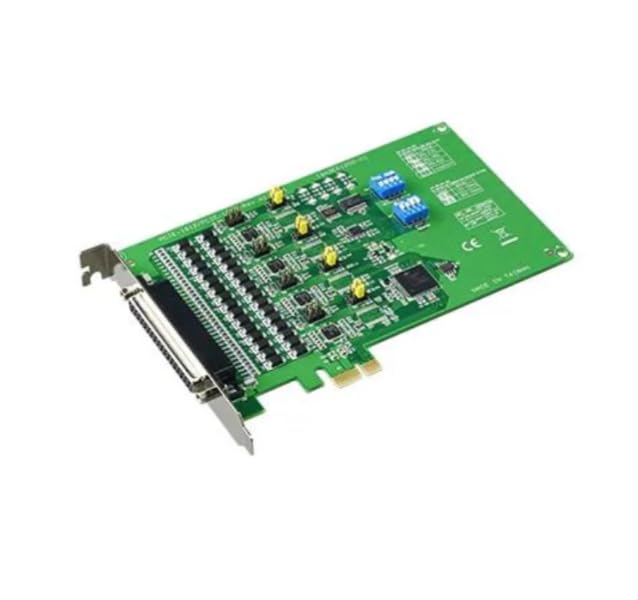
Figure 1: ADVANTECH PCIE-1612C-AE 4-Port RS-232/422/485 PCIe Communication Card. This image shows the physical card with its PCIe connector and four serial port connectors.
主要特點:
- Number of Channels / Ports: 4埠
- 最大數據速率: 921.6kb/秒
- 接口類型: PCIe, RS-232/422/485
- 營運供應量tage: 3.3V
- 工作溫度範圍: -10°C 至 +60°C
5. 設定
Follow these steps to properly install the PCIE-1612C-AE card into your computer system:
- 準備好您的系統: Power off your computer and disconnect the power cord from the wall outlet. Disconnect all peripheral devices.
- 開啟電腦機殼: Remove the side panel of your computer case to access the motherboard and expansion slots.
- 尋找可用的 PCIe 插槽: Identify an empty PCI Express (PCIe) slot on your motherboard. The PCIE-1612C-AE requires a standard PCIe slot.
- 移除插槽蓋: Remove the metal slot cover corresponding to the chosen PCIe slot from the back of your computer case.
- 安裝記憶卡: Carefully align the PCIE-1612C-AE card with the PCIe slot. Apply even pressure to both ends of the card until it is firmly seated in the slot. Ensure the card's bracket is flush with the back of the computer case.
- 保護卡: Secure the card's bracket to the computer case using the screw or latch mechanism provided by your case.
- 結案: 裝回電腦側面板並固定好。
- 重新連接電源: Reconnect the power cord and all peripheral devices. Power on your computer.
- 安裝驅動程序: Once the operating system boots, it may automatically detect the new hardware. Install the necessary drivers from the provided media or download them from the ADVANTECH web網站。請依照螢幕上的指示安裝驅動程式。
6.操作
After successful installation and driver setup, the PCIE-1612C-AE card's serial ports will be available in your operating system's Device Manager (Windows) or equivalent system information utility (Linux). Each port can be configured for its specific communication parameters (baud rate, data bits, parity, stop bits, flow control) through your operating system's settings or application software.
- 連接設備: Connect your RS-232, RS-422, or RS-485 compatible devices to the corresponding ports on the PCIE-1612C-AE card using appropriate serial cables.
- 軟件配置: Use your serial communication software or application to select the correct COM port number assigned to each physical port on the card and configure the communication parameters to match your connected device.
- RS-422/485 Mode: For RS-422/485 modes, ensure proper termination and biasing are applied if required by your network topology. Refer to your device's documentation for specific requirements.
7、維護保養
The PCIE-1612C-AE card is designed for long-term reliability with minimal maintenance. However, adhering to general computer maintenance practices will help ensure optimal performance:
- 除塵: Periodically open your computer case (after disconnecting power) and use compressed air to gently remove dust buildup from the card and surrounding components. Dust can impede heat dissipation and lead to component failure.
- 環境控制: 確保操作環境保持在規定的溫度和濕度範圍內。
- 纜線管理: Keep internal cables tidy to maintain good airflow within the case.
8。 故障排除
If you encounter issues with your PCIE-1612C-AE card, consider the following troubleshooting steps:
- 未偵測到銀行卡:
- 確保顯示卡完全插入 PCIe 插槽。
- 嘗試將顯示卡安裝到不同的 PCIe 插槽。
- Check your computer's BIOS/UEFI settings to ensure PCIe slots are enabled.
- 驅動程式無法安裝/運作:
- Verify you have downloaded the correct drivers for your operating system and card model from the ADVANTECH web地點。
- Uninstall any previous serial port drivers before installing new ones.
- Check Device Manager for any error codes related to the serial ports.
- 通訊錯誤:
- Confirm that the serial cable is correctly connected and not damaged.
- Verify that the communication parameters (baud rate, data bits, parity, stop bits, flow control) in your software match those of the connected device.
- For RS-485, check for proper wiring (A/B lines) and termination.
- Test with a known working serial device or loopback test if possible.
9. 規格
| 特徵 | 規格 |
|---|---|
| 型號 | PCIE-1612C-AE |
| 製造商 | 研華 |
| 產品類型 | 接口模塊 |
| Number of Channels / Ports | 4埠 |
| 介面類型 | PCIe, RS-232/422/485 |
| 最大數據速率 | 921.6kb/秒 |
| 營運供應量tage | 3.3V |
| 最低工作溫度 | -10℃ |
| 最高工作溫度 | +60°C |
| 物品重量 | 7 磅 |
10. 保固和支持
For warranty information, please refer to the documentation included with your purchase or contact your reseller or ADVANTECH directly. Warranty terms and conditions may vary by region and purchase agreement.
For technical support, driver downloads, or further assistance, please visit the official ADVANTECH website or contact their customer support services. Provide your product model number (PCIE-1612C-AE) and any relevant system information when seeking support.