
Varstrom EKD01
Varstrom EKD01 TFT LCD Display User Manual
型號:EKD01
For BAFANG Mid Motors (BBS02B, BBS-HD)
一、簡介
The Varstrom EKD01 is a 2.4-inch IPS color TFT LCD display designed for BAFANG mid-drive electric bicycle motors. It features an intuitive interface with three integrated buttons, offering essential functions for your e-bike experience. This manual provides detailed instructions for the proper installation, operation, and maintenance of your EKD01 display.

Figure 1.1: The Varstrom EKD01 TFT LCD Display, showing its screen and control buttons.
2. 產品規格
The EKD01 display is built with robust materials and designed for reliable performance in various conditions. Key specifications are detailed below:
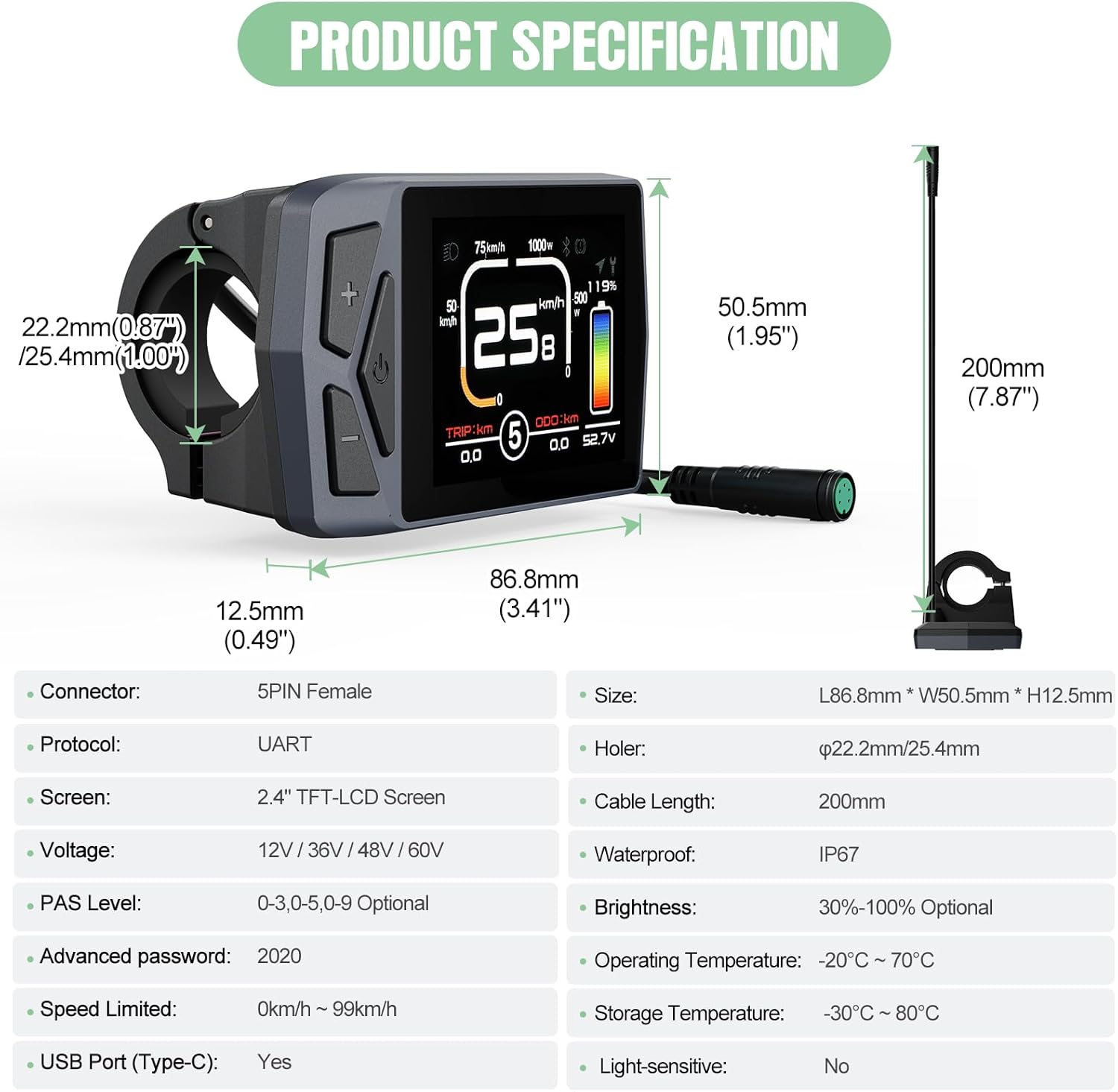
Figure 2.1: Diagram illustrating the physical dimensions and key specifications of the EKD01 display.
| 規格 | 細節 |
|---|---|
| 模型 | 01埃克朗 |
| 螢幕尺寸 | 2.4" IPS Color Matrix |
| 解決 | 320 * 240px |
| 方面 | 86.8*50.5*12.5毫米 |
| 防水等級 | IP67 |
| 連接器類型 | 5-Pin Female Round (M5 Waterproof Connector) |
| 卷tage 兼容性 | 12V/32V/48V/60V |
| 工作溫度 | -20°C 至 +70°C |
| 儲存溫度 | -30°C 至 +80°C |
| USB充電器 | C型 |
| 默認密碼 | 2020 |
| PAS 等級 | 0-3 / 0-5 / 0-9 (Optional) |
| 車把適配 | Ø22.2mm / Ø25.4mm |
| 通訊協議 | UART (versions 5.0 to 5.8) |
3. 設定與安裝
Proper installation is crucial for the display's functionality and your safety. Follow these steps carefully.
3.1 相容性檢查
The EKD01 display is specifically designed for BAFANG motors that utilize the UART通訊協議 (versions 5.0 to 5.8). It features a 5-pin female round connector. Ensure your motor's connector and protocol match these specifications. It is 不是 compatible with CAN protocol motors or other connector types.
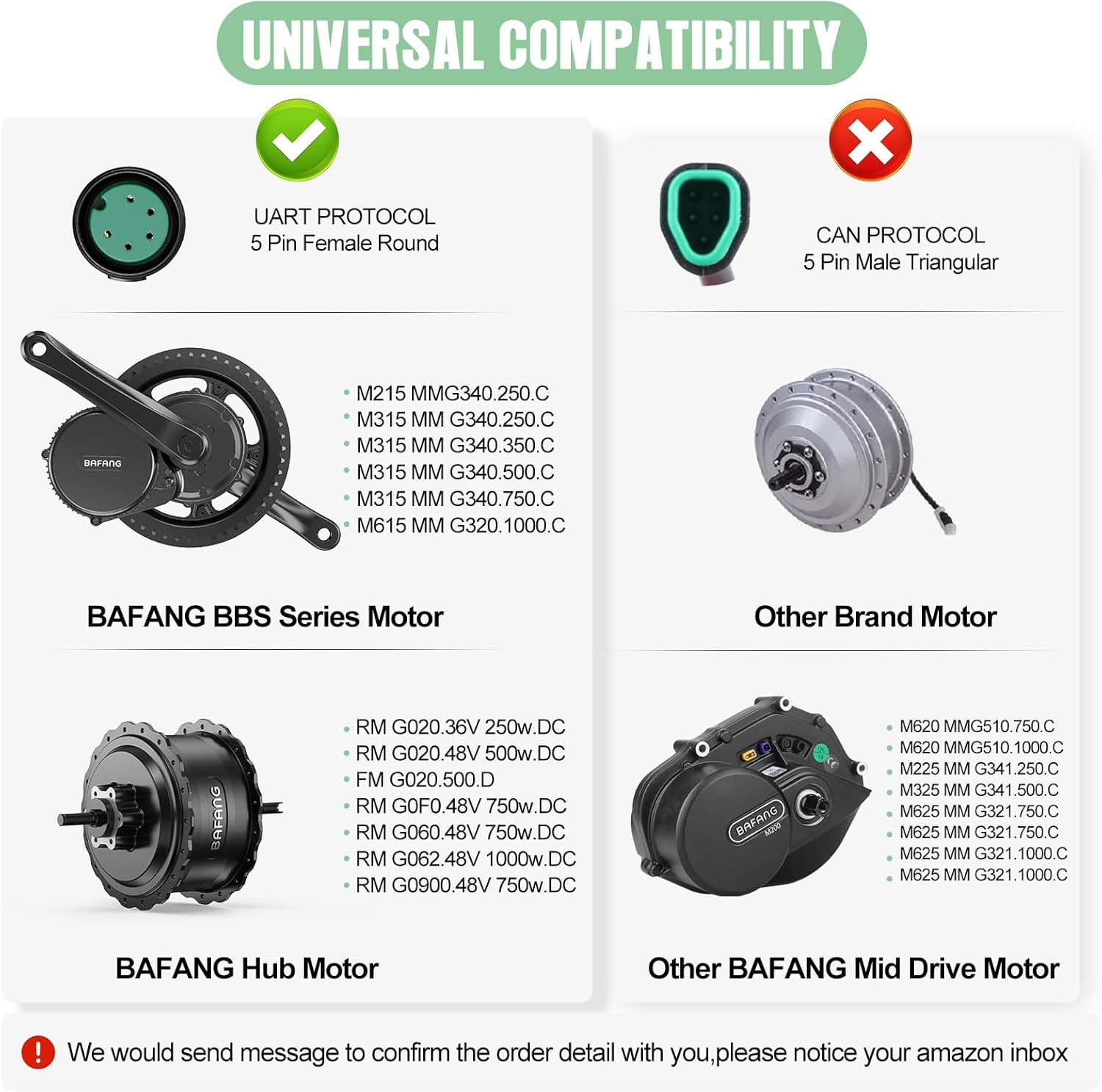
Figure 3.1: Compatibility diagram showing supported BAFANG BBS Series and Hub Motors (UART protocol) versus incompatible CAN protocol motors.
3.2 安裝顯示器
- Select a suitable position on your e-bike's handlebar (compatible with Ø22.2mm or Ø25.4mm diameters).
- 鬆開 clamp screws on the display's mounting bracket.
- Place the display bracket around the handlebar and tighten the screws securely, ensuring the display is stable and visible. Do not overtighten.
3.3 接線
Connect the EKD01 display to your e-bike's motor system using the 5-pin female round connector. Refer to the wiring diagram below to ensure correct pin alignment. Incorrect wiring can damage the display or motor.
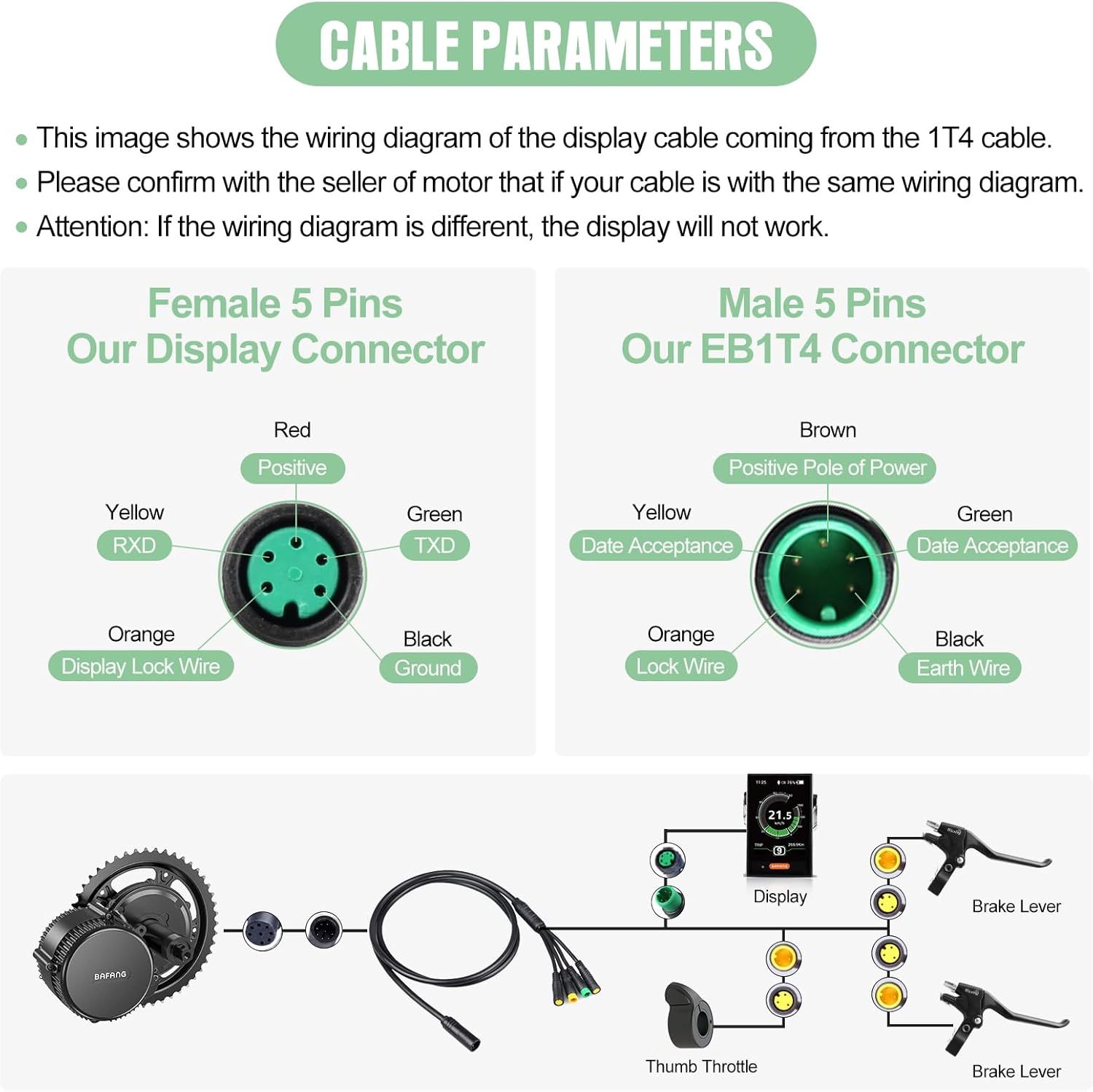
Figure 3.2: Detailed wiring diagram for the EKD01 display's 5-pin female connector and the corresponding male EB1T4 connector. Ensure your cable matches this configuration.
- 紅色的: 積極的
- 黃色: RXD(接收資料)
- 橘子: Display Lock Wire
- 綠色的: TXD(發送數據)
- 黑色的: 地面
重要的: Confirm with your motor's seller that your cable's wiring diagram is identical to the one shown. If the wiring diagram differs, the display will not function correctly.
4. 操作顯示屏
The EKD01 display provides comprehensive information and control over your e-bike's functions.
4.1 電源開關
按住電源按鈕(⏻) located on the display to turn it on or off.
4.2 顯示介面view
The EKD01's color screen presents various data points to monitor your ride. Refer to the diagram below for an explanation of each indicator.
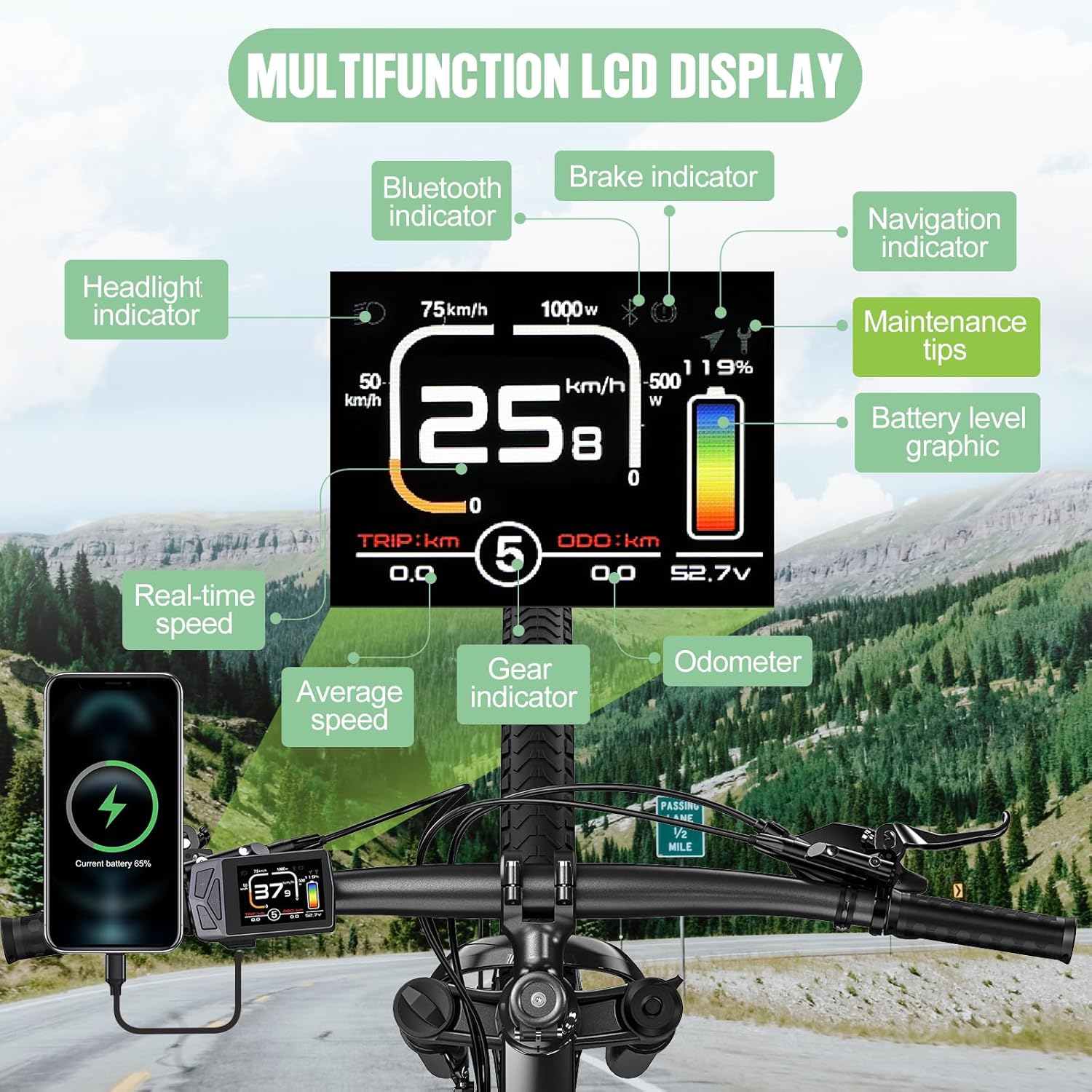
Figure 4.1: Annotated diagram of the EKD01 display, detailing the various indicators and their meanings.
- 頭燈指示燈: Shows if the bike's headlights are on.
- 藍牙指示燈: 指示藍牙連線狀態。
- 煞車指示燈: 踩下煞車時亮起。
- Navigation Indicator: Displays navigation prompts (requires activation).
- 維護提示: Alerts for service or maintenance.
- Battery Level Graphic: Visual representation of remaining battery charge.
- 即時速度: 當前騎乘速度。
- 平均速度: 本次行程的平均速度。
- 檔位指示器: Current PAS (Pedal Assist System) level.
- 里程表(ODO): Total distance traveled by the e-bike. This value can be cleared on the EKD01.
- 行程距離(TRIP): 本次騎乘行程的行駛距離。
4.3 調整 PAS 等級
使用 + 和 - buttons to cycle through the available Pedal Assist System (PAS) levels. The EKD01 supports 0-3, 0-5, or 0-9 PAS levels, depending on your motor's configuration.
4.4 Settings and Functions
The EKD01 offers several customizable settings:
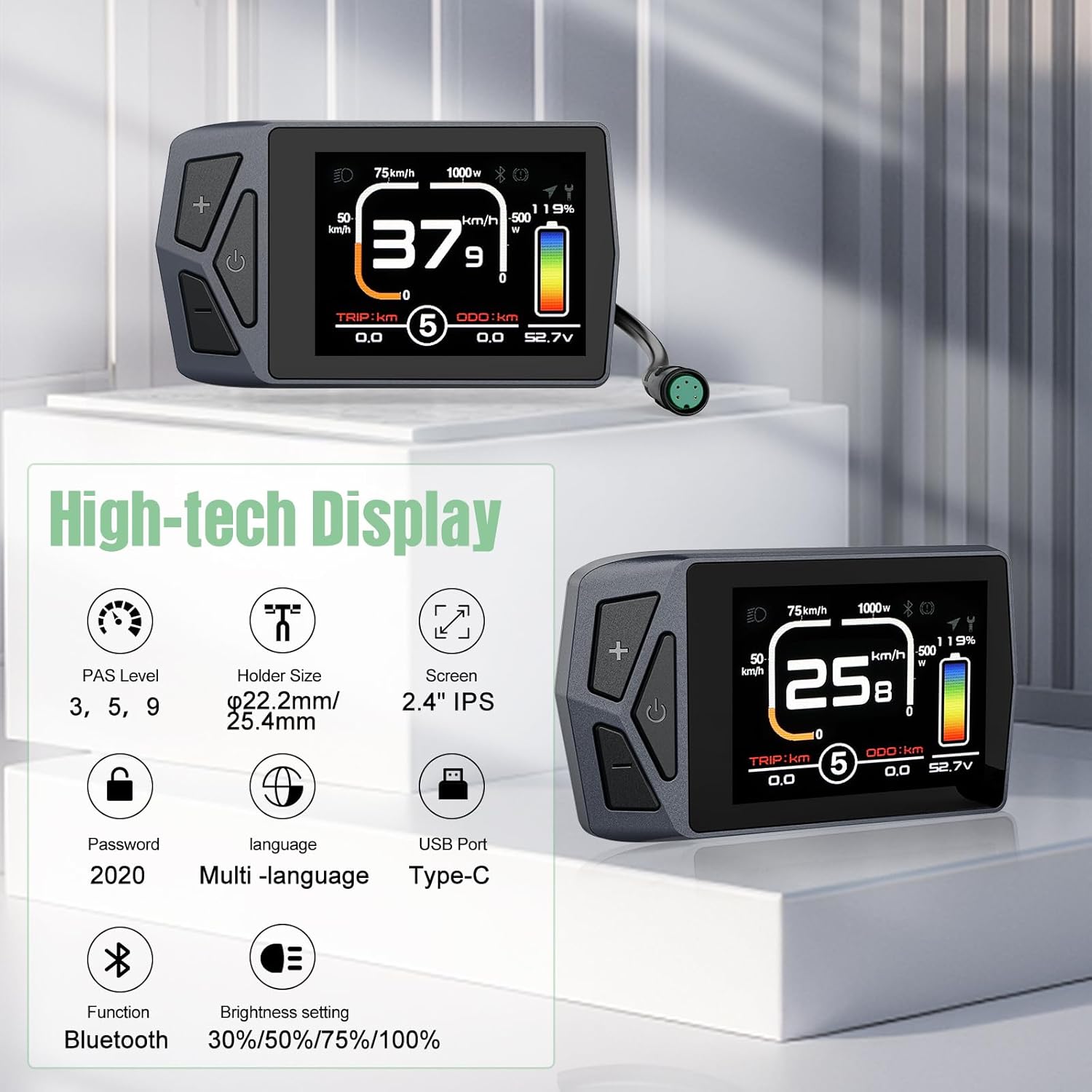
Figure 4.2: Summary of advanced features available on the EKD01 display.
- 語言選擇: The display supports 8 languages: English, French, German, Spanish, Italian, Polish, Dutch, and Czech. Navigate through the settings menu to change the language.
- 亮度設置: Adjust screen brightness to 30%, 50%, 75%, or 100% for optimal visibility in different lighting conditions.
- Navigation Function: The display includes a navigation feature. Note that this function typically offers 5 free trials, and continued use may require payment. It provides seamless connection for real-time navigation and data synchronization.
- 密碼: The default password for accessing certain settings is 2020.
- USB 連接埠(Type-C): Use the integrated Type-C USB port for charging compatible devices.
- ODO重置: Unlike some other models, the EKD01 allows the Odometer (ODO) to be cleared. Consult the display's menu for this option.
5、維護保養
To ensure the longevity and optimal performance of your EKD01 display, follow these maintenance guidelines:
- 打掃: The display has an IP67 waterproof rating, meaning it is protected against dust and temporary immersion in water. However, for cleaning, use a soft, damp cloth. Avoid abrasive cleaners, solvents, or high-pressure water jets, which can damage the screen or housing.
- 溫度: Operate the display within its specified working temperature range of -20°C to +70°C. For storage, ensure temperatures are between -30°C and +80°C. Extreme temperatures can affect performance and lifespan.
- 實體保護: While durable, avoid dropping the display or subjecting it to strong impacts. Ensure the connector is clean and free of debris before connecting.
6。 故障排除
If you encounter issues with your EKD01 display, refer to the following common problems and solutions:
| 問題 | 可能的原因/解決方案 |
|---|---|
| 顯示幕無法開機。 |
|
| Display shows no data or incorrect data. |
|
| Navigation function not working or asking for payment. |
|
| Display is loose on the handlebar. |
|
If you are unable to resolve an issue using the troubleshooting steps above, please contact Varstrom customer support for assistance.
7. 保固和支持
7.1 保固信息
The Varstrom EKD01 display comes with a warranty that includes a 30天退貨期 和 365 days for repair or replacement 自購買日起生效。本保固涵蓋正常使用情況下的製造缺陷和故障。但不包括因誤用、意外事故、未經授權的改裝或安裝不當造成的損壞。
7.2 客戶支持
For technical support, warranty claims, or any questions regarding your Varstrom EKD01 display, please contact Varstrom customer service. Provide your product model (EKD01) and purchase details when contacting support to expedite assistance.
You can typically find contact information on the Varstrom official web網站或透過您購買產品的零售商。
相關文件 - 01埃克朗
 |
Bafang BBS02B/BBSHD Mid Motor Gear Shift Sensor User Manual User manual for the Bafang BBS02B and BBSHD mid-drive motor gear shift sensor. Learn about product overview, installation steps, and important notes & warnings for e-bike conversion kits. |
 |
八方 M510 中置馬達使用手冊和安裝指南 BAFANG M510 中置馬達綜合使用手冊,涵蓋電動自行車的規格、安裝步驟、維護和故障排除。 |
 |
BAFANG BBS01/BBS02 中置馬達電動自行車馬達安裝手冊 | eMax 電動自行車 BAFANG BBS01 和 BBS02 中置馬達套件的完整安裝手冊。內容包括技術規格、組裝步驟、接線圖以及 eMax eBikes 提供的保固資訊。 |
 |
EKD01-AKSM 顯示器手冊:電動自行車顯示器綜合指南 透過這份詳細的使用手冊,了解 EKD01-AKSM 和 B02NU-AKSM 電動自行車顯示器。手冊內容涵蓋安裝、功能、設定、藍牙連接、應用程式整合以及故障排除等各個方面。 |
 |
八方BBS系列驅動系統使用手冊 八方BBS系列驅動系統綜合使用手冊,涵蓋電動自行車改裝套件的安裝、操作、維護和故障排除。 |
 |
BAFANG BBS01/BBS02 中置馬達電動自行車改裝套件安裝手冊 BAFANG BBS01 和 BBS02 中置馬達電動自行車改裝套件的詳細安裝指南。涵蓋系統所有方面。view為電動自行車 DIY 愛好者提供技術規格、逐步組裝說明、組件連接和保固資訊。 |
Ask a question about this manual
Ask about setup, troubleshooting, compatibility, parts, safety, or missing instructions. Manuals+ will review the question and use this page’s manual context to help answer it.