
DUMBORC X6F, X6FG
DUMBORC 2.4G 6通道遙控器接收器使用手冊
Models: X6F, X6FG
1. 產品結束view
The DUMBORC 2.4G 6-channel RC receiver combo includes both X6F (without gyroscope) and X6FG (with gyroscope) models. These receivers operate on a 2.4GHz frequency, providing a stable and responsive connection for various RC models. Designed for use with DUMBORC X4, X6, and X10 transmitters, they offer a control distance of up to 400 meters.
The FHSS (Frequency Hopping Spread Spectrum) signal technology ensures faster transmission speeds, quicker response times, and enhanced stability, making them suitable for a wide range of applications including RC trucks, crawlers, racing cars, and boats.

Image: A set of four DUMBORC receivers. The top two are X6F models, and the bottom two are X6FG models, distinguishable by their labels.
2.主要特點
- 2.4GHz FHSS 技術: 確保可靠且無幹擾的通信,控制距離可達 400 公尺。
- 6 個頻道: 提供 ample control options for various RC functions.
- 多功能兼容性: Compatible with DUMBORC X4, X6, and X10 transmitters.
- Gyroscope Function (X6FG): The X6FG model includes an integrated gyroscope for enhanced vehicle stability, particularly useful in challenging driving conditions.
- 應用廣泛: Suitable for RC cars (trucks, crawlers, racing), boats, and tanks.
- Multi-Receiver Control: A single DUMBORC transmitter can be bound to multiple receivers, allowing control of several models with one transmitter.
3. 包裝內容
標準軟體包包含以下組件:
- 2 x DUMBORC X6F Receivers (without gyroscope)
- 2 x DUMBORC X6FG Receivers (with gyroscope)
Note: You may receive updated versions labeled P6F and P6FG. These are functionally identical or improved versions of the X6F and X6FG.
4. 設定和綁定
4.1 Receiver Layout (X6FG Example)
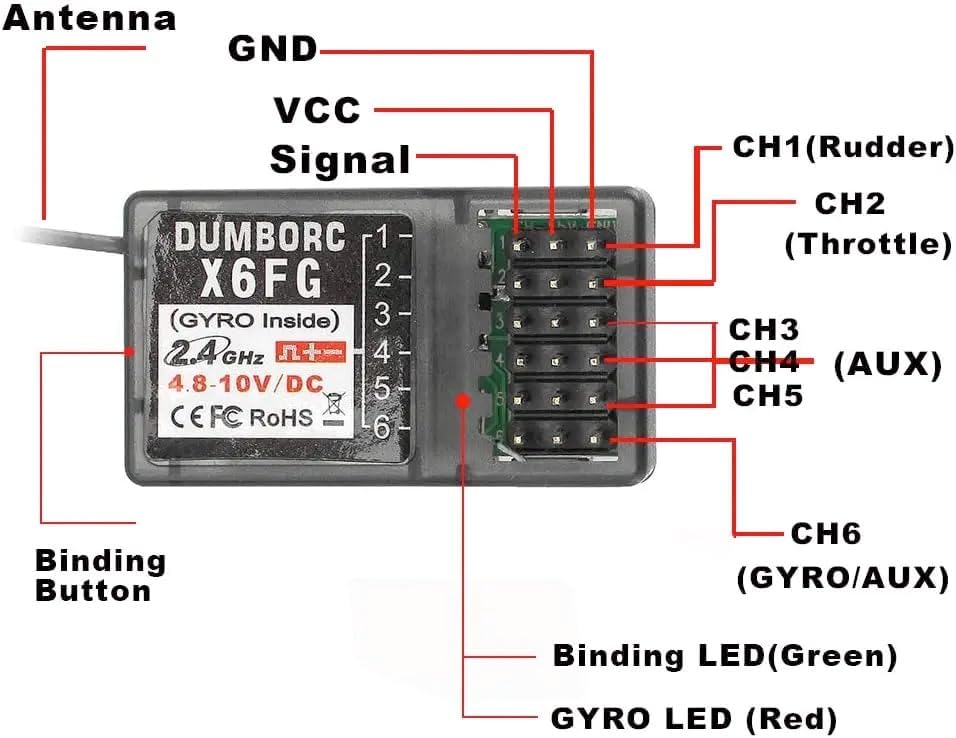
Image: A detailed diagram of the DUMBORC X6FG receiver, illustrating the location of the antenna, binding button, power (GND, VCC), signal pin, and channels CH1 through CH6. It also shows the Binding LED (Green) and Gyro LED (Red).
- 天線: For signal reception. Ensure it is positioned away from metal parts for optimal performance.
- Binding Button: Used to initiate the binding process with the transmitter.
- GND(接地): Negative power connection.
- VCC (Voltage Common Collector): Positive power connection (4.8-10V DC for X6F, 3.3-10V DC for X6FG).
- 信號: Signal output pin for each channel.
- CH1 (Rudder): Typically for steering.
- CH2 (Throttle): Typically for motor control.
- CH3-CH5 (AUX): Auxiliary channels for additional functions (e.g., lights, winches).
- CH6 (GYRO/AUX): For X6FG, this channel controls the gyroscope sensitivity or can be used as an auxiliary channel.
- Binding LED (Green): Indicates binding status.
- GYRO LED (Red): (X6FG only) Indicates gyroscope status.
4.2 綁定程序
To establish communication between your DUMBORC transmitter and receiver, follow these steps:
- Ensure your DUMBORC transmitter is turned off.
- Connect power to the receiver (e.g., via an ESC or a dedicated receiver battery). The receiver's LED will flash rapidly, indicating it is in binding mode.
- Press and hold the binding button on the receiver.
- While holding the binding button, turn on your DUMBORC transmitter.
- Release the binding button on the receiver once the receiver's LED turns solid green. This indicates successful binding.
- 關閉發射器和接收器。
- Turn on the transmitter first, then the receiver. The receiver's LED should turn solid green, confirming the connection.
If the binding fails, repeat the steps. Ensure the transmitter and receiver are within close proximity during the binding process.
5. 操作說明
5.1 基本操作
- Always turn on your transmitter before turning on your RC model's receiver.
- After use, turn off the receiver first, then the transmitter.
- Ensure all connections (servos, ESC, battery) are secure before operation.
- Perform a range check before operating your model at a distance, especially in new environments.
5.2 Gyroscope Function (X6FG Only)
The X6FG receiver features an integrated gyroscope to assist with vehicle stability, particularly beneficial for drift cars or vehicles prone to losing traction. The gyroscope helps maintain the vehicle's direction by automatically counteracting unwanted movements.
- Gyroscope Activation: The gyroscope is active by default on the X6FG.
- 靈敏度調整: The sensitivity of the gyroscope can typically be adjusted via Channel 6 on your DUMBORC transmitter. Refer to your transmitter's manual for specific instructions on adjusting auxiliary channels.
- Gyro LED (Red): A solid red LED on the X6FG indicates the gyroscope is active.
Experiment with different sensitivity settings to find the optimal balance for your driving style and vehicle type. High sensitivity can make the vehicle feel overly assisted, while low sensitivity may not provide enough stabilization.
6. 規格
| 特徵 | 規格 |
|---|---|
| 頻率 | 2.4GHz 飛高速 |
| 頻道 | 6 |
| 控制距離 | 長達 400 米 |
| 操作量tage (X6F) | 4.8V - 10V 直流 |
| 操作量tage (X6FG) | 3.3V - 10V 直流 |
| 方面 | 0.79 x 0.51 x 1.38 英吋(20 x 13 x 35 毫米) |
| 重量 | 0.32 盎司(約 9 克) |
| 陀螺儀 | Integrated (X6FG only) |
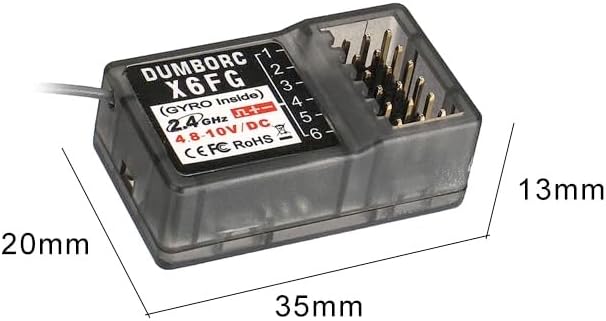
Image: The DUMBORC X6FG receiver shown with its physical dimensions: 35mm in length, 20mm in width, and 13mm in height.
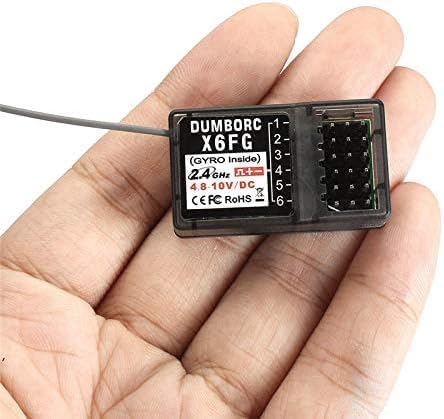
Image: The DUMBORC X6FG receiver resting in the palm of a hand, illustrating its small and lightweight design.
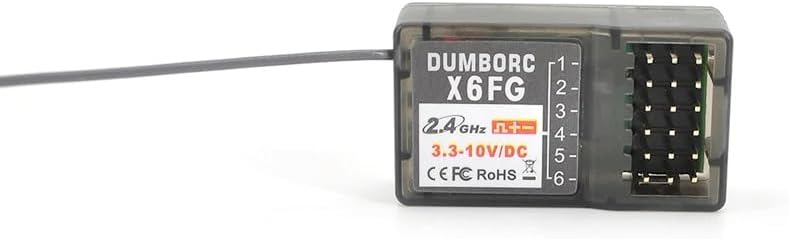
Image: A close-up shot of the DUMBORC X6FG receiver, highlighting its label with specifications and the array of pin connectors.

Image: A close-up shot of the DUMBORC X6F receiver, highlighting its label with specifications and the array of pin connectors.

圖:一個有角度的 view of the DUMBORC X6F receiver, showcasing its compact and rectangular form factor with the antenna wire extending from one end.
7。 故障排除
| 問題 | 可能的原因 | 解決方案 |
|---|---|---|
| Receiver not binding / LED flashing rapidly | Incorrect binding procedure; Transmitter not in binding mode; Receiver too far from transmitter. | Review and repeat the binding procedure (Section 4.2). Ensure transmitter is on and in binding mode (if applicable). Bring receiver closer to transmitter. |
| No control / Intermittent control | Receiver not bound; Low battery voltage (transmitter or receiver); Interference; Damaged antenna. | Re-bind the receiver. Check and replace batteries. Avoid operating near strong electrical interference sources. Inspect antenna for damage and ensure proper placement. |
| Gyroscope not working (X6FG) | Gyroscope disabled or sensitivity set to zero; Faulty receiver. | Check Channel 6 setting on your transmitter to ensure gyroscope is enabled and sensitivity is not zero. If issues persist, the receiver may be faulty. |
| 控制範圍短 | Antenna obstructed or damaged; High interference; Low battery. | Ensure antenna is fully extended and clear of carbon fiber or metal parts. Operate in an open area. Check battery levels. |
8、維護保養
- 打掃: Use a soft, dry cloth to clean the receiver. Avoid using solvents or harsh chemicals.
- 貯存: 請將接收器存放在陰涼乾燥處,避免陽光直射和極端溫度。
- 連接: Regularly check all wire connections for signs of wear, corrosion, or looseness. Ensure pins are not bent.
- 天線: Protect the antenna from kinks or cuts. A damaged antenna can significantly reduce range.
9. 保固和支持
DUMBORC products are manufactured to high quality standards. For warranty information, technical support, or service inquiries, please refer to the official DUMBORC web請造訪網站或聯絡您的授權經銷商。請保留您的購買收據作為購買憑證。
欲了解更多信息,請訪問 DUMBORC Store.
相關文件 - X6F, X6FG
 |
RC4WD 收音機和接收器(適用於 Miller Motorsports Pro Rock Racer)使用手冊 本使用手冊提供了有關 Miller Motorsports Pro Rock Racer 的 RC4WD 無線電和接收器系統的設定、綁定和操作的說明,包括發射器控制、接收器連接和安全預防措施的詳細資訊。 |
 |
Racing Electronics Receiver and Receiver PRO User Manual This user manual provides detailed instructions for operating and programming the Racing Electronics Receiver and Receiver PRO devices, including channel selection, scan functions, and sub-channel programming. |
 |
DumboRC DDF-350 10頻道遙控系統操作手冊 DumboRC DDF-350 10通道遙控系統(帶接收器)的綜合操作手冊,詳細介紹了設定、功能、安全指南和技術規格。包含綁定、通道功能、陀螺儀穩定、功率設定和校準等資訊。 |
 |
Sound Devices Astral ARX16 使用者指南:採用 SpectraBand 技術的 8、12 和 16 通道真分集接收器 Sound Devices Astral ARX16 是一款 8、12 或 16 通道真分集無線麥克風接收器,採用 SpectraBand 技術、NexLink 控制和 Dante 音訊 over IP 技術。本使用者指南全面介紹其設定、操作、規格和功能。 |
 |
Pioneer VSX-1020 Audio/Video Multi-Channel Receiver Operating Instructions Get detailed operating instructions and setup guidance for the Pioneer VSX-1020 Audio/Video Multi-Channel Receiver. Learn about connections, audio settings, playback, and advanced features. |
 |
Endyshow LED Stage Pixel Light Bar DMX Control and Technical Specifications Detailed guide to DMX modes, channel functions, and technical specifications for the Endyshow LED Stage Pixel Light Bar, including RGB color values and operational parameters. |
Ask a question about this manual
Ask about setup, troubleshooting, compatibility, parts, safety, or missing instructions. Manuals+ will review the question and use this page’s manual context to help answer it.