
AKEEYO AKEEYO-EYES-01
AKEEYO EYES 3-Channel Dash Cam User Manual
Model: AKEEYO-EYES-01
一、簡介
This manual provides comprehensive instructions for the installation, operation, and maintenance of your AKEEYO EYES 3-Channel Dash Cam. This device is designed to enhance driving safety and provide reliable video evidence with its advanced features, including AI driver assistance, multi-lens recording, and 24/7 parking surveillance.
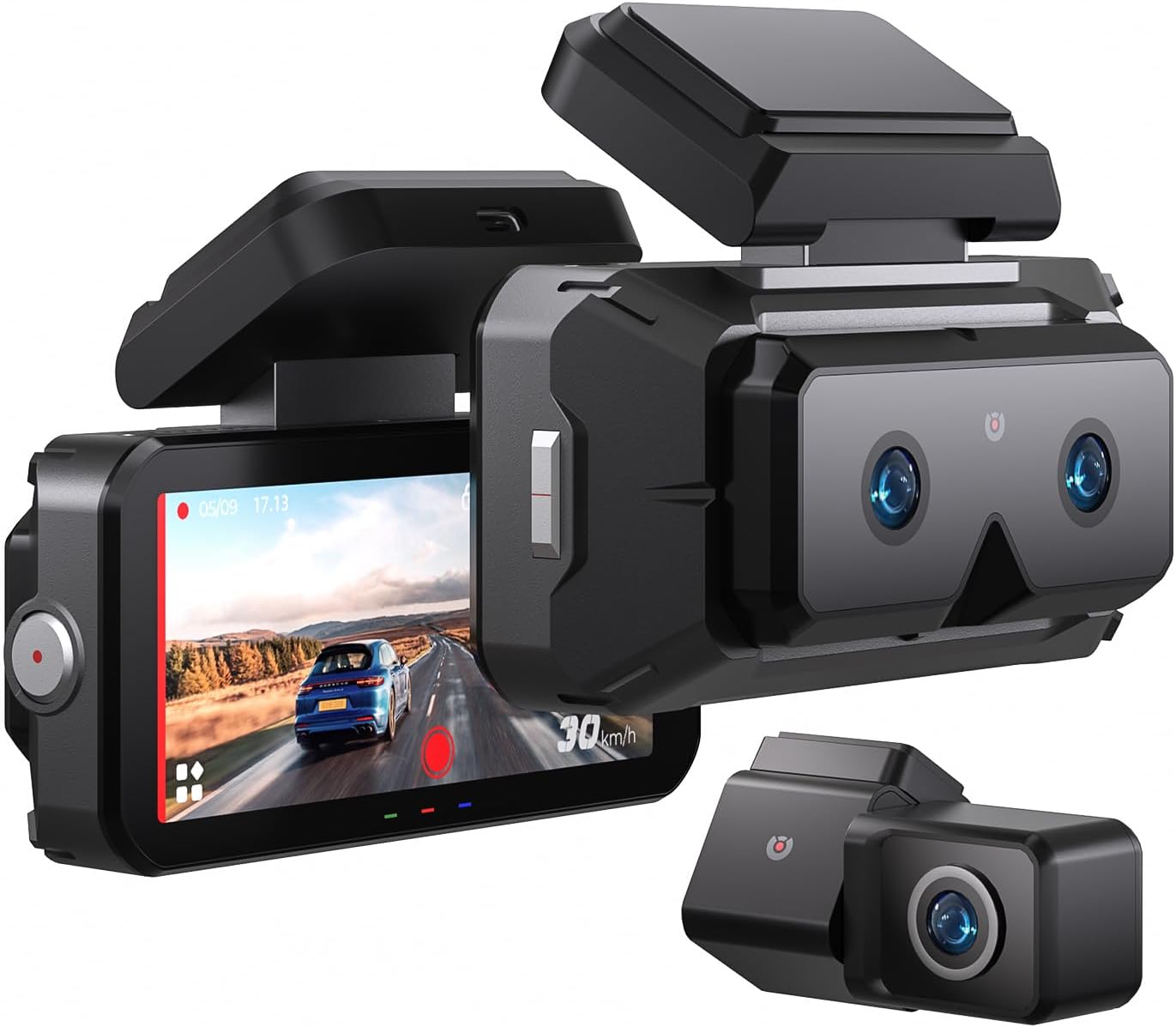
Image 1.1: The AKEEYO EYES 3-Channel Dash Cam, showing the main unit with its 4-inch IPS touchscreen and the separate rear camera.
2.產品特點
- 三聲道錄音: Simultaneous recording from front (telephoto and wide-angle) and rear cameras.
- 2K解析度: High-definition video capture for clear details.
- 4吋IPS觸控螢幕: Intuitive interface for live view 和設定調整。
- AI Driver Assistance (ADAS & BSD): Real-time alerts for collision, lane departure, blind spot detection, pedestrian detection, and front vehicle start reminders.
- WDR夜視: 低光條件下清晰度更高。
- 語音控制: Hands-free operation for key functions.
- 內建GPS: Records speed and location data.
- 5G Wi-Fi 連線: Fast data transfer to mobile devices via app.
- G 感測器: Automatic emergency recording upon impact.
- 循環錄音: 連續記錄,覆蓋最舊的記錄 files when storage is full (emergency videos are protected).
- 全天候停車模式: Monitors vehicle activity when parked (requires separate hardware kit).
- 超級電容: Provides durability and resistance to extreme temperatures.
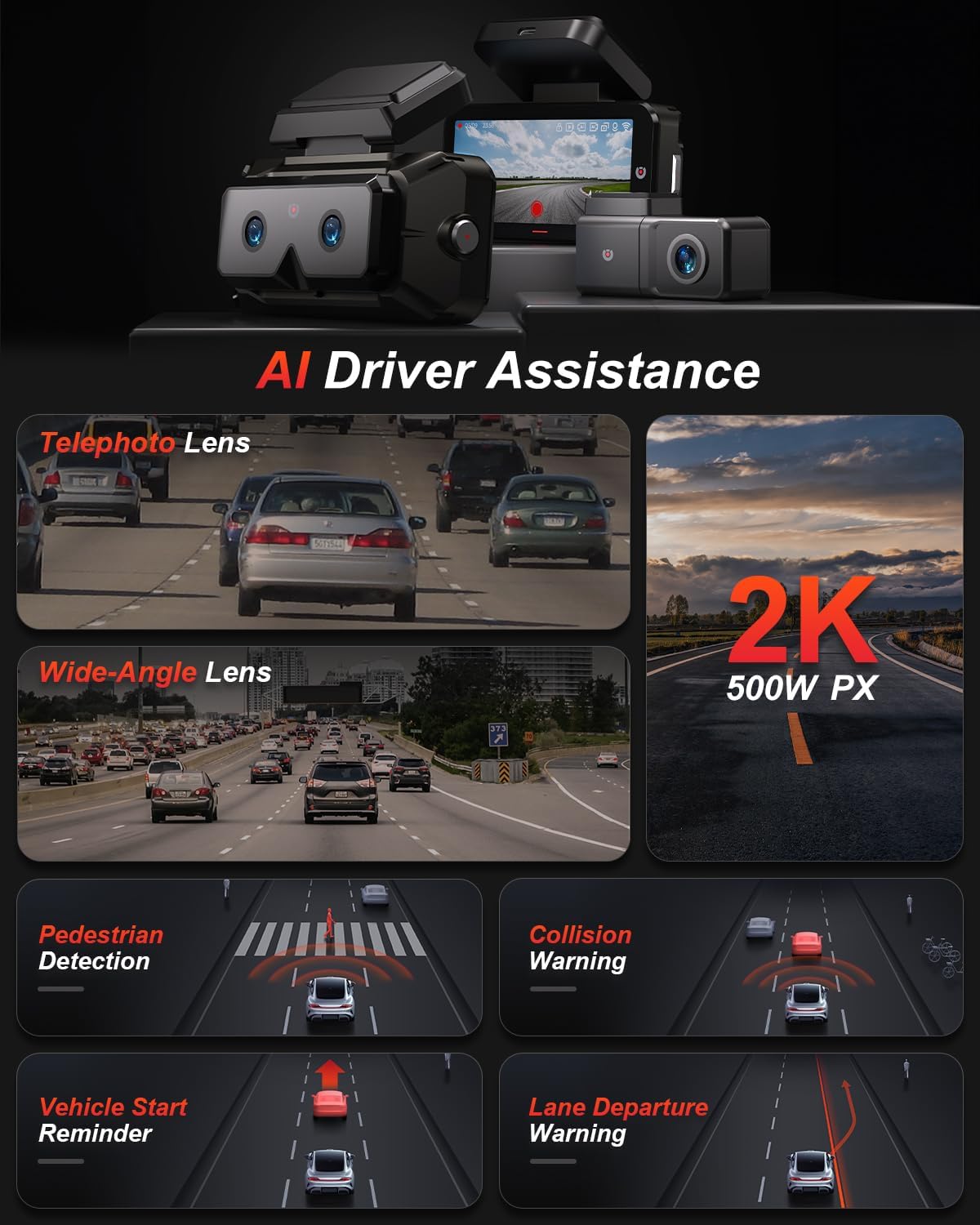
圖 2.1:結束view of AI Driver Assistance features, including ADAS and BSD.

圖 2.2:詳細信息 view of the dash cam's main unit and rear camera, highlighting the 3.99-inch display, wide-angle and telephoto lenses, and 360-degree rotating rear camera.
3. 包裝內容
確認包裹內所有物品齊全:
- AKEEYO EYES Dash Cam (Main Unit)
- 後置攝像頭
- 車用充電器
- 後置攝像頭電纜
- PC Data Transmission Wire
- 撬棍(用於佈線)
- Static Electricity Sticker
- 身體安裝
- 3M 膠墊

Image 3.1: All components included in the AKEEYO EYES Dash Cam package.
4. 設定與安裝
4.1 MicroSD卡安裝
- 請確保行車記錄器已關閉電源。
- Insert a compatible MicroSD card (Class 10 or higher, U3 V30 A2 recommended, up to 256GB) into the designated slot on the main unit until it clicks.
- 要取出,請輕輕推卡直至彈出。
4.2 前行車記錄器安裝
- 清潔行車記錄器安裝位置的擋風玻璃區域。
- Attach the static electricity sticker to the chosen area on the windshield.
- Affix the body mount with 3M adhesive to the static electricity sticker.
- Slide the main dash cam unit onto the body mount.
- 調整行車記錄器的角度,確保清晰 view 前方的道路。
4.3 後置攝像頭安裝
- Choose a mounting location for the rear camera, either inside the rear window or outside near the license plate (IP67 rated for outdoor use).
- 徹底清潔安裝表面。
- 使用提供的 3M 膠帶貼上後置相機。
- Route the rear camera cable to the main dash cam unit, ensuring it does not interfere with airbags or vehicle operation. Use the crowbar to tuck cables neatly.
- Connect the rear camera cable to the AV-IN port on the main unit.
- If the rear camera is installed upside down, detach it from its quick-release mount and reattach it in the correct orientation. No software adjustment is needed.
4.4 電源連接
- Connect the car charger to the Type-C port on the main dash cam unit.
- 將車用充電器插入車輛的點煙器插座。
- 整齊地佈置電源線,避免阻礙通行。

Image 4.1: Visual guide for the installation of the dash cam system.
5. 操作說明
5.1 電源開關
- 當車輛點火開關打開時,行車記錄器將自動開機並開始錄製。
- 點火開關關閉時,它會自動斷電。
- 若要手動開/關機,請按住電源按鈕。
5.2 Using the 4-inch IPS Touchscreen
The touchscreen allows for easy navigation and view荷蘭國際集團:
- 居住 View: 顯示實時 footage from the cameras. You can view all three channels simultaneously or focus on a single camera.
- 設定: Access various settings such as resolution, loop recording duration, G-sensor sensitivity, and Wi-Fi.
- 回放: Review 將錄製的影片直接顯示在螢幕上。
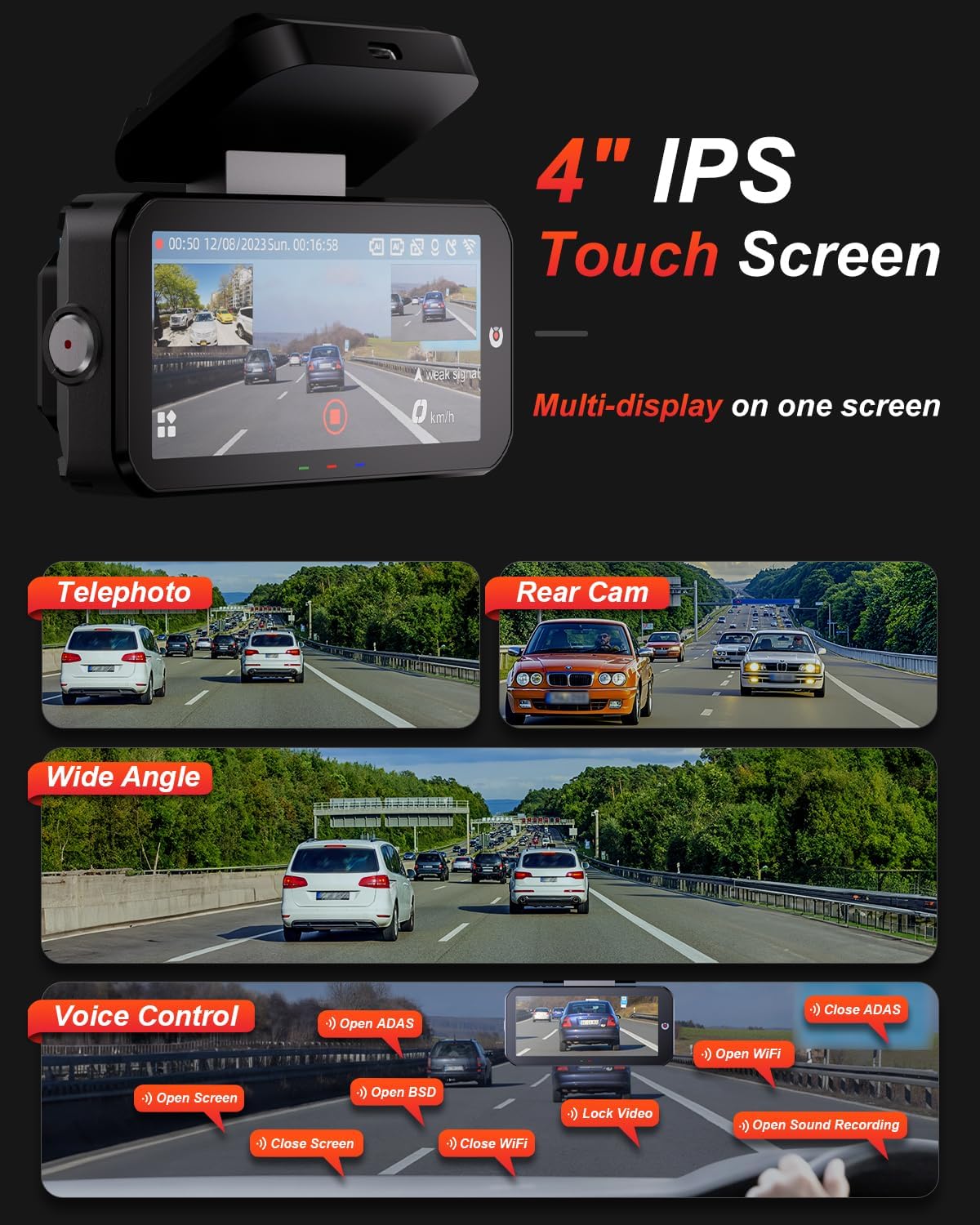
Image 5.1: The dash cam's 4-inch IPS touchscreen interface.
5.3 語音控制
Operate key functions hands-free using voice commands. Examp其中包括:
- "Open ADAS" / "Close ADAS"
- "Open BSD" / "Close BSD"
- "Open Screen" / "Close Screen"
- "Open WiFi" / "Close WiFi"
- "Lock Video" (to protect current recording)
- "Open Sound Recording"

Image 5.2: Voice control commands for hands-free operation.
5.4 錄製模式
- 循環錄音: The dash cam records continuously in segments. When the memory card is full, it automatically overwrites the oldest unlocked files.
- G 感測器: In the event of a sudden impact or collision, the built-in G-sensor automatically detects the event and locks the current video segment to prevent it from being overwritten.

Image 5.3: Loop Recording mechanism.
5.5 24/7 Parking Mode
When properly configured with the optional AKEEYO hardware kit (ASIN B0DHZPR4XW, sold separately), the dash cam can monitor your vehicle 24/7. It detects vibrations and records abnormal events, providing security against theft or collisions while parked. Low framerate recording can conserve storage during parking surveillance.

Image 5.4: 24/7 Parking Monitor functionality.
5.6 GPS and Wi-Fi Connectivity
- 全球定位系統: The built-in GPS module records your vehicle's speed and location data, which can be reviewed via the mobile app or PC player.
- 5G 無線網絡: Connect your smartphone to the dash cam via the AKEEYO app (available on App Store and Google Play) using 5G Wi-Fi for fast video download, playback, editing, and sharing.

Image 5.5: 5G Wi-Fi and Global GPS connectivity.
5.7 AI Driver Assistance (ADAS & BSD)
The dash cam provides real-time alerts to enhance driving safety:
- 碰撞預警: Alerts you if your vehicle is too close to the vehicle ahead or if a car slows down abruptly.
- 車道偏離警告: 如果您的車輛在未打方向燈的情況下偏離車道,系統會發出通知。
- 盲點偵測(BSD): Monitors vehicles in your blind spots and provides alerts when changing lanes.
- 行人偵測: Identifies pedestrians in front of you at low speeds and issues an alarm.
- 前部車輛啟動提醒: Reminds you when the vehicle ahead starts to move.

Image 5.6: Collision Warning system in action.

Image 5.7: Blind Spot Detection system.
6、維護保養
6.1 清潔設備
- 用柔軟的乾布清潔行車記錄器機身和螢幕。
- For lenses, use a specialized lens cleaning cloth to avoid scratches.
- 請勿使用磨蝕性清潔劑或溶劑。
6.2 MicroSD 卡管理
- Regularly format the MicroSD card (at least once a month) through the dash cam's settings to ensure optimal performance and prevent data corruption.
- Replace the MicroSD card periodically, as continuous overwriting can degrade its lifespan.
6.3 溫度因素
The dash cam is designed to withstand temperatures up to 176°F (80°C). However, prolonged exposure to extreme heat can affect performance. If the device becomes excessively hot, allow it to cool down before handling or removing the SD card.
7。 故障排除
- 行車記錄器無法開機: Check the power connection to the car charger and ensure the vehicle's cigarette lighter socket is functional.
- 錄音問題: Ensure a compatible MicroSD card is inserted and formatted. Check if the card is full or corrupted. Try formatting the card or using a new one.
- Camera shutting down randomly: This could be due to a faulty SD card or extreme temperatures. Try replacing the SD card. If the issue persists, contact customer support.
- Rear camera fogging/malfunctioning: Ensure the rear camera is properly sealed if mounted externally. If mounted internally, check for condensation.
- AI features (ADAS/BSD) providing false alerts or not working: Ensure the camera lenses are clean and unobstructed. Calibrate the system if an option is available in settings. Adjust sensitivity if alerts are too frequent.
- Wi-Fi 連線問題: Ensure Wi-Fi is enabled on the dash cam and your smartphone. Restart both devices and try connecting again.
- GPS 無法定位: 確保行車記錄器畫面清晰。 view 天空的。
For further assistance, please contact AKEEYO customer support.
8. 規格
| 特徵 | 規格 |
|---|---|
| 產品尺寸 | 10.24 x 7.48 x 2.76 英寸 |
| 物品重量 | 2.34磅 |
| 型號 | AKEEYO-EYES-01 |
| 視訊擷取分辨率 | 1440p (2K) |
| 展示 | 4吋IPS觸控螢幕 |
| 連接技術 | Powerline, USB, Voice, Wi-Fi (5G) |
| 特色 | 3-Channel 2K+2K+2K, GPS, Night Vision, Voice Control, Touch Control, AI ADAS & BSD Assistance, Wide-Angle, Loop Recording, G-Sensor, Telephoto Lens, 24H Parking Mode |
| 安裝類型 | 擋風玻璃安裝座 |
| 顏色 | 黑色的 |
| 現場 View | 160 Feet (Front Telephoto) / 135° (Front Wide-Angle) / 154° (Rear) |
| 儲存支援 | Up to 256GB MicroSD (Class 10, U3 V30 A2 recommended) |
| 工作溫度 | 最高176°F(80°C) |
9. 保固和支持
- 保固單: The AKEEYO EYES Dash Cam comes with an 18-month warranty.
- 返回: You are eligible for returns within 30 days of purchase.
- 客戶服務: AKEEYO provides 24-hour customer service. For support, please visit the official AKEEYO web或直接聯絡他們的客服團隊。
相關文件 - AKEEYO-EYES-01
 |
AKEEYO AKEEYO-P1 迷你行車記錄器快速入門指南 AKEEYO-P1迷你行車記錄器快速入門指南,涵蓋應用程式安裝、連接和聯絡資訊。包含FCC合規性資訊。 |
 |
AKEEEYO AKY-NV-X超級夜視系統使用說明書 AKEEEYO AKY-NV-X 超級夜視系統的綜合說明手冊,詳細介紹了安全預防措施、安裝指南、盲點偵測 (BSD) 等操作功能、記錄模式、系統設定、規格和故障排除常見問題解答。 |
 |
AKEEYO AKY-868GS 摩托車行車記錄器 使用手冊 AKEEYO AKY-868GS 雙攝影機摩托車行車記錄器使用手冊,涵蓋安裝、操作、安全注意事項、錄製格式、回放、設定和故障排除。 |
 |
AKEEYO AKY-NV-X2 Dashcam User Manual and Guide Comprehensive user manual for the AKEEYO AKY-NV-X2 Dashcam with Super Night Vision System, covering installation, app usage, calibration, software updates, troubleshooting, and warranty information. |
 |
AKEEYO AKY-NV-X2 Super Night Vision Dashcam Generation II Product Manual Get detailed information on the AKEEYO AKY-NV-X2 Super Night Vision Dashcam Generation II. This manual covers installation, features, settings, safety, and operation for optimal vehicle recording and safety. |
 |
AKEEYO AKY-610L Motorcycle Driving Recorder & Action Camera User Manual Comprehensive user manual for the AKEEYO AKY-610L, detailing setup, installation, recording features, system settings, troubleshooting, and specifications for motorcycle driving and action camera use. |
Ask a question about this manual
Ask about setup, troubleshooting, compatibility, parts, safety, or missing instructions. Manuals+ will review the question and use this page’s manual context to help answer it.