
Hodozzy 9 Inch
Hodozzy 4G+64G Double Din Android Car Stereo User Manual
Model: 9 Inch Touchscreen GPS Car Radio
介紹
This manual provides comprehensive instructions for the installation, operation, and maintenance of your Hodozzy 4G+64G Double Din Android Car Stereo. This advanced car multimedia player features a 9-inch HD touchscreen, Wireless CarPlay, Android Auto, GPS navigation, Bluetooth 5.0, Wi-Fi connectivity, DSP sound processing, and support for a rear view camera and steering wheel controls. Please read this manual thoroughly before use to ensure proper functionality and safety.

Image: The Hodozzy 9-inch Double Din Android Car Stereo unit, showcasing its display and key features, along with a microphone and rear camera.
產品特點
- 高效能係統: Equipped with Android 13, 4GB RAM, and 64GB ROM for a smooth user experience. Features a 9-inch 1280x720 HD touchscreen with split-screen support and customizable UI. Dual USB ports are included for file transfer and device charging.
- Wireless CarPlay & Android Auto & Mirrorlink: Supports wireless connection for iOS CarPlay and Android Auto, allowing access to messages, contacts, and third-party applications. Voice control functions are available. Dual system mirror link provides complete synchronization of your phone screen to the radio display.
- GPS Navigation and Wifi: Built-in GPS antenna for real-time online navigation and support for offline maps (requires initial internet connection for download). Integrated Wi-Fi allows connection to hotspots for online browsing and software downloads.
- Bluetooth & FM/RDS Radio & DSP: Bluetooth 5.0 for enhanced data transfer and connection stability, supporting hands-free calling and music playback. FM/RDS radio allows storage of 18 preset channels (FM 87.50-108.00 MHz). A 32-band equalizer enables custom audio effects.
- Steering Wheel Controls & Rear View 相機: Includes an AHD HD camera for automatic display of the reversing image when shifting into reverse gear, with optional auxiliary lines. Steering wheel controls allow convenient operation of the radio and other in-car devices (re-learning of controls may be required).
盒子裡有什麼
打開包裝後,請確認以下所有組件是否齊全:
- Hodozzy 9-inch Android Car Stereo Unit
- 後部 View 相機
- 電源線
- RCA線
- GPS天線
- 後置相機輸入線
- USB 數據線 (x2)
- 安裝支架
- Users Manual (this document)
- 麥克風 (MIC)

Image: A visual representation of the product dimensions and a detailed list of all included accessories and cables.
設定和安裝
Installation of the Hodozzy car stereo requires basic automotive electrical knowledge. If you are unsure about any steps, it is highly recommended to seek professional installation to avoid damage to the unit or your vehicle.
一般安裝步驟:
- 準備: 在進行任何電氣工作之前,請先斷開車輛蓄電池的負極接線柱。
- 拆除舊設備: Carefully remove your existing car stereo unit and its mounting brackets.
- 接線連接:
- Connect the main power harness (Power Cable) to your vehicle's wiring harness. Ensure correct connections for constant power (B+), accessory power (ACC), ground (GND), and illumination.
- Connect speaker wires according to their polarity.
- 連接 GPS 天線並將其放置在視野開闊的位置。 view 天空(例如,儀表板、A柱)。
- Connect the RCA cables for audio output (if using external amp擴大機)和視訊輸入/輸出。
- 連接外部設備的USB線。
- 後部 View 攝像頭安裝:
- 安裝後部 view camera at the back of your vehicle, ensuring a clear view.
- Route the camera's video cable to the stereo unit and connect it to the "Rear Camera Input" port.
- Connect the camera's power wire to your vehicle's reverse light circuit so it powers on when reverse gear is engaged.
- 安裝: Secure the Hodozzy unit using the provided mounting brackets. Ensure it is firmly in place.
- 最終檢查: Reconnect the vehicle's battery. Turn on the ignition and test all functions of the stereo.
操作說明
基本操作:
- 電源開/關: The unit typically powers on with the vehicle's ignition. Press and hold the power button on the unit or steering wheel control to manually turn it off or on.
- 觸摸屏界面: 在 9 吋高清觸控螢幕上,透過點擊、滑動和捏合來瀏覽選單和應用程式。
- 音量控制: 使用主機上的實體按鈕或方向盤控制鍵來調整音量。
- 主螢幕: The main screen provides access to frequently used applications and widgets. You can customize the layout and arrangement of apps.
- 分割畫面功能: The unit supports split-screen mode, allowing you to run two applications simultaneously (e.g., navigation and music player).

Image: Demonstrates the vibrant full-color HD screen, split-screen capability, and diverse UI designs available on the car stereo.
連接特性:
無線 CarPlay 和 Android Auto:
Connect your iPhone or Android smartphone wirelessly to access navigation, music, calls, and messages directly on the stereo's display. Ensure Bluetooth and Wi-Fi are enabled on your phone.
- 在手機和車用音響上啟用藍牙功能。
- 透過藍牙將手機與車上音響配對。
- Once paired, the system will prompt you to activate CarPlay or Android Auto. Follow the on-screen instructions.
- For Android Auto, ensure the Android Auto app is installed on your phone.

Image: Illustrates the seamless integration of Apple CarPlay, Android Auto, and Mirrorlink with various smartphone devices.
鏡像連結:
Mirrorlink allows you to completely synchronize your phone's screen to the car stereo display. This function typically uses a Wi-Fi connection.
- Open the Mirrorlink application on the car stereo.
- Follow the instructions on the stereo screen to connect your phone via Wi-Fi.
藍牙5.0:
用於免持通話和音訊串流。
- 開啟車用音響的藍牙設定。
- 在行動裝置上啟用藍牙並蒐索可用裝置。
- Select "Hodozzy" (or similar name) from the list on your phone and pair.
- 連接成功後,您可以透過車用揚聲器撥打/接聽電話和播放音樂。
無線網路連線:
Connect to a Wi-Fi hotspot (e.g., from your phone) to access online features, download apps, and browse the internet.
- Navigate to Wi-Fi settings on the stereo.
- 打開Wi-Fi並選擇您想要的網路。
- 如果出現提示,請輸入密碼。

Image: Displays the GPS navigation interface with online and offline map options, alongside the Wi-Fi connection screen for internet access.
導航(GPS):
The built-in GPS module allows for precise navigation. The unit supports both online and offline maps.
- 線上導航: Requires an active internet connection (via Wi-Fi or mobile hotspot) to provide real-time traffic updates and the latest map data.
- 離線地圖: For navigation without an internet connection, you must first download map resources. Connect the unit to Wi-Fi and use the pre-installed map application to download the required regions.
Audio Features (DSP & FM/RDS):
- DSP(數位聲音處理器): Access the 32-band equalizer settings to customize the audio output according to your preferences. Adjust bass, treble, balance, and fader settings for an optimized listening experience.
- 調頻/RDS收音機:
- Tune into FM radio stations (87.50-108.00 MHz).
- 使用自動掃描功能尋找並儲存可用網站。
- RDS(無線電資料系統)提供電台名稱、歌曲名稱和交通資訊(如有)等附加資訊。

Image: Details the Bluetooth hands-free calling interface, the 32-band equalizer for sound customization, and the dual USB ports for connectivity.
後部 View 相機:
The included AHD HD camera provides a clear view 車輛後方區域,增強倒車操作時的安全性。
- When the vehicle is shifted into reverse gear, the stereo automatically switches to the camera view.
- You can enable or disable the reversing auxiliary lines (guidelines) through the stereo's settings menu.
方向盤控制(SWC):
The unit supports connection to your vehicle's existing steering wheel controls, allowing you to operate key functions without taking your hands off the wheel.
- After installation, you may need to perform a "re-learning" or "mapping" process for the steering wheel controls within the stereo's settings menu. Follow the on-screen prompts to assign functions (e.g., volume up/down, track skip, mode, answer/hang up call) to your vehicle's buttons.
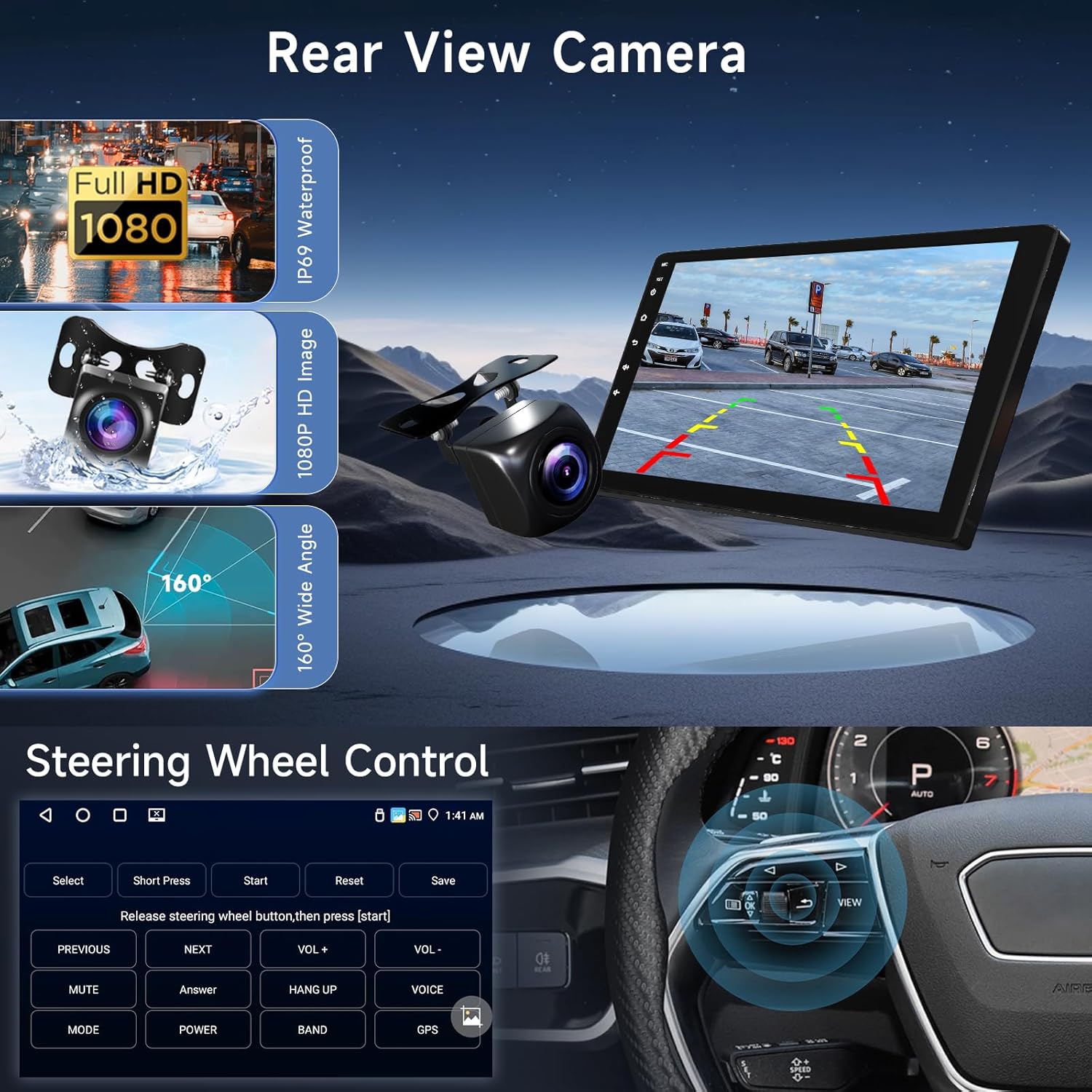
Image: Shows the clear display of the rear view camera with guidelines and the user interface for configuring steering wheel controls.
維護
- 打掃: Use a soft, dry cloth to clean the touchscreen and unit exterior. For stubborn smudges, damp用清水或螢幕清潔劑輕輕擦拭布料。避免使用研磨性材料或刺激性化學物質。
- 軟體更新: Periodically check for software updates through the unit's system settings (requires Wi-Fi connection). Updates can improve performance, add new features, and fix bugs.
- 溫度: 避免將設備長時間暴露在極端溫度下。
故障排除
| 問題 | 可能的原因 | 解決方案 |
|---|---|---|
| 沒有電源 | 線路連接錯誤;保險絲熔斷;車輛電池斷開。 | Check power and ground connections. Inspect vehicle's fuse box and the unit's fuse. Ensure battery is connected. |
| 沒有聲音 | 揚聲器線斷開;音量過低;靜音已啟用;音訊來源錯誤。 | Check speaker connections. Increase volume. Deactivate mute. Select correct audio source (e.g., FM, Bluetooth, USB). |
| GPS訊號遺失/不準確 | GPS天線被遮蔽或斷開連接;設備位於衛星訊號接收不良的區域。 | 確保 GPS 天線連接正確且視線清晰。 view 天空。將車輛移至空曠區域。 |
| Bluetooth/Wi-Fi Connection Issues | Bluetooth/Wi-Fi off on unit or phone; Pairing failed; Interference. | 確保兩台裝置均已啟用藍牙/Wi-Fi。刪除先前的配對資訊並重新配對。重啟兩台設備。 |
| 後置相機不顯示 | Camera power/video cable disconnected; Reverse trigger wire not connected. | Check camera power and video connections. Verify the reverse trigger wire is correctly connected to the vehicle's reverse light circuit. |
| 方向盤控制功能無法使用 | Incorrect wiring; Controls not learned/mapped. | Check SWC wiring connections. Perform the steering wheel control learning process in the unit's settings. |
規格
| 特徵 | 細節 |
|---|---|
| 品牌 | 霍多茲 |
| 模型 | 9 Inch Double Din Android Car Stereo |
| 作業系統 | 安卓13 |
| 記憶體 | 4GB |
| ROM(內部儲存) | 64GB |
| 螢幕尺寸 | 9寸 |
| 顯示解析度 | 1280 x 720 高清 |
| 觸控螢幕類型 | 電容式 |
| 連接技術 | 藍牙 5.0、Wi-Fi、USB |
| 特色 | Wireless CarPlay, Android Auto, Mirrorlink, GPS Navigation, DSP (32-band EQ), FM/RDS Radio, Steering Wheel Control (SWC), Rear View 相機輸入 |
| 包含的組件 | Camera, Cables (Power, RCA, USB, Camera Input), GPS Antenna, Mounting Bracket, Microphone, User Manual |
| 安裝類型 | 儀表板安裝 |
| 包裝尺寸 | 31.5 x 19.9 x 8.7 厘米 |
| 物品重量 | 1.24公斤 |
| 製造商 | 霍多茲 |
| 首次可用日期 | 26 年 2024 月 XNUMX 日 |
保固和支持
Hodozzy is committed to providing quality products and excellent customer service.
- 退貨政策: This product is eligible for a 30-day return policy from the date of purchase. Please refer to your retailer's specific return terms for details.
- 換貨政策: Hodozzy offers a 24-month "No Reason For Return or Replacement" policy, indicating strong product support.
- 技術支援: Hodozzy provides lifetime technical support for this product. If you encounter any issues or have questions, please contact Hodozzy customer service. Response is typically within 18 hours.
- 聯絡資訊: For support, please refer to the contact details provided on the Hodozzy official web網站或透過您的購買平台。

Image: Hodozzy's commitment to customer satisfaction, highlighting fast response times, replacement policy, and professional technical support.
Ask a question about this manual
Ask about setup, troubleshooting, compatibility, parts, safety, or missing instructions. Manuals+ will review the question and use this page’s manual context to help answer it.