
Safescan 131-0701
Safescan 6165 高級點鈔秤使用手冊
型號:131-0701
介紹
The Safescan 6165 Advanced Money Counting Scale is designed to provide a fast and efficient solution for counting cash. This device accurately counts loose coins, coin rolls, bills, and bill bundles, streamlining your cash management process. It supports multiple currencies and offers features like auto-add, auto-next, and a bank function for enhanced convenience.

Figure 1: Safescan 6165 Advanced Money Counting Scale with a stack of bills and a coin cup.
The 6165 is pre-programmed with 8 currencies including USD, CAD, MXN, EUR, GBP, CHF, CNY, and HKD. Its adaptive count algorithm allows for counting both old and new versions of bills seamlessly. The device is also designed for easy updates to accommodate new or revised currency issues.
包裝內容
Before you begin, please verify that all items are present in your Safescan 6165 package:
- Safescan 6165 Money Counting Scale Unit
- Money Platform
- Coin Cup
- Get Started Folder (Quick Install Guide)
- USB Cable / Print Cable
- 電源線

Figure 2: Visual representation of the Safescan 6165 package contents.
設定
- 拆箱: 小心地從包裝中取出所有組件。
- 電源連接: Connect the provided power cable to the Safescan 6165 and plug it into a suitable power outlet. The device can also be used with an optional Safescan LB-205 rechargeable battery (sold separately) for up to 30 hours of mobile use.
- 初次開機: 按下電源按鈕(⏻) to turn on the device. The display will illuminate.
- Platform and Coin Cup Placement: Ensure the money platform is securely in place. For coin counting, place the coin cup onto the designated area on the platform.
- Optional Printer/PC Connection: If you intend to print results or use the Safescan Money Counting Software (MCS-6165), connect the USB cable to the device and your PC, or the RJ10 port to a compatible thermal printer (e.g., Safescan TP-230).
影片 1:一輪view of the Safescan 6165 Money Counting Scale, demonstrating its features and setup.
操作說明
1. Counting Coins
The Safescan 6165 can count loose coins, coin rolls, and even integrate with cash drawer coin cups.
- Loose Coins: Place the coin cup on the platform. Select the desired currency if not already set. Carefully pour loose coins into the coin cup. The scale will automatically count and display the total value. Remove the coins to reset for the next denomination.
- Coin Rolls: Place coin rolls directly onto the platform. The device automatically recognizes the denomination and value of coin rolls for faster counting.
- Cash Drawer Coin Cups: The Safescan 6165 can be custom calibrated for a second coin cup, allowing direct counting from compatible cash drawer coin cups (e.g., Safescan 4141CC and 4617CC).

Figure 3: The Safescan 6165 is capable of counting various forms of currency, including loose coins, coin rolls, and banknotes.
Video 2: Demonstration of counting coins and banknotes using the Safescan 6165.
2. Counting Banknotes
Place loose bills or bill bundles onto the money platform. The scale will automatically detect and count the value. Remove the bills to proceed to the next denomination.
3. 使用智慧功能
- Auto-Add: This feature automatically adds the counted bills/coins to the running total.
- Auto-Next: The device automatically moves to the next denomination after the current bills or coins are removed from the platform.
- Bank Function: Set a starting cash amount for your drawer, and the device will automatically subtract it from the total count, providing your net cash.
4. Viewing and Exporting Results
The clear display panel provides detailed reporting, showing the exact quantity and value of all counted items. You can easily navigate through denominations using the control panel.
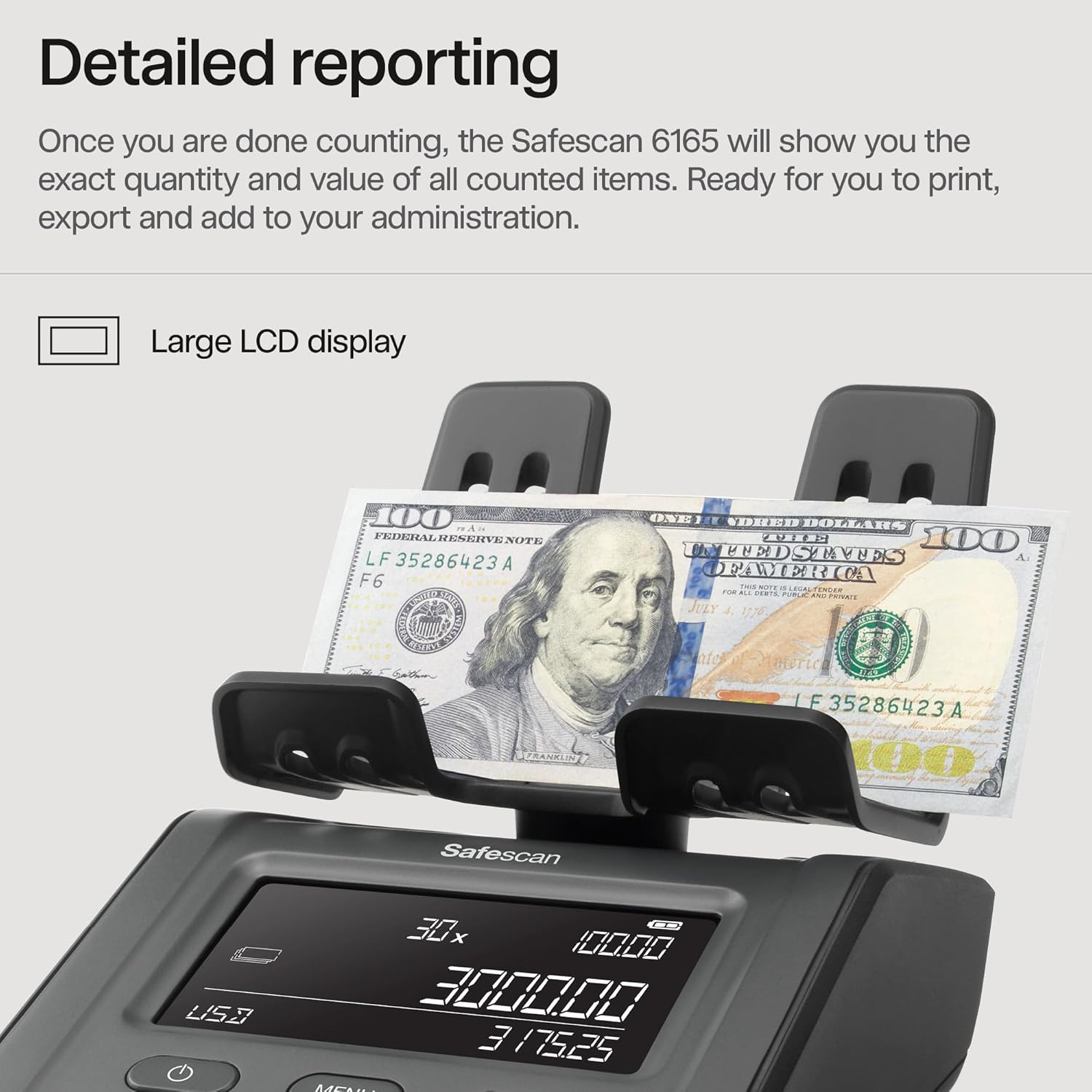
Figure 4: The large LCD display provides detailed counting results for each denomination.
Counting results can be printed using the Safescan TP-230 Thermal Printer or exported to the Safescan MCS-6165 Money Counting Software via the USB interface for comprehensive administration.
維護
- 打掃: Regularly clean the money platform and coin cup to ensure accurate counting. Use a soft, dry cloth. Avoid abrasive cleaners or solvents.
- 軟體更新: Safescan provides free currency updates on their website. It is recommended to periodically check for and install these updates to ensure your device can accurately count new or revised bills and coins. Connect the device to a PC using the USB cable for updates.
故障排除
| 問題 | 可能的原因 | 解決方案 |
|---|---|---|
| 計數不準確 | Dirty platform/sensor, incorrect currency selected, old currency data. | Clean the device. Verify currency settings. Check for and install software updates. Ensure items are placed correctly on the platform. |
| 設備未開機 | Power cable not connected properly, power outlet issue, battery drained (if applicable). | Check power cable connection. Try a different power outlet. Charge or replace the battery. |
| Display Issues (e.g., blank screen) | 內部故障。 | Restart the device. If the problem persists, contact Safescan support. |
| Cannot Connect to PC/Printer | Incorrect cable, driver issues, port malfunction. | Ensure correct USB/RJ10 cable is used. Install necessary drivers for PC connection. Try a different port. |
For further assistance, please refer to the comprehensive troubleshooting guide available on the official Safescan web網站或聯絡他們的客戶支援。
規格
- 型號: 131-0701
- 產品尺寸: 8.9 x 5.6 x 3 英寸
- 重量: 1.19 磅
- Pre-installed Currencies: USD, CAD, MXN, EUR, GBP, CHF, CNY, HKD
- 力量: 直流12V/0.5A
- 連接性: USB interface (for PC/printer), RJ10 port (for printer)
- 認證: CE認證
- 原產地: 中國
保固和支持
The Safescan 6165 Advanced Money Counting Scale is backed by a 3年保固, ensuring long-term reliability and peace of mind. Additionally, it comes with a 30 天滿意保證.
For product support, including free currency updates and detailed user guides, please visit the official Safescan web網站上也有客服聯絡方式。
Safescan is committed to enhancing business efficiency with smart, secure cash handling solutions. They provide high-quality products designed with stringent standards.

Figure 5: Safescan products are designed for future-proof innovation, offering free currency updates and a 3-year warranty.
Ask a question about this manual
Ask about setup, troubleshooting, compatibility, parts, safety, or missing instructions. Manuals+ will review the question and use this page’s manual context to help answer it.