
一、簡介
This manual provides detailed instructions for the setup, operation, and maintenance of your NEW BAXS CT80S Professional 8-Channel DJ Audio Mixer. Please read this manual thoroughly before using the device to ensure proper functionality and to maximize your experience.
2. 安全訊息
- 電源供應: 請僅使用指定的電源供應器。確保音量設定正確。tage 與您當地的電源相符。
- 水和水分: Do not expose the mixer to water, rain, or excessive moisture. Avoid placing liquid containers on or near the unit.
- 通風: 確保攪拌機周圍通風良好。切勿堵塞通風口。
- 熱源: 請將本產品遠離散熱器、暖氣片、爐灶或其他發熱電器等熱源。
- 打掃: 清潔前請斷開電源。使用乾燥柔軟的布。請勿使用液體清潔劑或噴霧劑。
- 維修: 所有維修工作請交由合格的維修人員進行。請勿自行嘗試維修。
3. 包裝內容
確認包裹內所有物品齊全:
- NEW BAXS CT80S Audio Mixer
- 電源適配器
- 用戶手冊(本文檔)
4. 產品結束view
The NEW BAXS CT80S is an 8-channel professional audio mixer designed for various audio applications, including DJing, live performances, and studio recording. It features Bluetooth connectivity, a USB interface for playback and recording, DSP effects, and phantom power for condenser microphones.

圖片:正面 view of the NEW BAXS CT80S 8-Channel DJ Audio Mixer, showcasing all controls and input/output ports.
4.1 控制面板佈局
The mixer's control panel is intuitively designed for ease of use. Below is a diagram highlighting key components and their functions.

Image: Detailed diagram of the NEW BAXS CT80S mixer, labeling various inputs, outputs, and control knobs such as Gain, EQ, FX, Pan, Volume faders, USB port, MP3 controls, and main output controls.
- XLR/Line Inputs (Channels 1-8): For connecting microphones (XLR) or line-level instruments (1/4 inch jack).
- 增益旋鈕: 調整每個通道的輸入靈敏度。
- EQ Controls (High, Mid, Low): Adjust the frequency response for each channel.
- 外匯發送: 控制發送到內部效果處理器的信號量。
- 平移控制: 調整聲道訊號的立體聲位置。
- 通道推子: Control the volume level of individual channels.
- 主輸出(左/右): XLR and 6.5mm outputs for connecting to main speakers.
- 耳機插孔: 用於音頻監聽。
- USB介面: 用於連接U盤進行MP3播放或錄製。
- 藍牙模塊: 用於無線音訊串流傳輸。
- +48V幻象電源按鈕: 為電容式麥克風啟用幻象電源。
- PFL/AFL Buttons: Pre-Fader Listen / After-Fader Listen for monitoring individual channels.
5. 設定
Follow these steps to set up your NEW BAXS CT80S mixer:

Image: Diagram illustrating various devices connected to the mixer, including a computer, condenser microphone, wireless microphone, musical instrument, U disk, phone, speaker, amp擴大機和耳機。
- 電源連接: Connect the provided power adapter to the mixer's power input and then to a suitable power outlet. Do not power on the unit yet.
- 連接麥克風:
- For dynamic microphones, connect an XLR cable from the microphone to an XLR input on the mixer.
- For condenser microphones, connect an XLR cable from the microphone to an XLR input. You will need to activate +48V phantom power (see Section 5.4).
- 連接線路級設備: Connect instruments (e.g., keyboards, guitars via DI box) or other audio sources (e.g., CD players) to the 1/4 inch LINE inputs using appropriate cables.
- Connecting Main Outputs: Connect the L/R MAIN OUT XLR or 6.5mm jacks to your powered speakers or amp升壓器輸入。
- 連接耳機: Plug your headphones into the PHONES jack for monitoring.
- 連接到計算機: To use the mixer as an audio interface for recording or playback with a computer, connect a USB cable from the mixer's USB port to your computer.
- 開機: Once all connections are made, power on your main speakers/amplifier first, then power on the NEW BAXS CT80S mixer.

Image: A NEW BAXS CT80S mixer connected via USB to a laptop, illustrating its use for audio recording and playback with a computer.
6. 操作說明
This section covers the basic operation of the mixer.
6.1 Adjusting Input Levels (Gain)
對於每個通道,使用 獲得 knob to set the input level. Adjust it so that the signal peaks are strong but do not consistently clip (indicated by the PEAK LED lighting up). This ensures a clean signal without distortion.
6.2 均衡化 (EQ)
每個頻道都具有 高的, 中, 和 低的 EQ controls. Use these to shape the tone of your audio source. Turn clockwise to boost frequencies and counter-clockwise to cut them.

Image: A hand adjusting an EQ knob on the mixer, with a graphic representation of frequency response curves before and after adjustment, demonstrating finer adjustments for accurate sound.
6.3 Channel Volume and Panning
- Use the individual channel 推子 to control the volume of each input in the main mix.
- 這 平底鍋 control adjusts the stereo position of the channel's signal, moving it between the left and right main outputs.
6.4 主音量
這 主左/右推桿 control the overall output volume of the mixer. Adjust these to achieve the desired listening level from your speakers.
7. Effects Adjustment
The CT80S mixer includes a built-in DSP effects processor with 16 preset effects. Use the dedicated controls to apply and adjust these effects:
- FX Knob (per channel): Determines how much of that channel's signal is sent to the effects processor.
- 外匯水平: Controls the overall volume of the effects return.
- DLY (Delay): 調整效果的延遲時間。
- REF (Reverb/Feedback): Controls the decay or feedback of the effect.
- 程序選擇器: Allows you to choose from the 16 available preset effects.
8. 藍牙連接
The mixer features Bluetooth 5.0 for wireless audio streaming from compatible devices.

Image: A smartphone displaying a music player interface, wirelessly connected via Bluetooth to the NEW BAXS CT80S mixer, demonstrating audio input adjustment.
- Activate the Bluetooth function on the mixer (refer to the MP3/USB section on the mixer's display).
- 在您的行動裝置(手機、平板電腦、筆記型電腦)上,啟用藍牙並搜尋可用裝置。
- Select "NEW BAXS" or a similar name from the list to pair.
- Once connected, you can stream audio from your device to the mixer. Adjust the volume using your device and the mixer's dedicated Bluetooth/USB channel controls.
9. USB播放和錄製
The USB interface allows for direct playback of MP3/WAV/WMA files from a USB flash drive and recording of the main mix to a USB flash drive.

Image: A USB flash drive inserted into the USB port of the NEW BAXS CT80S mixer, indicating its capability for direct playback and recording without drivers or complex setup.
9.1 USB播放
- 插入包含音訊的 USB 隨身碟 files 插入 USB 端口。
- Use the MP3 player controls (MENU, Play/Pause, Skip) on the mixer to navigate and play tracks.
- Adjust the volume using the dedicated USB channel fader.
9.2 USB 錄音
The mixer can record the main stereo mix directly to a USB flash drive. Refer to the mixer's display and controls for specific recording functions (e.g., REC button, file format selection).
10.幻象電源(+48V)
The CT80S provides +48V phantom power for condenser microphones on channels 1-8.
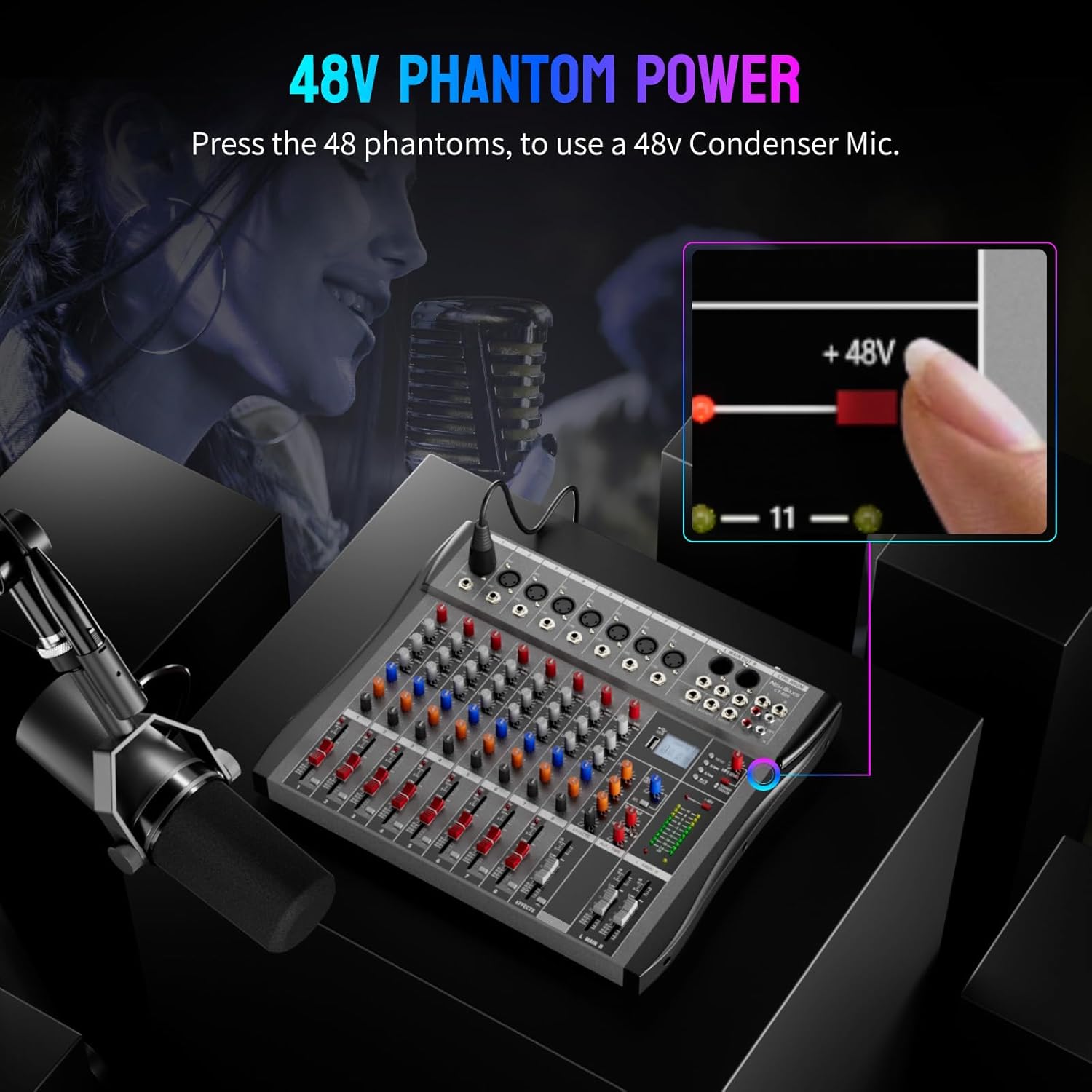
Image: A finger pressing the +48V phantom power button on the mixer, with an illuminated indicator, demonstrating how to activate phantom power for condenser microphones.
- Ensure your condenser microphone is connected via an XLR cable to one of the input channels (1-8).
- 按 +48V button located near the main output section. An indicator light will illuminate, confirming phantom power is active.
- 警告: Do not activate phantom power for dynamic microphones or ribbon microphones unless specifically designed to handle it, as this can cause damage. Always connect/disconnect microphones with phantom power off.
11. Monitoring Features (PFL/AFL)
The mixer offers Pre-Fader Listen (PFL) and After-Fader Listen (AFL) for precise monitoring of individual channels.

Image: Two hands interacting with the mixer, one activating PFL monitoring on a channel and the other activating AFL monitoring on another, illustrating independent channel monitoring capabilities.
- PFL(推子前監聽): When activated, the signal from that channel is sent to the headphones 前 the channel fader and EQ. This allows you to check the raw input signal and set gain levels without affecting the main mix.
- AFL (After-Fader Listen): When activated, the signal from that channel is sent to the headphones 後 the channel fader and EQ. This allows you to monitor the channel's contribution to the mix, including its volume and EQ adjustments.
12、維護保養
- 打掃: Regularly wipe the mixer's surface with a soft, dry cloth. Avoid using harsh chemicals or abrasive materials.
- 防塵: When not in use, cover the mixer to protect it from dust and debris.
- 貯存: 請將攪拌機存放在陰涼乾燥處,避免陽光直射和極端溫度。
- Detachable Anti-Collision Strip: The mixer features a detachable anti-collision strip for added protection. This can be removed for cleaning or if embedding the mixer into a custom setup.

Image: A diagram showing the detachable anti-collision strip being removed from the mixer, highlighting its design for protection and customization.
13。 故障排除
如果您遇到攪拌機問題,請參考以下常見問題和解決方案:
| 問題 | 可能的原因 | 解決方案 |
|---|---|---|
| 無聲音輸出 |
|
|
| 聲音失真 |
|
|
| 麥克風不工作 |
|
|
| 藍牙連線問題 |
|
|
14. 規格
- 模型: CT80S
- 頻道數: 8
- 連接技術: 藍牙、USB
- 電源: 有線電動
- 卷tage: 220伏
- 物品重量: 8.38 磅(3.8 公斤)
- 產品尺寸: 15.74吋深 x 1.33吋寬 x 12.99吋高(40公分 x 3.38公分 x 33公分)
15. 保固和支持
NEW BAXS provides a 12-Month Worry-Free After-sales Service for this product. This includes 24-hour prompt customer service to ensure your complete satisfaction. If you encounter any issues, please contact us directly.
15.1 如何聯絡支援人員
For support or warranty claims, please contact the seller through the Amazon platform:

Image: A visual guide demonstrating the steps to contact the seller on Amazon, typically found on the product page under 'Sold by' or 'Ask a question'.
- 前往亞馬遜上的產品頁面。
- Locate the 'Sold by' section (e.g., 'Sold by MoKenTao').
- Click on the seller's name to visit their storefront or contact page.
- Look for an option like 'Ask a question' or 'Contact Seller' to send a message.