
cenmate 2 Bay Raid
Cenmate 雙盤位硬碟 RAID 機殼使用手冊
Model: 2 Bay Raid
一、簡介
This user manual provides comprehensive instructions for the Cenmate Dual Bay Hard Drive RAID Enclosure. This device is designed to provide reliable external storage for both individuals and businesses, supporting a maximum capacity of up to 40TB using 2.5-inch or 3.5-inch SATA HDDs and SSDs. Please read this manual carefully before using the product to ensure proper setup and operation.
2. 產品結束view
2.1. 包裝內容
- 雙托架硬碟 RAID 盒
- USB A/C 3.0 電纜
- 電源適配器
- 用戶手冊(本文檔)
2.2.主要特點
- 高容量: Supports up to 40TB (20TB per hard drive) for 2.5/3.5-inch SATA HDD/SSD.
- 多種 RAID 模式: Supports RAID 0, RAID 1, Normal, and JBOD modes.
- 高效冷卻: Built-in 2-inch fan and aluminum-alloy materials for superior heat dissipation. Note: Fan noise is approximately 40-50 decibels.
- 高速資料傳輸: Equipped with JMS561 chip and USB 3.0 output interface, offering up to 5Gbps under UASP control.
- 廣泛的兼容性: Plug and play with Windows 7 and above, Mac 9.1 and above, and Linux. Includes USB A/C 3.0 Cable.
- 免工具設計: Easy, screwless installation for 3.5-inch hard drives.
- 穩定的電源: DC 12V power adapter ensures stable data transfer.
- LED 指示燈: Blue indicates standby mode, red flashing indicates reading and writing activity.
- Silicone Anti-skid Pad: Wear-resisting and skidproof for dock protection.
2.3. 產品視覺效果
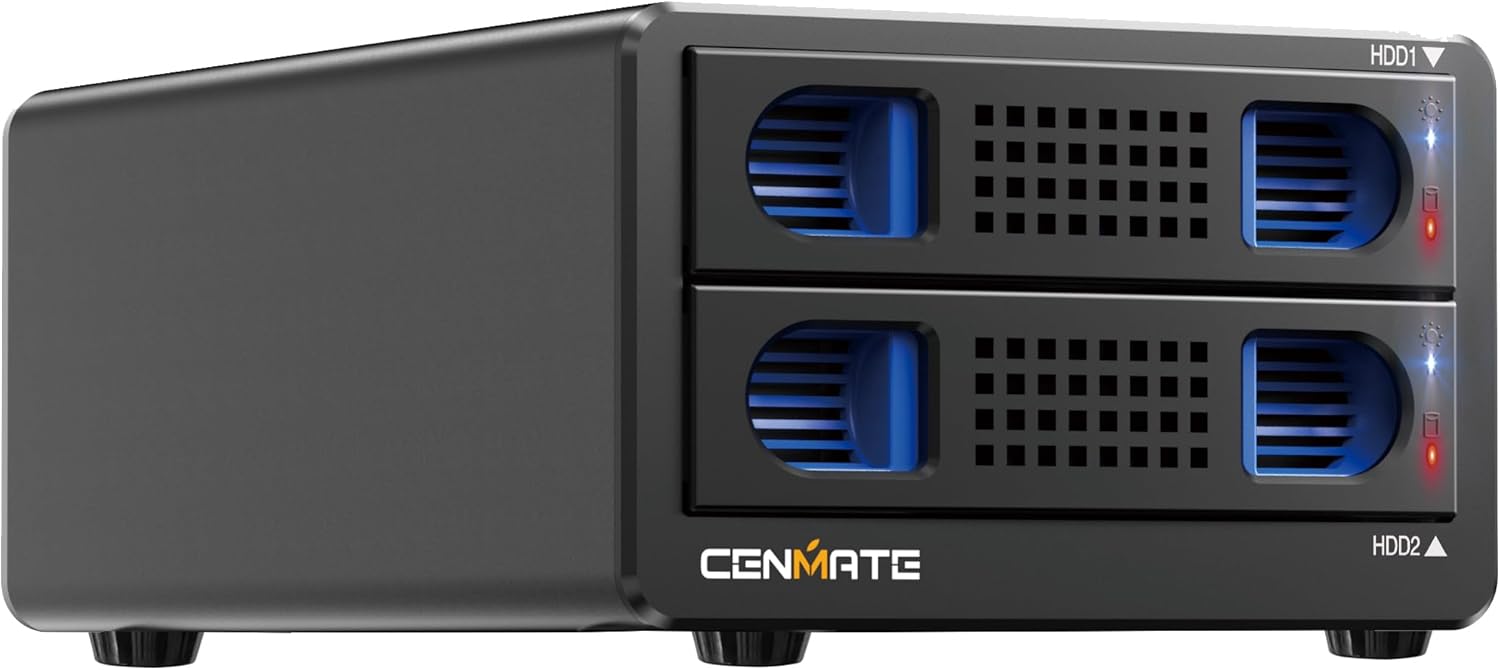
正面 view of the Cenmate Dual Bay Hard Drive RAID Enclosure, showing the two drive bays.

Illustration highlighting the 40TB large capacity, supporting two 20TB 2.5/3.5-inch SATA HDD/SSD drives.

Image demonstrating the maximum 5Gbps data transfer speed, allowing data transfer in seconds.

Diagram showing the internal upgraded built-in cooling fan and aluminum housing for heat dissipation.

Comparison showing the tool-free, screwless installation for 3.5-inch hard drives and the non-slip feet on the enclosure.

Illustration of the enclosure's wide compatibility with laptops and PCs, supporting 3.5" HDD, 2.5" HDD, and 2.5" SSD.

Image showing the DC 12V power supply connection, ensuring a stable power and safe data transfer environment.

Diagram illustrating the four RAID modes: Normal, JBOD, RAID 0, and RAID 1, with corresponding switch settings.

Image explaining the LED indicators: Blue for standby mode, Red flashing for reading and writing.

Close-up of the silicone anti-skid pads on the bottom of the enclosure, designed for wear-resistance and protection.

Image of the included 2-in-1 USB cable, featuring both USB-A and USB-C connectors for wide device compatibility.
3. 設定說明
3.1. 安裝硬碟
- 輕輕地將硬碟托架從機殼中拉出。
- For 3.5-inch HDDs: Pull up the blue clasps on both sides of the bracket and gently place the hard disk into the tray. The tool-free design secures the drive.
- For 2.5-inch SSDs/HDDs: Use a screwdriver to open the blue clasp on the side of the tray. Place the 2.5-inch drive into the tray and secure it with screws (provided).
- 將裝有硬碟的硬碟托架滑回硬碟盒內,直到聽到喀嚓聲為止。
3.2. 連接外殼
- 將電源適配器連接到外殼的 DC 12V 輸入端口,然後將其插入電源插座。
- Connect the provided USB A/C 3.0 cable from the enclosure's USB 3.0 output interface to your computer's USB port.
- Turn on the enclosure using the power switch.
3.3. Initializing and Formatting Drives
After connecting a new hard drive to your computer, it must be formatted before the system can recognize and use it. Follow these steps:
- Right-click 'Computer' (or 'This PC') and select 'Manage'.
- Open 'Disk Management'.
- Find the new hard drive. Right-click on it and select 'Initialize Disk'. Choose 'MBR' for hard drives less than or equal to 2TB, or 'GPT' for hard drives greater than 2TB.
- Right-click the unallocated space on the new disk and select 'New Simple Volume'. Follow the wizard to format the partition.
- Once formatting is complete, the hard drive can be used normally and will appear with a new disk symbol.
4. 操作說明
4.1. RAID模式配置
The enclosure supports four RAID modes: Normal, JBOD, RAID 0, and RAID 1. The mode is set using DIP switches on the back of the unit. Note: Designing or resetting a RAID array may result in data loss. Back up important data before changing RAID modes.
Diagram illustrating the four RAID modes: Normal, JBOD, RAID 0, and RAID 1, with corresponding switch settings.
- 普通模式: (Switch 1 & 2 are down) Each drive operates independently.
- JBOD模式: (Switch 1 down & Switch 2 up) Drives are concatenated to form a single large volume.
- RAID 0 模式: (Switch 1 up & Switch 2 down) Data is striped across both drives for increased performance. No redundancy.
- RAID 1 模式: (Switch 1 & 2 are up) Data is mirrored across both drives for redundancy. Capacity is limited to the smallest drive.
After setting the desired RAID mode using the DIP switches, press and hold the
相關文件 - 2 Bay Raid
 |
CENMATE 802RU 雙盤位外接硬碟 RAID 機箱使用手冊 本文檔提供 CENMATE 802RU 雙碟位外接硬碟 RAID 硬碟盒(適用於 2.5/3.5 吋 SATA 硬碟/固態硬碟)的產品說明和規格。內容涵蓋功能特性、安裝、故障排除和 RAID 等級設定。 |
 |
Cenmate 804U3RAID3G 4碟位外接RAID硬碟盒使用手冊 Cenmate 804U3RAID3G 四碟位外接 RAID 硬碟盒完整使用手冊。內容涵蓋安裝、設定、產品規格、各種 RAID 等級(RAID 0、1、5、10、JBOD、克隆、普通)、故障排除和技術支援。支援 2.5/3.5 吋 SATA 硬碟和固態硬碟。 |
 |
Cenmate 802RU 雙盤位外接硬碟 RAID 機箱使用手冊 Cenmate 802RU 2磁碟位外接硬碟 RAID 機殼的綜合使用手冊,涵蓋安裝、RAID 配置(RAID 0、RAID 1、JBOD、一般)、硬碟格式化、故障排除和安全指南。 |
 |
CENMATE 802RU 2-Bay RAID HDD 硬碟盒使用手冊 CENMATE 802RU 使用手冊,這是一款支援 USB 3.0 轉 SATA 連接的 2 碟位 RAID 硬碟盒。包含設定、作業系統支援、分割區、格式化和產品規格。 |
 |
Cenmate 2盤位外接硬碟盒 802U3-5G 使用手冊 Cenmate 2碟位外接硬碟盒(適用於2.5/3.5吋SATA硬碟/固態硬碟),型號802U3-5G的使用手冊和產品說明。內容包括安裝、分割區、格式化、功能特性、故障排除和注意事項。 |
 |
CENMATE 804RAID-5G 2-Bay HDD Enclosure: User Manual and Specifications Comprehensive guide for the CENMATE 804RAID-5G 2-Bay Hard Drive RAID Enclosure, covering installation, setup, features, RAID modes, troubleshooting, and technical specifications. Supports 2.5" and 3.5" SATA HDDs/SSDs via USB 3.0. |
Ask a question about this manual
Ask about setup, troubleshooting, compatibility, parts, safety, or missing instructions. Manuals+ will review the question and use this page’s manual context to help answer it.