
1. 產品結束view
The Tassuowell Wireless Picture Light (Model 7115) is a rechargeable, battery-operated LED light designed to illuminate artwork, paintings, and displays. It features adjustable color temperature, dimmable brightness, and a rotatable design for optimal lighting. The light is controlled via an included remote control and offers wireless installation.
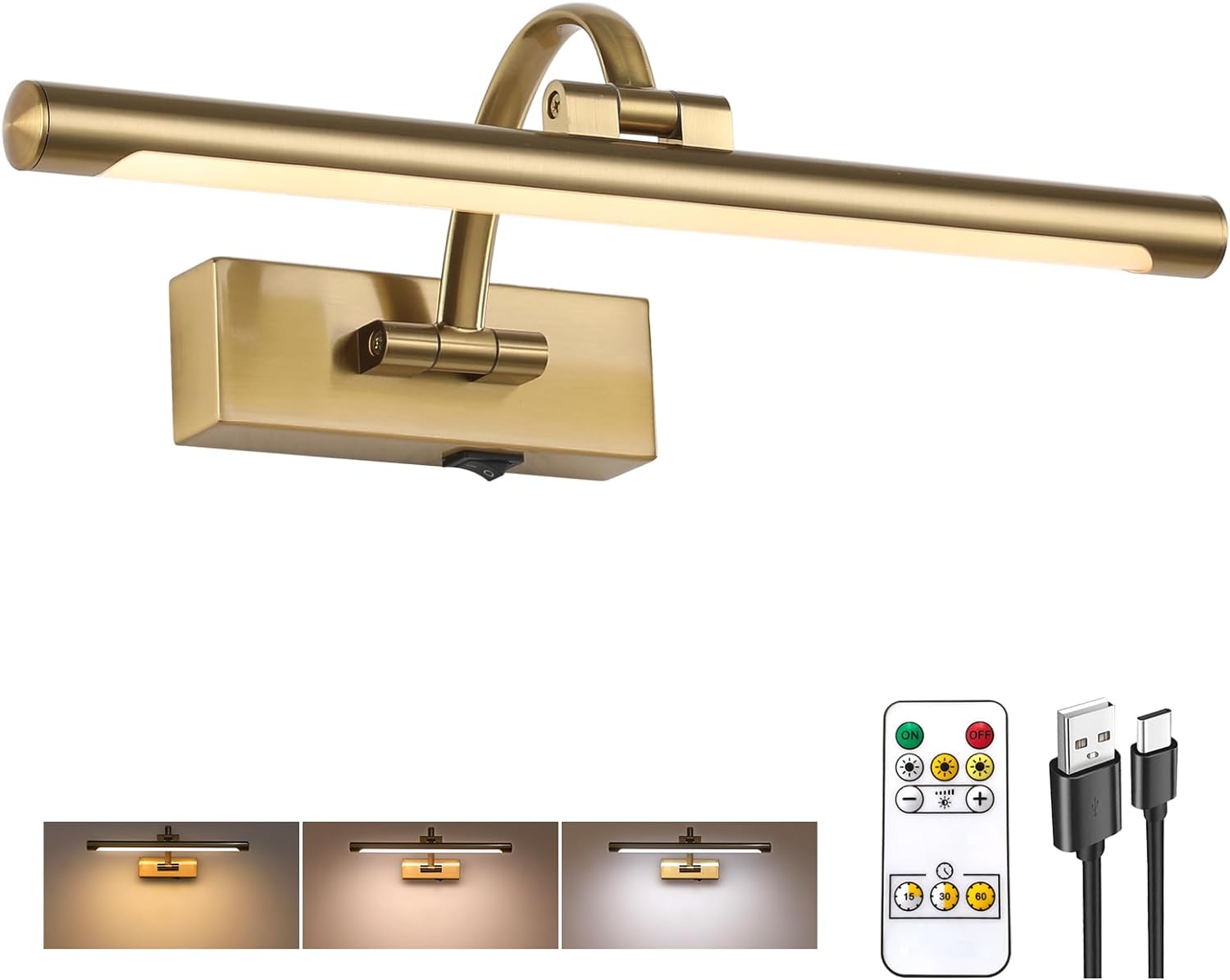
Image: Tassuowell Wireless Picture Light, displaying the main unit, remote, and charging cable.
2. 包裝內容
確認包裹內所有物品齊全:
- 1 x Tassuowell Wireless Picture Light (Model 7115)
- 1 個遙控器
- 1 x USB-C充電線
- 安裝配件(螺絲、牆錨)
- 使用說明書(本文件)
3. 設定與安裝
The Tassuowell Wireless Picture Light is designed for effortless wireless installation, requiring no complex wiring.
3.1 初始充電
- Locate the USB-C charging port on the picture light.
- Connect the provided USB-C charging cable to the light and to a compatible USB power source (e.g., computer, power bank, USB wall adapter).
- 充電指示燈將會亮起 紅色的 在充電過程中。
- 充滿電後(大約需要 4 小時),指示燈將會亮起。 綠色的.

Image: Charging options for the picture light, showing the USB-C port and indicator lights.
3.2 壁掛式安裝
- Choose a suitable location on the wall for mounting the picture light. Ensure the surface is clean and dry.
- Separate the mounting bracket from the light fixture if necessary.
- Hold the mounting bracket against the wall at the desired height and mark the screw hole positions with a pencil.
- Drill pilot holes at the marked positions. If mounting into drywall, insert the provided wall anchors.
- 使用提供的螺絲將安裝支架固定在牆上。
- Align the picture light with the mounted bracket and slide it into place until it is securely attached.

Image: Product dimensions and key features for installation reference.
3.3 遠端控制準備
Before first use, remove the plastic insulator tab from the battery compartment of the remote control.
4. 操作說明
The picture light can be operated using the manual ON/OFF switch on the fixture or the included remote control.
4.1 手動操作
Use the toggle switch located on the base of the light fixture to manually turn the light ON or OFF.
4.2 遙控器操作
The remote control provides comprehensive control over the light's functions:

圖:遙控器佈局及功能。
- 開/關: 按 ON 按鈕用於開啟燈,以及 離開 按鈕將其關閉。
- 亮度調節: 使用 '+' 和 '-' buttons to adjust brightness from 10% to 100%.
- 色溫: Select from three color temperatures: 2700K(暖光), 4000K (Natural Light), 或者 6000K(白光) 使用專用按鈕。
- 定時器功能: 設定燈光在一段時間後自動關閉 15、30 或 60 分鐘 使用定時器按鈕。
- 記憶功能: The light will remember the last brightness and color temperature setting used when turned back on.

Image: Visual representation of color temperature and dimming capabilities.
4.3 Adjusting Lighting Angle
The picture light features an adjustable design to direct light precisely where needed:
- 擺臂: The arm connecting the light bar to the base can be adjusted 180° 上下。
- 可旋轉L型amp 管子: The light bar itself can be rotated 270° to fine-tune the light direction.

Image: Adjustable lighting angle features.
5、維護保養
5.1 清潔
To clean the picture light, gently wipe the surface with a soft, dry cloth. Avoid using abrasive cleaners or solvents, as these may damage the finish or acrylic lamp樹蔭。
5.2 電池續航力及充電
The built-in 5000mAh rechargeable battery provides approximately 7 hours of illumination at the highest brightness setting and up to 30 hours at the lowest brightness setting. Recharge the light when the brightness diminishes or the charging indicator light signals low battery.
For optimal battery longevity, avoid completely draining the battery frequently. Recharge as described in Section 3.1.
6。 故障排除
If you encounter issues with your Tassuowell Wireless Picture Light, refer to the following troubleshooting guide:
- 燈不亮:
- Ensure the manual ON/OFF switch on the fixture is in the 'ON' position.
- Check if the battery is charged. Connect the light to the USB-C charging cable and observe the charging indicator.
- 遙控器無法使用:
- Verify that the plastic insulator tab has been removed from the remote's battery compartment.
- Ensure the remote control battery is functional. Replace if necessary (battery type not specified, typically a coin cell battery).
- Ensure there are no obstructions between the remote and the light fixture.
- 燈光昏暗或電池續航力短:
- The battery may require recharging. Refer to Section 3.1 for charging instructions.
- 隨著反覆充電循環,電池效能會隨時間推移而下降。
7. 規格
| 特徵 | 規格 |
|---|---|
| 型號 | 7115 |
| 尺寸(長x寬x高) | 15.7 英寸 x 3.94 英寸 x 6.8 英寸 |
| 重量 | 1.96磅 |
| 材料 | 金屬、壓克力 |
| 結束 | 黃銅 |
| 電源 | 電池供電(5000mAh 鋰離子電池) |
| 充電口 | USB-C |
| 充電時間 | 大約。 4小時 |
| 電池壽命 | 7-30小時(取決於亮度) |
| 光源 | 引領 |
| 亮度 | 可調光範圍:10%-100%(最高亮度600流明) |
| 色溫 | 2700K(暖色),4000K(自然色),6000K(白光) |
| 控制方式 | 遙控器,按鈕(手動開/關) |
| 特色 | 可調式色溫、可調式照明角度、可調光、定時器、記憶功能 |
| 安裝類型 | 無線壁掛式 |
| 室內/室外使用 | 室內的 |
8. 保固和支持
8.1 保固信息
The Tassuowell Wireless Picture Light comes with a 2年售後服務保固. This warranty covers performance issues or defects that may arise with the product within this period.
8.2 客戶支持
For any questions, concerns, or warranty claims, please contact the Tassuowell support team. Refer to the product packaging or purchase documentation for specific contact details.