
介紹
This manual provides essential instructions for the operation and maintenance of your Minolta XG-1 35mm SLR Film Camera. The Minolta XG-1 is a classic single-lens reflex camera designed for use with 35mm film, featuring a built-in light meter and auto exposure settings. It utilizes the Minolta MD lens mount system and includes a hot shoe for external flash units. This kit comes with a manual focus zoom lens.
設定
1. 電池安裝
The Minolta XG-1's built-in light meter is powered by two LR44 batteries. To install or replace batteries:
- 找到電池倉蓋,它通常位於相機機身的底部。
- Unscrew the cover using a coin.
- Insert two fresh LR44 batteries, ensuring correct polarity as indicated inside the compartment.
- Replace the cover and tighten securely.
2. 鏡頭附件
The camera uses the Minolta MD lens mount system. To attach the zoom lens:
- 將鏡頭筒上的紅點與相機鏡頭卡口上的紅點對齊。
- 將鏡頭插入卡口,順時針旋轉至聽到喀嚓聲。
- 若要卸下鏡頭,請按下相機機身上的鏡頭釋放鈕,然後逆時針旋轉鏡頭。

Figure 1: Minolta XG-1 camera with the manual focus zoom lens attached. This view highlights the camera body and the extended lens barrel.
3. 薄膜裝載
The Minolta XG-1 uses standard 35mm film. Follow these steps to load film:
- 向上拉起底片倒片旋鈕,打開相機後蓋。
- 將 35 毫米膠捲盒放入左側的膠卷倉中。
- 將底片片頭拉到右側的收片軸上,將片頭插入其中一個插槽。
- 使用底片推進桿稍微推進底片,確保底片卡入收片軸。
- 將相機背蓋牢牢合上,直到聽到喀嚓聲。
- 每次按下快門按鈕,將膠卷向前推進兩幀,直到捲過已曝光的片頭。此時,計數器應顯示“1”。
4. Setting Film Speed (ASA/DIN)
The camera's light meter needs to be set to the correct film speed (ASA or ISO) for accurate exposure readings. This setting is typically found on the back of the camera.

Figure 2: The back of the Minolta XG-1 camera, displaying the ASA and DIN film speed settings. Adjust the dial to match your film's sensitivity.
Rotate the ASA/DIN dial to match the speed of the film you have loaded (e.g., ASA 100, 200, 400).
操作說明
1. Powering On and Metering
To activate the light meter, lightly press the shutter release button. The red LED meter exposure indicator inside the viewfinder will illuminate, showing the recommended shutter speed for the current aperture setting.
2 曝光模式
The Minolta XG-1 offers both automatic exposure and manual control:
- Automatic Exposure (A Mode): Set the shutter speed dial to 'A'. The camera will automatically select the appropriate shutter speed based on the light meter reading and your chosen aperture.
- 手動曝光: Set the shutter speed dial to a specific speed (e.g., 1/125s, 1/60s). You will then need to adjust the aperture ring on the lens until the light meter indicates a correct exposure.

圖 3:頂部 view of the Minolta XG-1, illustrating the shutter speed dial (right), film advance lever (right), and the hot shoe for flash (center).
3. 聚焦
This kit includes a manual focus zoom lens. To focus:
- 看看透過 view發現者。
- Rotate the focusing ring on the lens until your subject appears sharp in the split-image or microprism focusing aid in the center of the view發現者。
- Adjust the zoom ring to change the focal length as desired.
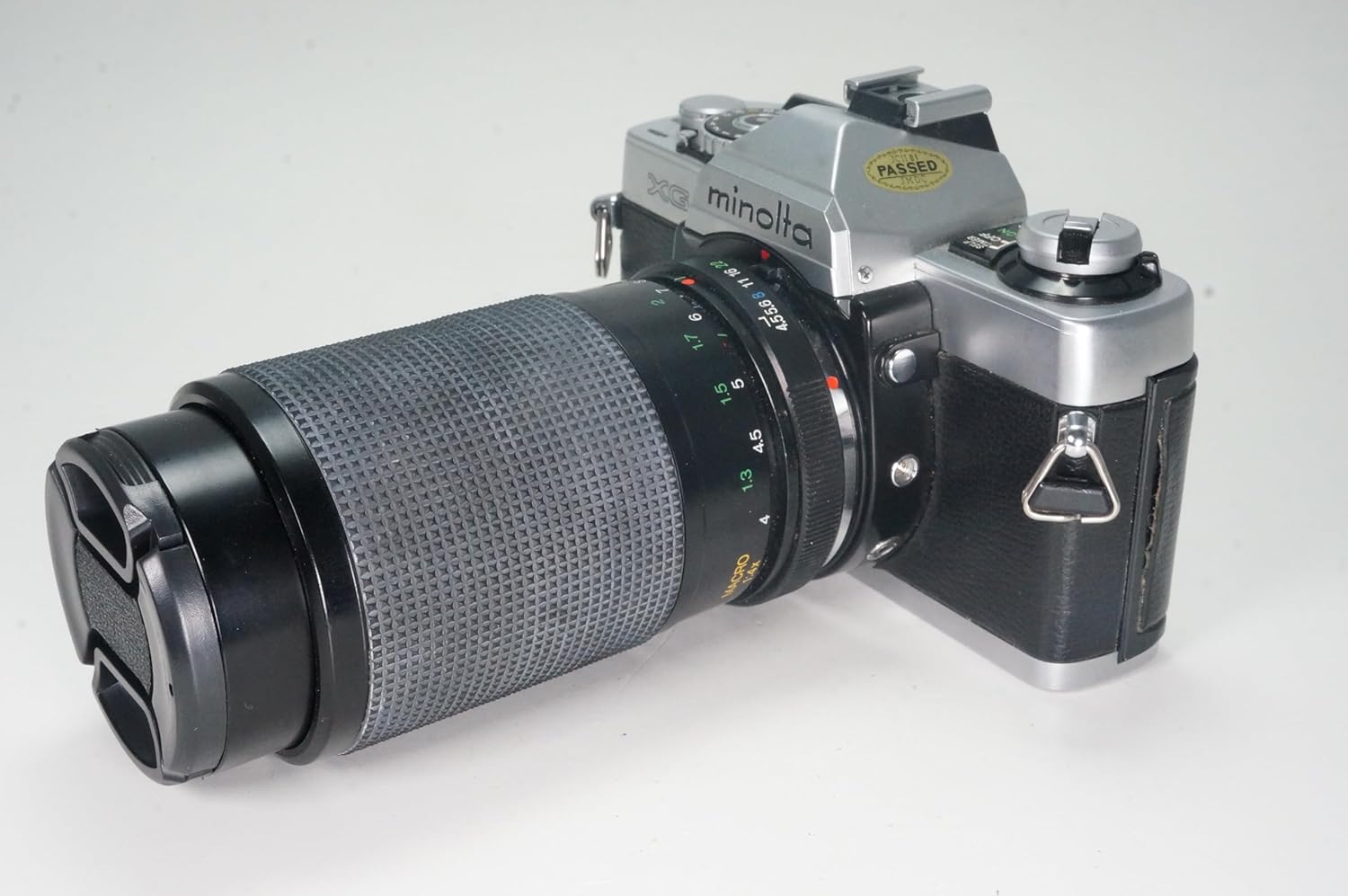
圖 4:側面 view of the Minolta XG-1 camera and its zoom lens. The focus and zoom rings on the lens are visible for manual adjustment.
4. 拍照
Once focus and exposure are set, gently press the shutter release button all the way down to take the picture. After each shot, advance the film using the film advance lever to prepare for the next frame.
5. Using an External Flash
The camera features a hot shoe mount for external flash units. Attach a compatible flash to the hot shoe. Refer to your flash unit's manual for specific operation instructions. Ensure the camera's shutter speed is set to the flash synchronization speed (usually marked with a lightning bolt symbol or a specific speed like 1/60s).
6 倒片
When the film counter indicates the end of the roll (or you feel resistance when advancing the film), it's time to rewind. Press the film rewind release button (usually on the bottom of the camera) and turn the film rewind knob clockwise until you feel the film leader detach from the take-up spool. Open the camera back and remove the film cartridge.
維護
- 打掃: 用柔軟無絨布清潔相機機身。清潔鏡頭時,請使用專用的鏡頭清潔液和清潔布。避免直接觸摸鏡頭元件。
- 貯存: 請將相機存放在陰涼乾燥處,避免陽光直射和極端溫度。若長時間存放,請取出電池以防漏液。
- 電影室: Keep the film chamber clean and free of dust or debris to prevent scratches on the film.
故障排除
- Camera not powering on / Light meter not working: 檢查電池安裝狀況,並確保電池電量充足。如有必要,請更換電池。
- 膠卷無法播放: Ensure the film leader is properly engaged with the take-up spool. Check if the film rewind release button is accidentally pressed.
- Images are too dark/light: Verify that the film speed (ASA/DIN) is correctly set. In manual mode, ensure the aperture and shutter speed settings align with the light meter's recommendation. In auto mode, check if the scene is too dark or bright for the camera's capabilities.
- 影像模糊: Ensure the lens is properly focused. Check for camera shake; use a faster shutter speed or a tripod in low light.
規格
| 品牌 | 美能達 |
| 型號名稱 | XG-1 |
| 膠片格式類型 | 35毫米 |
| 特別報道 | Auto Exposure, Manual Focus, Sturdy Design |
| 最大快門速度 | 1/1000秒 |
| 快門類型 | 焦平面快門 |
| 包含的組件 | 相機機身和鏡頭 |
| 物品重量 | 2 磅 |
| 電源 | 2x LR44 Batteries (for light meter) |
| 鏡頭卡口 | 美能達MD |
保固和支持
This Minolta XG-1 camera is a renewed product. Specific warranty terms for renewed items are typically provided by the seller. Please refer to the purchase documentation or contact the seller directly for details regarding warranty coverage and support for this specific renewed unit.
For general inquiries or technical assistance, you may also consult online photography forums or resources dedicated to vintage Minolta cameras.