
介紹
Thank you for choosing the IRONMAX 13.5 Amp Electric Tiller. This manual provides essential information for the safe assembly, operation, maintenance, and troubleshooting of your new electric tiller. Please read this manual thoroughly before using the product and keep it for future reference.
一般安全說明
Always follow basic safety precautions to reduce the risk of fire, electric shock, and personal injury when using this electric tiller.
- 閱讀手冊: Familiarize yourself with all controls and proper use of the equipment.
- 個人防護裝備: Always wear safety glasses or goggles, sturdy footwear, and gloves. Avoid loose clothing that could get caught in moving parts.
- 電氣安全: Ensure the power source matches the tiller's requirements (120V/60Hz). Use only outdoor-rated extension cords in good condition. Do not operate in wet conditions.
- 工作區域: Keep the work area clear of bystanders, children, and pets. Operate only in daylight or good artificial light.
- 刀片安全: Keep hands and feet away from the tines. Disconnect the power cord before performing any adjustments, cleaning, or maintenance.
- 障礙: Before tilling, clear the area of rocks, roots, wires, and other debris that could damage the blades or be thrown by the machine.
- 過載保護: The tiller is equipped with over-temperature protection. If the motor stops, allow it to cool down before restarting.
- 安全抓握: Maintain a firm grip on the handles at all times during operation.
- 貯存: Store the tiller in a dry, secure place out of reach of children.
產品組件
Understand the different parts of your IRONMAX Electric Tiller for proper assembly and operation.

圖片說明: This diagram illustrates the key components of the IRONMAX Electric Tiller. Visible parts include the Ergonomic Handle, Safety Button, ON/OFF Trigger, Lever Clamps for Folding, Cable Clamps, Powerful Motor, Shield, Wheel Position Adjustment, Durable Wheels, and 6 Sharp Blades. A 15-inch long wire is also shown extending from the handle.
- 符合人體工學的手把: Designed for comfortable grip and reduced arm strain.
- 安全按鈕: Must be pressed before the ON/OFF trigger to activate the tiller.
- ON/OFF Trigger: Activates and deactivates the motor. Releasing it stops the machine.
- 槓桿 Clamps for Folding: Used to fold the handle for compact storage.
- 強大的馬達: 13.5 Amp motor drives the tines.
- 盾: Protects the user from thrown debris and prevents sand splashes.
- Wheel Position Adjustment: Allows adjustment of wheel height for transport or tilling.
- 耐用輪子: 為了方便操控。
- 6 Sharp Blades (Tines): Steel tines designed for efficient soil cultivation.
安裝和組裝
The IRONMAX Electric Tiller is designed for straightforward assembly. Follow these steps to prepare your tiller for use.
- 開箱: 小心地從包裝中取出所有部件。根據裝箱單核對所有部件是否齊全。
- 手柄組裝: 使用提供的緊固件將上把手連接到下把手。確保所有連接都牢固可靠。
- 固定電纜: 使用電纜夾amps to secure the power cord along the handle to prevent it from interfering with operation or getting damaged.
- 展開手柄: If the handle is in the folded position for storage, release the lever clamps and extend the handle to the operating position. Secure the clamp堅定地。
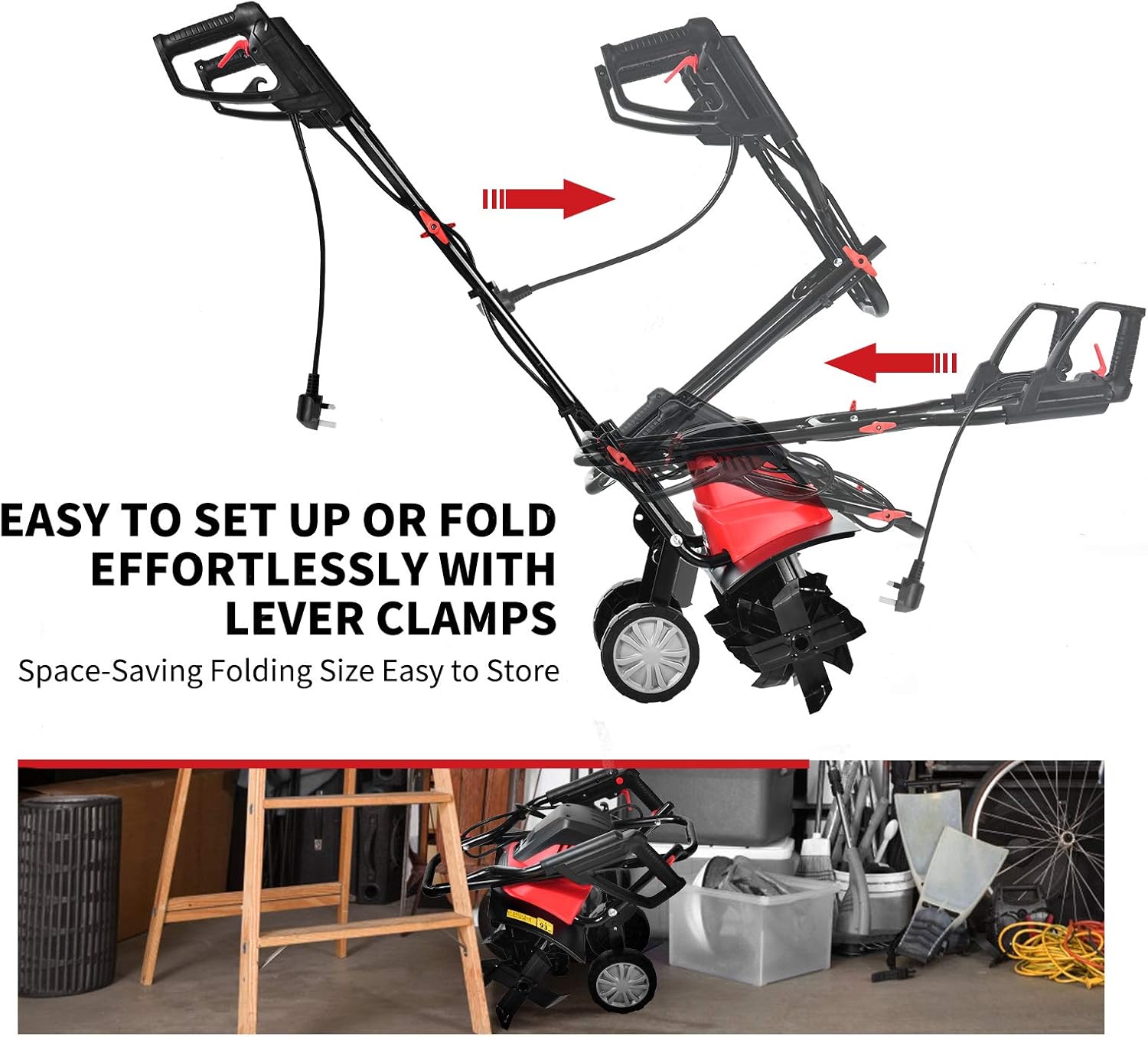
圖片說明: This image demonstrates the folding mechanism of the tiller's handle. It shows how the handle can be easily set up or folded using lever clamps, allowing for space-saving storage and transport.
車輪位置調整
The tiller features adjustable wheels for transport and tilling. To adjust the wheel position:
- Locate the ring-pull mechanism near the wheels.
- Pull out the ring-pull to disengage the wheels.
- Adjust the wheels to the desired height:
- 運輸位置: Wheels lowered to allow easy movement of the tiller.
- Tilling Position: Wheels raised to allow the tines to dig into the soil.
- Release the ring-pull to lock the wheels in place. Ensure they are securely locked before operation.

圖片說明: This image illustrates the "Easy Use" feature for adjusting the tiller's wheels. It shows a close-up of the ring-pull mechanism, indicating that pulling it out allows the wheels to be lifted or lowered for different operational needs.
操作說明
Follow these steps for safe and effective operation of your electric tiller.
- 準備區域: Clear the tilling area of any large rocks, debris, or thick vegetation that could impede the tines.
- 連接電源: Plug the tiller into a suitable 120V/60Hz power outlet using a heavy-duty outdoor extension cord.
- 啟動耕耘機:
- 按住 安全按鈕 位於手柄上。
- While holding the Safety Button, squeeze the 開/關觸發器. The tines will begin to rotate.
- Once the tiller is running, you can release the Safety Button, but continue to hold the ON/OFF Trigger.
- 鋪貼技術:
- Begin tilling at one end of the area, moving slowly and steadily.
- Allow the tines to dig into the soil. Do not force the tiller.
- For deeper tilling, make multiple passes over the same area, gradually increasing 深度。
- The tiller has a working width of 17.7 inches and a maximum working depth of 8.7 inches.
- 停止耕耘: Release the ON/OFF Trigger. The tines will stop rotating.
- 使用後: Disconnect the tiller from the power source immediately after use.

圖片說明: This image highlights the operational capabilities of the IRONMAX Electric Tiller, specifically its working depth of 8.7 inches and working width of 17.7 inches. It also shows the 6 steel blades, their high strength, and sharp design.
維護與儲存
定期保養可確保耕耘機的使用壽命長久且性能最佳。
打掃
- 清潔前請務必斷開電源。
- Remove soil, debris, and tangled vegetation from the tines and shield after each use. A stiff brush or wooden stick can be used.
- 用清潔劑擦拭舵柄外部。amp cloth. Do not use water jets or immerse the unit in water.
- Ensure the wide shield is clean to effectively prevent sand and stone splashes.
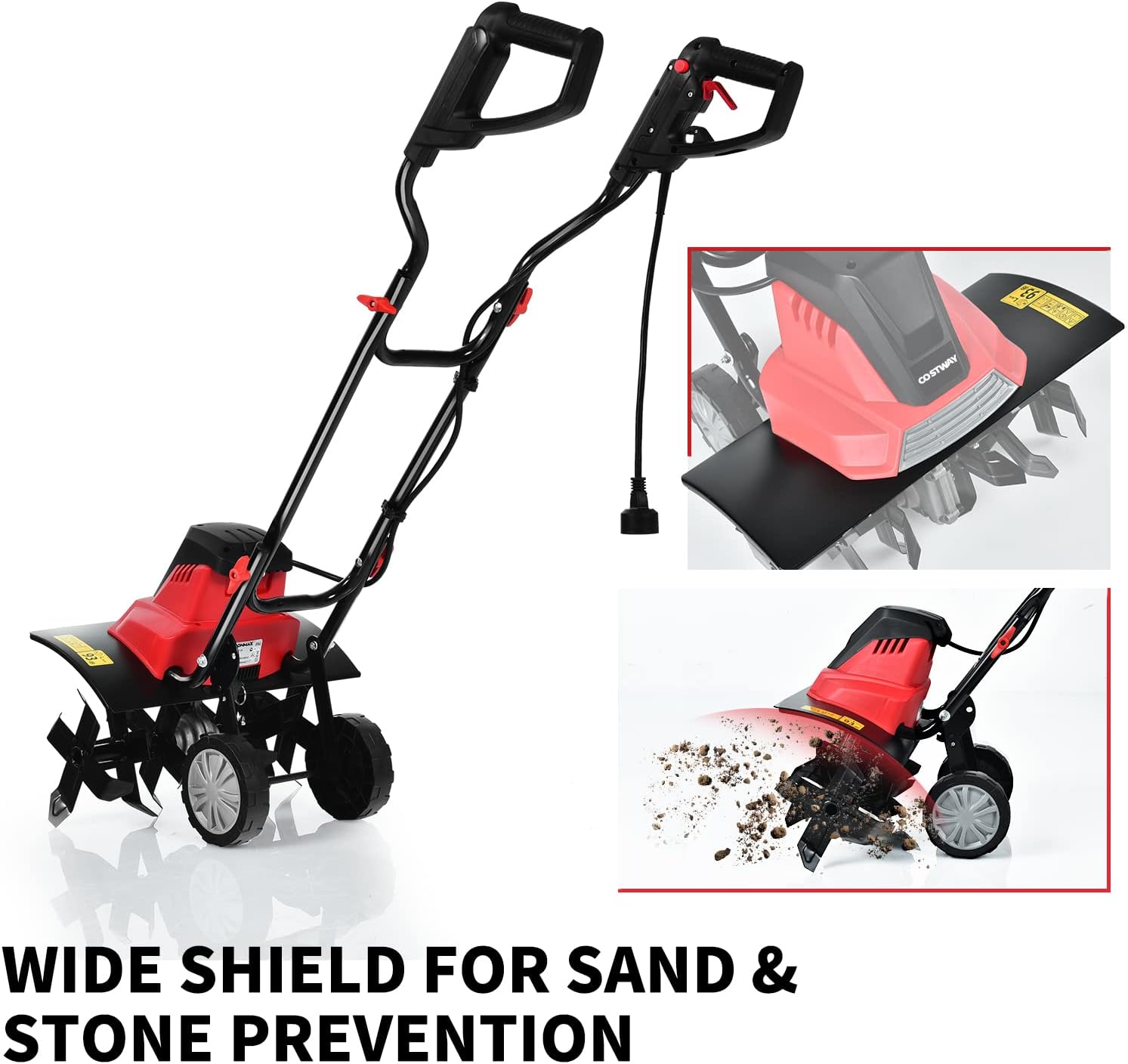
圖片說明: This image focuses on the wide shield of the IRONMAX Electric Tiller, emphasizing its role in preventing sand and stone splashes during operation. Keeping this shield clean is part of routine maintenance.
葉片檢測
- Regularly inspect the tines for wear, damage, or bending.
- Replace damaged tines immediately to maintain tilling efficiency and safety.
貯存
- 斷開電源線。
- 徹底清潔舵柄。
- Fold the handle using the lever clamp用於緊湊型儲存。
- Store the tiller in a dry, well-ventilated area, protected from direct sunlight and moisture. Keep it out of reach of children.
故障排除
請參閱本節以取得您可能遇到的常見問題的解決方案。
| 問題 | 可能的原因 | 解決方案 |
|---|---|---|
| 耕耘機無法啟動。 |
|
|
| 耕耘機在作業過程中停止運作。 |
|
|
| Tiller not tilling effectively. |
|
|
技術規格
| 特徵 | 規格 |
|---|---|
| 品牌 | 鐵麥克斯 |
| 型號 | IR358TG |
| 電源輸入 | 13.5 Amp |
| 卷tage/頻率 | 120V/60赫茲 |
| 空載速度 | 400轉/分 |
| 齒數 | 6 |
| 工作寬度 | 17.7 吋(450 公釐) |
| 最大限度。工作深度 | 8.7 吋(220 公釐) |
| 淨重 | 24 磅 |
| 外形尺寸(長x寬x高) | 40英寸 x 18英寸 x 41英寸 |
| 材料 | 合金鋼 |
| 聲功率級 | 91.57分貝(A) |
保固資訊
Specific warranty details for your IRONMAX Electric Tiller may vary. Please refer to the warranty card included with your product or contact the retailer/manufacturer directly for comprehensive warranty terms and conditions. Keep your proof of purchase for any warranty claims.
客戶支援
If you have any questions, require technical assistance, or need to order replacement parts, please contact IRONMAX customer support or your authorized dealer. For the most up-to-date contact information, please visit the official IRONMAX web請造訪網站或參考您購買時提供的聯絡方式。