
ZHDBD 8898
ZHDBD 8898 2-in-1 Soldering and Rework Station User Manual
型號:8898
介紹
This manual provides essential instructions for the safe and effective operation, setup, and maintenance of your ZHDBD 8898 2-in-1 Soldering and Rework Station. This device integrates a hot air gun and a soldering iron, designed for precision electronic repair and soldering tasks.
請在使用產品前仔細閱讀本手冊並妥善保管以供日後參考。
安全注意事項
- 務必在通風良好的地方操作裝置,以避免吸入煙霧。
- 穿戴合適的個人防護裝備,包括安全眼鏡和耐熱手套。
- The soldering iron tip and hot air nozzle reach very high temperatures. Avoid direct contact.
- 確保電源線完好無損且已正確接地。
- Do not use the station near flammable materials or gases.
- 不使用時或清潔/維護前,請將設備從電源插座拔下。
- 請將本品放在兒童接觸不到的地方。
產品組件
The ZHDBD 8898 Soldering and Rework Station typically includes the following components:
- Main Control Unit with Digital Displays
- 熱風槍
- 烙鐵
- 烙鐵架
- 熱風噴嘴(各種尺寸)
- 電源線
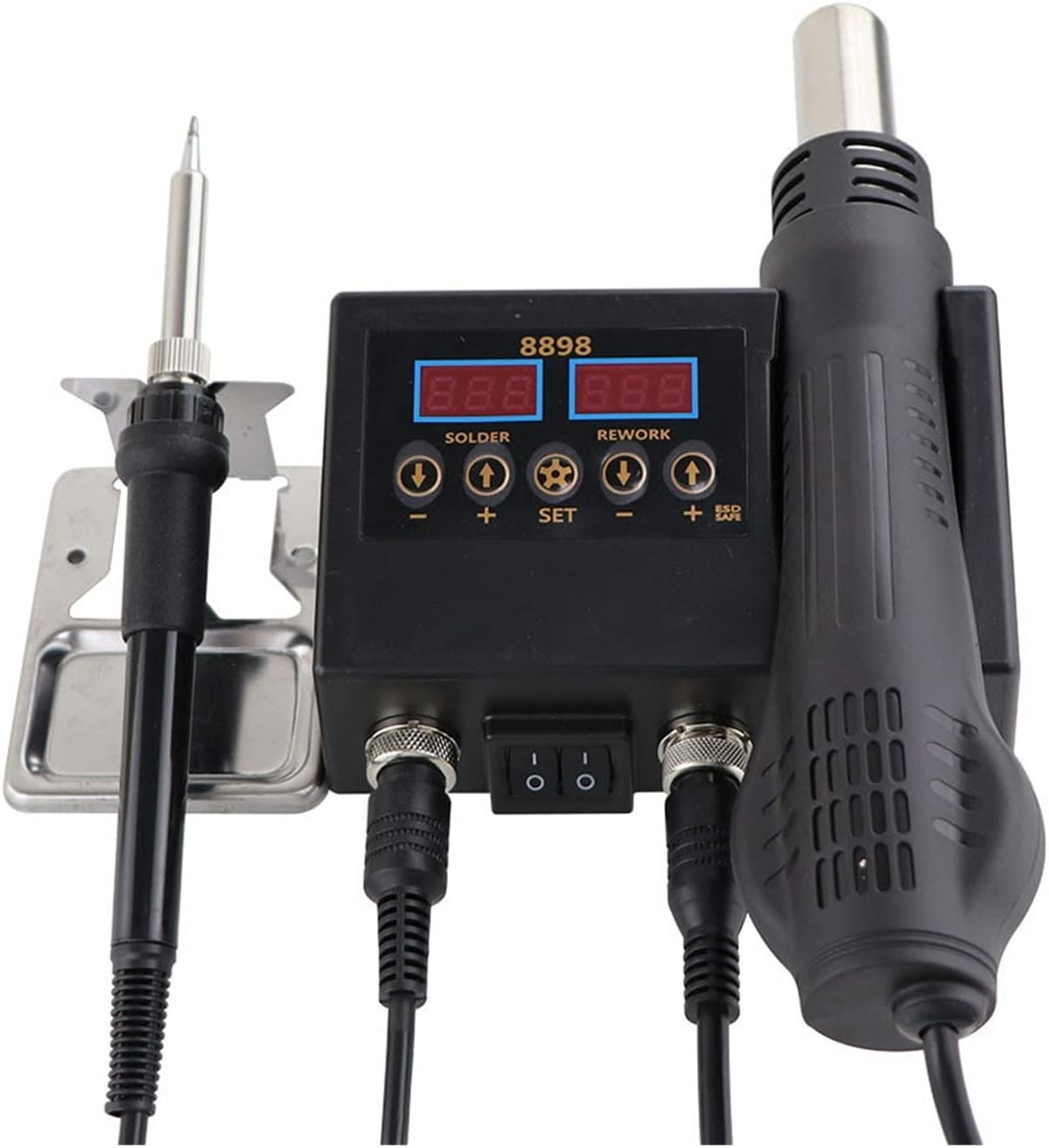
Image: The ZHDBD 8898 Soldering and Rework Station, showing the main control unit, soldering iron, and hot air gun connected. The digital displays for solder and rework temperatures are visible.

Image: The ZHDBD 8898 Soldering and Rework Station, including the main unit, soldering iron, hot air gun, and a set of three different sized hot air nozzles.
設定說明
- 拆箱: 小心地從包裝中取出所有組件。檢查是否有任何損壞。
- 放置: Place the main control unit on a stable, heat-resistant, and non-flammable surface. Ensure adequate clearance for ventilation.
- 連接電烙鐵: Plug the soldering iron cable into the designated "SOLDER" port on the main unit. Place the soldering iron securely in its stand.
- 連接熱風槍: Plug the hot air gun cable into the designated "REWORK" port on the main unit. Ensure the hot air gun is placed in its holder on the side of the unit.
- Attach Nozzle (Hot Air Gun): Select the appropriate hot air nozzle for your task and securely attach it to the hot air gun.
- 電源連接: 將電源線連接到主機,然後插入接地的電源插座。
操作說明
一般操作
- 開機: Flip the main power switch on the front of the unit to the "ON" position. The digital displays will illuminate.
- 溫度調節:
- 對於 烙鐵: Use the "SOLDER" temperature adjustment buttons (+ 和 -) to set the desired temperature. The recommended temperature range is 180°C-500°C.
- 對於 熱風槍: Use the "REWORK" temperature adjustment buttons (+ 和 -) to set the desired temperature. The recommended temperature range is 100°C-480°C.
- Air Flow Adjustment (Hot Air Gun): Use the "REWORK" air flow adjustment button (often labeled with a fan icon or "AIR") to control the air volume.
- Automatic Standby (Hot Air Gun): The hot air gun features a sensor switch in its handle. When the handle is placed in its holder, the system will automatically enter standby mode, cooling down the element and prolonging its life. When the handle is picked up, it will quickly return to the set operating temperature.
- 關機: When finished, flip the main power switch to the "OFF" position. Allow the hot air gun to cool down completely in its holder before unplugging.
Soldering Iron Usage
- 準備: Ensure the electronic components to be soldered are clean.
- 預裝罐: Once the iron reaches the desired temperature (recommended 300-400°C), apply a small amount of solder to the heated iron tip. This prevents oxidation and helps transfer heat efficiently. Rub the tip to evenly spread the solder.
- 焊接: Bring the heated, tinned iron tip into contact with both the component lead and the PCB pad simultaneously. Apply solder to the joint, not directly to the iron tip. Allow the solder to flow smoothly and form a shiny, conical joint. Remove the iron and allow the joint to cool without disturbance.
Hot Air Gun Usage (Rework)
- 組件拆卸: Select an appropriate nozzle. Set the desired temperature and airflow. Direct the hot air stream evenly over the component to be removed. Once the solder melts, carefully lift the component using tweezers.
- 組件安裝: Apply solder paste to the pads on the PCB. Carefully place the SMD component onto the solder paste. Direct the hot air stream evenly over the component and pads until the solder paste melts and reflows, forming solid connections.
- 冷卻: After use, place the hot air gun back into its holder. The unit will automatically initiate a cooling cycle to protect the heating element.
維護
- 烙鐵頭清潔: Regularly clean the soldering iron tip using a damp sponge or brass wool to remove excess solder and oxidation. Re-tin the tip after cleaning.
- 尖端更換: Replace worn or damaged soldering iron tips to ensure optimal heat transfer and soldering performance.
- 熱風噴嘴清潔: Ensure hot air nozzles are free from debris or blockages. Clean gently if necessary.
- 單元清潔: Disconnect power before cleaning. Wipe the main unit with a soft, dry cloth. Do not use abrasive cleaners or solvents.
- 貯存: 不使用時,請將本機存放在乾燥、無塵的環境中。
故障排除
| 問題 | 可能的原因 | 解決方案 |
|---|---|---|
| 電烙鐵不發熱。 | 電源開關關閉、連接鬆脫、加熱元件故障。 | Check power switch. Ensure iron is securely plugged in. If problem persists, contact support. |
| Hot air gun not producing hot air. | Hot air gun not picked up from holder, loose connection, faulty heating element/fan. | Ensure hot air gun is picked up from its holder. Check connection. If problem persists, contact support. |
| Solder not melting properly. | Insufficient temperature, oxidized iron tip, incorrect solder. | Increase temperature. Clean and re-tin the iron tip. Use appropriate solder for electronics. |
| 設備顯示錯誤代碼。 | 內部故障。 | Refer to specific error code documentation (if available) or contact customer support. |
技術規格
| 特徵 | 規格 |
|---|---|
| 模型 | 8898 |
| 輸入音量tage | Not specified (typically 110V/220V AC, 50/60Hz) |
| 總輸出功率 | 750W |
| 熱風槍 | |
| 輸出功率 | 500W |
| 頻率 | 50赫茲/60赫茲 |
| 溫度範圍 | 100°C - 480°C |
| 溫度穩定性 | ±2℃ |
| 空氣流動 | 120 L/min (max) |
| 烙鐵 | |
| 輸出功率 | 60W |
| 頻率 | 50赫茲/60赫茲 |
| 溫度範圍 | 180°C - 500°C |
| 溫度穩定性 | ±1℃ |
| 加熱器材質 | 陶瓷 |
| 設計 | 防靜電 |
保固和支持
如需了解保固資訊或技術支持,請參閱購買時隨附的文件或直接聯絡製造商。請保留購買收據作為購買憑證。
Manufacturer: ZHDBD
Ask a question about this manual
Ask about setup, troubleshooting, compatibility, parts, safety, or missing instructions. Manuals+ will review the question and use this page’s manual context to help answer it.