
介紹
This manual provides detailed instructions for the setup, operation, and maintenance of your summina MIDI Mixing Console. This versatile MIDI controller is designed to integrate seamlessly into your digital audio workstation (DAW) setup, offering extensive control and flexibility for music production.
主要特點包括:
- 多功能連接: Connect via Bluetooth (BT) or USB for seamless integration.
- 可自訂的控制: Eight sets of 360-degree rotating encoders for precise parameter adjustment.
- Enhanced Control & Flexibility: 43 assignable keys, eight buttons, and eight knobs compatible with most electronic instruments.
- 廣泛的兼容性: Supports various digital audio workstations for effortless fine-tuning.
- 便攜耐用: Made from high-quality plastic, powered by a 780mAh battery or Type-C supply.
盒子裡有什麼
請檢查包裹內容,確保所有物品齊全:
- MIDI Mixing Console
- 使用說明書
- USB-C 充電線

Image: Contents of the summina MIDI Mixing Console package, showing the device, user manual, and USB-C cable.
設定
為設備供電
The summina MIDI Mixing Console can be powered via its internal 780mAh battery or through a Type-C USB connection. To power on/off, use the dedicated power switch located on the side of the device.

Image: Close-up of the summina MIDI Mixing Console showing the USB-C port and a connected cable for power or data transfer.
連接性
The device supports both USB and Bluetooth (BT) connections for integration with various operating systems and DAWs.

Image: The summina MIDI Mixing Console demonstrating compatibility with Windows, Mac, iOS, and Android systems.
USB連接
Connect the provided USB-C cable from the console to your computer (Windows/Mac). The device should be automatically recognized by your operating system and DAW.
藍牙 (BT) 連接
To activate the wireless function, press and hold the BT button on the device. The light will flash, indicating it's searching for a connection. Once successfully connected, the light will remain steady.
影片:結束view of the summina MIDI Mixing Console, demonstrating its features and connectivity options, including wireless pairing and USB connection.
操作說明
The summina MIDI Mixing Console features a comprehensive set of controls for precise manipulation of your audio software.
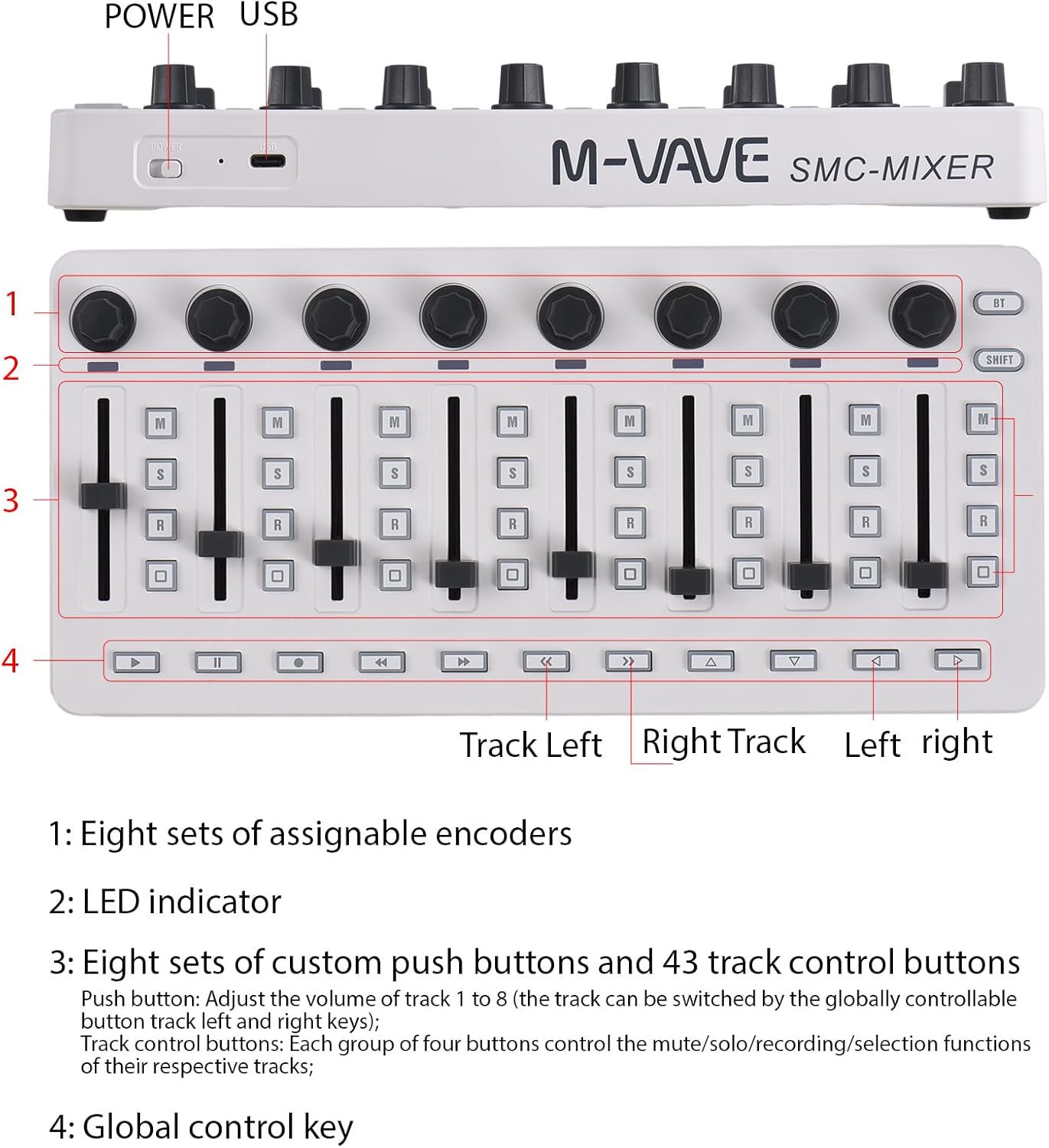
Image: Labeled diagram of the summina MIDI Mixing Console highlighting its controls.
控制view
- 旋鈕(1): Eight sets of assignable 360-degree rotating encoders. These are typically used to manipulate pan settings for tracks 1 through 8. Use the Channel Left and Channel Right buttons to switch between tracks.
- LED指示燈(2): The LED will flash if the physical position of the faders does not align with the track volume in your software.
- Faders (3): Eight faders for manipulating the volume levels individually for tracks 1 through 8. Each group of four buttons below the faders controls the mute, solo, record, and selection functions for their respective tracks.
- Global Control Keys (4): These buttons control playback functions such as play, stop, record, rewind, and fast forward. They also allow switching between previous and next 8-track groups and provide directional navigation (up, down, left, right).
模式選擇
To switch between DAW mode and User mode, hold down the Shift button and toggle between the Left and Right buttons. This allows for flexible configuration based on your workflow.
維護
To ensure the longevity and optimal performance of your summina MIDI Mixing Console, follow these maintenance guidelines:
- 打掃: Use a soft, dry cloth to clean the surface of the device. Avoid abrasive cleaners or solvents.
- 貯存: 將設備存放在陰涼乾燥處,避免陽光直射和極端溫度。
- 電池保養: The device features a charging indicator. When the battery is in normal use, the indicator will be off. During charging, the indicator will be red and turn green once fully charged.
故障排除
If you encounter issues with your summina MIDI Mixing Console, please refer to the following common troubleshooting steps:
- Device Not Recognized (USB): Ensure the USB-C cable is securely connected to both the console and your computer. Try a different USB port or cable. Verify that your DAW's MIDI settings are correctly configured to detect the device.
- 藍牙連線問題: If the Bluetooth connection is unstable or frequently disconnects, ensure the device is within range of your computer/device and there are no significant obstructions. Some users have reported improved stability with a wired connection or by using the manufacturer's dedicated app (e.g., Cube Suite for M-VAVE branded devices, if applicable) for initial pairing.
- Fader/Knob Inaccuracy: If faders or knobs are jumping in value or not responding accurately, ensure the device's firmware is up to date. For some DAWs, recalibrating MIDI controllers within the software settings can resolve this.
- 按鈕無響應: Check if the device is in the correct mode (DAW vs. User mode). Ensure the buttons are correctly mapped within your DAW's MIDI learn function.
規格
| 物品重量 | 1.28磅 |
| 產品尺寸 | 4.7 x 10.1 x 0.9 英寸 |
| 硬體平台 | 電腦/蘋果機 |
| 材料類型 | 塑膠 |
| 鍵盤按鍵數 | 43 (assignable) |
| 混音器通道數量 | 1 |
| 相容設備 | Computers with compatible OSs, devices with USB port, most electronic instruments |
| 連接器類型 | USB |
| 硬體介面 | USB |
| 支援的軟體 | Ableton Live(以及其他 DAW) |

Image: Physical dimensions of the summina MIDI Mixing Console.
保固和支持
For warranty information or technical support, please refer to the documentation included in your product packaging or contact the seller directly. Keep your purchase receipt for any warranty claims.