
MINIEYE C2M
MINIEYE 2 Pro C2M Dash Cam User Manual
型號:C2M
一、簡介
This manual provides detailed instructions for the installation, operation, and maintenance of your MINIEYE 2 Pro C2M Dash Cam. This device is designed to enhance driving safety through advanced recording capabilities and an integrated Advanced Driver-Assistance System (ADAS).
The MINIEYE 2 Pro C2M features high-resolution front and rear cameras, AI-powered detection, and real-time alerts to assist drivers. Please read this manual thoroughly before using the product to ensure proper functionality and safety.
2. 產品結束view
The MINIEYE 2 Pro C2M is a dual-camera dash cam system equipped with a 2.4-inch display and AI-driven ADAS features. It records both front and rear view您車輛的 s。

Image 2.1: Main unit of the MINIEYE 2 Pro C2M Dash Cam, showing the front camera module and the separate display unit.
主要特點:
- 雙鏡頭錄製: Front camera records in 4K (2160p) with a 150° field of view, and the rear camera records in 1080p with a 130° field of view.
- AI-Powered ADAS: Utilizes AI for real-time detection of vehicles, pedestrians, motorcycles, and lane markings.
- Safety Driving Support: Provides alerts for vehicle distance, collision, lane departure, pedestrian distance, and front vehicle departure.
- Sony IMX415 感測器: Ensures clear recording even in low-light conditions.
- 無線網路連線: Connects to your smartphone for video viewing, settings adjustment, and data transfer via a dedicated app.
- 2.4吋顯示器: For real-time monitoring and alert display.
- 24小時監控: Provides continuous surveillance (requires constant power supply, not included).
- Japanese Voice Guidance: Offers audio alerts and instructions in Japanese.
- 固件更新: Supports over-the-air firmware updates via the smartphone app.

Image 2.2: Icons illustrating key features such as collision warning, lane departure warning, pedestrian warning, front vehicle departure alert, 24-hour monitoring, 3D mapping, 4K recording, voice guidance, and night mode.
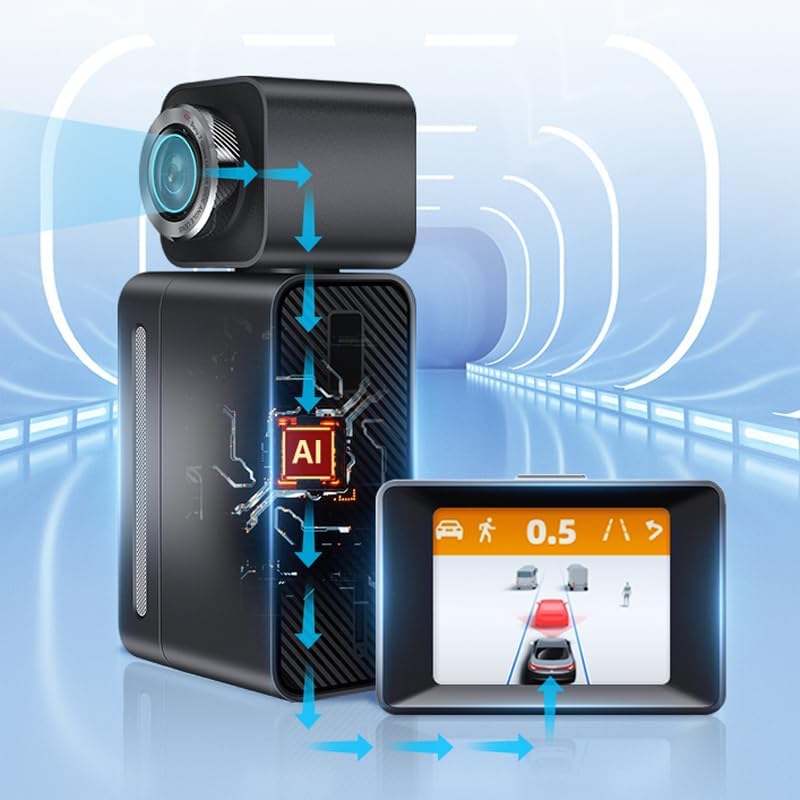
Image 2.3: Diagram showing the AI processing within the MINIEYE 2 Pro C2M, where the camera captures data, the AI unit processes it, and the display shows real-time driving assistance information.
3. 設定與安裝
3.1 包裝內容
安裝前,請確保所有組件齊全:
- MINIEYE 2 Pro C2M Main Unit (Front Camera)
- 後置攝像頭
- 顯示單位
- 電源線(點煙器適配器)
- 後置攝像頭連接線
- 安裝膠
- User Manual (Warranty Card included)
3.2 安裝行車記錄儀
The dash cam uses an adhesive mounting method. Choose a location on your windshield that does not obstruct your view and allows for optimal camera angles.
- 徹底清潔擋風玻璃上的選定區域。
- Attach the main unit to the front windshield using the provided adhesive mount. Ensure the front camera has a clear view 前方的道路。
- 將後置相機安裝在後擋風玻璃上,確保畫面清晰。 view 後面的路。
- Connect the rear camera to the main unit using the provided cable.
- Mount the display unit on the dashboard in a position that is easily visible but does not obstruct driving.
接線說明: The cables for this device are relatively thick. Exercise caution and plan your cable routing carefully to avoid interference with vehicle operations. Specialized tools like a cable routing needle may be helpful for a clean installation, especially when routing the rear camera cable through rubber grommets.
3.3 電源連接
Connect the power cable to the main unit and plug the cigarette lighter adapter into your vehicle's 12V power outlet. The device will power on automatically when the vehicle starts.
重要的: The included power adapter is designed to convert voltage for the dash cam. Using a different power source directly without proper voltage conversion may damage the device. If you prefer a hardwired installation, consider purchasing a compatible hardwire kit with voltage 監管。
3.4 GPS功能
This model does not feature an internal GPS module. For GPS functionality, the display unit must be placed on the dashboard where it has a clear view 接收衛星信號的天空。
4. 操作說明
4.1 基本錄音
Once powered on, the dash cam will automatically begin recording. The front camera records in 4K, and the rear camera records in 1080p. Recordings are saved to a microSD card (not included, sold separately).
該設備支援循環錄音,這意味著舊款設備也能進行循環錄音。 file當記憶卡已滿時,s 將被覆蓋,從而確保連續錄製。
4.2 顯示模式
The 2.4-inch display unit can switch between different views:
- Center Screen: Displays real-time ADAS information, such as vehicle distance and warnings.
- Dash Cam Screen: Shows the live feed from the front or rear camera.
To switch between display modes, quickly double-click the button located on the top of the display unit.

Image 4.1: Illustration of switching between the ADAS center screen view and the dash cam recording view by double-clicking the top button.
4.3 夜視
Equipped with a SONY IMX415 sensor, the MINIEYE 2 Pro C2M provides clear video recording even in low-light conditions, enhancing visibility during nighttime driving.
5. 應用程式連接
The MINIEYE 2 Pro C2M can connect to your smartphone via Wi-Fi, allowing you to manage the device and access recordings.
- Download the official MINIEYE app from your smartphone's app store.
- 打開行車記錄儀。
- Enable Wi-Fi on your smartphone and connect to the dash cam's Wi-Fi network (SSID and password can be found in the device settings or initial setup guide).
- Open the MINIEYE app. You can now:
- View live video feeds from both cameras.
- Access and download recorded videos to your smartphone.
- Adjust various settings of the dash cam, including recording resolution, ADAS sensitivity, and time zone.
6. Advanced Driver-Assistance System (ADAS) Features
The integrated ADAS provides real-time driving assistance to help prevent accidents.
6.1 AI Detection and 3D Mapping
The system uses AI analysis to detect various objects on the road, including cars, SUVs, minivans, trucks, motorcycles, pedestrians, and bicycles. It also recognizes lane markings. The real-time 3D mapping feature displays these detected objects on the screen, adapting the display based on the type of vehicle ahead.

Image 6.1: Illustration showing the dash cam's ability to detect vehicles up to 120 meters ahead, displaying the distance on the screen.

Image 6.2: Illustration showing the dash cam's ability to detect pedestrians up to 60 meters ahead, displaying the distance on the screen.
6.2 Safety Driving Support Functions
- 前方碰撞警告 (FCW): Alerts you if you are approaching a vehicle too quickly, indicating a potential collision risk.
- 車道偏離預警(LDW): 如果您的車輛在未打方向燈的情況下偏離車道,系統會發出通知。
- 行人碰撞預警(PCW): Warns you of potential collisions with pedestrians in your path.
- Front Vehicle Departure Alert (FVDA): Informs you when the vehicle in front of you starts moving after a stop (e.g., at a traffic light).
- Sudden Braking/Acceleration Warning: Alerts for abrupt changes in driving behavior.
重要提示: The ADAS functions are for warning purposes only and do not control the vehicle's brakes or steering. Always maintain awareness of your surroundings and drive safely. The effectiveness of these functions may vary depending on road conditions, weather, and lighting.
7、維護保養
7.1 固件更新
The device supports firmware updates via the smartphone app. Regularly check for and install updates to ensure optimal performance and access to new features.
- Connect your dash cam to the smartphone app via Wi-Fi.
- Navigate to the firmware update section within the app.
- 按照螢幕上的指示下載並安裝最新韌體。
7.2一般護理
- Keep the camera lenses clean to ensure clear recordings. Use a soft, lint-free cloth.
- 不使用時,請避免將設備長時間暴露在極端溫度或陽光直射下。
- Ensure the microSD card is properly inserted and formatted periodically to maintain recording stability.
8。 故障排除
8.1 常見問題及解決方案
- 設備未開機:
- Check the power cable connection to the dash cam and the cigarette lighter socket.
- 確保車輛的 12V 電源插座運作正常。
- Recording issues (e.g., blurry video, no recording):
- 清潔相機鏡頭。
- Ensure a compatible microSD card is inserted and formatted correctly.
- Check if the microSD card is full or corrupted. Replace if necessary.
- ADAS warnings not functioning correctly:
- 確保攝影機的 view 暢通無阻,乾淨整潔。
- Verify that the dash cam is properly calibrated (refer to app settings).
- Note that ADAS functionality can be affected by vehicle conditions, driving style, and environmental factors.
- Device generates heat during operation:
- It is normal for electronic devices to generate some heat during operation. If the heat is excessive or causes the device to malfunction, contact support.
- Wi-Fi 連線問題:
- 請確保行車記錄器的 Wi-Fi 功能已啟用。
- 重啟行車記錄器和智慧型手機。
- 請確認Wi-Fi密碼。
9. 規格
| 模型 | MINIEYE C2M |
| 顯示尺寸 | 2.4吋(液晶顯示器) |
| 前置鏡頭分辨率 | 4K (2160p) |
| 後置攝像頭分辨率 | 1080p |
| 前置鏡頭視野 View (FOV) | 150° |
| 後置相機視野 View (FOV) | 130° |
| 影像感測器 | 索尼IMX415 |
| 安裝類型 | 黏合劑 |
| 控制方式 | App (via Wi-Fi) |
| Main Unit Dimensions (Approx.) | 110毫米(長)×50毫米(高)×35毫米(深) |
| Display Unit Dimensions (Approx.) | 74毫米(長)×49.7毫米(高)×40.7毫米(深) |

Image 9.1: Detailed dimensions of the main unit, front camera module, and display unit.

Image 9.2: Diagram illustrating the 150-degree field of view for the front camera and 130-degree field of view for the rear camera, showing comprehensive coverage.
10. 保固和重要訊息
10.1 保修期
The warranty period for this product is 一年 從購買之日起。
重要的: The manufacturer's warranty for this product is only valid for items purchased from "MINIEYE Store". Please verify the seller when making your purchase.
10.2 重要安全信息
- This product is an aftermarket collision prevention "warning" system only. It does not control the vehicle's brakes or steering.
- Some functions may not operate normally depending on vehicle conditions, driving style, and environmental factors.
- The manufacturer assumes no responsibility for any accidents, property damage, personal injury, or any other incidents that may occur due to the misuse of this product or reliance on its warnings.
- This product is a parallel import.
Ask a question about this manual
Ask about setup, troubleshooting, compatibility, parts, safety, or missing instructions. Manuals+ will review the question and use this page’s manual context to help answer it.