
Tolifo PT-176S
Tolifo PT-176S LED 視訊燈使用說明書
Model: PT-176S | Brand: Tolifo
介紹
The Tolifo PT-176S is a versatile on-camera LED video light designed for various photography and videography applications. It features 176 ultra-bright LED bulbs, adjustable brightness, and comes with multiple color filters to customize lighting. This manual provides detailed instructions for setting up, operating, and maintaining your PT-176S video light.

Figure 1: Tolifo PT-176S LED Video Light and its accessories.
包含什麼
Your Tolifo PT-176S package includes the following items:
- 1x PT-176S LED Video Light
- 1 個熱靴接口
- 1x NP-F550 Battery (2200mAh)
- 1 個電池充電器
- 1 條 USB 線
- 1x White Diffusion Filter
- 1x Orange Filter
- 1x Red Filter
- 1x Green Filter
- 1x Blue Filter
- 1 本使用手冊
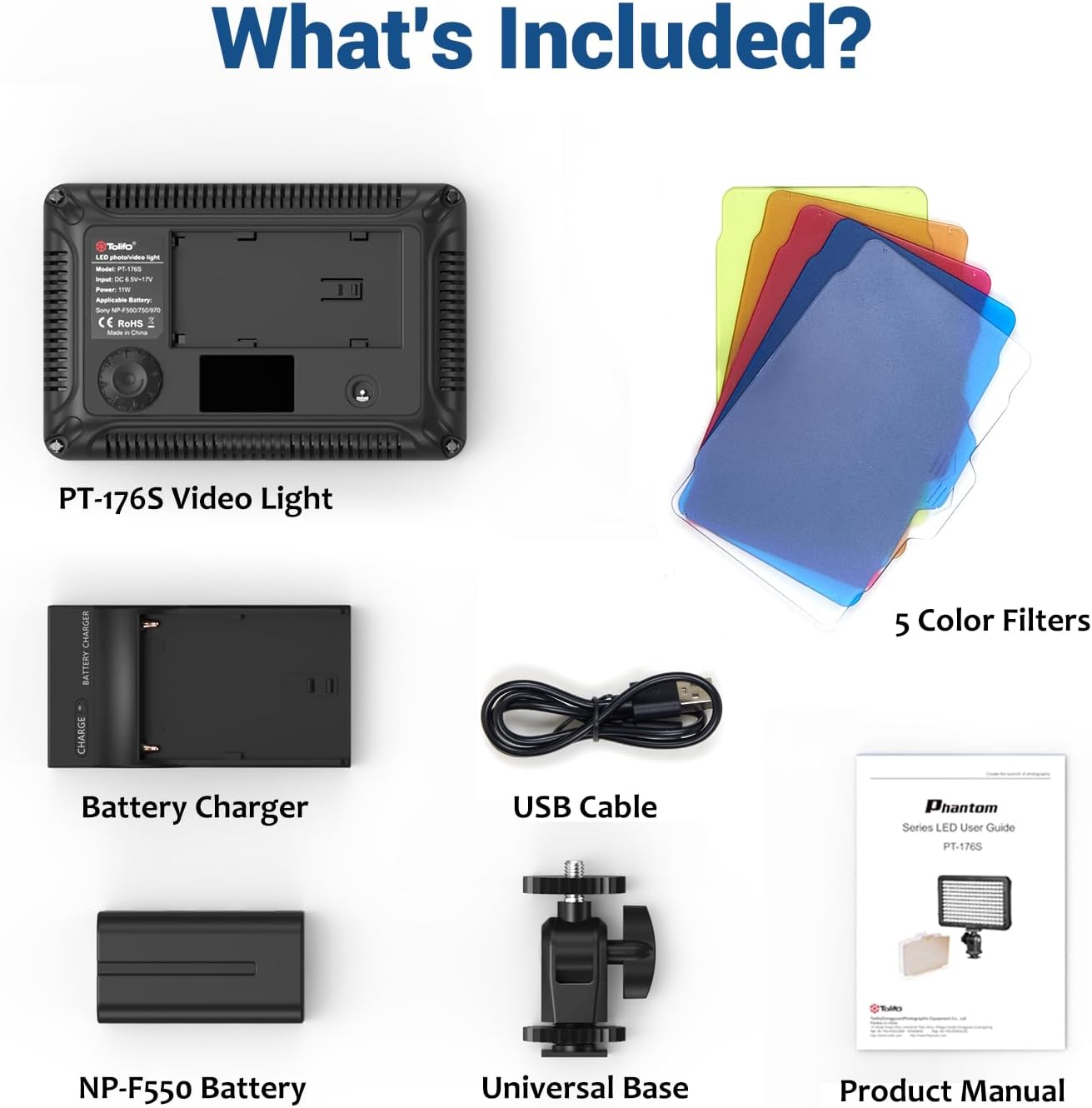
Figure 2: All components included in the Tolifo PT-176S package.
主要特點
- 11W LED Output: Equipped with 176 ultra-bright LED bulbs, producing 11W of power and 1320LM luminous flux.
- 色溫: Default 5600K, adjustable to 3200K with the orange color filter.
- 可調亮度: Stepless dimming from 10% to 100%, displayed on a digital screen.
- Versatile Filters: Includes white diffusion, orange, red, green, and blue filters for creative lighting effects.
- 電源選項: Powered by an included NP-F550 battery or an optional DC power cable (not included).
- 緊湊便攜: Lightweight design (0.39lb / 0.18kg) made from durable ABS plastic.
- 安裝: Standard hot shoe with a 1/4'' hole for easy installation on cameras, tripods, or handles.

圖 3:結束view of the PT-176S LED Video Light's key specifications.
設定
1. 電池安裝與充電
The PT-176S uses an NP-F550 battery. Ensure the battery is fully charged before use.
- Insert the NP-F550 battery into the battery compartment on the back of the light, ensuring correct polarity.
- To charge the battery, connect the included battery charger to a USB power source using the provided USB cable. Insert the battery into the charger. The indicator light on the charger will show charging status.
- Alternatively, the light can be powered directly using a DC power cable (not included) connected to the DC IN port.

Figure 4: The PT-176S offers two power supply options: NP-F series battery or DC power adapter.
2. 安裝燈
The PT-176S comes with a standard hot shoe mount for attachment to cameras, tripods, or other equipment.
- Attach the hot shoe mount to the 1/4'' screw hole at the bottom of the video light.
- Slide the hot shoe mount into your camera's hot shoe or attach it to a tripod with a 1/4'' screw.
- Tighten the locking knob on the hot shoe mount to secure the light in place.

Figure 5: Product display with labeled parts, including the 1/4'' hole for mounting.

Figure 6: The lightweight and portable design allows for easy installation on cameras, video recorders, tripods, or other equipment.
操作說明
1. 電源開/關和亮度調節
The rear knob on the LED panel light controls both power and brightness.
- To power on or off the light, press and hold the rear knob.
- To adjust brightness, rotate the knob left (decrease) or right (increase). The brightness level (10% to 100%) will be displayed on the digital screen.
Video 1: Demonstrates the power on/off function, brightness adjustment from 10% to 100%, and the use of color filters. This video also shows the cold shoe mount installation and the light being used for product photography.
2. 使用彩色濾光片
The PT-176S includes five color filters (white, orange, red, green, blue) to modify the light's color temperature and create specific moods.
- To attach a filter, slide it into the designated slots on the front of the LED panel.
- The white diffusion filter provides a softer, more even illumination, reducing harsh shadows.
- The orange filter changes the color temperature from 5600K to 3200K, ideal for warmer lighting conditions.
- Other colored filters (red, green, blue) can be used for creative effects or to match specific scene requirements.
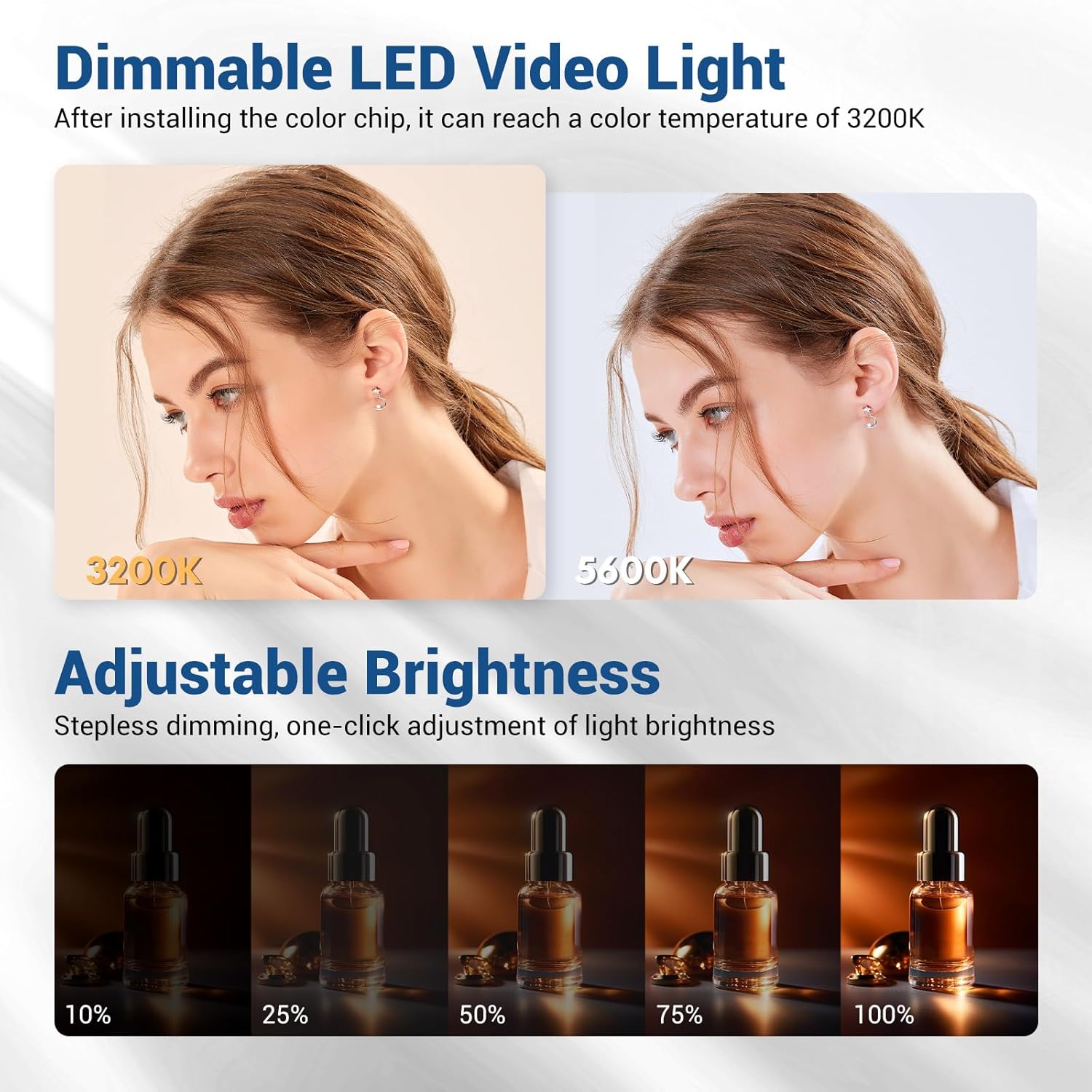
Figure 7: The light's color temperature can be adjusted to 3200K by installing the orange color filter.

Figure 8: Various color filters allow for customization of lighting effects.
維護
- Keep the light clean by wiping it with a soft, dry cloth. Avoid using abrasive cleaners or solvents.
- Store the light and accessories in a dry, cool place away from direct sunlight and extreme temperatures.
- 為保持電池健康,長期存放前請確保電池已充滿電。
- Regularly check the hot shoe mount and other connections for tightness and wear.

Figure 9: The light features air vents for efficient heat dissipation, contributing to its longevity.
故障排除
- 燈不亮:
- 確保電池已正確插入並充電。
- Verify that the power knob is pressed and held correctly to toggle the light.
- If using DC power, ensure the adapter is correctly connected and providing sufficient power.
- 燈光閃爍或昏暗:
- Check battery charge level. A low battery can cause flickering or reduced brightness.
- Ensure the brightness knob is set to the desired level.
- Filters not fitting properly:
- Ensure filters are inserted into the correct slots and are not bent or damaged.
規格
| 模型 | PT-176S |
| 功率輸出 | 11W |
| LED燈泡 | 176 個超亮 LED |
| 光通量 | 1320流明 |
| 色溫 | 5600K (3200K with Orange Filter) |
| 亮度範圍 | 10% - 100% |
| 電源 | NP-F550/750/970 Battery (NP-F550 included) or DC 8.5V-17V (adapter not included) |
| 材料 | ABS塑膠 |
| 物品重量 | 1.12磅(約0.51公斤) |
| 包裝尺寸 | 6.06 x 5.91 x 1.93 英寸 |
保固和支持
The Tolifo PT-176S LED Video Light comes with a one-year warranty. For any inquiries about your product, technical support, or warranty claims, please contact Tolifo customer service. Refer to the contact information provided with your purchase or visit the official Tolifo web地點。
You can also visit the Tolifo store on Amazon for more information: Tolifo Amazon Store
Ask a question about this manual
Ask about setup, troubleshooting, compatibility, parts, safety, or missing instructions. Manuals+ will review the question and use this page’s manual context to help answer it.