
MEGATEK CP27BR
MEGATEK Portable CD Player User Manual
Model: CP27BR
介紹
Thank you for choosing the MEGATEK Portable CD Player. This device is designed to provide a versatile and high-quality audio experience, supporting various media formats and offering multiple connectivity options. Please read this manual carefully to ensure proper use and maintenance of your new CD player.

Image: The MEGATEK Portable CD Player, showcasing its compact design, integrated speakers, control buttons, and included accessories like headphones and USB-C charging cables.
安全資訊
為確保安全操作並防止損壞,請遵守以下預防措施:
- 請勿將設備暴露在極端溫度、濕度或陽光直射下。
- 避免設備跌落或受到強烈撞擊。
- 請勿自行拆卸或嘗試維修本設備。所有維修工作應交由合格人員進行。
- 請僅使用提供的充電線和相容的電源轉接器。
- 將設備遠離水和其他液體。
- 使用柔軟的乾布清潔設備。請勿使用研磨性清潔劑或溶劑。
- 長時間以高音量收聽音樂可能會損害聽力。請將音量調至安全等級。
包裝內容
確認包裹內所有物品齊全:
- MEGATEK Portable CD Player - Black
- 有線耳機
- USB-C 充電線
- 使用者手冊

Image: A visual representation of the package contents, including the CD player, headphones, USB-C cable, and user manual.
產品結束view
Familiarize yourself with the various parts and controls of your MEGATEK Portable CD Player.
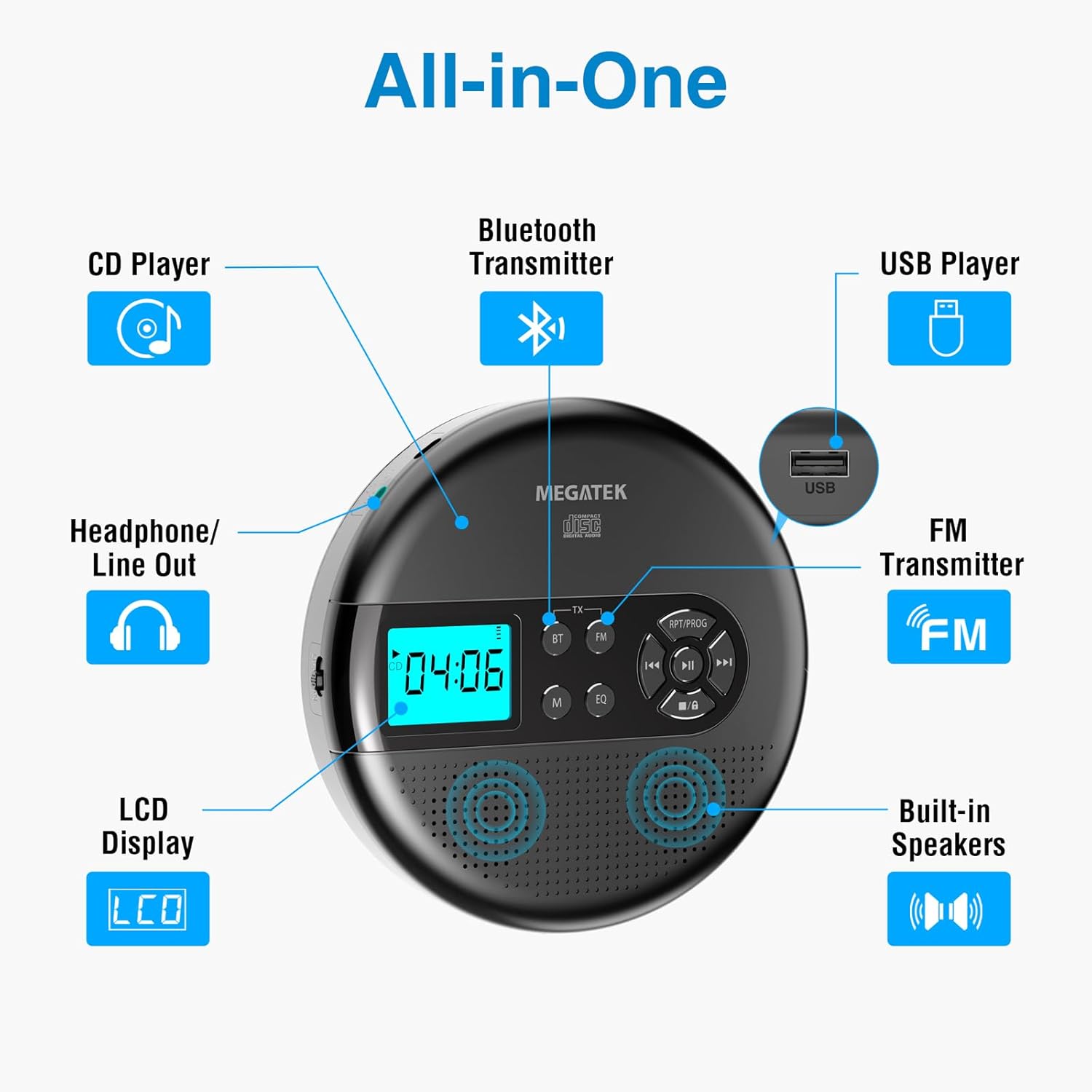
Image: An "All-in-One" diagram highlighting key features such as the CD Player, Bluetooth Transmitter, USB Player, FM Transmitter, Built-in Speakers, LCD Display, and Headphone/Line Out port.
控制和連接埠:
- 液晶顯示幕: 顯示曲目編號、時間、模式和電池狀態。
- 播放/暫停按鈕: 開始或暫停播放。
- 上一頁/下一頁按鈕: 跳過曲目或快轉/快退。
- 停止按鈕: 停止播放。
- RPT/PROG Button: Controls repeat modes and programming tracks.
- BT按鈕: 啟用藍牙傳輸模式。
- 調頻按鈕: 啟用調頻發射模式。
- M(模式)按鈕: Switches between CD, USB, Bluetooth, and FM modes.
- 均衡器按鈕: 循環切換均衡器預設模式。
- 音量控制: 調節音頻輸出電平。
- USB連接埠: 用於播放音訊 file來自 USB 隨身碟。
- Type-C充電端口: 用於對內部電池充電。
- 3.5mm Audio Out Jack: 用於連接耳機或外接揚聲器。
- 內置立體聲揚聲器: 用於直接音訊播放。
設定
為電池充電:
The device is equipped with a built-in 2000mAh rechargeable Li-ion battery. Before first use, fully charge the player.
- Connect the provided USB-C charging cable to the Type-C charging port on the player.
- 將 USB-C 連接線的另一端連接到 USB 電源轉接器(不包含)或電腦的 USB 連接埠。
- The battery indicator on the LCD display will show charging status. A full charge provides up to 15 hours of playtime at medium volume.

Image: The portable CD player connected to a power source via its USB-C cable, resting on a nightstand next to a bed.
Inserting a CD:
- Locate the CD compartment latch/button on the side of the player and slide/press it to open the lid.
- Carefully place the CD onto the center spindle with the label side facing up.
- 輕輕向下按壓光碟,直到聽到喀嚓一聲到位。
- 將 CD 艙蓋牢固地合上,直到它卡入到位。

Image: The portable CD player with its lid open, showing a blue CD disc inserted into the compartment, ready for playback.
操作說明
CD播放:
- 按照“安裝”部分所述插入光碟。
- 按 播放/暫停 按鈕開始播放。
- 使用 上一個/下一個 buttons to navigate between tracks. Hold to fast-forward or rewind.
- 按 RPT/PROG button to cycle through repeat modes (repeat one, repeat all, random) or to program a custom playback order.
- 按 停止 按下此按鈕即可結束播放。
- Adjust volume using the dedicated volume control.
USB播放:
The player supports MP3, WMA, and WAV audio file來自 USB 隨身碟。
- 將 USB 隨身碟插入 USB 連接埠。
- 按 M(模式) 按鈕切換到 USB 模式。
- 使用 播放/暫停, 上一個/下一個, 和 RPT/PROG 按鈕操作方式與 CD 播放相同。
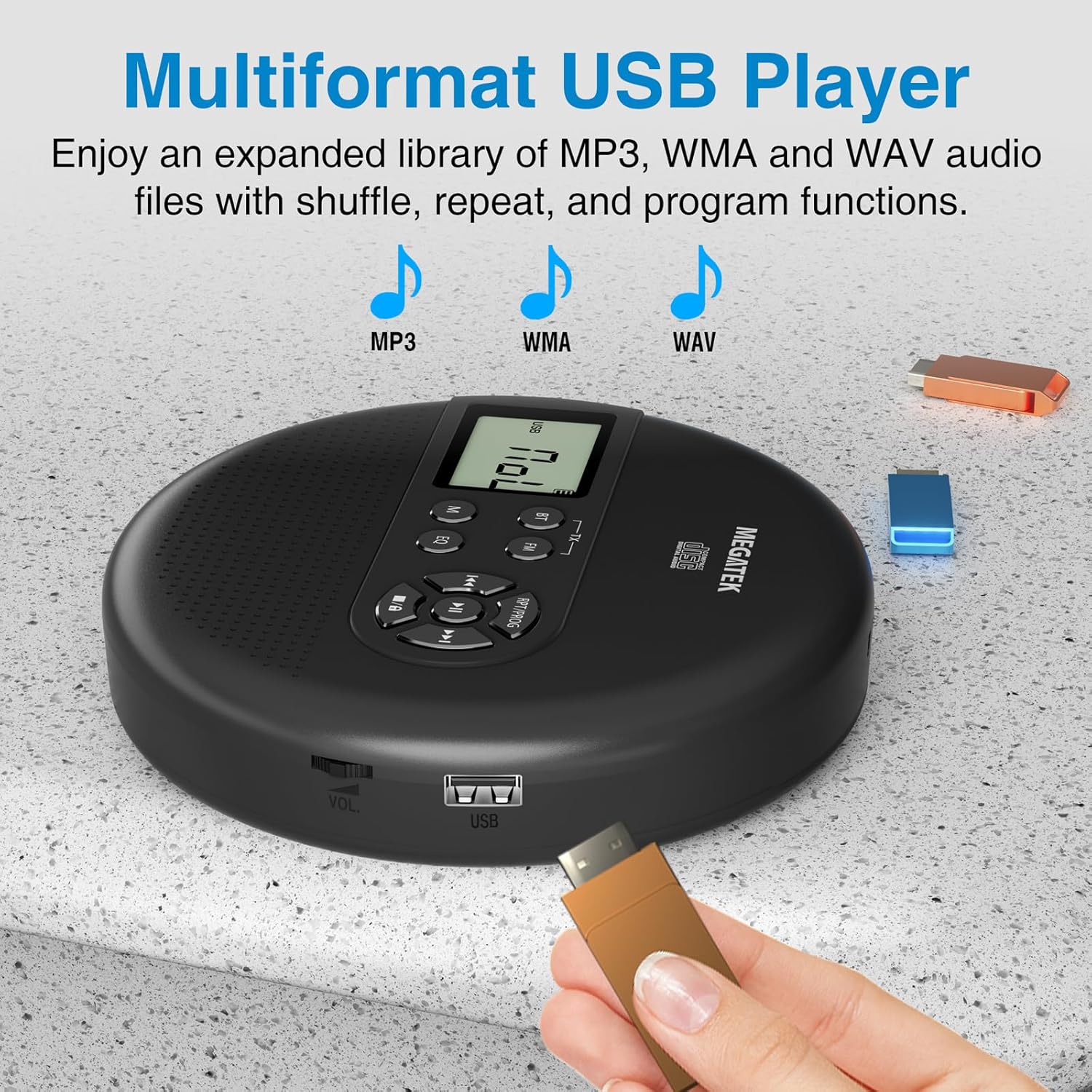
Image: The portable CD player with a USB flash drive inserted into its side port, illustrating its multi-format USB playback capability.
藍牙傳輸:
Stream audio wirelessly to Bluetooth-enabled headphones or speakers. Note: This feature does not support connections to car stereo systems.
- 請確保您的藍牙耳機或揚聲器處於配對模式。
- On the CD player, press the BT button. The Bluetooth indicator on the display will flash.
- The player will automatically search for and connect to nearby Bluetooth devices. Once connected, the indicator will stop flashing.

Image: The portable CD player wirelessly transmitting audio to two external Bluetooth speakers, demonstrating its Bluetooth transmission capability.
調頻傳輸:
Transmit audio signals to nearby FM radios, including car FM stereos and home stereo systems.
- 按 FM button on the CD player. The display will show an FM frequency.
- Tune your FM radio (car stereo, home stereo) to the same frequency displayed on the CD player.
- Adjust the frequency on the CD player using the 上一個/下一個 buttons if interference occurs or to find a clearer channel.

Image: The portable CD player placed on a car dashboard, transmitting audio to the car's FM stereo system, indicated by an FM frequency on the car's display.
Using Headphones/External Speakers:
For private listening or connecting to wired audio systems:
- Plug the included wired headphones into the 3.5mm audio out jack.
- Alternatively, connect an audio cable (not included) from the 3.5mm audio out jack to the AUX input of external speakers or an audio system.
- The built-in speakers will automatically mute when headphones or external speakers are connected.

Image: A close-up of the portable CD player, visually representing sound waves emitting from its dual stereo speakers, emphasizing the built-in audio capability.
維護
- 打掃: Use a soft, dry, lint-free cloth to clean the exterior of the player. For the CD lens, use a specialized CD lens cleaner. Do not use liquids or aerosol cleaners directly on the device.
- 貯存: 長時間不使用時,請將播放器存放在陰涼乾燥處,避免陽光直射和極端溫度。
- 電池保養: 為延長電池壽命,請避免頻繁地將電池完全放電。即使不使用設備,也請定期充電。
故障排除
| 問題 | 可能的原因 | 解決方案 |
|---|---|---|
| 播放器無法開機。 | 電池電量耗盡。 | Charge the player using the USB-C cable. |
| 揚聲器/耳機沒有聲音。 | Volume is too low; headphones not fully plugged in; incorrect mode selected. | Increase volume; ensure headphones are securely connected; press the M(模式) 按下按鈕選擇正確的來源。 |
| CD播放時出現跳幀或無法播放的狀況。 | CD is dirty, scratched, or inserted incorrectly; anti-skip function overwhelmed. | Clean the CD; ensure CD is properly seated; avoid strong vibrations. |
| 藍牙連線問題。 | 設備未處於配對模式;距離播放器太遠;受到干擾。 | Ensure receiving device is in pairing mode; move closer to the player; restart both devices. |
| FM transmission static/poor quality. | 幹擾;頻率錯誤。 | Adjust the FM frequency on the player and receiver to find a clear channel. |
規格
| 特徵 | 細節 |
|---|---|
| 型號 | CP27BR |
| 產品尺寸 | 5.91 x 5.91 x 1.32 英寸 |
| 物品重量 | 10.9 盎司 |
| 電池 | 2000mAh 鋰離子(可充電) |
| 遊戲時間 | 長達 15 小時(中等音量) |
| 支援的CD格式 | CD, CD-R/RW, MP3 CD, Audio Book CD |
| 支援的 USB 格式 | MP3、WMA、WAV |
| 防跳保護 | 60秒 |
| 連接性 | USB, Bluetooth Transmitter, FM Transmitter, 3.5mm Audio Out |
| 特色 | Built-in Stereo Speakers, Resume Play, Shuffle, Repeat, Program Functions, 5 EQ Options |
保固和支持
MEGATEK offers comprehensive support for its products:
- 12個月更換: In case of product defects or issues within 12 months of purchase.
- 終身技術支援: Assistance with product usage, troubleshooting, and general inquiries.
- 24/7 客戶服務: Available through Amazon buyer-seller messaging.
For any questions or problems, please contact MEGATEK customer service via the Amazon platform or refer to the contact information provided in the product packaging.
Image: A graphic detailing MEGATEK's customer support, including 12-month replacement, lifetime technical support, and 24/7 Amazon buyer-seller messaging, alongside an image of customer service representatives.
相關文件 - CP27BR
 |
Megatek CP27BR 便攜式 CD 播放器使用手冊 Megatek CP27BR 便攜式 CD 播放器(帶藍牙功能)使用手冊,涵蓋功能、操作、故障排除和規格。 |
 |
Megatek CP27BR 便攜式 CD 播放器使用手冊 Megatek CP27BR 便攜式 CD 播放器使用手冊,詳細介紹功能、操作、安全性、故障排除、規格和保固資訊。 |
 |
GPX PC332B 便攜式 CD 播放器使用者指南 了解如何操作 GPX PC332B 便攜式 CD 播放器,包括開啟/關閉、了解模式按鈕以及編程播放曲目。 |
 |
MONODEAL 便攜式 CD 播放器使用手冊 MONODEAL便攜式CD播放器使用手冊,詳細介紹其功能、操作、常見問題和規格。支援CD、CD-R、CD-RW、MP3和WMA格式。 |
 |
MONODEAL 手提式 CD 播放器使用手冊 - 型號 MD-702 MONODEAL 可攜式 CD 播放器(型號 MD-702)的使用手冊,提供此消費性電子設備的安全說明、操作程序、故障排除提示和功能說明。 |
 |
HOTT CD511 便攜式 CD 播放器用戶手冊 This user manual provides comprehensive instructions for operating the HOTT CD511 portable CD player, including setup, features, specifications, and safety guidelines. |
Ask a question about this manual
Ask about setup, troubleshooting, compatibility, parts, safety, or missing instructions. Manuals+ will review the question and use this page’s manual context to help answer it.