
MOOER PRIME P2
MOOER P2 多功能效果器踏板使用手冊
Model: PRIME P2
品牌:MOOER
介紹
MOOER P2 多功能效果器是一款小巧而強大的數位音訊設備,專為吉他手和貝斯手設計。它採用 MOOER 獨有的 MNRS 技術,提供豐富的高品質效果。 amp models and effects. Its intuitive touch screen interface and extensive connectivity options make it suitable for performance, practice, and recording.
設定
開箱和初步檢查
小心地從包裝中取出所有部件。核對裝箱單上列出的所有物品是否齊全且完好無損。
為裝置充電
The P2 is equipped with a 3000 mAh rechargeable lithium-ion battery.
Connect the device to a power source using the provided USB-C cable. A full charge takes approximately 2.5 hours and provides up to 5 hours of battery life.

Image description: An illustration showing the MOOER P2's battery capacity (3000 mAh), battery life (5 hours), and charging time (2.5 hours), alongside the device and its accessories.
連接您的儀器
Connect your electric guitar or bass to the input jack of the P2.
For stereo output, use a 1-in-2 (TRS to 2 x TS) adapter cable from the stereo output jack to your amplifier或音頻接口。
圖片描述:特寫鏡頭 view of the MOOER P2 showing its input and stereo output jacks, highlighting its true stereo capabilities.
應用程式安裝和連接
The MOOER Prime P2 is primarily controlled via a dedicated mobile application.
Download the "MOOER Studio" app from the official MOOER website or your device's app store (Android, HarmonyOS, iOS compatible).
Enable Bluetooth on your mobile device and pair it with the P2. The app allows for extensive control over effects, presets, and settings.

Image description: The MOOER P2 device displayed next to a smartphone showing the MOOER Studio app interface, demonstrating the touch screen and app control.
Operating the MOOER P2
觸摸屏界面
The 1.3-inch touch screen displays the currently selected preset. Swipe down to access the Tools screen, which includes volume control, tuner, battery status, and Bluetooth connection status.

Image description: A visual representation of the MOOER P2's touch screen interface, illustrating how to swipe down to access various tools like tuner, volume, and battery indicators.
Effect Chain Configuration
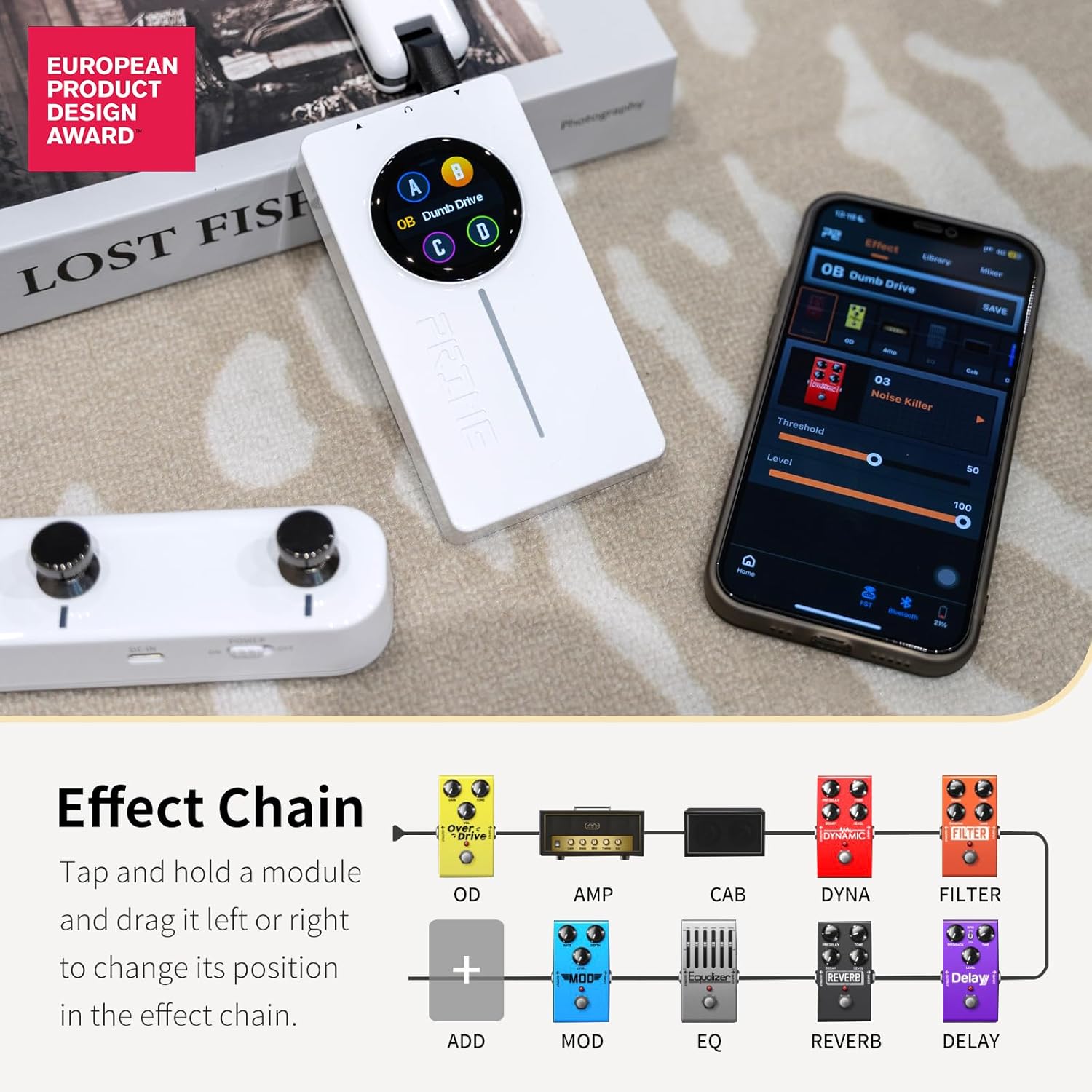
The P2 features 57 classic and experimental effect models. You can easily configure your effects chain within the app. Tap and hold a module, then drag it left or right to change its position in the effect chain.

Image description: A diagram illustrating the customizable effect chain of the MOOER P2, showing various effect modules like OD, Amp, Cab, Dyna, and Filter, and how they can be rearranged.
Bass-Specific Updates (Firmware 1.5.6)
The latest firmware update (version 1.5.6) introduces significant enhancements for bass players:
- 新的 AMP 型號: 10 new bass amp models (slots 53-62) have been added.
- New CAB Simulations: 10 new bass cabinet simulations (slots 56-65) are now available.
- New Overdrive Effects: Two new overdrive effects for bass (slots 27 and 29) have been included.
Video description: An official MOOER video detailing the new firmware update for the Prime P2, specifically highlighting the new bass amp models, cabinet simulations, and overdrive effects.
Guitar-Specific Updates (Firmware 1.5.6)
Guitar players also benefit from new additions in firmware 1.5.6:
- New Overdrive Effects: 10 new overdrive effects (slots 19-26, and 28) have been added to the OD module.
- New Choptones CAB SIMs: 30 authorized Choptones guitar cabinet models (CT) are incorporated within the CAB module (slots 26-55).
Cloud Official Area Optimization
The Cloud Official Area in the app has been optimized. It now expands the GNR area with divisions for Preamp and Entire samp令 files, allowing for easier downloads and sharing of tones.
Fine-Tuning Mode
A new fine-tuning mode for parameter adjustment has been implemented. This mode allows for precise control over effect parameters, addressing previous issues where the parameter bar moved too fast. To activate, press and hold the parameter bar in the app. Your mobile device will vibrate to confirm entry into fine-tuning mode.
Wireless Footswitch Optimization
The wireless footswitch functionality has been optimized to prevent misoperation during playing. The combination of B and C footswitches entering the "LD" mode now requires a pressing of 0.3 seconds to be activated. This prevents accidental mode changes.
維護
To ensure the longevity and optimal performance of your MOOER P2, follow these maintenance guidelines:
- 保持設備清潔,無灰塵和碎屑。請使用柔軟的乾布進行清潔。
- 避免將設備暴露在極端溫度、濕度或陽光直射的環境中。
- 請勿自行拆卸或修理設備,否則將導致保固失效。
- 不使用時,請將設備存放在安全的地方,最好是存放在原包裝盒或保護套中。
故障排除
常見問題及解決方案
| 問題 | 可能的原因 | 解決方案 |
|---|---|---|
| 設備未開機 | 電量低;電源按鈕按壓時間不夠長 | 將設備充滿電。按住電源鍵 2-3 秒。 |
| 無聲音輸出 | Incorrect cable connection; Volume too low; Incorrect preset/effect chain | Check all cable connections. Increase volume on the device and connected equipment. Verify effect chain in the app. |
| 藍牙連線問題 | Bluetooth not enabled; Device too far from phone; Interference | Ensure Bluetooth is on for both devices. Keep devices within range. Minimize interference from other wireless devices. |
| App parameters difficult to adjust precisely | Standard adjustment mode | Use the new fine-tuning mode by pressing and holding the parameter bar. |
規格
| 特徵 | 細節 |
|---|---|
| 物品重量 | 5.3 盎司(0.15 公斤) |
| 產品尺寸 | 3.91 x 2.17 x 0.75 英寸 |
| 型號 | PRIME P2 |
| 電池 | 1 顆鋰聚合物電池(隨附) |
| 電池壽命 | 長達 5 小時 |
| 充電時間 | 大約。 2.5小時 |
| 硬體介面 | Bluetooth, USB-OTG, MIDI Extension |
| 信號格式 | 模擬 |
| 顏色 | P2 黑色 |
| 原產地 | 中國 |
保固和支持
For warranty information, technical support, or service inquiries, please visit the official MOOER web或直接聯絡客服。請保留購買憑證,以便進行保固索賠。
官方 MOOER Web地點: www.mooeraudio.com
Ask a question about this manual
Ask about setup, troubleshooting, compatibility, parts, safety, or missing instructions. Manuals+ will review the question and use this page’s manual context to help answer it.