
Stealth Cam STC-BT18
STEALTH CAM Browtine 18MP Trail Camera Instruction Manual
Model: STC-BT18
品牌:隱形攝影機
1. 產品結束view
The STEALTH CAM Browtine Trail Camera is designed for outdoor surveillance and wildlife monitoring, offering 18-megapixel photo resolution and 480P video recording at 30 frames per second. It features a rapid 0.8-second trigger speed and an 80-foot detection and infrared (IR) range, making it ideal for capturing fast-moving game in various lighting conditions. The camera's robust design and camouflage finish ensure discreet operation in natural environments.

圖 1:正面 view of the STEALTH CAM Browtine Trail Camera, showcasing its compact and camouflaged design.
2.主要特點
- 高解析度成像: Captures 18MP still photos and 480P video at 30FPS.
- 快速觸發速度: Responds to motion in 0.8 seconds to minimize missed shots.
- Extended Detection & IR Range: Features an 80ft detection and infrared range for clear night vision.
- 突發模式: Configurable to take 1-3 photos per triggering event.
- 可調式恢復時間: Settings for 5s, 15s, 30s, 60s, or 120s recovery times between triggers.
- 紅外線 LED: Equipped with 18 pieces of 850nm LEDs for vibrant imaging and nighttime illumination.
- 圖像街amp: Photos are stamp包含時間、日期和月相資訊。
- SD 卡支援: Supports SD memory cards up to 32GB.
- 耐用的設計: Integrated Python Lock Latch provision for security and robust construction.
3. 初始設定
3.1 裝入電池
The Browtine Trail Camera requires 8 AA batteries (not included) for operation. Ensure correct polarity when inserting the batteries.
- 找到相機底部的電池倉。
- Gently pull the latch to open the battery tray.
- Insert 8 AA batteries, paying close attention to the positive (+) and negative (-) indicators within the compartment.
- Close the battery tray securely until it clicks into place.
3.2 插入 SD 卡
An SD card (up to 32GB, not included) is required to store photos and videos. The camera supports Class 10 SD cards.
- Open the main camera housing by unlatching the side clip.
- Locate the SD card slot, typically labeled "SD CARD", near the control panel.
- Insert the SD card into the slot until it clicks into place. Ensure it is inserted in the correct orientation.
- Close the main camera housing and secure the side latch.

Figure 2: The camera's interior, showing the battery compartment and SD card slot for easy access during setup.
3.3 安裝相機
The camera comes with an adjustable strap for secure mounting to trees or posts.
- Thread the provided strap through the mounting slots on the back of the camera.
- Wrap the strap around a sturdy tree or post at the desired height and angle.
- Tighten the strap securely to prevent any movement, ensuring the camera is stable and pointed towards the desired monitoring area.
- The camouflaged strap blends with natural surroundings for discreet placement.

Figure 3: The trail camera securely mounted to a tree, demonstrating its discreet profile in a natural setting.
4. Operating Your Trail Camera
4.1 開關機
To power on the camera, slide the ON/OFF switch located inside the main housing to the 'ON' position. To power off, slide it to the 'OFF' position.
4.2 編程設置
The camera features a simple control panel for programming. Use the 'MENU' button to navigate through options, the arrow buttons (up/down) to adjust settings, and the 'ENTER' button to confirm selections.
- 照片解析度: Select from 18MP, 8MP, or 4MP.
- 視訊解析度: Set to 480P.
- 突發模式: Choose to capture 1, 2, or 3 photos per trigger.
- 恢復時間: Adjust the delay between triggers (5s, 15s, 30s, 60s, 120s).
- 圖像街amp: Ensure time, date, and moon phase stamping is enabled for detailed records.
4.3 拍攝影像和視頻
Once powered on and configured, the camera will automatically detect motion within its 80ft range and capture images or videos based on your programmed settings. The 0.8-second trigger speed ensures minimal delay in capturing activity.
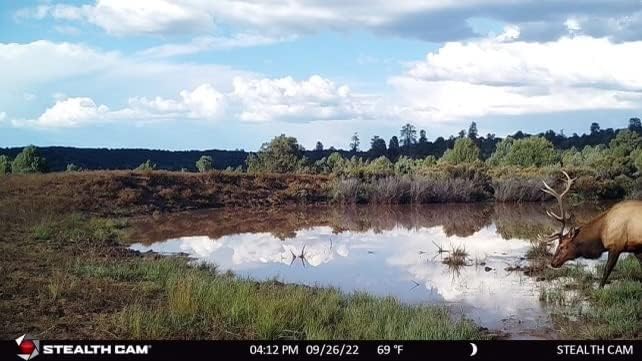
圖 4:Example of a daytime image captured by the trail camera, showing a deer in its natural habitat.

圖 5:Example of a daytime image captured by the trail camera, featuring an elk near a water source.

圖 6:Example of a nighttime image captured by the trail camera using its infrared capabilities.
5、維護保養
- 電池更換: Regularly check battery levels and replace all 8 AA batteries when low to ensure continuous operation.
- SD卡管理: Periodically remove the SD card to transfer data to a computer and format the card to maintain optimal performance and storage space.
- 打掃: Use a soft, dry cloth to clean the camera lens and IR emitters. Avoid abrasive materials or harsh chemicals.
- 貯存: 長時間不使用時,請取出電池並將相機存放在陰涼乾燥處。
6. 常見問題排除
6.1 相機無法開機
- Ensure 8 fresh AA batteries are correctly inserted with proper polarity.
- 確認電源開關處於“開”的位置。
- 檢查電池盒是否已牢固關閉。
6.2 Settings Not Saving or Resetting
- Some trail cameras may reset settings upon battery removal. Re-enter desired settings after replacing batteries.
- Ensure the SD card is properly inserted and not full or corrupted, as this can sometimes affect setting retention.
6.3 SD Card Issues (Not Reading/Working)
- Ensure you are using a standard SD card (not microSD with adapter) with a maximum capacity of 32GB and Class 10 speed.
- Format the SD card using the camera's menu (if available) or on a computer before first use and periodically thereafter.
- Check if the SD card's write-protect tab is in the locked position.
6.4 Inaccurate Time/Date Stamp
- Access the camera's menu settings to manually set the correct time and date.
- If settings reset frequently, refer to the 'Settings Not Saving' troubleshooting step.
6.5 Connectivity (Wi-Fi)
While product specifications indicate Wi-Fi connectivity, user feedback suggests this model may not feature direct Wi-Fi for remote access or control. The term "Wireless Communication Technology" may refer to internal wireless components for motion detection rather than user-facing Wi-Fi. For specific wireless capabilities, consult the official Stealth Cam support resources.
三、技術規格
| 特徵 | 規格 |
|---|---|
| 照片分辨率 | 18MP / 8MP / 4MP |
| 視訊解析度 | 480P 30幀 |
| 觸發速度 | 0.8秒 |
| 檢測和紅外線範圍 | 80 英尺 |
| LED | 18顆850nm LED |
| LED Flash Type | 紅外線的 |
| 突發模式 | 1-3 Photos Per Trigger |
| 恢復時間 | 5s/15s/30s/60s/120s |
| 圖像街amp | Time/Date/Moon Phase |
| SD 卡支持 | 高達 32GB(建議 10 級) |
| 所需電池 | 8 AA(不包括在內) |
| 鎖閂 | Integrated Python Provision |
| 尺寸(長x寬x高) | 2 x 1 x 5 英寸 |
| 重量 | 12.6 盎司 |
| 型號 | STC-BT18 |
| 統一產品程式碼 | 888151039786 |
8. 保固和客戶支持
For specific warranty information and detailed customer support, please refer to the official Stealth Cam web請造訪其網站或直接聯絡客服。請保留購買收據,作為任何保固索賠的購買憑證。
Additional protection plans may be available for purchase separately to extend coverage beyond the standard manufacturer's warranty. Please check with your retailer for details on these plans.
Ask a question about this manual
Ask about setup, troubleshooting, compatibility, parts, safety, or missing instructions. Manuals+ will review the question and use this page’s manual context to help answer it.