
介紹
This manual provides detailed instructions for the safe and proper installation, operation, and maintenance of your Atlantic Full-Motion Wall Mount. Please read all instructions carefully before beginning installation and retain this manual for future reference.
The Atlantic Full-Motion Wall Mount is designed to securely hold televisions ranging from 47 to 86 inches, with a maximum weight capacity of 121 lbs (55 kg). It offers versatile viewing options including tilt, swivel, and extension capabilities to optimize your view荷蘭國際集團的經驗。
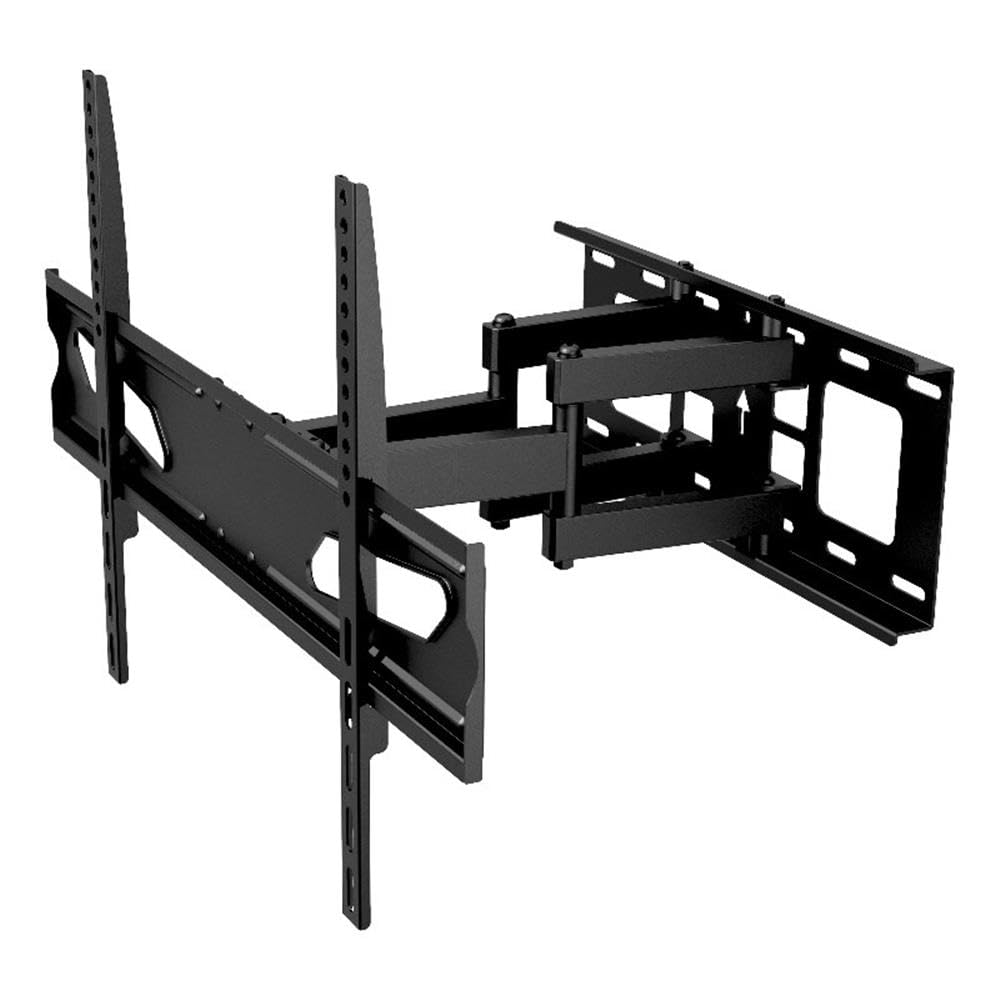
Image: The Atlantic Full-Motion TV Wall Mount, highlighting its ability to tilt ±20°, swivel ±45°, and extend up to 15.5 inches from the wall. It is suitable for TVs from 47 to 86 inches, supporting up to 121 lbs (55 kg).
安全資訊
警告:不閱讀和遵守這些說明可能會導致嚴重的人身傷害、財產損失或保固失效。
- 承重能力: 請勿超過最大承重121磅(55公斤)。本支架僅適用於標示的最大承重。使用超過標明最大承重的產品可能會導致支架不穩定,造成人身傷害。
- 電視尺寸: 這款支架專為 47 至 86 吋的電視機設計。請確保您的電視機尺寸在此範圍內。
- 牆體結構: The wall mount must be securely fastened to a solid wall stud (wood or metal) or concrete/brick wall. Do not install on drywall alone. If unsure about your wall structure, consult a qualified professional.
- 工具: 安裝時請使用合適的工具。確保所有螺絲都擰緊,但不要擰得太緊。
- 孩子們: 安裝過程中請讓兒童遠離。小零件可能造成窒息危險。
- 專業安裝: If you have any doubts about installing this product, please contact a professional installer.
包裝內容
Please verify that all components are present and undamaged before installation. Refer to the parts list included in your product packaging for a complete inventory. If any parts are missing or damaged, do not proceed with installation and contact customer support.
設定和安裝
Proper installation is critical for the safety and stability of your TV. Follow these steps carefully.
1. Prepare the Wall and Locate Studs
Identify the exact location on your wall where you intend to mount the TV. Use a stud finder to locate the center of the wall studs. Mark these locations clearly. For concrete or brick walls, use a masonry drill bit and appropriate anchors (not always included, check your package).
2. 將牆板安裝到牆上
Position the wall plate against the wall, aligning the mounting holes with the marked stud centers. Use a level to ensure the plate is perfectly horizontal. Drill pilot holes as recommended in your specific hardware kit, then secure the wall plate using the provided lag bolts and washers. Ensure it is firmly attached.
3. 將電視支架安裝到電視機上
Lay your TV face down on a soft, clean surface to prevent scratches. Identify the VESA mounting holes on the back of your TV. Select the appropriate screws, washers, and spacers from the hardware kit that fit your TV's VESA pattern. Attach the two vertical TV brackets to the back of your TV. Ensure they are securely fastened and evenly spaced.

Image: A diagram illustrating the TV mounting pattern (VESA compatibility) ranging from minimum 75mm/3 inches to maximum 600mm/23.6 inches horizontally and 410mm/16.1 inches vertically. Also shows overall mount dimensions.
4. 將電視機掛在牆板上
With assistance, carefully lift the TV and hook the attached TV brackets onto the wall plate. Ensure the brackets are properly seated and locked into place. Most mounts include safety screws or locking mechanisms to prevent accidental dislodgement. Secure these as per the instructions in your hardware kit.

圖:A 面 view of the wall mount, illustrating its extension capabilities. The mount can extend from 2.7 inches (profile from wall) to 15.5 inches from the wall.
操作說明
Once installed, your full-motion mount allows for flexible TV positioning.
- 擴大: Gently pull the TV away from the wall to extend the arm. The mount can extend up to 15.5 inches from the wall.
- 旋轉: Carefully push or pull the TV horizontally to swivel it left or right. The mount offers a ±45° swivel range.
- 傾斜: Adjust the vertical angle of the TV by gently pushing the top or bottom of the TV. The mount allows for a ±20° tilt (20° downward and upward). This can help reduce glare.
- 螢幕高度調整: The mounting plate allows for a ±3° rotation for last-minute level adjustments after installation.

Image: An illustration demonstrating the ±45° swivel range of the TV wall mount, allowing for flexible view荷蘭國際集團角度。

Image: A living room setting demonstrating the full-motion capability, specifically the swivel range, to find the perfect view角。

Image: A living room scene showing a TV mounted on the wall, tilted ±20° to avoid unwanted glare and improve view舒適。

Image: This image indicates the mount fits TVs up to a maximum of 86 inches (47-86 inches) and highlights the ±3° screen level adjustment feature.
維護
定期維護可確保電視支架的使用壽命長久和安全運作。
- 打掃: 用柔軟的乾布擦拭鏡框。避免使用可能損壞表面塗層的研磨性清潔劑或溶劑。
- 檢查連接: Periodically check all screws and bolts to ensure they remain tight. Over time, vibrations or adjustments can cause them to loosen. Do not overtighten.
- 檢查磨損情況: 檢查支架是否有磨損、損壞或腐蝕跡象。如果發現任何問題,請停止使用並聯絡客戶支援。
故障排除
If you encounter issues with your TV mount, refer to the following common solutions.
- 電視機不等級: Use the ±3° screen level adjustment feature to fine-tune the horizontal alignment. If this does not resolve the issue, re-check the wall plate installation to ensure it was level.
- Difficulty moving the TV (tilt/swivel/extend): Ensure no cables are snagged or obstructing movement. Check if any adjustment knobs or bolts are overtightened. Loosen slightly if necessary, but ensure the TV remains secure.
- 安裝感覺不穩定: Immediately remove the TV from the mount. Re-check all wall plate and TV bracket connections. Ensure the mount is securely fastened to wall studs or appropriate concrete/brick anchors. Verify that your TV's weight and size are within the mount's specifications. If instability persists, contact a professional installer.
規格
| 特徵 | 規格 |
|---|---|
| 型號 | 63607415 |
| 電視尺寸兼容性 | 47英寸 – 86英寸 |
| 承重能力 | 121 磅(55 公斤) |
| 專業版file 來自牆 | 2.7英寸 |
| 牆體延伸部分 | 最大可達 15.5 英寸 |
| 傾斜範圍 | ±20° (20° downward and upward) |
| 旋轉範圍 | ±45° |
| 螢幕水平調節 | ±3° |
| VESA 相容性 | 200x100 至 600x400 毫米 |
| 材料 | 耐用鋼結構 |
| 物品重量 | 10.8磅 |
| 產品尺寸 | 15.43 x 25.98 x 16.93 英寸 |
| 統一產品程式碼 | 031742074158 |
保固資訊
This Atlantic Full-Motion Wall Mount comes with a 1 年有限製造商保固. This warranty covers defects in materials and workmanship under normal use. It does not cover damage resulting from improper installation, misuse, abuse, accident, or unauthorized modifications. Please retain your proof of purchase for warranty claims.
客戶支援
For technical assistance, missing parts, or warranty inquiries, please contact Atlantic customer support. You can typically find contact information on the manufacturer's official web網站或產品包裝上。
Web地點: www.atlantic-inc.com (請查閱官方資訊) web(網站提供最新聯絡方式。)