
一、簡介
This manual provides instructions for the installation, operation, and maintenance of your RIVECO 1U Rack Mount Power Distribution Unit (PDU). This PDU is designed to provide reliable power distribution and surge protection for network, server, and audio equipment within a 19-inch server cabinet.
2. 產品結束view
The RIVECO 1U Rack Mount PDU features 6 standard AC outlets and 2 USB charging ports, integrated with surge protection. Its robust design and flexible mounting options make it suitable for various professional environments.
主要特點:
- 6 AC Outlets (120V/15A): Provides power for multiple network and audio devices.
- 2 個 USB 端口: Conveniently charge small electronic devices such as mobile phones or USB-powered accessories.
- 突波保護: Integrated modules protect connected equipment from power surges.
- ON/OFF Switch with Cover: Prevents accidental power cycling.
- 耐用的結構: Made from high-quality aluminum alloy for corrosion resistance and insulation.
- Rotatable Mounting Ears: Allows flexible installation in 19-inch server racks (forward, backward, horizontal, or vertical).
成分:
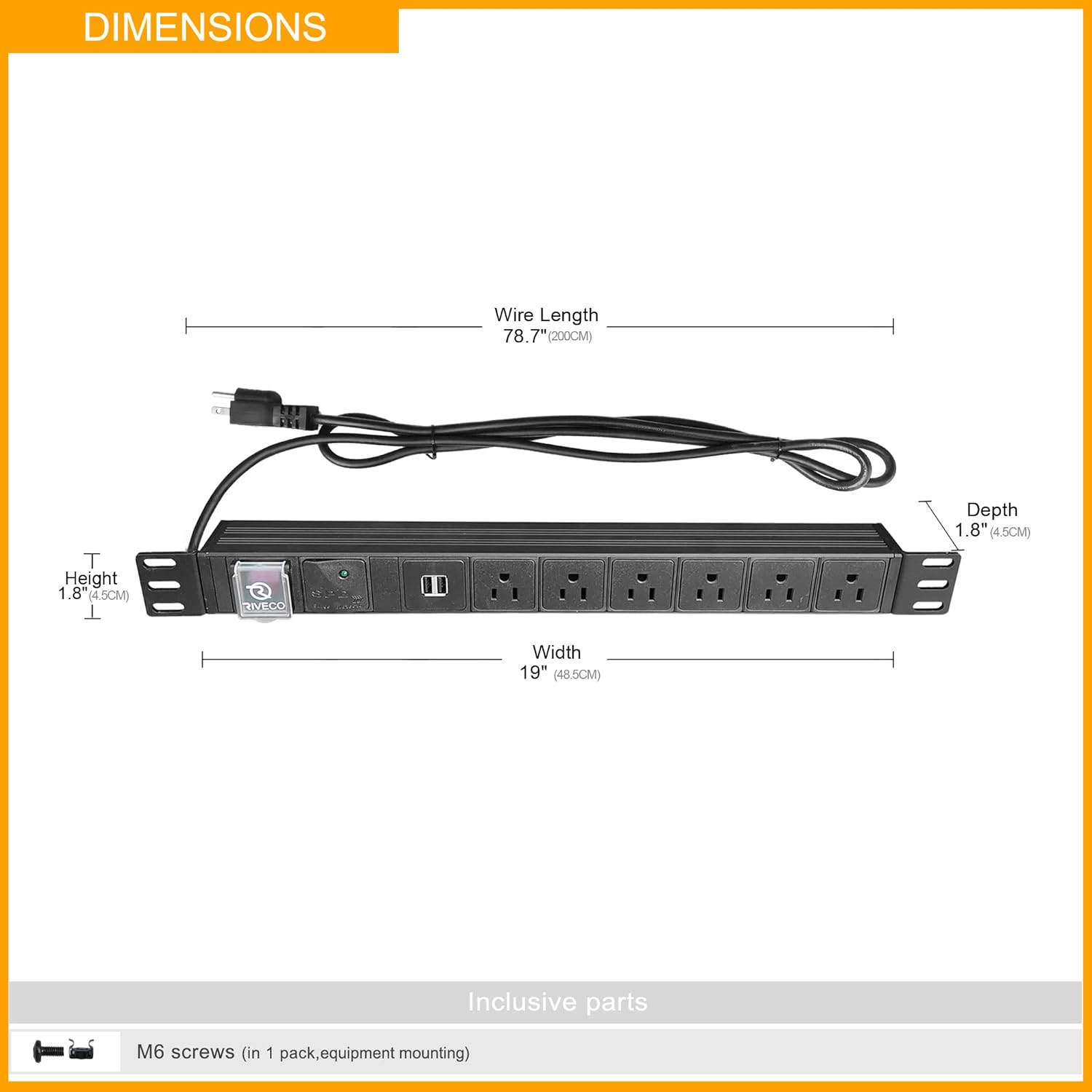
圖2.1: 正面 view of the RIVECO 1U Rack Mount PDU, showing 6 AC outlets, 2 USB ports, power switch, and surge protection indicator.

圖2.2: Close-up details of the PDU, highlighting the Surge Protection Device (SPD) indicator, aluminum alloy housing, covered ON/OFF switch, USB ports, and standard AC sockets.

圖2.3: Detail of the rotatable mounting ears, allowing for flexible installation orientations.
3. 規格
| 特徵 | 描述 |
|---|---|
| 產品尺寸 | 1.8 x 19 x 1.8 英吋(4.5 x 48.3 x 4.5 公分) |
| 物品重量 | 1.98 磅(0.9 公斤) |
| 總電源插座 | 6個交流電源插座 |
| USB連接埠 | 2 個 USB 連接埠 |
| 卷tage | 120伏 |
| 電流額定值 | 15 Amps |
| 電源線長度 | 7 英尺(2.1 公尺) |
| 特色 | Mountable, On/Off Switch, Surge Protection, USB Slot, Rotatable Ears |
| 外殼材料 | 鋁合金 |

圖3.1: Dimensional drawing of the PDU, showing height, width, depth, and power cord length.
4. 設定與安裝
The RIVECO PDU is designed for easy installation in standard 19-inch server racks. Ensure the rack is stable and properly grounded before installation.
機架安裝:
- Prepare Mounting Ears: The PDU features rotatable mounting ears. Adjust them to the desired orientation (forward, backward, horizontal, or vertical) by loosening the screws, rotating, and re-tightening.
- Position the PDU: Align the mounting ears with the rack rails at the desired 1U height.
- Secure the PDU: Use appropriate rack screws (M6 screws are typically included for equipment mounting) to firmly attach the mounting ears to the rack rails. Ensure both sides are securely fastened.
- 連接電源線: Plug the PDU's 7-foot power cord into a suitable, grounded power source.

圖4.1: The PDU installed within a server rack, demonstrating its 1U form factor.

圖4.2: 前任ample of the PDU installed in a rack, with a laptop connected to one of the USB charging ports.
5. 操作說明
Once installed, operating the PDU is straightforward.
- 電源開/關: Locate the red ON/OFF switch on the front panel. Flip the clear protective cover up, then press the switch to the 'ON' position to supply power to the outlets and USB ports. Press it to 'OFF' to cut power. Always close the protective cover to prevent accidental operation.
- 電湧保護指示器: A green LED labeled 'SPD' (Surge Protection Device) indicates that the surge protection is active and functioning. If this light is off, the surge protection may have been compromised, and the unit should be inspected.
- 連接交流設備: Plug your 120V/15A compatible devices into the 6 standard AC outlets. Ensure devices do not exceed the PDU's total current rating.
- 連接 USB 裝置: Plug your USB charging cables into the 2 USB ports to charge compatible small electronic devices.

圖5.1: Detail of the two USB charging ports on the PDU.

圖5.2: The green SPD indicator light, confirming active surge protection.
6. 安全訊息
Adhere to the following safety guidelines to prevent injury or damage to equipment:
- Do not exceed the maximum electrical rating of 120V/15A.
- Ensure the PDU is connected to a properly grounded power outlet.
- Do not disassemble or modify the PDU. There are no user-serviceable parts inside.
- Avoid exposing the PDU to moisture or extreme temperatures.
- Keep children away from the PDU and connected devices.
- If the surge protection indicator light (SPD) is off, the surge protection feature may be compromised. Disconnect all devices and replace the PDU if necessary.
- Do not use in medical life support applications.
7、維護保養
The RIVECO PDU requires minimal maintenance.
- 打掃: 清潔前請先斷開PDU與電源的連接。使用柔軟的乾布擦拭外殼。請勿使用液體清潔劑或噴霧劑。
- 檢查: Periodically inspect the power cord and the PDU housing for any signs of damage. Ensure all connections are secure.
- 突波保護檢查: Regularly check the green SPD indicator light to ensure the surge protection is active.
8。 故障排除
If you encounter issues with your RIVECO PDU, refer to the following common problems and solutions:
| 問題 | 可能的原因 | 解決方案 |
|---|---|---|
| No power to outlets/USB ports | PDU switch is OFF PDU not plugged in 牆壁插座沒電 Overload/Internal fuse tripped | Ensure ON/OFF switch is ON Verify power cord is securely plugged into a live outlet Test wall outlet with another device Reduce connected load; if issue persists, contact support |
| SPD indicator light is off | Surge protection compromised | The PDU may have absorbed a significant surge. While power distribution may still function, surge protection is no longer active. Replace the PDU for continued surge protection. |
| Devices not charging via USB | USB 連接線故障 設備不相容 PDU not powered | 嘗試使用不同的 USB 數據線 Ensure device is compatible with USB charging Verify PDU is powered ON |
If troubleshooting steps do not resolve the issue, please contact RIVECO customer support.
9. 保固和支持
RIVECO is committed to customer satisfaction.
- 退款保證: This product comes with an unconditional 30-day money-back guarantee.
- 技術支援: RIVECO provides lifetime technical support for this product.
For warranty claims, technical assistance, or any inquiries, please refer to the contact information provided with your purchase or visit the official RIVECO web地點。