
MEGA MOTION HY-A03
MEGA MOTION Hoverboard Go Kart User Manual
型號:HY-A03
介紹
Welcome to the MEGA MOTION Hoverboard Go Kart user manual. This guide provides essential information for the safe operation, setup, maintenance, and troubleshooting of your new self-balancing scooter and kart attachment. Please read this manual thoroughly before first use to ensure optimal performance and safety.

Image: The MEGA MOTION Hoverboard in blue, featuring LED lights on the wheels, paired with its adjustable blue Go Kart attachment. This image showcases the complete product package.
安全資訊
WARNING: Always wear appropriate safety gear, including a helmet, knee pads, and elbow pads, when operating the hoverboard or kart. Adult supervision is recommended for children.
- 重量限制: The hoverboard supports a load-bearing capacity of 20-100kg. Do not exceed the maximum weight limit.
- 速度極限: The speed limit is 15 km/hr (9 mph). Avoid excessive speed, especially in crowded areas.
- 電池安全: The product features a built-in battery overload protection system. Charge the device once a month to maintain battery life, even during periods of non-use.
- 環境條件: Use the hoverboard on flat, dry surfaces. Avoid wet conditions, uneven terrain, or steep inclines.
- 使用前檢查: Always check the status of the hoverboard before each use to ensure all components are secure and functioning correctly.
- 智慧保護: The device includes intelligent fault detection, low battery reminder, intelligent weight sensing, balance assist, explosion-proof tires, and overspeed warning functions.

Image: Two children, fully equipped with helmets and protective pads, are seen enjoying their hoverboards. One child is on a pink hoverboard, and the other is on a green one, demonstrating safe and fun usage.
產品結束view 和組件
The MEGA MOTION Hoverboard Go Kart system consists of two primary components: the self-balancing hoverboard and the adjustable hoverkart attachment.
Hoverboard Features:
- 材料: High-quality ABS+PC material for durability.
- 輪子: 6.5-inch aluminum alloy wheels with unique non-slip pedals.
- 引擎: Dual 250W motors for full power and stable performance.
- 燈光: Bright LED headlights for enhanced visibility and safety during night riding.
- 聲音的: Integrated Bluetooth speaker for music playback.

Image: A blue MEGA MOTION Hoverboard with vibrant LED lights on its wheels and front. A smartphone icon indicates Bluetooth connectivity, highlighting its integrated speaker feature.
Hoverkart Features:
- 可調式長度: The frame length can be adjusted from 31-44.5 inches (78.7-113 cm) using a telescopic button, accommodating various user heights.
- 控制: Allows control of the hoverboard from a seated position.
- 依戀: Easily attaches to the hoverboard with included straps.

Image: A blue Hoverkart attachment, demonstrating its adjustable length feature with arrows indicating extension and retraction. The image highlights the telescopic mechanism for user comfort.
設定
Hoverboard Initial Setup:
- 拆箱: 小心地從包裝中取出所有組件。
- 初始費用: Before first use, fully charge the hoverboard battery. Connect the charger to the charging port and plug it into a power outlet. The indicator light on the charger will change when fully charged.
- 開機: 按電源按鈕打開懸浮滑板。
Attaching the Hoverkart:
- Assemble Kart Frame: If not pre-assembled, connect the kart frame components according to the included assembly instructions.
- 調整長度: Adjust the length of the hoverkart frame to suit the rider's height by rotating the telescopic button and securing it.
- 連接到懸浮滑板: Position the hoverkart over the hoverboard. Use the provided straps to securely fasten the hoverkart's attachment points to the hoverboard's footpads. Ensure the straps are tight and the kart is stable.

圖片:特寫 view of a hand adjusting the length of the Hoverkart's frame using a knob, illustrating the ease of customization for different users.
操作說明
Operating the Hoverboard (Standing):
- 安裝: Place one foot on a footpad, then quickly place the other foot on the second footpad. Maintain balance by keeping your body upright.
- 移動: Lean slightly forward to move forward, and lean backward to slow down or move in reverse. To turn, apply more pressure to the footpad on the side opposite the desired turning direction.
- 拆卸: 一次一隻腳地從懸浮滑板上下來,最好往後走。

Image: A child confidently riding a pink hoverboard, showcasing the self-balancing technology and ease of use for young riders.
Operating with the Hoverkart (Seated):
- 座位: Sit comfortably in the kart seat with your feet on the footrests.
- 控制桿: Use the two control levers to steer and accelerate. Push both levers forward to move forward, pull both back to brake or reverse. Push one lever forward and pull the other back to turn.
- 學習曲線: Users can master the hoverboard and kart controls within minutes due to intuitive design.
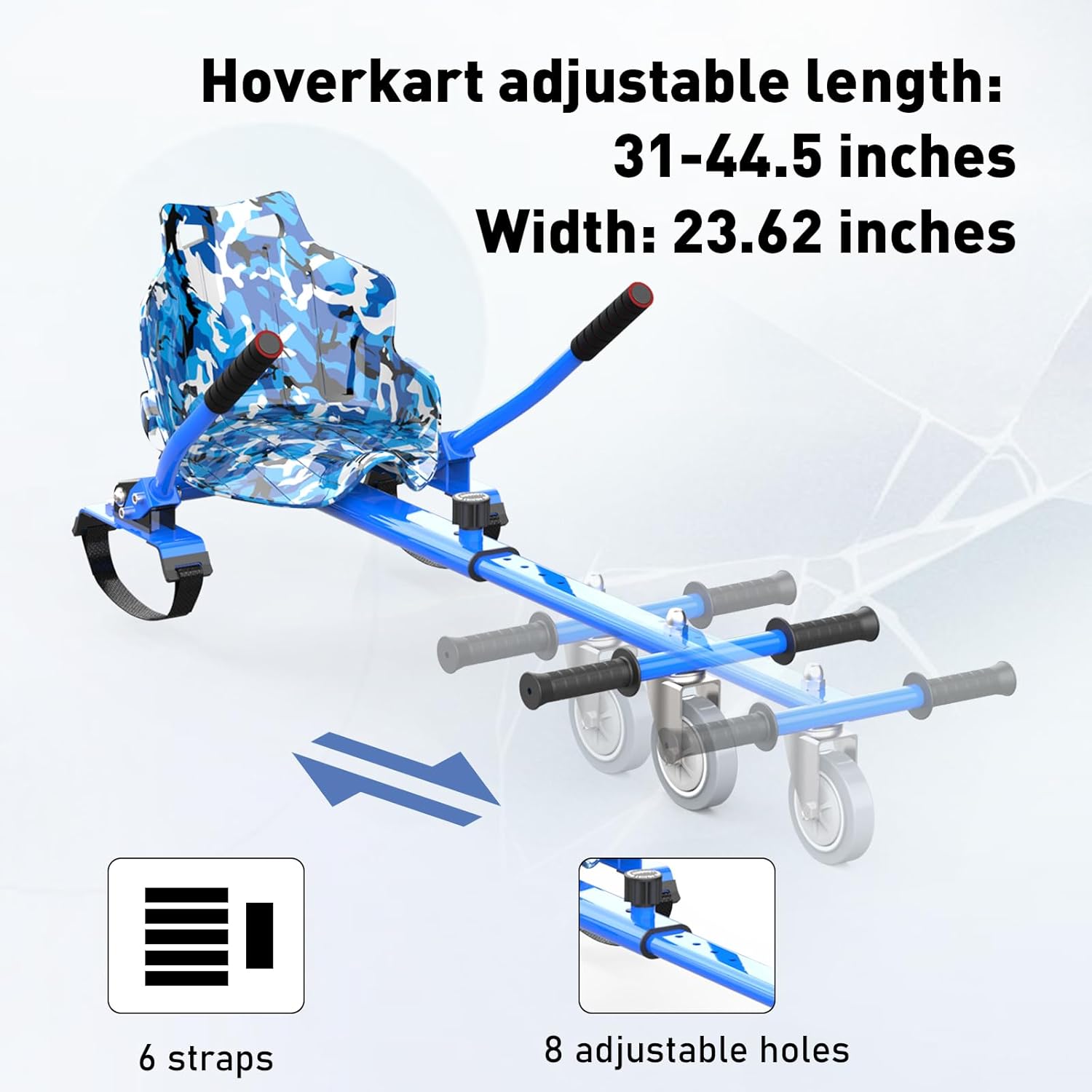
Image: A child happily riding the hoverboard with the kart attachment, demonstrating the seated operation and the fun experience it provides.
藍牙音箱功能:
- 配對: Turn on the hoverboard. Enable Bluetooth on your mobile device and search for "MEGA MOTION" or a similar device name. Select to pair.
- 音樂播放: Once paired, you can play music through the hoverboard's built-in speaker.
維護
- 打掃: Wipe the hoverboard and kart with a damp cloth. Do not use harsh chemicals or abrasive cleaners. Ensure the device is dry before charging or storing.
- 電池保養: Charge the battery regularly, even if not in use, to prevent deep discharge and prolong battery life. Store in a cool, dry place.
- 輪胎檢查: 定期檢查輪胎磨損情況,確保輪胎沒有被刺破或損壞。
- 貯存: Store the hoverboard and kart in a dry, temperature-controlled environment away from direct sunlight and moisture.
故障排除
| 問題 | 可能的原因 | 解決方案 |
|---|---|---|
| 平衡車無法啟動。 | 電池電量低或電源按鈕故障。 | 將平衡車充滿電。確保電源按鈕已牢固按下。 |
| Hoverboard not balancing correctly. | Calibration needed or sensor issue. | Refer to the full product manual for calibration steps. Ensure you are on a flat surface. |
| 藍牙未連線。 | Hoverboard not in pairing mode or device too far. | Ensure hoverboard is on. Move your device closer. Restart both devices and try pairing again. |
| 電池壽命縮短。 | 電池老化或充電不當。 | Ensure regular charging as per maintenance guidelines. Avoid over-discharging. |
| Kart attachment feels loose. | Straps not tightened sufficiently. | Re-tighten all straps connecting the kart to the hoverboard. Check for wear on straps. |
更複雜的問題,請聯絡客戶支援。
規格
| 特徵 | 細節 |
|---|---|
| 型號名稱 | HY-A03 |
| 品牌 | 超級運動 |
| 顏色 | Blue - Blue |
| 年齡範圍 | 孩子 |
| 最大承重能力 | 100公斤 |
| 馬達功率 | 250W (Dual Motors) |
| 速度極限 | 15 公里/小時(9 英里/小時) |
| 車輪尺寸 | 6.5英寸 |
| 電池類型 | Lithium Polymer (4AH) |
| 充電時間 | 約2-3小時 |
| 鏡框材質 | 鋁 |
| 包含的組件 | Hoverboard, Hoverkart |
| 包裝尺寸 | 61 x 56 x 22 厘米 |
| 物品重量 | 13.4公斤 |
保固和支持
MEGA MOTION products are manufactured with quality and performance in mind. For any questions or support, please refer to the following contact information:
- 製造商: YONGKANG CHIC
- 歐盟代表: Lead Speed B.V. (support@megamotion.eu)
- 英國代表: BOOSTERE COMMERCE SOLUTION LIMITED (boosteremm@outlook.com)
- 請保留您的購買憑證以供保固索賠。
Ask a question about this manual
Ask about setup, troubleshooting, compatibility, parts, safety, or missing instructions. Manuals+ will review the question and use this page’s manual context to help answer it.