
一、簡介
This manual provides detailed instructions for the setup, operation, maintenance, and troubleshooting of your Yujin Robot iClebo Arte Charger Docking Station with AC 120V Adapter. This product is designed to provide a reliable charging solution for compatible iClebo robot vacuum cleaner models, including YCR-M05-10, YCR-M05-12, YCR-M05-30, YCR-M05-50, and YCR-M05-90.
請在使用產品前仔細閱讀本手冊,以確保產品正常運作並延長使用壽命。
2. 安全訊息
請遵守以下安全預防措施,以防止損壞產品或傷害自己:
- Do not expose the charging dock or adapter to water or excessive moisture.
- Use only the provided AC 120V adapter with the charging dock.
- 請勿嘗試拆卸或改裝產品。
- 請將充電底座遠離熱源和陽光直射。
- 確保電源插座易於取用,以便在需要時快速斷開連接。
- Unplug the adapter from the wall outlet before cleaning or if the product will not be used for an extended period.
- 請將其放在兒童和寵物接觸不到的地方。
3. 包裝內容
確認包裹內所有物品齊全:
- 1 x Charging Dock Station
- 1 x AC 120V Power Adapter
- 1 x Cleaning Comb Tool (for maintenance of contact pins)
Note: The robot vacuum cleaner is sold separately and is not included with this charging station.
4. 產品結束view
Familiarize yourself with the components of your charging dock station:
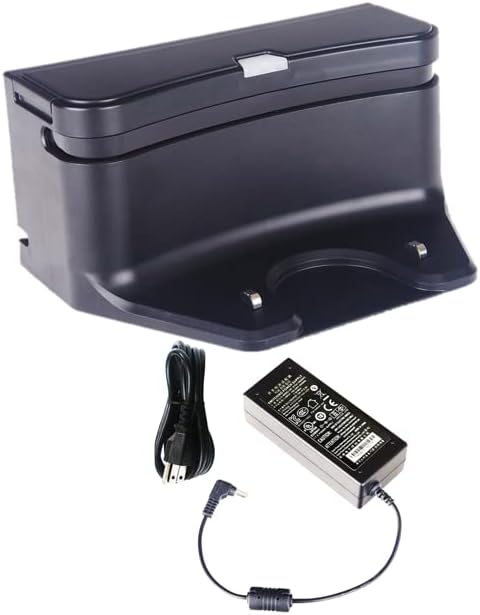
圖4.1: The Yujin Robot iClebo Arte Charger Docking Station shown with its accompanying AC 120V power adapter and power cord. The dock is black with a silver accent, featuring two metal contact pins at the base for charging the robot vacuum.

圖4.2: 更接近 view of the Yujin Robot iClebo Arte Charger Docking Station, highlighting its compact black design and the two prominent metal contact pins where the robot vacuum connects for charging.
主要特點:
- Built-in infrared sensors: For precise docking of the robot vacuum.
- Status light indicator: 提供充電狀態的視覺回饋。
- Metal contact pins: Ensure efficient power transfer to the robot vacuum.
- Cleaning comb tool: Included for maintaining the contact pins and surrounding area.
5. 設定
Follow these steps to set up your charging dock station:
- 選擇地點: Select a flat, stable surface against a wall with clear space around it. Ensure there are no obstacles within 1 meter (3 feet) in front of the dock and 0.5 meters (1.5 feet) on either side. This allows the robot vacuum to dock easily.
- 連接適配器: Insert the small plug of the AC 120V power adapter into the power input port located on the back or side of the charging dock station.
- 插入電源: Plug the other end of the AC 120V power adapter into a standard wall outlet.
- 驗證電源: Once plugged in, the status light indicator on the charging dock should illuminate, indicating that it is receiving power.
6. 操作說明
The charging dock station is designed for automatic and manual charging of your iClebo robot vacuum.
自動充電:
When the robot vacuum's battery is low, it will automatically return to the charging dock to recharge. Ensure the dock is powered on and unobstructed.
手動充電:
To manually charge your robot vacuum:
- Align the robot vacuum with the charging dock, ensuring the charging contacts on the robot align with the metal contact pins on the dock.
- Gently push the robot onto the dock until it clicks into place and the status light indicator on the dock (and/or robot) confirms charging has begun.
The charging process typically takes approximately 2 hours for a full charge, depending on the robot's battery level.
7、維護保養
Regular maintenance ensures optimal performance and extends the lifespan of your charging dock station.
- 清潔碼頭: Use a soft, dry cloth to wipe down the exterior of the charging dock. Do not use abrasive cleaners or solvents.
- Cleaning Contact Pins: Periodically inspect the metal contact pins on the charging dock and the corresponding contacts on your robot vacuum. Use the included cleaning comb tool or a clean, dry cloth to remove any dust, dirt, or debris that may accumulate on these contacts. Clean contacts ensure efficient charging.
- 電源線檢查: Regularly check the power cord and adapter for any signs of damage, fraying, or kinks. If any damage is observed, discontinue use and contact support.
8。 故障排除
If you encounter issues with your charging dock station, refer to the following common problems and solutions:
| 問題 | 可能的原因 | 解決方案 |
|---|---|---|
| Dock status light is off. | 無電源。 | Ensure the AC adapter is securely plugged into both the dock and a working wall outlet. Try a different outlet. |
| 機器人吸塵器回到充電座後無法充電。 |
|
|
| Robot vacuum cannot find the dock. |
|
|
如果嘗試這些方法後問題仍然存在,請聯絡客戶支援以獲得進一步協助。
9. 規格
| 特徵 | 細節 |
|---|---|
| 品牌 | 通用的 |
| 型號名稱 | Arte, Alpha, POP, Light, eX300/500 (Compatible with) |
| 產品型號 | YCRM05CGR |
| 特別報道 | Bagless (refers to the compatible vacuum, not the dock itself) |
| 顏色 | 黑色的 |
| 產品尺寸 | 6 英吋長 x 3 英吋寬 x 3 英吋高(15.24 公分長 x 7.62 公分寬 x 7.62 公分高) |
| 包含的組件 | Adaptor, Charging Dock |
| 電源 | Corded Electric (AC 120V Adapter) |
| 相容設備 | iClebo Alpha, Arte, Light, POP, eX300/500 Robot Vacuums |
| 外形尺寸 | 塑膠、ABS |
| 物品重量 | 1磅(約0.45公斤) |
| 製造商 | Yujin Robot |
| 首次可用日期 | 16 年 2022 月 XNUMX 日 |
10. 保固和支持
For warranty information or technical support, please refer to the documentation provided with your original robot vacuum cleaner or contact the manufacturer, Yujin Robot, or the seller, Robot Vacuum Co, directly. Keep your purchase receipt as proof of purchase.
For general inquiries or troubleshooting not covered in this manual, please visit the manufacturer's official web網站或聯繫他們的客戶服務部門。