
Blackmagic Design CINECAMPOCHDEF6K2
Blackmagic Design Pocket Cinema Camera 6K G2 使用說明書
Model: CINECAMPOCHDEF6K2
一、簡介
This manual provides essential information for the setup, operation, and maintenance of your Blackmagic Design Pocket Cinema Camera 6K G2. Please read this manual thoroughly before using the camera to ensure proper handling and optimal performance. This camera is designed for professional digital film production, offering advanced features for high-quality video capture.
2. 安全訊息
- 電源供應: Use only the specified power supply and battery. Incorrect power sources can damage the camera or cause fire.
- 水和水分: Do not expose the camera to water or high humidity. This camera is not waterproof.
- 溫度: 請在建議的溫度範圍內(通常為 0°C 至 40°C / 32°F 至 104°F)操作相機。避免極端高溫或低溫。
- 處理: 請小心使用相機。避免跌落或受到強烈撞擊。
- 鏡頭配件: Always ensure the camera is powered off when attaching or detaching lenses to prevent damage to the sensor or lens mount.
- 打掃: Use a soft, dry cloth for cleaning. For the sensor, use specialized cleaning kits and follow manufacturer guidelines.
3. 包裝內容
確認包裹內所有物品齊全:
- Blackmagic Design Pocket Cinema Camera 6K G2 Body
- DaVinci Resolve Studio Activation Key
- Lens Turret Dust Cap
- 相機帶
- 30W Power Supply with Locking Connector and International Adapters
- NP-F570電池
- NP-F Series Battery USB Charger
4. 相機結束view
The Blackmagic Design Pocket Cinema Camera 6K G2 features a compact design with a Super 35 sensor and an active EF/EF-S lens mount. It includes a large, bright adjustable tilt 5-inch LCD display for monitoring and menu navigation.

圖 4.1:傾斜的前端 view of the Blackmagic Design Pocket Cinema Camera 6K G2, showing the lens mount and grip.

圖 4.2:正面 view of the camera, highlighting the EF/EF-S lens mount and Super 35 sensor.
4.1. 連接和連接埠
The camera offers various connectivity options for audio, video output, and data transfer.

圖 4.3:詳細 view of the camera's side panel, showing various input/output ports.
- 麥克風輸入: Connect consumer microphones or a timecode master clock.
- 3.5 毫米耳機輸出: Supports consumer headphones for audio monitoring.
- Full Size HDMI Connector: Outputs 1080p up to 60fps as clean feed or with camera data.
- USB Expansion Port (USB-C): For recording to external SSD storage or connecting focus demands.
- 12V 直流電源: Main power supply input or for external batteries.
- XLR Audio Connection: Two professional balanced Mini XLR audio inputs with phantom power support.

圖 4.4:側面 view of the camera, illustrating the arrangement of the various ports.
4.2. 背面板和控制按鈕
The rear panel features the tilting LCD touchscreen and essential control buttons.

圖 4.5:背面 view of the camera displaying the menu interface on the 5-inch LCD screen.

圖 4.6:傾斜後部 view showing the camera's LCD screen tilted for flexible view荷蘭國際集團角度。
5. 設定
5.1. 電池安裝與充電
- 打開位於相機底部的電池蓋。
- Insert the NP-F570 battery, ensuring correct orientation. Close the cover securely.
- To charge, connect the included NP-F series battery USB charger to a power source and attach the battery. Alternatively, connect the camera to the 30W power supply with the battery installed.
5.2. 鏡頭附件
- 確保相機電源已關閉。
- Remove the lens turret dust cap from the camera body and the rear cap from your EF/EF-S compatible lens.
- Align the red or white index mark on the lens with the corresponding mark on the camera's lens mount.
- 輕輕地將鏡頭插入卡口,然後順時針旋轉,直到聽到喀嚓聲為止。
5.3. Media Card Insertion
The camera supports SD/UHS-II and CFast 2.0 cards, as well as external SSDs via USB-C.
- Locate the SD card slot and CFast 2.0 card slot on the camera body.
- Insert the appropriate card into its slot until it clicks. Ensure the card is correctly oriented.
- For external SSD recording, connect a compatible SSD to the USB-C port.
5.4. 開機/關機
Press and hold the power button located on the top of the camera until the screen illuminates or turns off.
6. 操作相機
6.1 基本錄音
To begin recording, press the red record button on the top of the camera. Press it again to stop recording.

Figure 6.1: Camera menu displaying recording settings such as project frame rate and preferred media.
- Frame Rates and Resolution: Navigate the menu on the LCD to select desired frame rates (e.g., 24 fps, 60 fps) and resolutions (up to 6K).
- File 格式: The camera supports industry-standard formats like Apple ProRes (up to 4K) and 12-bit Blackmagic RAW. Select your preferred format in the recording settings.
6.2. Focusing and Exposure
- 重點: Use the lens's manual focus ring or electronic focus controls if available. The LCD offers focus assist tools.
- 國際標準: Adjust the dual gain ISO up to 25,600 to manage sensitivity in various lighting conditions.
- Aperture and Shutter Speed: Control these settings via the camera's physical dials or the touchscreen interface to achieve desired exposure and depth of field.
6.3. 錄音
The camera includes a built-in stereo microphone. For professional audio, utilize the mini XLR or 3.5mm inputs for external microphones.
6.4. 監控
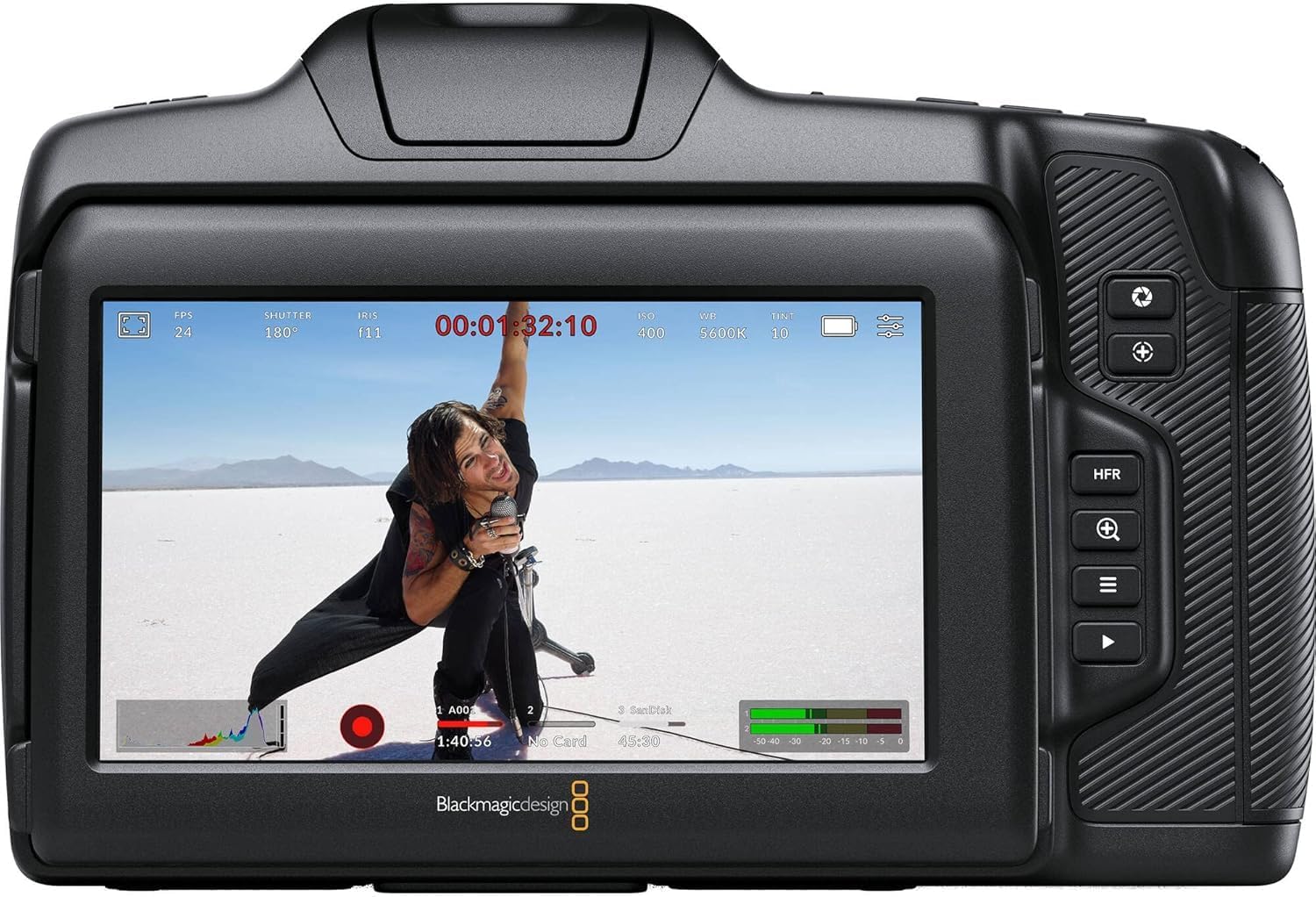
圖 6.2:背面 view of the camera displaying live footage with overlays on the LCD screen.
5吋液晶顯示器提供清晰的顯示效果。 view 你的腳tage and camera settings. It can be tilted for better viewing angles. An external monitor can be connected via the HDMI port.

Figure 6.3: The camera's tilting LCD screen in an operational setup, demonstrating its flexibility.
6.5. DaVinci Resolve Studio
Your camera includes an activation key for DaVinci Resolve Studio. This software is a comprehensive solution for editing, color correction, visual effects, and audio post-production. Install and activate it on your computer to process your Blackmagic RAW and ProRes footage.
7、維護保養
7.1. 清潔
- 相機機身: Wipe with a soft, dry, lint-free cloth. Do not use harsh chemicals or solvents.
- 鏡片: Use a lens brush or air blower to remove dust, then gently clean with a lens cleaning solution and microfiber cloth.
- 感應器: Sensor cleaning should be performed with extreme care using a specialized sensor cleaning kit. If unsure, consult a professional.
7.2. 韌體更新
Periodically check the Blackmagic Design website for firmware updates. Updates can improve performance, add features, and fix bugs. Follow the instructions provided by Blackmagic Design carefully during the update process.
7.3. 儲存
When not in use, store the camera in a cool, dry place, away from direct sunlight and extreme temperatures. Use a protective case to prevent dust and physical damage.
8。 故障排除
| 問題 | 可能的原因 | 解決方案 |
|---|---|---|
| 網路攝影機無法開機 | Battery depleted or incorrectly installed; power cable loose. | Charge battery, ensure correct installation. Check power cable connection. |
| 錄製意外停止 | Media card full or too slow; battery low. | Use a faster card (UHS-II, CFast 2.0), free up space, or replace/charge battery. |
| 圖像質量差 | Incorrect exposure settings; dirty lens/sensor. | Adjust ISO, aperture, shutter speed. Clean lens or sensor. |
| 無錄音 | Microphone not connected or configured correctly; audio levels too low. | Check microphone connections and camera audio settings. Adjust input levels. |
9. 規格
Key technical specifications for the Blackmagic Design Pocket Cinema Camera 6K G2:
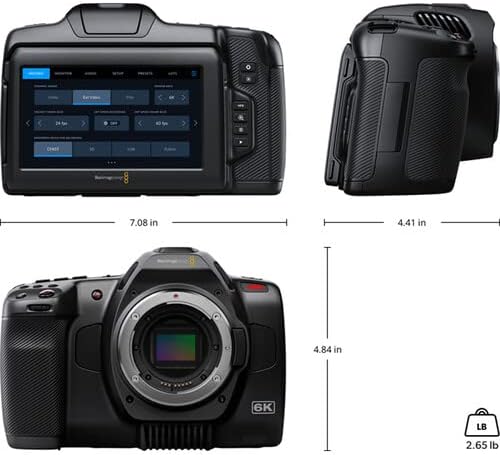
Figure 9.1: Dimensions of the Blackmagic Design Pocket Cinema Camera 6K G2.
| 特徵 | 細節 |
|---|---|
| 型號 | CINECAMPOCHDEF6K2 |
| 感測器尺寸 | 超35 |
| 原始解析度 | 6144×3456 |
| 動態範圍 | 13 站 |
| Dual Gain ISO | 最多 25,600 個 |
| 鏡頭卡口 | Active EF/EF-S |
| 螢幕尺寸 | 5 Inches (Adjustable Tilt LCD) |
| 儲存媒體 | SD/UHS-II, CFast 2.0, External SSD via USB-C |
| 視訊擷取分辨率 | 6K |
| 視頻採集格式 | Apple ProRes, Blackmagic RAW |
| 音訊格式 | WAV, BWF |
| 連接性 | HDMI, USB-C, 3.5mm Audio, Mini XLR Audio, 12V DC |
| 物品重量 | 3.8磅 |
| 產品尺寸 | 9.1 x 9.1 x 9.1 英寸 |
| 電池 | 1 Lithium Ion (NP-F570 included) |
10. 保固和支持
For detailed warranty information and technical support, please refer to the official Blackmagic Design web或聯絡其客服。請保留購買憑證,以便進行保固索賠。
線上資源: 訪問 www.blackmagicdesign.com/support 驅動程式、手冊和常見問題。
Ask a question about this manual
Ask about setup, troubleshooting, compatibility, parts, safety, or missing instructions. Manuals+ will review the question and use this page’s manual context to help answer it.