
JEYI JY-EAGLE-PS5
JEYI Eagle PS5 Heatsink User Manual
Model: JY-EAGLE-PS5
產品結束view
The JEYI Eagle PS5 Heatsink is an M.2 NVMe heatsink designed specifically for the PlayStation 5 console's SSD expansion slot. It is engineered to reduce SSD temperatures through native fan convection and direct contact with the heat core, ensuring optimal performance and longevity of your M.2 NVMe SSD.

Image: JEYI Eagle PS5 Heatsink. This image displays the sleek, black, eagle-shaped heatsink with its distinctive fin design and the JEYI logo.
包裝內容
驗證包裝中是否存在所有組件:
- 1 x JEYI Eagle PS5 Heatsink
- 1 x 螺絲起子
- 5 x 導熱墊
設定和安裝
The JEYI Eagle PS5 Heatsink is designed for quick and easy installation. Follow these steps carefully to ensure proper setup and optimal cooling performance.
準備
- Ensure your PlayStation 5 console is powered off and unplugged from the power outlet.
- Place the console on a clean, flat, and stable surface.
- Gather the provided screwdriver, thermal pads, and the heatsink.
安裝步驟
- 拆下側板: Carefully remove the side panel of your PS5 console to access the SSD expansion slot.
- 移除插槽蓋: Locate the SSD expansion slot cover and remove it.
- Apply Thermal Pad and Insert SSD: Stick the appropriate thermal pad onto your M.2 NVMe SSD. Then, gently insert the SSD into the expansion slot.
- 保護固態硬碟: Use the provided screwdriver to fix the SSD with its screw.
- Insert Heatsink Tail Pin: Align the tail pin of the JEYI Eagle heatsink with the corresponding slot and insert it.
- Secure Heatsink and Replace Side Panel: Fix the heatsink cover screw and then reattach the console's side panel.

Image: Step-by-step visual guide for installing the JEYI Eagle PS5 Heatsink. This image shows six distinct panels illustrating each stage of the installation process, from removing the side panel to securing the heatsink and replacing the cover.

Image: Illustration of the heatsink directly contacting the heat core. This image highlights the heatsink's design for direct thermal transfer within the PS5 console, showing the "Tail Locking Pin" and the heatsink's position relative to the SSD slot.
工作原理
The JEYI Eagle PS5 Heatsink operates on a passive cooling principle, leveraging the PS5 console's native fan convection. Its design ensures efficient heat dissipation from your M.2 NVMe SSD.
- Efficient Passive Heatsink: The heatsink is designed to be cooled by the fresh air flow generated by the console's internal fan, preventing heat from being trapped inside the SSD slot.
- Direct Heat Core Contact: The heatsink makes direct contact with the SSD's heat core, maximizing thermal transfer efficiency.
- One-Piece Aluminum Design: Constructed from a single block of CNC'd aluminum, the heatsink provides a large surface area for superior heat exchange.
- 優化氣流: The eagle-shaped design and fin structure are optimized to work with the PS5's internal airflow, effectively drawing heat away from the SSD.
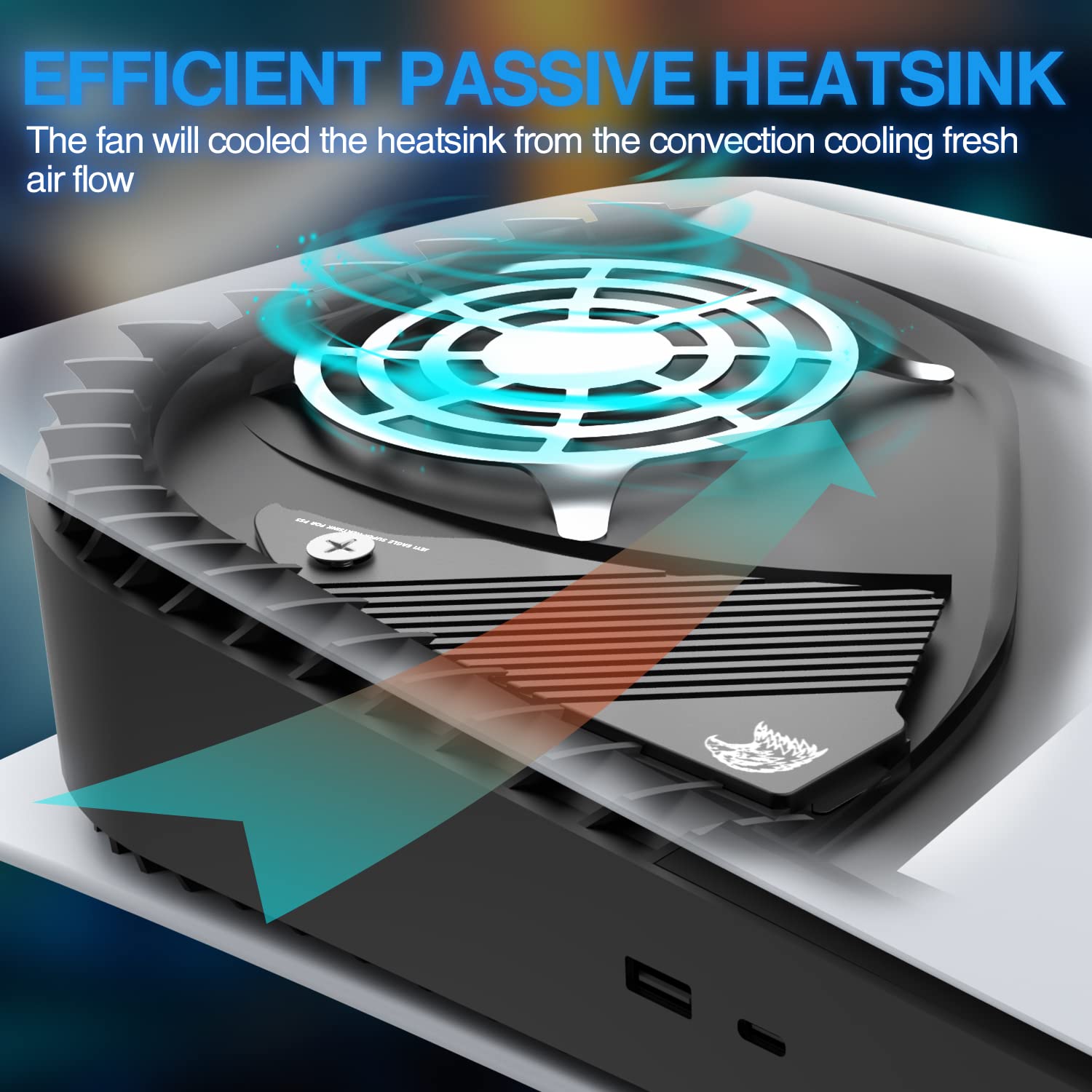
Image: Diagram illustrating the efficient passive heatsink operation. This image shows the heatsink installed in a PS5 console, with arrows indicating how the console's fan airflow cools the heatsink and dissipates heat.
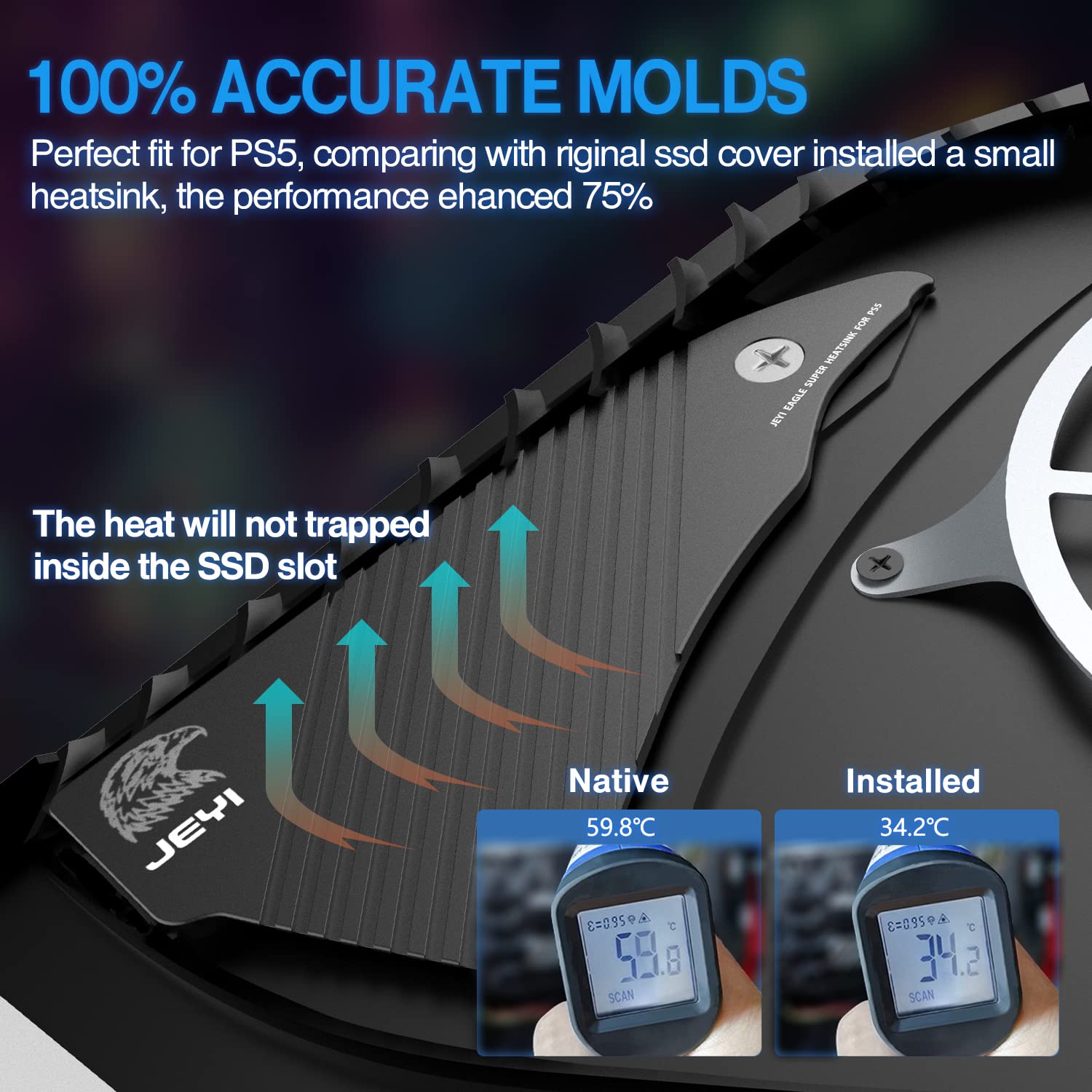
Image: Comparison of SSD temperatures with and without the JEYI heatsink. This image displays two thermal readings, showing a significant temperature reduction (from 59.8°C to 34.2°C) when the JEYI heatsink is installed, demonstrating its effectiveness.

影像: View of the one-piece aluminum heatsink. This image shows the top and bottom of the heatsink, highlighting its solid aluminum construction and the thermal pad placement, emphasizing its large surface area for cooling.
維護
The JEYI Eagle PS5 Heatsink is a passive component and requires minimal maintenance. Periodically, you may wish to:
- 除塵: If dust accumulates on the heatsink fins, gently clean it using compressed air or a soft brush. Ensure the console is powered off and unplugged before cleaning.
- 散熱墊檢查: While not typically required, if you ever remove the heatsink, inspect the thermal pads for wear or damage. Replace if necessary.
故障排除
This section addresses common concerns related to the JEYI Eagle PS5 Heatsink.
Issue: SSD Overheating (after heatsink installation)
可能的原因: Improper installation of thermal pads or heatsink, or incorrect contact with the SSD.
解決方案:
- Ensure the console is powered off and unplugged.
- Carefully remove the heatsink and SSD.
- Verify that the thermal pads are correctly placed on the SSD and that they are making full contact with both the SSD chips and the heatsink surface.
- Reinstall the SSD and heatsink, ensuring all screws are tightened appropriately and the heatsink is seated firmly.
Issue: Heatsink does not fit correctly
可能的原因: 安裝過程中使用了錯誤的型號或未正確對準。
解決方案:
- Confirm that you have the JEYI Eagle PS5 Heatsink (Model: JY-EAGLE-PS5), which is specifically designed for the PlayStation 5.
- Review the "Setup and Installation" section and the provided installation images to ensure correct alignment and seating of the heatsink and its tail pin.
規格
| 屬性 | 價值 |
|---|---|
| 品牌 | 傑伊 |
| 型號 | JY-EAGLE-PS5 |
| 更冷的散熱片材料 | 鋁 |
| 散熱器相容性 | PlayStation 5 M.2 NVMe SSD Slot |
| 物品重量 | 120克 |
| 產品尺寸(長x寬x高) | 15.5 x 6.9 x 1 厘米 |
| 安裝類型 | 底盤安裝 |
| 顏色 | 黑色的 |
| 原產地 | 中國 |
保固和支持
For warranty information and technical support, please refer to the official JEYI web請造訪網站或直接聯絡他們的客服。請保留您的購買收據作為購買憑證。
製造商: 傑伊
接觸: Please visit the official JEYI support page for contact details and further assistance.
Ask a question about this manual
Ask about setup, troubleshooting, compatibility, parts, safety, or missing instructions. Manuals+ will review the question and use this page’s manual context to help answer it.