
1. 介紹及結束view
Thank you for choosing the Ebarsenc X5 Mini 1080P Wireless WiFi Camera. This compact surveillance camera is designed for discreet home security and monitoring, offering 1080P high-definition video, motion detection, and night vision capabilities. Its small size and magnetic mount allow for flexible placement in various environments. This manual provides detailed instructions for setup, operation, and maintenance to ensure optimal performance.

Image 1.1: Ebarsenc X5 Mini WiFi Camera highlighting its compact design and key features such as HD lens, infrared light, USB interface, reset port, switch, and magnetic universal bracket. It also lists features like Full HD 1080P, App Remote Control, Night Vision, 2.4G WiFi Connection, Motion Detection, SD/Cloud Storage, and Battery Operated.
2. 包裝內容
請檢查包裝內容以確保所有物品齊全:
- Ebarsenc X5 Mini 1080P Wireless WiFi Camera
- Magnetic Universal Bracket
- USB充電線
- 復位銷
- 使用者手冊
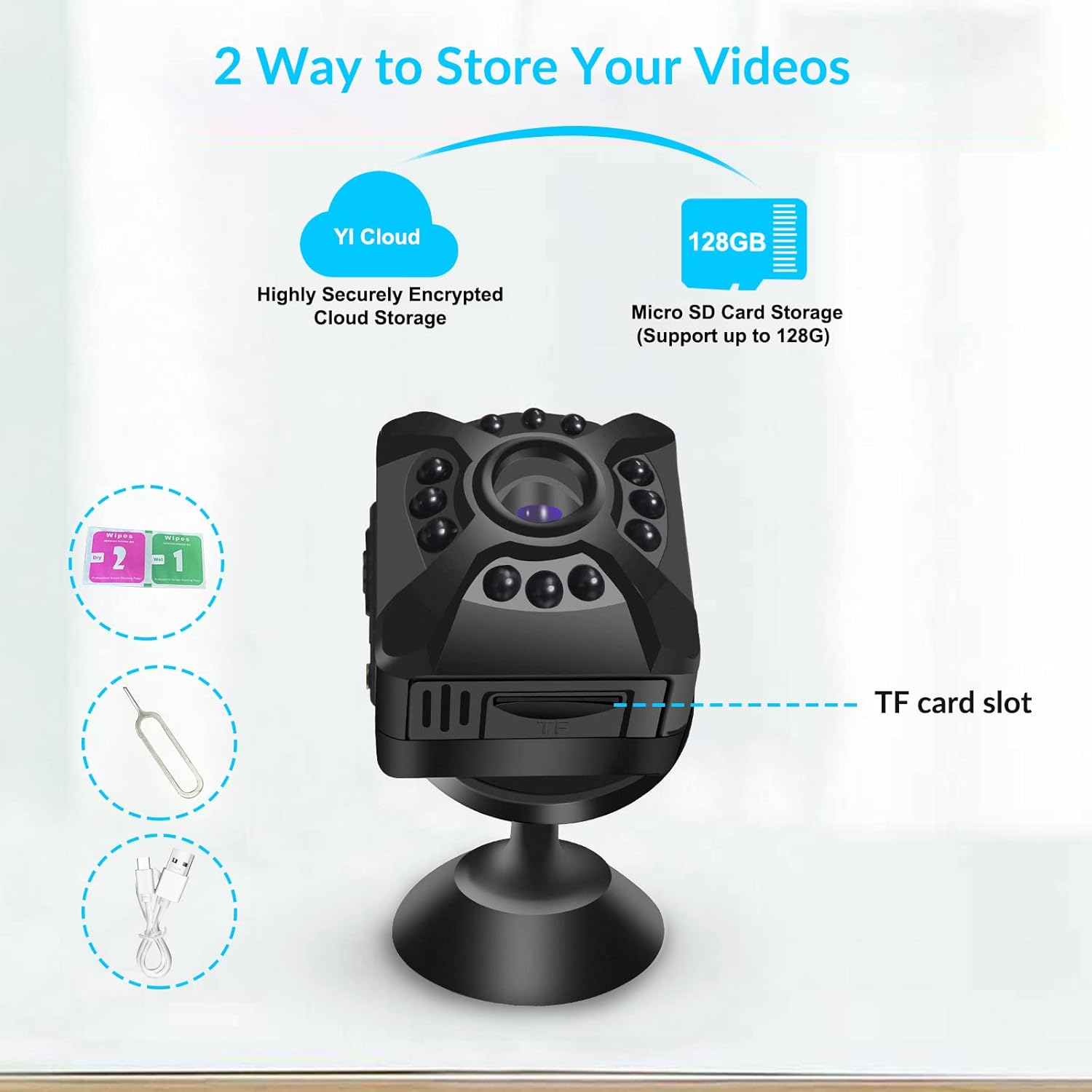
Image 2.1: The Ebarsenc X5 Mini WiFi Camera and its accessories, including the USB cable, reset pin, magnetic holder, and user manual, neatly arranged in its packaging.
3. 設置指南
3.1 Powering On and Resetting
- Insert a compatible Micro SD card (up to 128GB, not included) into the camera's SD card slot.
- Use the provided reset pin to press and hold the reset button for approximately 5 seconds until the blue indicator light flashes. This resets the camera to factory settings.
- Slide the power switch to the 'ON' position. The blue indicator light will illuminate.
3.2 應用程式下載和帳戶創建
- Scan the QR code provided on the product packaging or in the user manual to download the 'YI IoT' application from your smartphone's app store.
- Install the 'YI IoT' app and create a user account by following the on-screen instructions.
3.3 連接至 WiFi
The camera supports 2.4GHz WiFi networks. Ensure your smartphone is connected to a 2.4GHz WiFi network during the setup process.
- Open the 'YI IoT' app and tap the '+' icon to add a new camera.
- Select 'WiFi connection' as the connection mode.
- Follow the app's prompts. When instructed, connect your phone to the camera's hotspot (usually named 'CAM_xxxx' with a default password like '12345678').
- Return to the 'YI IoT' app and enter your 2.4GHz home WiFi network details (SSID and password).
- The app will generate a QR code. Position your phone's screen with the QR code in front of the camera lens (approximately 15-20 cm away) until the camera scans it successfully.
- Wait for the camera to connect to your WiFi network. Once connected, you can name your camera and begin monitoring.
Video 3.1: This video demonstrates the process of configuring the camera's hotspot to connect to your home WiFi network using the YI IoT app.
Video 3.2: A step-by-step guide on how to connect the Ebarsenc X5 camera to a 2.4G WiFi network.
4. 操作說明
4.1 直播 View
Once connected, open the 'YI IoT' app and select your camera from the device list to view the live video feed. You can monitor your space in real-time from anywhere with an internet connection.
4.2 彈性安置
The camera's compact size and magnetic base allow for easy and discreet placement. Attach it to any metallic surface or use the included magnetic universal bracket to position it as needed.

Image 4.1: The Ebarsenc X5 Mini WiFi Camera shown next to a human finger for size comparison, emphasizing its small and discreet design. It also illustrates the magnetic attachment to its universal bracket.
5. 移動偵測與警報
The Ebarsenc X5 camera features intelligent motion detection. When motion is detected, the camera can automatically begin recording and send instant alerts to your smartphone via the 'YI IoT' app.
- Enabling Motion Detection: Navigate to the camera settings within the 'YI IoT' app and enable the 'Motion Detection' feature.
- 調整靈敏度: You can adjust the motion detection sensitivity (Low, Medium, High) to minimize false alarms.
- 警報頻率: Configure how often you receive alerts to suit your monitoring needs.

Image 5.1: An illustration depicting the camera's motion detection capability, showing a person triggering an alert within the camera's field of view, resulting in an instant app notification.
6. 儲存選項
The Ebarsenc X5 offers versatile storage solutions for your recordings:
- 微型 SD 卡存儲: The camera supports Micro SD cards up to 128GB. Recordings can be stored locally on the card. The camera features loop recording, automatically overwriting the oldest files 卡滿時。
- 雲端儲存: An optional cloud storage service is available through the 'YI IoT' app (subscription may be required). This provides secure, off-site storage for your video footage.

Image 6.1: Visual representation of the two storage options for the Ebarsenc X5 camera: YI Cloud for highly encrypted cloud storage and Micro SD Card Storage supporting up to 128GB.
7.夜視儀
The camera is equipped with infrared (IR) night vision, allowing it to capture clear video footage even in low-light or complete darkness. The night vision mode activates automatically when ambient light levels are insufficient.

Image 7.1: A black and white image demonstrating the camera's night vision capabilities, showing a person in a dimly lit indoor environment.
8. 規格
| 特徵 | 描述 |
|---|---|
| 型號 | X5 |
| 視訊解析度 | 1080P全高清 |
| 連接性 | 2.4GHz Wireless WiFi |
| 鏡頭類型 | Fixed Focus, Wide Angle (120-degree field of view) |
| 貯存 | Micro SD 卡(最大支援 128GB),雲端儲存(選購) |
| 特色 | Motion Detection, Night Vision, HD Coating, Magnetic Mount |
| 產品尺寸 | 1.18 x 1.18 x 1.1 英寸 |
| 物品重量 | 2.08 盎司 |
9。 故障排除
If you encounter issues with your Ebarsenc X5 camera, please refer to the following common solutions:
- 攝影機無法連接到WiFi:
- 請確保您的WiFi網路為2.4GHz頻段。此攝影機不支援5GHz網路。
- Place the camera close to your WiFi router during the initial setup.
- 請確認應用程式中輸入的WiFi密碼是否正確。
- Reset the camera using the provided pin and attempt the connection process again.
- No Sound/One-Way Audio:
- The Ebarsenc X5 camera supports one-way audio, meaning you can hear audio from the camera's environment, but there is no two-way talk function.
- SD卡未錄製:
- Ensure the Micro SD card is inserted correctly and is not full. The camera supports loop recording, overwriting old files.
- Format the SD card through the camera settings in the 'YI IoT' app.
- Check if the recording settings (e.g., 'All time recording' or 'Event recording') are correctly configured in the app.
- 視訊品質差:
- 確保相機鏡頭清潔,無灰塵或污漬。
- Check your WiFi signal strength. A weak signal can affect video streaming quality.
10、維護保養
- 打掃: 請使用柔軟的乾布清潔相機鏡頭和機身。避免使用液體清潔劑或研磨性材料。
- 貯存: 長時間不使用時,請將相機存放在陰涼乾燥處。
- 電池保養: Charge the camera regularly to maintain battery health, especially if it's not continuously powered.
11. 保固和支持
For warranty information or technical support, please refer to the contact details provided on the product packaging or the official Ebarsenc web網站。請保留您的購買收據作為購買憑證。


