
Fral DD21LCD
FRAL Dry Digit 21 Dehumidifier User Manual
Model: DD21LCD
一、簡介
This manual provides comprehensive instructions for the safe and efficient operation, maintenance, and troubleshooting of your FRAL Dry Digit 21 Dehumidifier. Please read this manual thoroughly before operating the appliance and retain it for future reference.
The FRAL Dry Digit 21 is designed to effectively remove excess moisture from the air in residential environments, helping to prevent mold, mildew, and other humidity-related issues. This model replaces the previous Dry Digit 20.
2. 安全訊息
為降低火災、觸電或受傷的風險,請務必遵守以下安全預防措施:
- 請確保電源供應器的規格與設備上的額定功率標籤相符。
- 請勿使用損壞的電線或插頭操作除濕機。
- 請勿堵塞進風口或出風口。
- Keep the unit on a stable, level surface.
- 清潔或進行任何維護之前,請拔掉設備插頭。
- 請勿將本機浸入水或其他液體中。
- 本設備不適合身體、感官或精神能力較差或缺乏經驗和知識的人員(包括兒童)使用,除非有負責其安全的人員對他們進行有關使用本設備的監督或指導。
3. 產品結束view
Familiarize yourself with the main components of your FRAL Dry Digit 21 Dehumidifier.

圖 3.1:正面 view of the FRAL Dry Digit 21 Dehumidifier. Shows the compact, white casing with the control panel on top and air outlet grille.

圖 3.2:正面 view of the FRAL Dry Digit 21 Dehumidifier with the water collection tank partially pulled out. This illustrates how to access the tank for emptying.
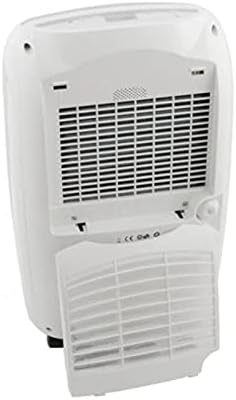
圖 3.3:背面 view of the FRAL Dry Digit 21 Dehumidifier, showing the air intake grille and the removable air filter cover. This is where the air filter is located for cleaning or replacement.
關鍵部件:
- 控制面板: Located on the top of the unit, featuring a digital display and control buttons.
- 進氣格柵: Located at the rear, where air is drawn into the unit.
- 通風口格柵: Located at the top, where dehumidified air is expelled.
- 集水罐: Removable tank at the front for collecting condensed water.
- 空氣過濾器: Located behind the rear grille, filters dust and particles from the air.
- 連續排水口: A port for connecting a hose for continuous drainage.
4. 設定
- 拆箱: 小心地將除濕機從包裝中取出。保留包裝材料以備日後存放或運送之用。
- 放置: Place the unit on a firm, level surface in the desired location. Ensure there is at least 20 cm (8 inches) of clear space around all sides for proper air circulation. Do not place it near heat sources or in direct sunlight.
- 電源連接: 將電源線插入接地的電源插座。確保音量已調至適當大小。tage 符合該設備的規格。
- 初始操作: Allow the unit to stand upright for at least 1 hour before plugging it in if it was transported on its side. This allows the refrigerant to settle.
- 水箱安裝: Ensure the water collection tank is correctly inserted into the unit. The unit will not operate if the tank is full or incorrectly positioned.
5. 操作說明
控制面板:
The FRAL Dry Digit 21 features a user-friendly digital control panel. Specific button functions may vary slightly, but generally include:
- 電源按鈕: 開啟/關閉設備。
- 濕度設定鈕(上/下箭頭): Adjusts the desired humidity level (e.g., from 30% to 80% Relative Humidity).
- 模式按鈕: Selects operating modes (e.g., Continuous, Auto, Laundry Dry).
- 定時器按鈕: 設定定時器,實現自動開/關機操作。
- 風扇速度按鈕: 調節風扇速度(例如,低速、高速)。
- 展示: 顯示目前濕度、設定濕度或定時器設定。
基本操作:
- 打開: Press the Power button to switch on the dehumidifier. The display will show the current room humidity.
- 設定所需濕度: Use the Up/Down arrow buttons to set your desired humidity level. The unit will operate until the room humidity reaches this level, then cycle on and off to maintain it. A common comfortable range is 40-60% RH.
- 選擇模式(可選): 按下模式按鈕可在可用操作模式之間循環切換。
- Adjust Fan Speed (Optional): 按下風速按鈕選擇您所需的風速。風速越高,除濕速度越快,但噪音也可能越大。
- 關: 再次按下電源按鈕即可關閉裝置。
連續排水:
For continuous operation without needing to empty the water tank, connect a suitable drain hose (not included) to the continuous drain outlet at the back of the unit. Ensure the hose is sloped downwards to allow gravity drainage into a floor drain or larger container.
6、維護保養
定期維護可確保除濕機的最佳性能並延長其使用壽命。
清空水箱:
When the water tank is full, the unit will automatically shut off and an indicator light (or message on display) will illuminate. Carefully pull out the water tank, empty the collected water, and reinsert the tank firmly until it clicks into place. The unit will resume operation.
清潔空氣過濾器:
空氣過濾器應每兩週或根據使用情況和空氣品質更頻繁地清潔。髒污的過濾器會降低效率並可能損壞設備。
- 關閉除濕機並拔掉電源插頭。
- Remove the filter cover from the rear of the unit (refer to Figure 3.3).
- 輕輕拉出空氣過濾器。
- Wash the filter with warm, soapy water, or use a vacuum cleaner to remove dust.
- 徹底沖洗乾淨,並讓過濾器完全風乾後再重新裝入。
- Reinstall the dry filter and close the filter cover.
清潔設備外部:
用柔軟的抹布擦拭除濕機的外部amp 用布擦拭。請勿使用研磨性清潔劑或溶劑,因為這些會損壞表面。
7。 故障排除
在聯絡客服之前,請先參考以下常見問題及其解決方案:
| 問題 | 可能的原因 | 解決方案 |
|---|---|---|
| 裝置未開啟。 | No power; Water tank full or incorrectly inserted; Room temperature too low. | Check power connection; Empty and reinsert water tank correctly; Ensure room temperature is above 5°C (41°F). |
| 沒有收集到水。 | Humidity level already low; Air filter clogged; Unit in continuous drain mode. | Increase desired humidity setting; Clean air filter; Check continuous drain hose connection. |
| 單位很吵。 | 設備未放置在水平面上;空氣過濾器堵塞;內部組件振動。 | Place on a level surface; Clean air filter; Contact customer support if noise persists. |
| Dehumidification is slow. | Room size too large; Air filter clogged; Doors/windows open. | Ensure unit is appropriate for room size; Clean air filter; Close doors and windows. |
8. 規格
| 特徵 | 規格 |
|---|---|
| 模型 | DD21LCD |
| 品牌 | Fral |
| 除濕量 | 21升/天 |
| 尺寸(長x寬x高) | 50 x 50 x 28 厘米 |
| 重量 | 13公斤 |
| 特殊功能 | Automatic humidity removal |
| 推薦用途 | 住宅 |
| 運作模式 | 連續的 |
9. 保固和支持
For warranty information and technical support, please refer to the warranty card included with your product or visit the official FRAL web網站。請保留您的購買收據,作為任何保固索賠的購買憑證。
If you encounter issues not covered in the troubleshooting section, or require further assistance, please contact FRAL customer service.