
一、簡介
This manual provides detailed instructions for the safe and efficient use of your Hoco HC3 Bounce Sports Wireless Speaker. Please read this manual thoroughly before operating the device and retain it for future reference. The Hoco HC3 is a versatile portable speaker supporting Bluetooth, FM radio, TF card, USB, AUX, and TWS modes.

Figure 1: Hoco HC3 Bounce Sports Wireless Speaker. This image displays the speaker in a vertical orientation, showcasing its black mesh grille, the 'hoco' logo at the bottom right, and a braided carrying strap attached to the top left side. The control buttons are visible on the side panel.
2. 包裝內容
開箱後請確認所有物品齊全:
- Hoco HC3 Bounce Sports Wireless Speaker
- USB充電線
- 用戶手冊(本文檔)
- AUX Audio Cable (if included with your model)
3. 產品結束view
3.1聲道揚聲器組件

Figure 2: Rear panel of the Hoco HC3 speaker. This image highlights the various input ports and control buttons located on the back of the speaker. Visible elements include the power switch, USB port, TF card slot, AUX input, and LED indicator.
熟悉音箱的控制按鈕和介面:
- 電源按鈕: 長按開/關機。短按切換模式。
- 播放/暫停按鈕: 播放或暫停音訊。接聽/結束通話。
- 音量增大/下一曲按鈕: 短按進入下一曲,長按增加音量。
- 音量減小/上一曲按鈕: 短按切換至上一曲,長按降低音量。
- 模式按鈕 (M): Short press to cycle through Bluetooth, FM, TF card, USB, and AUX modes.
- USB連接埠: 用於U盤播放。
- TF卡插槽: 用於TF(MicroSD)卡播放。
- 輔助輸入: 3.5mm 插孔,用於有線音訊連接。
- 充電埠: 用於給音箱充電的Micro USB介面。
- LED指示燈: Displays charging status and operating mode.
3.2 主要特點
- 藍牙V5.0: 提供穩定且高效的無線連線。
- 多種播放模式: Supports Bluetooth, FM radio, TF card, USB drive, and AUX input.
- 真正的無線立體聲 (TWS): Allows two HC3 speakers to connect wirelessly for a stereo sound experience.
- 電池壽命長: 2400mAh battery capacity offers up to 5 hours of music playback.
- 雙揚聲器: Equipped with two 45mm speaker units, each with 5W power output.
- 緊湊便攜: Dimensions of 202*60*60mm and weight of 561g for easy transport.
4. 設定
4.1 揚聲器充電
- 將提供的 USB 充電線連接到揚聲器的充電埠。
- 將 USB 連接線的另一端連接到 5V USB 電源轉接器(不包含)或電腦的 USB 連接埠。
- The LED indicator will illuminate to show charging status. It typically takes about 3 hours for a full charge.
- Once fully charged, the LED indicator will change or turn off (refer to specific LED behavior in the troubleshooting section if unsure).
注意:為獲得最佳電池壽命,請在首次使用前將揚聲器充滿電。
4.2 開關機
- 開機: Long press the Power button until you hear an audible prompt and the LED indicator lights up.
- 關閉電源: Long press the Power button again until you hear an audible prompt and the LED indicator turns off.
5. 操作說明
5.1 藍牙配對
- Ensure the speaker is powered on and in Bluetooth mode (the LED indicator will typically flash blue, indicating it's ready for pairing). If not, short press the Mode (M) button to switch to Bluetooth mode.
- 在您的行動裝置(智慧型手機、平板電腦、電腦)上啟用藍牙。
- 搜尋 available Bluetooth devices. You should see "HC3" or "Hoco HC3" in the list.
- Select "HC3" to connect. Once paired, the speaker will emit an audible confirmation, and the LED indicator will stop flashing and remain solid blue.
- 現在您可以透過揚聲器播放裝置上的音訊。
注意:如果上次配對的裝置處於藍牙狀態且在有效範圍內,則開機時揚聲器將自動嘗試重新連接到上次配對的裝置。
5.2 調頻廣播模式
- 開啟揚聲器電源。
- Short press the Mode (M) button repeatedly until you enter FM radio mode.
- To auto-scan and save available FM stations, short press the Play/Pause button. The speaker will scan and store stations.
- Use the Volume Up / Next Track and Volume Down / Previous Track buttons to navigate between saved stations.
5.3 TF卡/USB播放
- 開啟揚聲器電源。
- Insert a TF (MicroSD) card into the TF card slot or a USB flash drive into the USB port.
- The speaker should automatically switch to TF card or USB mode and begin playing audio files. If not, short press the Mode (M) button to select the correct mode.
- Use the Play/Pause, Volume Up / Next Track, and Volume Down / Previous Track buttons to control playback.
Note: Ensure your TF card or USB drive contains compatible audio file(例如,MP3 格式)。
5.4 AUX 模式
- 開啟揚聲器電源。
- Connect one end of a 3.5mm audio cable (if included) to the speaker's AUX input port.
- 將音訊線的另一端連接到外部裝置(例如 MP3 播放器、電腦)的音訊輸出插孔。
- The speaker should automatically switch to AUX mode. If not, short press the Mode (M) button to select AUX mode.
- 您可以透過外部設備控製播放。揚聲器和外部裝置上的音量可調整。
5.5 TWS(真無線立體聲)功能
The TWS function allows you to pair two Hoco HC3 speakers together for a true stereo sound experience.
- 請確保兩個 HC3 揚聲器都已關閉電源。
- Power on both speakers simultaneously. They should both enter Bluetooth pairing mode.
- On 一 of the speakers (this will become the primary speaker), long press the Mode (M) button or a dedicated TWS button (if present, otherwise try the Play/Pause button for 3-5 seconds) until you hear a pairing tone. The speakers will attempt to connect to each other.
- Once successfully paired, you will hear a confirmation tone, and one speaker's LED will indicate it's the primary (e.g., flashing slowly), while the other's LED will be solid.
- Now, connect your mobile device to the 基本的 speaker via Bluetooth as described in section 5.1.
- 現在音訊將透過兩個揚聲器以立體聲播放。
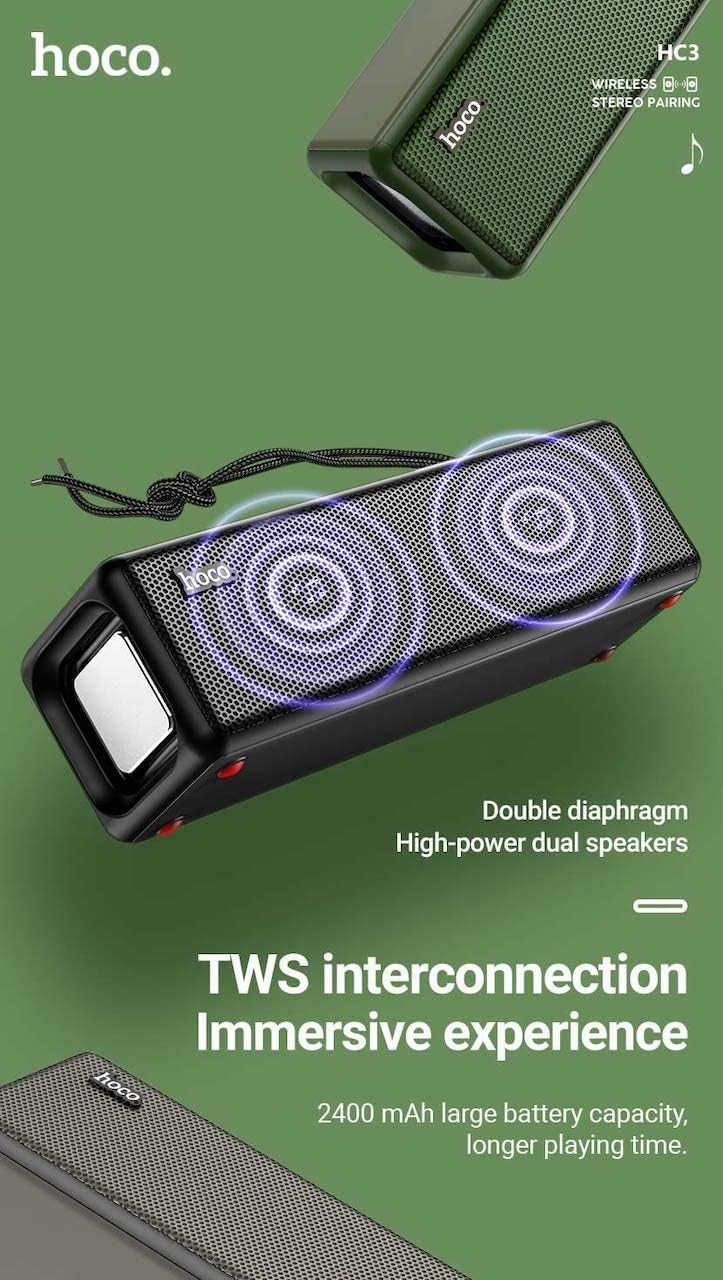
Figure 3: TWS Interconnection. This image illustrates the concept of two Hoco HC3 speakers wirelessly connected to provide a stereo audio experience, highlighting the dual speaker setup and the 2400 mAh battery capacity.
5.6 呼叫處理
透過藍牙連接智慧型手機時:
- 接聽電話: 短按播放/暫停按鈕。
- 結束通話: 通話期間短按播放/暫停按鈕。
- 拒絕來電: 來電響鈴時長按播放/暫停按鈕。
- 重撥上次號碼: 雙擊播放/暫停按鈕。
6、維護保養
- 打掃: 請使用柔軟的乾布清潔揚聲器表面。請勿使用研磨性清潔劑、酒精或其他化學溶劑。
- 貯存: 將揚聲器存放在陰涼乾燥處,避免陽光直射和極端溫度。
- 電池保養: To prolong battery life, charge the speaker regularly, even if not in use for extended periods (e.g., once every 3 months). Avoid fully discharging the battery frequently.
- 耐水性: While designed for sports, avoid submerging the speaker in water. Refer to product specifications for any IP rating.
- 避免影響: Protect the speaker from drops and strong impacts.
7。 故障排除
If you encounter issues with your Hoco HC3 speaker, refer to the following table for common problems and solutions:
| 問題 | 可能的原因 | 解決方案 |
|---|---|---|
| 揚聲器無法開啟。 | 電池電量低。 | 為揚聲器充電至少 30 分鐘。 |
| 無法透過藍牙配對。 | 裝置未啟用藍牙;揚聲器未處於配對模式;距離裝置太遠。 | Ensure Bluetooth is on, speaker is in pairing mode (flashing blue LED), and devices are within 10 meters. Forget "HC3" on your device and try pairing again. |
| 沒有聲音。 | 音量過低;模式選擇錯誤;設備未播放音訊。 | Increase volume on both speaker and connected device. Verify correct mode (Bluetooth, AUX, TF, USB). Ensure audio is playing on the source device. |
| FM 收音機接收效果不佳。 | 訊號弱;環境幹擾。 | Move the speaker to a location with better reception. Re-scan for stations. |
| TF卡/USB播放功能無法使用。 | Card/drive not inserted correctly; incompatible file 格式已損壞 files. | Ensure card/drive is fully inserted. Check file formats (MP3 recommended). Try another card/drive. |
| TWS 配對失敗。 | 音箱未處於TWS配對模式;距離太遠。 | Ensure both speakers are powered on and in TWS pairing mode. Keep them close during pairing. Refer to section 5.5. |
8. 規格
| 特徵 | 細節 |
|---|---|
| 模型 | HC3 |
| 方面 | 202×60×60毫米 |
| 重量 | 561克 |
| 藍牙版本 | V5.0 (Chip: JLAC6928B) |
| 電池容量 | 2400毫安培時 |
| 充電時間 | 約3小時 |
| 談話/音樂時間 | 長達 5 小時 |
| 揚聲器單體 | 45毫米*2 |
| 揚聲器功率輸出 | 5瓦* 2 |
| 連接模式 | Bluetooth, FM, TF card, USB, AUX, TWS |
| 音頻輸出模式 | 環繞 |
| 製造商 | 霍科 |
| 原產地 | 中國 |
9. 保固和支持
Hoco products are manufactured to high quality standards. For information regarding warranty coverage, please refer to the warranty card included with your purchase or contact your local Hoco distributor or retailer. Keep your proof of purchase for any warranty claims.
For technical support or further assistance, please visit the official Hoco website or contact their customer service department. Contact details are typically available on the product packaging or the official web地點。