
MOUNT PRO PR1009
MOUNT PRO 雙顯示器支架使用手冊
型號:PR1009
介紹
This user manual provides detailed instructions for the assembly, operation, and maintenance of your MOUNT PRO Dual Monitor Stand. Designed for ergonomic comfort and enhanced productivity, this free-standing desk mount supports two screens up to 27 inches each, with a maximum weight capacity of 17.6 lbs per arm. It offers extensive adjustability including tilt, swivel, rotation, and height adjustment to help you achieve an optimal view角。
包裝內容
請在開始組裝前確認所有零件齊全。如有任何零件缺失或損壞,請聯絡客服。
- 座板
- 主桿
- 雙顯示器支架組件
- VESA 安裝板(2 個)
- 電纜管理夾
- 五金配件包(螺絲、墊圈、墊片)
- 內六角扳手(各種尺寸)

Image: All components of the MOUNT PRO Dual Monitor Stand, including the base, pole, arms, VESA plates, and hardware.
規格
| 特徵 | 細節 |
|---|---|
| 產品尺寸 | 17.6 x 12.01 x 4.33 英寸 |
| 物品重量 | 8.47磅 |
| 產品型號 | PR1009 |
| 安裝類型 | Tabletop Mount (Free-Standing) |
| 運動類型 | 旋轉、擺動、傾斜、鉸接 |
| 品牌 | 安裝專業版 |
| 材料 | 鋁、合金鋼 |
| 最大相容尺寸 | 27 Inches (per screen) |
| 最小兼容尺寸 | 13 Inches (per screen) |
| 最大負載能力 | 17.6 lbs per arm |
| VESA 相容性 | 75x75毫米,100x100毫米 |
設定和安裝
Follow these steps carefully for proper assembly. It is recommended to have assistance when mounting monitors to prevent tipping.
1 電線桿安裝
Attach the main pole to the base plate using the provided screws and Allen wrench. Ensure it is securely tightened for stability.
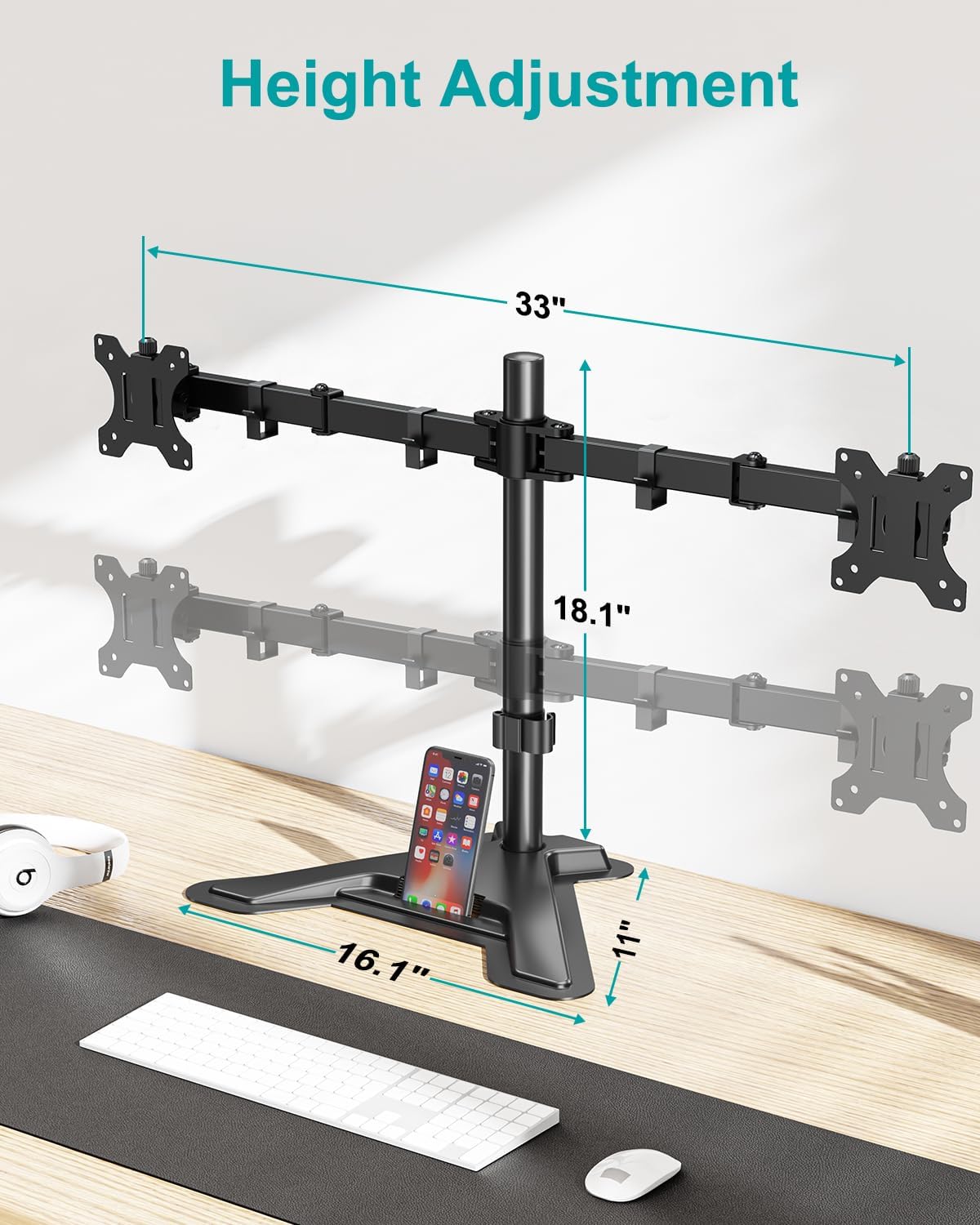
Image: The main pole attached to the sturdy V-shaped base, illustrating the overall dimensions and height adjustment range.
2. Arm Installation
Slide the dual monitor arm assembly onto the main pole. Position it at your desired height and secure it using the locking mechanism. The arm should be placed with the screw facing backwards for optimal adjustment.
3. 將 VESA 安裝板連接到顯示器
Attach a VESA mounting plate to the back of each monitor using the appropriate screws from the hardware kit. Ensure the screws are tightened securely but do not overtighten.

Image: Illustration of VESA 75x75 mm and 100x100 mm mounting patterns on the back of a monitor, demonstrating compatibility.
4 顯示器安裝
Attention: When installing monitors, please hang both monitors onto the arm at the same time to prevent the danger of tipping. Ensure the two arms are balanced during use.
Carefully slide the monitors (with VESA plates attached) onto the ends of the monitor arms. Secure them with the provided cap nuts or screws.
5. 線纜管理
Utilize the integrated cable management clips along the arms and pole to route your power and AV cables. This helps maintain a clean and organized workspace.

圖片:後視圖 view of the dual monitor stand showing cables neatly organized using the integrated cable management clips along the arms and central pole.
安裝視頻指南
Video: A step-by-step guide on how to install the MOUNT PRO Dual Monitor Stand, demonstrating each assembly phase.
操作說明和調整
The MOUNT PRO Dual Monitor Stand offers a variety of adjustments to customize your view提升體驗並促進符合人體工學的姿勢。
高度調節
Adjust the height of the monitor arms along the main pole to achieve your preferred eye-level viewing. The stand allows for height adjustment up to 18.1 inches.

Image: A user demonstrating a comfortable ergonomic position with monitors adjusted to an optimal height using the stand.
傾斜調整
Each monitor can be tilted from -90° to +70° to reduce glare and optimize viewing angles. Loosen the tilt knob, adjust, and then re-tighten.

Image: Visual representation of the monitor stand's ability to rotate 360 degrees and tilt from -90 to +70 degrees.
旋轉調整
Swivel your monitors from -90° to +90° to share your screen with others or adjust for different tasks.

Image: A demonstration of the monitor stand's swivel capability, allowing monitors to be angled up to 90 degrees in either direction.
旋轉
Rotate your monitors 360° to switch between landscape and portrait orientations effortlessly.

Image: Various screen configurations possible with the dual monitor stand, including horizontal-horizontal, vertical-vertical, and mixed orientations.
功能結束view 影片
影片:結束view of the MOUNT PRO Dual Monitor Stand's full motion capabilities, including tilt, swivel, and rotation.
維護
To ensure the longevity and optimal performance of your MOUNT PRO Dual Monitor Stand, follow these maintenance guidelines:
- 打掃: 定期用柔軟的布擦拭支架。amp 用布擦拭。避免使用研磨性清潔劑或溶劑,因為它們可能會損壞表面塗層。
- 密封性檢查: Periodically check all screws and connections to ensure they remain tight. Re-tighten if necessary to maintain stability and prevent wobbling.
- 潤滑: The articulating joints are designed for smooth movement and generally do not require lubrication. If movement becomes stiff, a small amount of silicone-based lubricant can be applied to the pivot points.
- 承重能力: Do not exceed the maximum weight capacity of 17.6 lbs per arm. Overloading can cause damage to the stand and monitors.
- Monitor Balance: Always ensure that the weight of the monitors is evenly distributed across the arms to maintain balance and prevent tipping.
故障排除
If you encounter any issues with your MOUNT PRO Dual Monitor Stand, please refer to the following common problems and solutions:
- 支架搖晃:
- Ensure the main pole is securely attached to the base plate.
- Verify that the monitor arms are tightly clamped to the main pole.
- Check that the monitors are properly balanced on the arms.
- Confirm that your desk surface is stable and level.
- Monitors are Tipping Forward/Backward:
- Tighten the tilt adjustment knob on the VESA mounting plate.
- Ensure the monitor weight does not exceed 17.6 lbs per arm.
- Difficulty Adjusting Height/Swivel/Tilt:
- Loosen the corresponding adjustment screws or knobs slightly before attempting to move, then re-tighten once in position.
- Do not force adjustments. If a joint is stuck, check for obstructions or consult the user manual for specific adjustment points.
- Monitors are Not Level:
- Adjust the height of each arm independently on the main pole until both monitors are level.
- Ensure the VESA plates are mounted straight on the back of the monitors.
If the issue persists, please contact MOUNT PRO customer support for further assistance.
安全資訊
Please read and understand all safety warnings before installation and use of this product. Failure to do so may result in property damage, serious injury, or death.
- Do not install this product if you cannot clearly understand the instructions.
- Ensure the mounting surface can safely support the combined weight of the stand and monitors.
- Do not exceed the maximum load capacity of 17.6 lbs per arm.
- 將小部件放在兒童接觸不到的地方,以防止窒息危險。
- 請僅使用提供的硬體。請勿使用損壞的零件。
- Always ensure monitors are securely attached to the VESA plates and arms before releasin給他們。
- When adjusting, hold the monitor firmly to prevent accidental drops.
- Avoid extending the arms too far forward or backward without proper balance, as this may cause the stand to tip.
保固和支持
For detailed warranty information and customer support, please refer to the official MOUNT PRO web網站或完整使用手冊PDF。
您可以下載官方使用手冊(PDF)。 這裡.
如需更多協助或有任何疑問,請訪問 MOUNT PRO 亞馬遜商店.
Ask a question about this manual
Ask about setup, troubleshooting, compatibility, parts, safety, or missing instructions. Manuals+ will review the question and use this page’s manual context to help answer it.