
一、簡介
The MINDEO MP-8000 is a high-speed, table-top barcode scanner designed for efficient and accurate data capture. It supports both one-dimensional (1D) and two-dimensional (2D) barcodes, making it suitable for a wide range of applications. Its auto-sense mode allows for hands-free operation, enhancing productivity in various environments.
This manual provides detailed instructions for setting up, operating, and maintaining your MINDEO MP-8000 barcode scanner. Please read this manual thoroughly before using the device to ensure proper functionality and longevity.
2.產品特點
- 高速掃描: Capable of fast reading for various barcode types, including GS1 DataBar and common 1D barcodes.
- 一維條碼支援: Reads both 1D and 2D barcodes, offering versatility for different data capture needs.
- Defaced Barcode Reading: Advanced technology allows for scanning of defaced or anti-color barcodes.
- 耐用的結構: Designed to withstand multiple drops from 1.5 meters onto concrete, ensuring reliability in demanding environments.
- 自動感應模式: Automatically detects and scans barcodes when presented, enabling hands-free operation.
- Adjustable Imaging Platform: The optional base allows for adjustment of the scanning angle to optimize reading results.
- USB 連接: Simple plug-and-play connection via USB cable for easy integration with desktop and laptop systems.
3. 包裝內容
請確認您的包裹中所有物品均齊全:
- MINDEO MP-8000 Barcode Scanner Unit
- USB 連接線
- (選修的) 可調底座

圖3.1: The MINDEO MP-8000 barcode scanner unit. This image shows the compact, black scanner device from an angled front view, highlighting its scanning window and overall design without the optional base.
4. 設定
Follow these steps to set up your MINDEO MP-8000 barcode scanner:
- 連接 USB 數據線: Insert the USB connector of the provided cable into the USB port on the back of the scanner unit.
- 連接到主機設備: 將 USB 連接線的另一端插入電腦(桌上型電腦或筆記型電腦)上可用的 USB 連接埠。
- 開機: The scanner will typically power on automatically upon connection. A beep or indicator light may confirm successful power-up.
- Install Optional Base (if applicable): If you have the adjustable base, securely attach the scanner unit to the base. Ensure it clicks into place. The base allows for stable placement and angle adjustment.
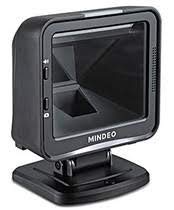
圖4.1: The MINDEO MP-8000 scanner mounted on its adjustable base. This view demonstrates how the scanner sits on the base, providing stability and allowing for optimal positioning on a table or counter.
The scanner is generally plug-and-play, requiring no additional driver installation for most operating systems. It will be recognized as a Human Interface Device (HID) keyboard or a virtual COM port, depending on its default configuration.
5. 操作說明
The MINDEO MP-8000 is designed for ease of use, primarily operating in an auto-sense mode.
- 放置: Position the scanner on a stable surface, ideally using the adjustable base, to ensure the scanning window is clear and accessible.
- 自動感應模式: The scanner is typically configured to automatically detect and scan barcodes when they are presented within its field of view. There is no trigger button to press.
- 掃描條碼: Hold the barcode approximately 0 to 22 cm (0 to 8.6 inches) from the scanner's window. Ensure the entire barcode is within the illuminated scanning area.
- 確認: Upon successful scan, the scanner will emit an audible beep and/or an indicator light will flash, and the barcode data will be transmitted to your connected computer as if typed.
- Adjusting Scan Angle: If using the optional base, you can gently tilt the scanner unit to achieve the best reading angle for various items.
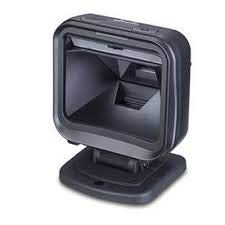
圖5.1: 邊 view of the MINDEO MP-8000 scanner with its adjustable base. This image illustrates the profile of the device, showing how the scanner unit connects to the base and its potential range of motion for angle adjustment during operation.
6、維護保養
妥善維護可確保掃描器的使用壽命長久並發揮最佳效能。
- 清潔掃描視窗: Regularly clean the scanning window with a soft, non-abrasive cloth. For stubborn dirt, slightly dampen the cloth with water or a mild, non-abrasive cleaner. Do not use harsh chemicals or abrasive materials, as they can scratch the window and impair scanning performance.
- 清潔外部: 用柔軟的布擦拭掃描器外部。amp 布料。避免過度潮濕。
- 貯存: 不使用時,請將掃描器存放在清潔乾燥的環境中,避免陽光直射和極端溫度。
- 電纜檢查: Periodically check the USB cable for any signs of damage (fraying, cuts). Replace damaged cables immediately to prevent malfunction or electrical hazard.
7。 故障排除
If you encounter issues with your MINDEO MP-8000 scanner, refer to the following common problems and solutions:
| 問題 | 可能的原因 | 解決方案 |
|---|---|---|
| 掃描器無法開機。 | USB連接線連接不正確或USB連接埠故障。 | Ensure the USB cable is securely connected to both the scanner and the computer. Try a different USB port on the computer. |
| 掃描器無法讀取條碼。 | Barcode is damaged, too far/close, or scanning window is dirty. | Ensure the barcode is clean and undamaged. Adjust the distance (0-22 cm). Clean the scanning window. Verify the barcode type is supported (1D/2D). |
| 條碼資料不正確或不完整。 | Incorrect scanner configuration or damaged barcode. | Ensure the barcode is fully within the scanning area. If issues persist, consult the full programming manual (if available) for configuration settings. |
| 掃描器發出嗶嗶聲,但沒有資料傳輸。 | Host computer not recognizing the scanner as an input device. | Check device manager on your computer to ensure the scanner is recognized. Restart the computer. Try a different USB port. |
8. 規格
Detailed technical specifications for the MINDEO MP-8000 barcode scanner:
- 模型: MP-8000
- 製造商零件號: SDH13
- 連接性: Wired USB Cable
- Readable Barcodes: 1D and 2D (e.g., UPC/EAN, Code 39, QR Code, Data Matrix, PDF417)
- 閱讀距離: 0 至 22 公分(0 至 8.6 吋)
- 掃描速度: 每秒 45 張 (fps)
- 解決: 0.101 mm / 4 mil
- 抗跌落性: Withstands multiple 1.5 m (5 ft) drops to concrete
- 尺寸(長x寬x高): 約 150 x 200 x 80 毫米(5.9 x 7.9 x 3.1 英吋)
- 重量: 約 300 公克(0.66 磅)
- 顏色: 黑色的
- 相容設備: 桌上型電腦、筆記型電腦
- 電源: 有線電源(透過 USB)
9. 保固和支持
For warranty information, please refer to the documentation provided at the time of purchase or contact your retailer. MINDEO products typically come with a standard manufacturer's warranty covering defects in materials and workmanship.
For technical support or service inquiries, please contact your product vendor or the MINDEO authorized service center in your region. Keep your purchase receipt and product serial number handy when seeking support.