
一、簡介
Thank you for choosing the Techsmarter 6-Port Charging Station Supreme. This device is designed to provide efficient and organized charging for multiple electronic devices simultaneously. Please read this manual thoroughly to understand the product's features, setup, and operation, ensuring safe and optimal use.
2. 產品結束view
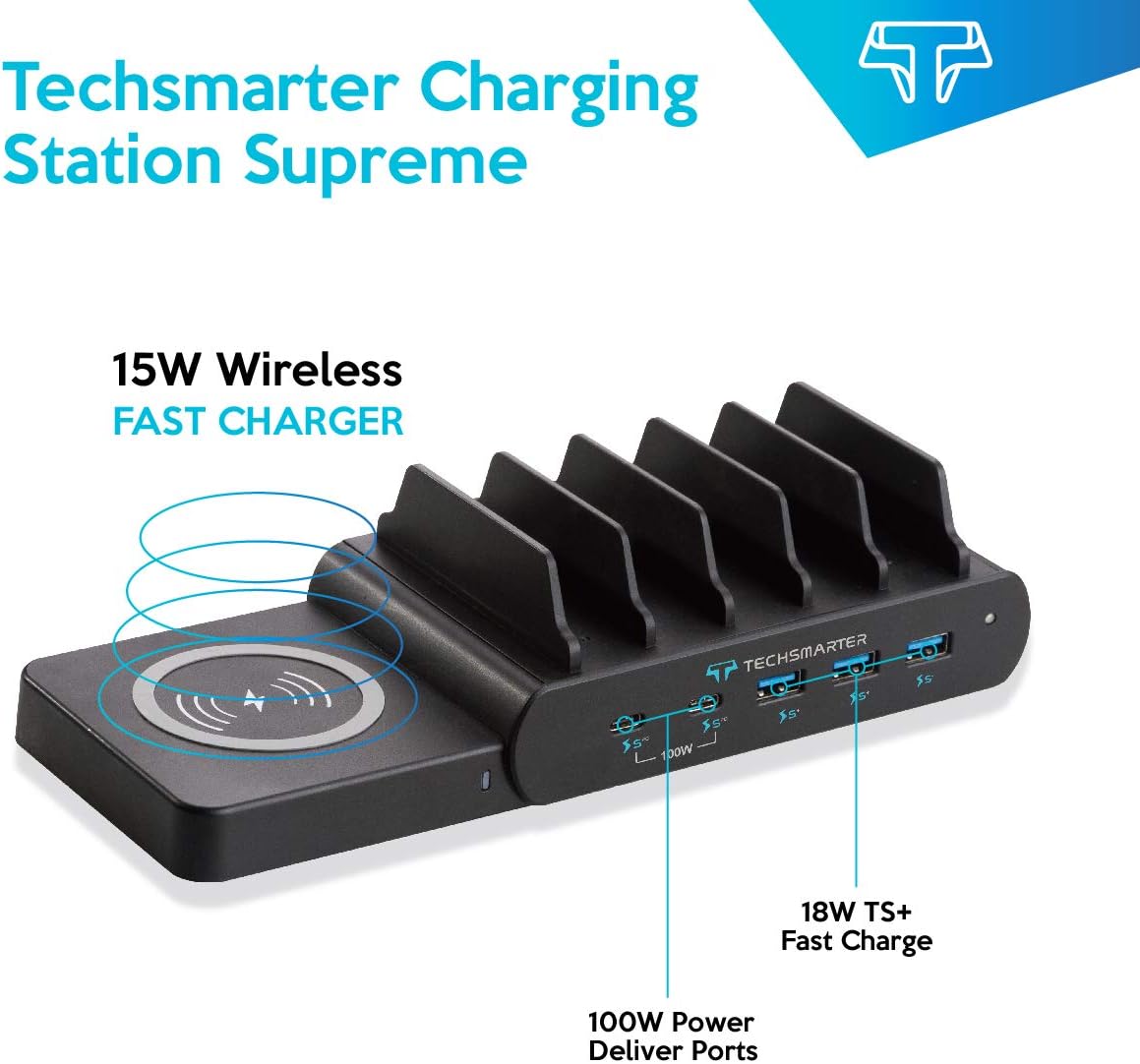
The Techsmarter Charging Station Supreme delivers a total output of 110W across six charging ports. It includes three 18W TS+ USB-A ports, two 100W USB-C Power Delivery (PD) ports, and a detachable 15W wireless charger. The Adaptive Intelligence Charge technology optimizes power distribution, providing up to 100W high-speed charging for a single USB-C device. The unit incorporates TurboGaurd, Techsmarter’s 11-point protection system, for device safety.

This image displays the Techsmarter 6-Port Charging Station Supreme in use, showcasing its ability to charge multiple devices simultaneously, including a tablet and a smartphone, within its integrated slots.
3. 包裝內容
- Techsmarter Charging Station Supreme
- 交流電源轉接器
4. 設定
- 連接交流電源轉接器: Plug the provided AC adapter into the power input port on the back of the charging station. Connect the other end of the AC adapter to a standard wall outlet.
- 放置充電站: Position the charging station on a stable, flat surface with adequate ventilation.
- Attach Wireless Charger (Optional): The 15W wireless charging pad is detachable. Align the connectors and gently push the wireless charger onto the designated side port of the main unit until it clicks into place.
- 整理設備: Utilize the integrated dividers to neatly place your smartphones, tablets, and other devices while they charge.
This image highlights the modular design of the charging station, featuring the detachable 15W wireless charging pad connected to the main unit, ready to charge compatible devices.
5. 操作說明
5.1. USB-C Power Delivery (PD) Ports
- The two USB-C PD ports deliver up to 100W when a single USB-C device is connected.
- When two USB-C devices are connected simultaneously, the power is intelligently allocated, providing up to 50W per port.
- These ports are compatible with devices such as MacBook Air/Pro, iPad Air/Pro, Samsung Tab, ThinkPad, Yoga, Surface, Chromebook, and XPS.
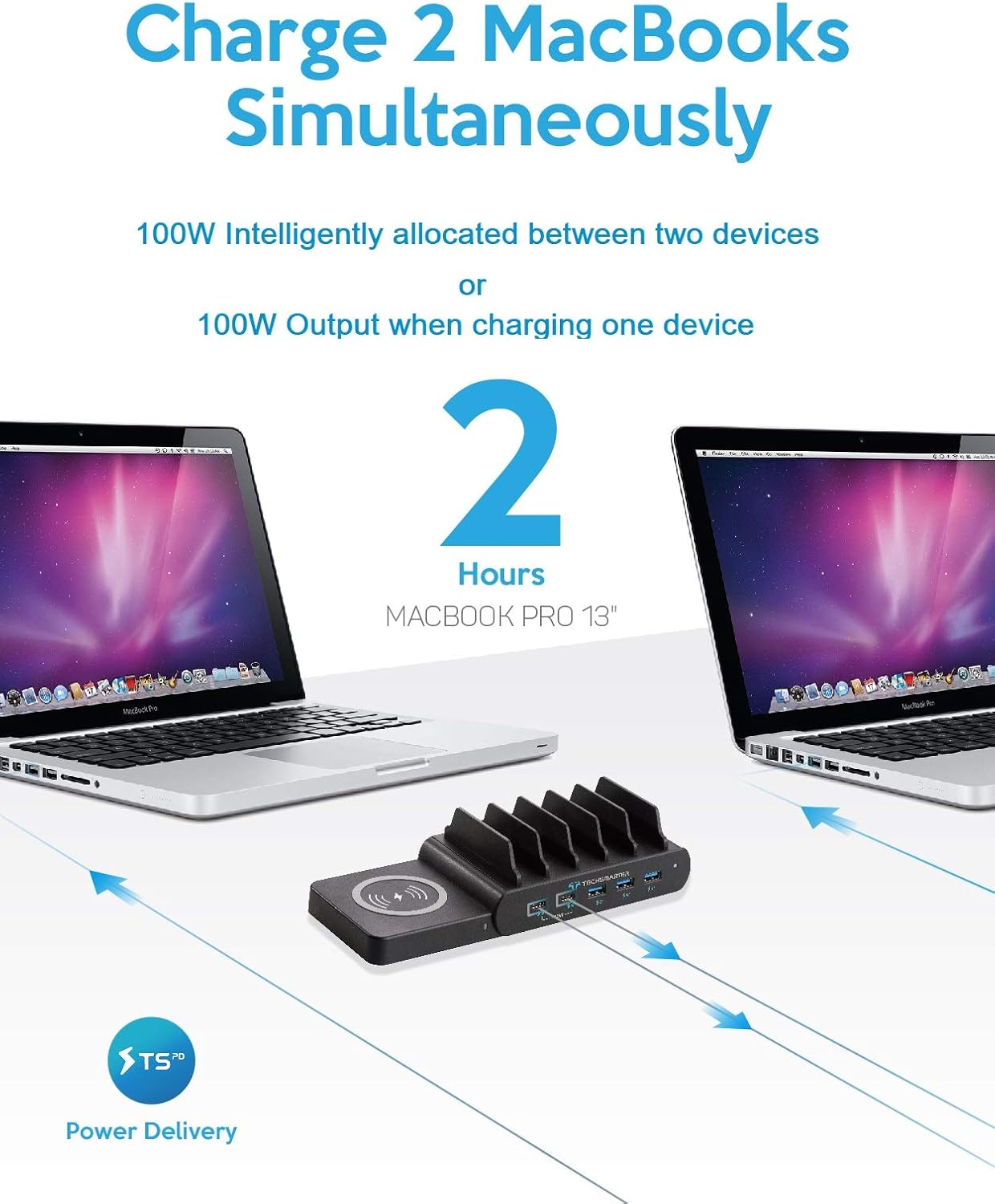
This image illustrates the charging station's capability to power two MacBook Pro 13-inch laptops simultaneously via its USB-C Power Delivery ports, highlighting its high-wattage 輸出。
5.2. USB-A Fast Charging Ports
- The three USB-A ports feature TS+ technology, providing up to 18W fast charging.
- These ports are suitable for fast-charging smartphones and other USB-A compatible devices.

This image demonstrates the station's three 18W TS+ USB-A ports actively fast-charging three smartphones, including an iPhone XS, Samsung S10, and Pixel 3, showcasing its efficiency for mobile devices.
5.3. 15W Detachable Wireless Charger
- The detachable wireless charger provides up to 15W fast wireless charging for compatible devices.
- It supports charging through cases up to 5mm thick, excluding cases with magnetic or metal attachments.
- Place your wireless charging compatible device directly onto the wireless charging pad. Ensure the device is centered for optimal charging.

詳細的 view of the Techsmarter Charging Station, showing the 15W wireless charging pad, the 100W USB-C Power Delivery ports, and the 18W TS+ Fast Charge USB-A ports, with labels indicating their functions.
6、維護保養
- 打掃: Disconnect the charging station from the power outlet before cleaning. Use a soft, dry cloth to wipe the surface. Avoid using abrasive cleaners, solvents, or harsh chemicals.
- 貯存: 長時間不使用時,請將設備存放在陰涼乾燥處,避免陽光直射和極端溫度。
7。 故障排除
- 設備未充電:
- Ensure the charging station is properly connected to a working wall outlet.
- Verify that the charging cable is securely connected to both the device and the charging port.
- 嘗試更換充電線或充電口,排除充電線或充電口的問題。
- For wireless charging, ensure your device is centered on the pad and is wireless charging compatible. Remove any thick or metallic cases.
- 慢速充電:
- Ensure you are using the appropriate port for your device (e.g., USB-C PD for laptops, TS+ USB-A for fast-charging smartphones).
- When two USB-C devices are connected, the power output per port is reduced to 50W. For maximum speed on a single USB-C device, ensure only one is connected to a USB-C PD port.
- Use high-quality charging cables that support fast charging.
- 過熱:
- Ensure the charging station has adequate ventilation and is not covered.
- Avoid placing devices that are not compatible with wireless charging on the wireless pad, as this can cause excessive heat.
- If the device or charging station becomes excessively hot, disconnect it immediately and contact support.
- 設備未通電:
- Check the AC adapter connection to both the charging station and the wall outlet.
- 用其他設備測試牆壁插座,確認其功能正常。
8. 規格
| 特徵 | 規格 |
|---|---|
| 型號 | LS-PD110T-2C |
| 產品尺寸 | 5.98 x 3.7 x 2.2 英寸 |
| 物品重量 | 1.65磅 |
| 總輸出功率 | 110W |
| USB-C PD 連接埠 | 2 x 100W (50W per port when two devices connected) |
| USB-A 連接埠 | 3 x 18W TS+ Fast Charging |
| 無線充電器 | 15W Detachable |
| 輸入音量tage | 12伏 |
| Ampage | 12 Amps |
| 特色 | Fast Charging, Multi Device Charging, Short Circuit Protection, Wireless Charging |
9. 安全訊息
- Use only the provided AC adapter. Using an incompatible adapter may damage the product or connected devices.
- 請勿將充電站暴露在水、潮濕環境或極端溫度下。
- 避免設備跌落或受到劇烈撞擊。
- Do not disassemble, repair, or modify the product. Contact customer support for service.
- 請將本品放在兒童接觸不到的地方。
- Ensure proper ventilation around the charging station during use to prevent overheating.
- The integrated TurboGaurd system provides 11-point protection against overcharge, overcurrent, short circuit, and other electrical hazards.
10. 保固和支持
The Techsmarter 6-Port Charging Station Supreme typically comes with a 1-year limited warranty from the date of purchase. Please refer to your purchase documentation for specific warranty terms and conditions.
For technical support, warranty claims, or any questions regarding your product, please contact Techsmarter customer service through their official web購買該產品的網站或零售商。