
介紹
The VAIS Technology GSR-MZ01 adapter kit allows seamless integration of SiriusXM Satellite Radio into your compatible factory Mazda radio system. This adapter eliminates the need for additional mounts or FM modulation adapters, preserving your vehicle's original aesthetic and functionality. Enjoy a vast array of music, sports, news, and entertainment channels directly through your existing car stereo controls.
包含什麼
驗證包裝中是否存在所有組件:
- GSR 介面適配器
- GSR USB 連接線
- 電源線束
- 車載天線
- SiriusXM Tuner SXV300 (Note: Vehicle Antenna and SiriusXM Tuner SXV300 are included in GSR-TKIT only)
- OBD II 連接器

產品結束viewGSR 連接器和連接埠
Familiarize yourself with the connectors and ports on the GSR Interface Adapter:

- 棕色 USB 連接埠連接器: Connects to the factory USB data port in your vehicle.
- SiriusXM SXV300調諧器的介面連接器: Connects to the SiriusXM tuner module.
- 電源連接器: Connects to the provided power harness.
- LED指示燈: 設備狀態指示器。
- 微型 USB 連接器: 用於固件更新。
相容性
The VAIS Technology GSR-MZ01 is specifically designed for select Factory Mazda models. Please refer to the table below to ensure compatibility with your specific vehicle model and year:

相容型號:
- Yaris / Yaris iA (2018-2019) - With factory USB
- iA (2017) - With factory USB
- Spider (2017-2019) - With Factory USB
- Mazda 3 (2015-2017) - With USB A
- Mazda 6 (2016-2017) - With USB A
- CX3 (2016-2017) - With USB A
- CX5 (2016-2017) - With USB A
- CX9/CX90 (2016-2017) - With USB A
- Miata/MX5 (2017) - With USB A
安裝
請依照以下步驟成功安裝:
- 連接 OBD II 連接器: Connect the provided OBD II connector to your vehicle's OBD II port for power.
- 將GSR連接到工廠USB連接埠: Plug the VAIS adapter into the factory USB data port to send SiriusXM data to the radio. This port is typically found on the dashboard or in the center console.
- 在屋頂安裝天線: For optimal Satellite Radio reception, install the antenna on the highest point of the vehicle's roof. It must be mounted outside the vehicle with a clear view of the sky. Avoid placing it near other antennas or under roof racks.
- 將所有東西安裝在面板後面: Secure the GSR and the SiriusXM tuner module behind the dash panels to keep them hidden and prevent clutter.

Antenna Installation Video Guide
Video 1: This video demonstrates the proper installation of a SiriusXM antenna, including recommended mounting locations and cable routing techniques.
手術
Once installed, activating and using your SiriusXM Satellite Radio is straightforward:
- 啟用訂閱: 連接適配器後,啟動您的 SiriusXM 訂閱。
- 選擇 SiriusXM 音源: Turn on your vehicle and select SiriusXM from the source menu on your factory radio.
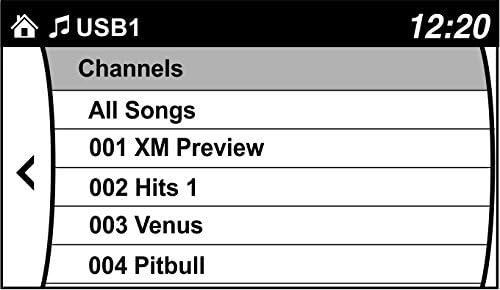
- 瀏覽頻道: Use your factory radio controls and steering wheel controls to browse and enjoy SiriusXM channels. You can also save up to 36 presets.

產品結束view 影片
Video 2: This video highlights the benefits of adding SiriusXM to your factory original radio with the VAIS Technology adapter, showcasing seamless integration and control.
Video 3: This video demonstrates how to quickly add SiriusXM to your factory radio using a GSR adapter, emphasizing the ease of installation and use.
故障排除
如果遇到問題,請考慮以下幾點:
- 沒信號: Ensure the antenna is correctly positioned on the vehicle's roof with an unobstructed view of the sky. Check all cable connections.
- 無電源: Verify the OBD II connector is securely plugged into the vehicle's OBD II port.
- No Audio/Channels: Confirm the USB connection to the factory radio is secure. Ensure your SiriusXM subscription is active.
- 間歇訊號: Re-evaluate antenna placement for optimal reception. Avoid areas with tall buildings or dense foliage.
如需進一步協助,請聯絡 VAIS Technology 客戶支援。
規格
| 型號 | GSR-MZ01 Interface Tuner Kit |
| 品牌 | 威士科技 |
| 連接技術 | USB |
| 調諧器技術 | 衛星 |
| 電源 | 車輛動力 |
| 包含的組件 | Antenna, OBD II connector, SXV300V1 SiriusXM tuner module |
| 物品重量 | 1 磅(16 盎司) |
| 包裝尺寸 | 9.4 x 5.9 x 2.3 英寸 |
保固資訊
For detailed warranty information regarding your VAIS Technology GSR-MZ01 adapter kit, please refer to the warranty card included with your product or visit the official VAIS Technology web網站。請保留購買憑證,以便進行保固索賠。
客戶支援
Should you require technical assistance, have questions about installation, or need to troubleshoot an issue, please contact VAIS Technology customer support. Contact information can typically be found on the product packaging or the official VAIS Technology web地點。