
FEELWORLD FW760
FEELWORLD FW760 7-Inch On-Camera Monitor User Manual
Model: FW760 | Brand: FEELWORLD
介紹
This manual provides detailed instructions for the proper setup, operation, and maintenance of your FEELWORLD FW760 7-inch On-Camera Monitor. Please read this manual thoroughly before using the product to ensure optimal performance and to prevent damage.
產品結束view
The FEELWORLD FW760 is a 7-inch Full HD on-camera monitor designed for professional videography and photography. It features a 1920x1200 resolution IPS panel, 4K HDMI input, and a lightweight, ultra-thin design. Key features include a built-in sunshade and an HDMI lock for secure connections.
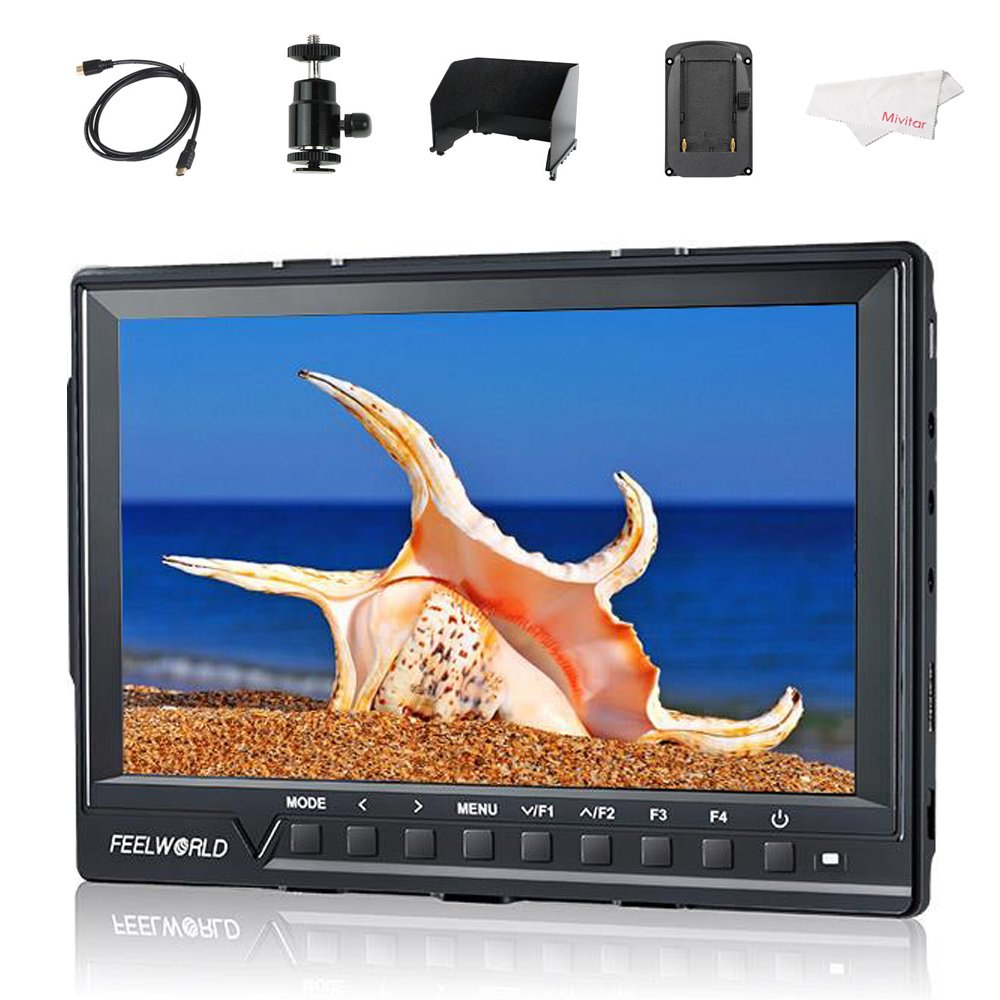
Image: The FEELWORLD FW760 monitor displaying an image, with callouts for Full HD 1920x1200 Resolution, 4K HDMI Input, and 1200:1 Contrast Ratio.
包裝內容
請檢查以下所有物品是否均包含在您的包裹中。如有任何物品缺失或損壞,請聯絡您的零售商。
- 1 × FEELWORLD FW760 Monitor
- 1 × Mini HDMI Cable
- 1 × 遮陽篷
- 1 × Hot Shoe Mount
- 1 × F970 Battery Plate (pre-installed or separate)
- 1 × HDMI Plug Lock
- 1 × 操作手冊(本文檔)

Image: A visual representation of the standard accessories: Mini HDMI Cable, Sun Shade, Hot Shoe Mount, HDMI Plug Lock, Operation Manual, and F970 Battery Plate.
設定說明
1. Attaching the HDMI Plug Lock
The HDMI plug lock secures the HDMI cable to prevent accidental disconnection during operation.
- Locate the HDMI port on the side of the monitor.
- Align the HDMI plug lock with the screw hole next to the HDMI port.
- Insert the HDMI cable into the port.
- Secure the HDMI plug lock by tightening the screw.

圖:後部 view of the monitor, highlighting the HDMI port with the HDMI lock mechanism and the F970 battery plate.

Image: A step-by-step visual guide demonstrating the attachment of the HDMI plug lock to the monitor's HDMI port.
2. Attaching the Sunshade
The sunshade reduces glare and improves screen visibility in bright conditions.
- 將遮陽罩與顯示器螢幕周圍的凹槽對齊。
- Gently slide the sunshade into place until it is securely attached.

Image: The FEELWORLD FW760 monitor with its sunshade fully assembled and attached, providing shade to the screen.

Image: A sequence of images illustrating how to correctly attach the sunshade to the monitor, showing the monitor both with and without the sunshade.
3. Attaching the Hot Shoe Mount
The hot shoe mount allows you to attach the monitor to your camera's hot shoe or other compatible mounting points.
- Screw the hot shoe mount onto the 1/4-inch screw hole at the bottom or side of the monitor.
- Tighten the locking ring on the hot shoe mount to secure it.
- Attach the hot shoe mount to your camera's hot shoe and tighten its locking mechanism.
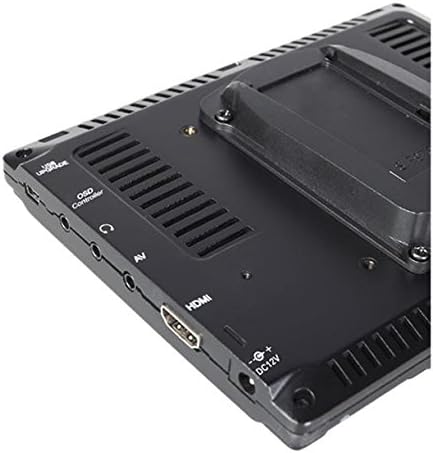
圖片:側面特寫 view of the monitor, detailing the various input/output ports and the threaded mounting point.
4. 將顯示器通電
The monitor can be powered via a DC 12V adapter or an F970 series battery (not included).
- 直流電源: 將 12V 直流電源轉接器連接到顯示器上的 12V 直流輸入連接埠。
- 電池電量: Ensure an F970 battery is securely attached to the F970 battery plate on the back of the monitor.

Image: The back panel of the monitor, showing the DC 12V power input and the F970 battery plate for portable power.
5. 連接攝影機(HDMI)
Use the provided Mini HDMI cable to connect your camera to the monitor.
- Connect one end of the Mini HDMI cable to your camera's HDMI output.
- Connect the other end to the HDMI input port on the FEELWORLD FW760 monitor.
- If installed, ensure the HDMI plug lock is secured.

Image: A close-up of the monitor's input ports, specifically highlighting the 4K HDMI input and listing supported resolutions such as 4K UHD 3840x2160P and 4096x2160P.
設置視頻指南
Video: A visual guide demonstrating the unboxing, assembly of the HDMI lock, sunshade, and hot shoe mount for the FEELWORLD FW760 monitor.
操作說明
基本操作
- 電源開/關: Press and hold the power button (usually located on the front panel) to turn the monitor on or off.
- 菜單導航: Use the 'MENU' button to access the main menu. Use the arrow buttons (<, >) to navigate through options and 'V/F1' or 'F2' to confirm selections.
- 功能鍵(F1-F4): These customizable buttons can be assigned to frequently used functions like False Color, Peaking, Zoom, etc. Refer to the menu settings to configure them.
進階功能
假色
The False Color feature assists in setting exposure by displaying different luminance values as distinct colors. This helps identify overexposed or underexposed areas quickly.

Image: A side-by-side comparison showing a normal image and the same image with the False Color function activated, displaying different exposure levels in various colors.
Zebras Exposure
Zebras indicate areas of the image that are overexposed, helping to prevent blown-out highlights. The zebra pattern appears on parts of the image exceeding a set luminance threshold.

Image: A comparison showing a normal image of a horse and the same image with Zebras Exposure activated, indicating overexposed areas with diagonal stripes.
變焦功能
The zoom function allows you to magnify a portion of the image for critical focus assessment. Multiple zoom levels are available.

Image: Four screen captures illustrating different zoom modes: Normal Mode, 1.3X zoom, 2.0X zoom, and 2.0X magnified view.
圖像翻轉
This feature allows you to flip the image horizontally, vertically, or both, which is useful when the monitor is mounted in unconventional positions.

Image: Four images demonstrating the Image Flip function: Normal image, Horizontal flip, Vertical flip, and Horizontal & Vertical flip.
九格
The Nine Grid function overlays a 3x3 grid on the screen, assisting with composition using the rule of thirds.

Image: A split image showing the Nine Grid overlay for composition on one side and a zoomed-in portion of an image on the other.
像素到像素
This mode displays the image at its native resolution without scaling, allowing for precise focus checking.

Image: A comparison showing an image in normal display mode versus Pixel to Pixel mode, highlighting the unscaled, native resolution view.
規格
| 特徵 | 細節 |
|---|---|
| 螢幕尺寸 | 7英寸 |
| 解決 | 1920x1200(全高清) |
| 面板類型 | IPS |
| View中角 | 160°寬 |
| 對比 | 1200:1 |
| 亮度 | 450 cd/平方米 |
| HDMI輸入 | 4K HDMI (Supports 4K UHD 3840x2160P, 4096x2160P) |
| 厚度 | 17毫米 |
| 重量 | 270 克(0.6 磅) |
| 商品重量(包裝後) | 1.9磅 |
| 電源輸入 | DC 12V,F970 板 |
| 特色 | HDMI Lock, Built-in Sunshade, Histogram, False Color, Zebras, Zoom, Image Flip, Nine Grid, Pixel to Pixel |

Image: A visual representation of the monitor's 160° wide viewing angles, showing consistent image quality from various perspectives.

圖:A 面 view of the monitor emphasizing its ultra-thin profile, measuring 17mm in thickness.
故障排除
- 無電源: Ensure the DC power adapter is correctly connected or the F970 battery is fully charged and properly seated.
- 沒信號: Verify that the HDMI cable is securely connected to both the camera and the monitor. Check camera output settings. Ensure the HDMI lock is engaged.
- 影像問題: If the image is distorted or incorrect, check the input resolution settings on both the camera and the monitor. Reset monitor settings to default if necessary.
- 按鈕無響應: Power cycle the monitor. If the issue persists, contact customer support.
維護
- 打掃: 使用柔軟的乾布清潔顯示器螢幕和機身。若要頑固污漬,可輕輕擦拭。amp cloth with a mild, non-abrasive cleaner suitable for electronics can be used. Avoid harsh chemicals.
- 貯存: Store the monitor in a cool, dry place away from direct sunlight and extreme temperatures. Use the sunshade or a protective case during transport.
- 電池保養: If using battery power, follow the manufacturer's guidelines for battery charging and storage to prolong battery life.
保固和支持
For warranty information, technical support, or service inquiries, please refer to the warranty card included with your product or visit the official FEELWORLD web網站。請保留您的購買收據,作為保固索賠的購買憑證。
Official FEELWORLD Store: 造訪亞馬遜上的 FEELWORLD 商店
相關文件 - 韌體760
 |
FEELWORLD T7 7吋4K HDMI機載監視器使用手冊 FEELWORLD T7 7吋全高清IPS機載監視器使用手冊。具備4K HDMI輸入/輸出、1920x1200分辨率,以及適用於攝影和廣播的高級視訊輔助功能。 |
 |
Feelworld T7 PLUS 7吋全高清機載監視器使用手冊 Feelworld T7 PLUS 7吋全高清機載監視器使用手冊,詳細介紹其功能、操作和技術規格。了解其4K HDMI輸入/輸出、3D LUT、直方圖和對焦輔助等進階功能,以及如何使用其各種設定。 |
 |
Feelworld 7" 4K HDMI On-Camera Monitor User Manual Comprehensive user manual for the Feelworld 7-inch 4K HDMI On-Camera Monitor, detailing its features, operation, menu functions, technical specifications, and troubleshooting. Includes setup, usage, and advanced settings for professional video production. |
 |
FEELWORLD F6 Plus:顯示器 Táctil 3D LUT 全高清 5.5 英寸,帶 HDMI 4K - 使用手冊 FEELWORLD F6 Plus 5.5 全高清顯示器使用手冊。包括專業監測儀的技術規格、功能指南、使用說明和預防措施。 |
 |
ZK-75 房車門智慧鎖:自動、超薄、安全 探索 ZK-75,這是一款全自動房車門智慧鎖,具備一鍵鎖定/解鎖功能、超薄合金外殼、防窺密碼系統和耐候矽膠鑰匙。了解其安裝、功能和規格。 |
 |
FEELWORLD FW759 PRO 7吋觸控相機監視器 - 功能、規格和概述view 詳細過view 本文詳細介紹了FEELWORLD FW759 PRO 7吋觸控螢幕攝影機監視器,包括主要功能、輔助功能、技術參數、結構和電源選項。是專業攝影的理想選擇。 |
Ask a question about this manual
Ask about setup, troubleshooting, compatibility, parts, safety, or missing instructions. Manuals+ will review the question and use this page’s manual context to help answer it.