介紹
The Canon Speedlite 600EX II-RT is designed to provide powerful and responsive flash performance with advanced wireless communication capabilities. This unit offers improved continuous performance, enabling faster firing rates. It incorporates new Quick Flash settings and a flash-readiness indicator to ensure reliable shutter operation. The Speedlite 600EX II-RT features enhanced button and dial controls, a dust- and water-resistant body, and includes accessories for various lighting effects. This manual provides essential information for setting up, operating, and maintaining your Speedlite.

正面 view of the Canon Speedlite 600EX II-RT flash unit, showcasing its main flash head and infrared assist beam window.
主要特點
- Improved Continuous Flash Performance: Offers approximately 1.1 to 1.5 times faster continuous flash performance, and up to 2.0 times faster when used with the optional Compact Battery Pack CP-E4N.
- Wireless Flash Shooting Support: Supports both radio and optical transmission, providing extended functional range for diverse flash setups.
- Multiple Flash System: Allows control of up to five groups of flashes for complex lighting arrangements.
- 電源: Operates on four AA-size/LR6 alkaline or AA/HR6 Ni-MH batteries.
- 耐用的結構: Features a refined dust- and water-resistant body for reliable use in various environments.
盒子裡有什麼
Upon unboxing your Canon Speedlite 600EX II-RT, verify that all the following items are included:
- Speedlite 600EX II-RT unit
- 軟包
- 迷你支架
- Bounce Adapter
- Color Filter (SCF-E3OR1 and SCF-E3OR2)
- 使用說明書(本文件)
- 保固卡
設定
1. 安裝電池
Open the battery compartment door located on the side of the Speedlite. Insert four AA-size alkaline or Ni-MH batteries, ensuring correct polarity (+/-) as indicated inside the compartment. Close the battery door securely until it latches.
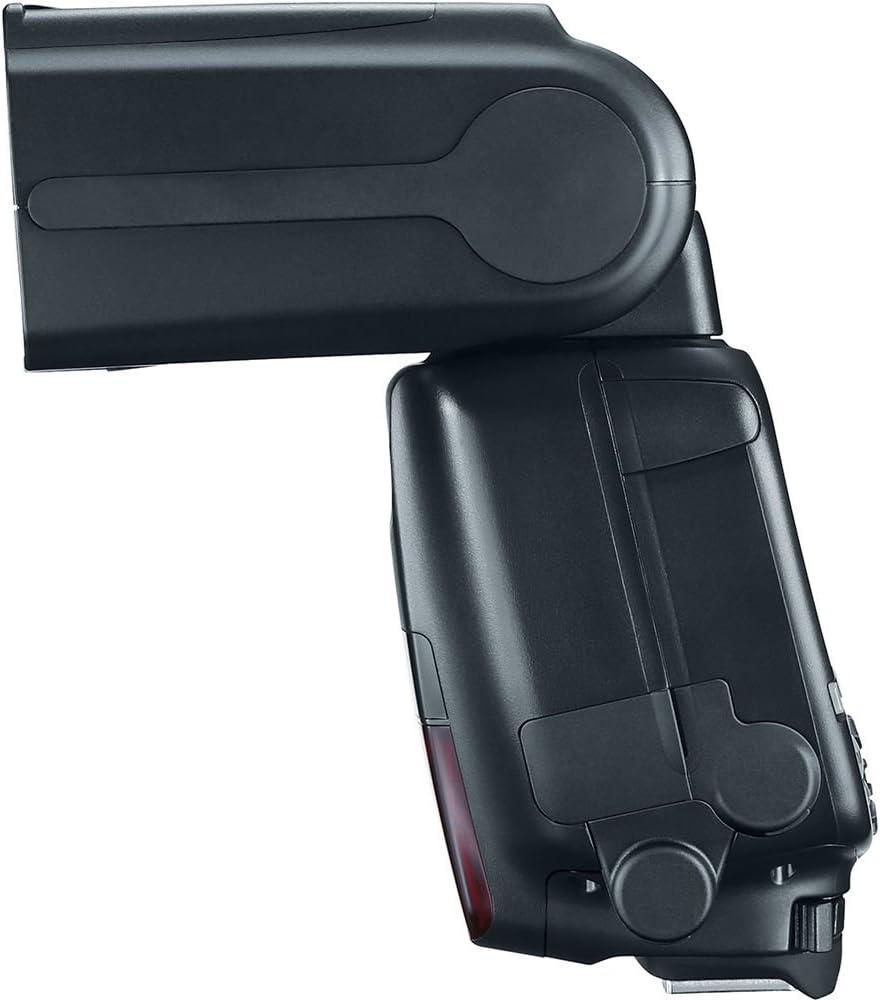
邊 view of the Speedlite, illustrating the location of the battery compartment.
2. 連接到相機
Slide the Speedlite's mounting foot into your camera's hot shoe until it clicks into place. Rotate the locking lever to secure the flash unit firmly to the camera. Ensure a snug fit to maintain proper electrical contact.
3. 首次上電
Flip the power switch to the 'ON' position. The LCD panel will illuminate, and the flash-readiness indicator will light up when the flash is charged and ready to fire.
Video demonstrating the physical details, ports, and build quality of the Canon 600EX II-RT Speedlite, including battery installation and head articulation.
Operating the Speedlite
1. 控制面板結束view
The rear LCD panel and buttons allow for comprehensive control over the Speedlite's functions. Use the 'MODE' button to cycle through flash modes (E-TTL II/E-TTL, Manual, Multi, etc.). The 'SEL/SET' dial and surrounding buttons are used for navigating menus and adjusting settings.
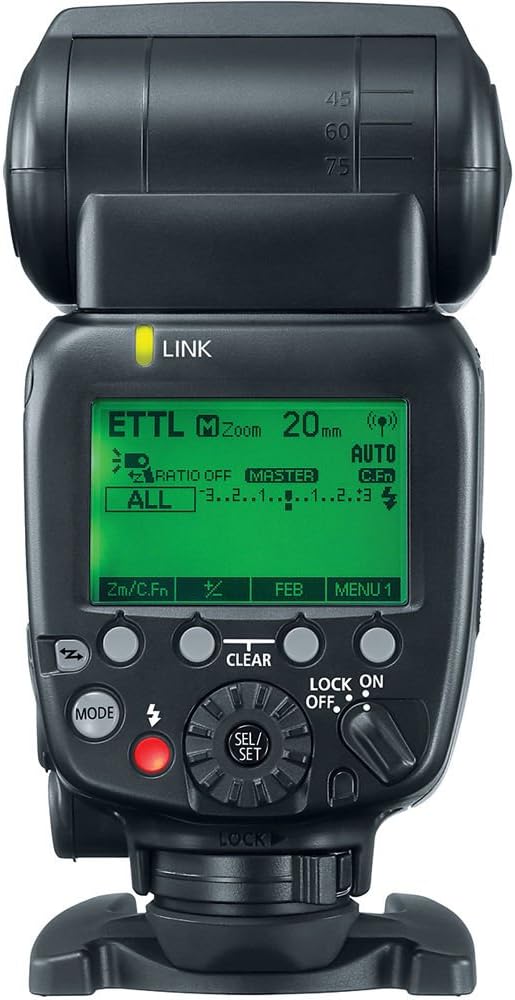
後部 view of the Speedlite, highlighting the LCD display and control interface.
2. 調整閃光燈頭角度
The flash head can be rotated horizontally and vertically to bounce light off ceilings or walls for softer illumination. Press the release button on the side of the flash head to adjust its angle. Ensure the head locks into position after adjustment.

Illustrative sequence of the Speedlite's flash head rotation capabilities.
3. Using the Built-in Bounce Card and Wide Panel
The Speedlite includes a built-in bounce card and wide panel. Pull out the white panel from the flash head to use the bounce card, which helps create catchlights in subjects' eyes when bouncing the flash. The wide panel can be extended to cover wider focal lengths, ensuring even light distribution.

正面 view of the Speedlite with the bounce card extended for softer light.
4. Wireless Flash Operation
The 600EX II-RT supports both radio and optical wireless transmission. To use wireless functions, set the Speedlite to Master or Slave mode via the control panel. Refer to your camera's manual for specific settings related to external flash control.
5. 使用彩色濾光片
Attach the included color filters to the flash head to adjust the color temperature of the flash output, matching ambient light or creating creative effects.

Speedlite with an orange color filter, used to adjust flash color temperature.
維護
打掃
Wipe the Speedlite body with a soft, dry cloth. For stubborn dirt, use a cloth lightly dampened with water. Do not use organic solvents such as paint thinner or benzine. Clean the electrical contacts on the mounting foot with a clean, dry cloth to ensure proper communication with the camera.
貯存
When storing the Speedlite for extended periods, remove the batteries to prevent leakage and corrosion. Store the unit in a cool, dry place away from direct sunlight and extreme temperatures. Use the provided soft case for protection.
故障排除
- 閃光燈不亮: Check battery levels and ensure they are inserted correctly. Verify the Speedlite is securely mounted to the camera's hot shoe. Confirm the flash is powered on and the flash-readiness indicator is lit.
- 曝光錯誤: Ensure the flash mode (E-TTL II/E-TTL or Manual) is appropriate for your shooting conditions. Adjust flash output compensation if necessary. Check camera settings for flash synchronization.
- 無線通訊問題: Verify that both the master and slave units are set to the correct channel and group. Ensure there are no obstructions between the units. Check for interference from other radio devices.
- 過熱: Continuous rapid firing can cause the flash head to overheat. If the overheating warning appears, allow the flash to cool down before resuming use.
規格
| 特徵 | 規格 |
|---|---|
| 產品尺寸 | 4.8 x 3.1 x 5.6 英寸 |
| 物品重量 | 1.29磅 |
| 產品型號 | 600EX II-RT |
| 所需電池 | 4 顆 AA 電池 |
| 電池壽命 | Approximately 100-700 flashes (depending on battery type and usage) |
| 兼容的安裝 | 佳能 |
| 相機閃光燈類型 | Shoe Mount, Slave |
| 閃光同步速度 | 1/200 (varies by camera model) |
| 製造商 | 佳能相機美國 |
保固和支持
For warranty information and technical support, please refer to the Warranty Card included in your product packaging or visit the official Canon web網站。請保留購買憑證,以便進行保固索賠。
線上資源: For additional support, firmware updates, and detailed guides, visit the 佳能商店.