
Hantek 6074BE
Hantek 6074BE 數位示波器使用手冊
型號:6074BE | 品牌:漢泰克
一、簡介
The Hantek 6074BE is a 4-channel USB digital oscilloscope designed for a wide range of applications, including automotive diagnostics, electronic circuit testing, and general laboratory use. It features a 70MHz bandwidth, 1GSa/s real-time sampling rate, and high input sensitivity, making it a versatile tool for waveform analysis. This device connects to a computer via USB, utilizing software for display and control, and supports various Windows operating systems.
2. 安全訊息
Please read and understand all safety instructions before operating the Hantek 6074BE oscilloscope. Failure to follow these instructions may result in injury or damage to the instrument.
- 電氣安全: Always ensure proper grounding when connecting the oscilloscope to a power source or test circuit. Avoid contact with live circuits.
- 環境條件: Operate the device in a dry environment, away from moisture, dust, and direct sunlight. Maintain appropriate temperature and humidity levels as specified in the technical data.
- 探頭用途: Use only probes supplied or recommended by Hantek. Ensure probes are correctly calibrated and rated for the voltage 被測量。
- 維護: 請勿嘗試開啟或修理設備。所有維修工作應由合格人員進行。
3. 包裝內容
Verify that all items listed below are present in your package. If any items are missing or damaged, please contact your supplier.
- Hantek 6074BE 數位示波器單元
- 示波器探頭(數量:4)
- USB 線
- 軟件安裝光盤
- Test Leads and Accessories (e.g., alligator clips, test hooks)

圖3.1: The Hantek 6074BE oscilloscope unit shown with its standard accessories, including probes, test leads, USB cable, and software CD.
4. 產品結束view
The Hantek 6074BE is a compact, black-cased unit with four BNC input connectors on one side and USB interfaces on the other. The device is designed for robust use with protective end caps.
4.1 Front Panel (Input Side)
- CH1, CH2, CH3, CH4 BNC Connectors: These are the four analog input channels for connecting oscilloscope probes. Each channel can serve as a trigger source.
4.2 Rear Panel (Interface Side)
- USB介面: Standard USB 2.0 port for connecting the oscilloscope to a computer. This port also provides power to the device.
- USBXI介面: An additional interface for specific system integrations.
- PRG按鈕: Program button, typically used for firmware updates or specific functions.
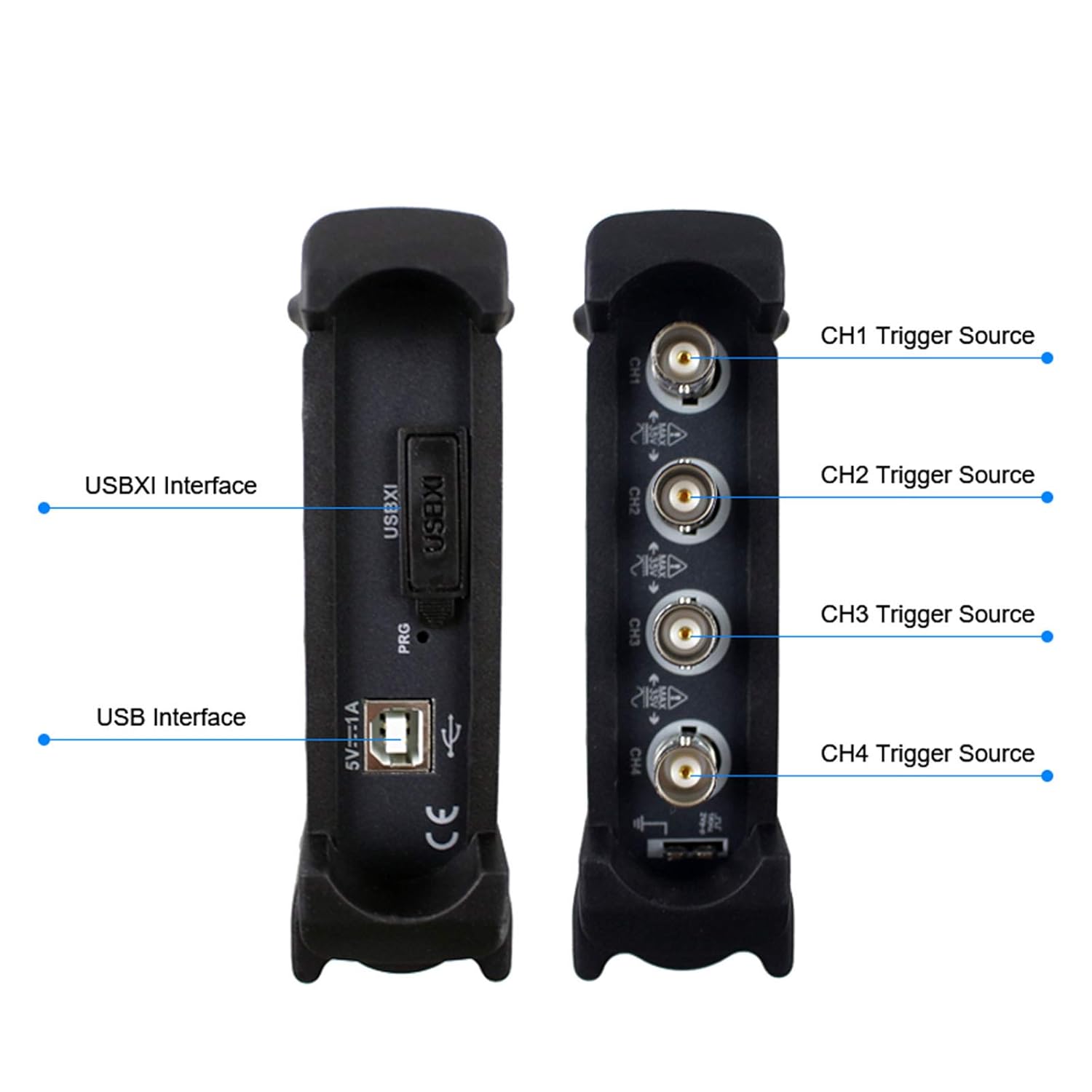
圖4.1: 詳細的 view of the Hantek 6074BE's interfaces, showing the USBXI, USB, and the four BNC input channels (CH1-CH4) with their respective trigger source labels.

圖4.2: 頂部 view of the Hantek 6074BE digital oscilloscope, displaying the Hantek brand logo.
5. 設定
5.1 系統要求
The Hantek 6074BE oscilloscope requires a computer running one of the following operating systems:
- 視窗10
- 視窗8
- 視窗7
5.2 硬件連接
- Connect one end of the supplied USB cable to the USB port on the Hantek 6074BE unit.
- Connect the other end of the USB cable to an available USB 2.0 port on your computer. The device will power on automatically.
- Attach the oscilloscope probes to the desired BNC input channels (CH1-CH4) on the oscilloscope.
5.3 軟體安裝
- Insert the provided software installation CD into your computer's CD/DVD drive. If your computer does not have a CD drive, download the latest software and drivers from the official Hantek web網站(www.hantek.com).
- Follow the on-screen instructions to install the Hantek oscilloscope software and necessary drivers. It is crucial to install the drivers for the device to be recognized by your operating system.
- 安裝完成後,如果出現提示,請重新啟動電腦。

圖5.1: The Hantek 6074BE oscilloscope connected to a desktop computer, demonstrating a typical setup for operation.
6. 操作說明
6.1 啟動軟體
After successful installation, launch the Hantek oscilloscope application from your desktop shortcut or Start Menu. The software interface will appear, ready to display waveforms.
6.2 Basic Waveform Display and Control
Connect your probes to the circuit under test. The software provides controls for adjusting vertical scale (Volts/Div), horizontal scale (Time/Div), and trigger settings. Use the on-screen menus and controls to:
- 調整垂直刻度: 設定音量tage per division for each channel (2mV-10V/DIV).
- 調整水平比例: Control the time base for viewing waveforms.
- Position Waveforms: Move waveforms vertically and horizontally on the screen.
- Enable/Disable Channels: Turn individual channels on or off as needed.
6.3 測量函數
The Hantek 6074BE software includes over 20 types of automatic measurement functions to analyze waveform parameters. These include peak-to-peak voltage,RMS 體積tage, frequency, period, and more. Additionally, a PASS/FAIL check function allows for automated testing against predefined limits.
6.4 Trigger Functions
The oscilloscope features resourceful trigger functions to stabilize and capture specific events in a waveform. Common trigger types include Edge, Pulse, Video, Slope, and Alternate. Configure the trigger source (CH1-CH4), level, and slope to capture the desired signal.
6.5 Waveform Record and Replay
The software allows for recording and replaying waveforms, which is useful for capturing transient events or analyzing signals over extended periods. This function enables detailed post-acquisition analysis.

圖6.1: The Hantek 6074BE oscilloscope connected to a computer, showing the software interface with multiple waveform displays and diagnostic options.

圖6.2: The Hantek 6074BE oscilloscope in use, connected to a circuit board and displaying waveforms on a tablet, illustrating its portability and application versatility.
7、維護保養
7.1 清潔
To clean the exterior of the oscilloscope, use a soft, damp 用布擦拭。請勿使用研磨性清潔劑或溶劑,因為這些會損壞塗層。asing. Ensure the device is powered off and disconnected from all circuits before cleaning.
7.2 儲存
When not in use, store the Hantek 6074BE in a dry, dust-free environment at a moderate temperature. Protect the BNC connectors and USB ports from dust and physical damage by using protective caps if available.
7.3 探針保養
Handle oscilloscope probes with care. Avoid bending or stressing the probe cables excessively. Store probes properly to prevent damage to the tips and connectors. Periodically check probe compensation for accurate measurements.
8。 故障排除
This section provides solutions to common issues you might encounter with your Hantek 6074BE oscilloscope.
| 問題 | 可能的原因 | 解決方案 |
|---|---|---|
| 計算機無法辨識該設備。 | Drivers not installed or corrupted; loose USB connection. | Ensure USB cable is securely connected. Reinstall the device drivers from the provided CD or Hantek web網站。請嘗試使用其他 USB 連接埠。 |
| 未顯示波形 | Probe not connected; channel disabled; incorrect trigger settings; signal too small or too large. | Verify probe connection to the circuit and oscilloscope. Ensure the channel is enabled in the software. Adjust trigger level and mode. Adjust vertical (Volts/Div) and horizontal (Time/Div) scales. |
| Unstable or rolling waveform | 觸發器設定不正確。 | Adjust the trigger level to a stable point on the waveform. Change the trigger type (e.g., to Edge trigger). Ensure the trigger source is correctly selected. |
| 測量不準確 | Probe compensation incorrect; incorrect probe attenuation setting in software. | Perform probe compensation adjustment. Verify that the probe attenuation setting in the software matches the physical probe (e.g., 1X, 10X). |
9. 規格
The following table details the technical specifications of the Hantek 6074BE Digital Oscilloscope.
| 範圍 | 規格 |
|---|---|
| 模擬頻寬 | 70兆赫 |
| 實時 Samp靈率 | 1 GSa/秒 |
| 頻道 | 4 中文 |
| 垂直分辨率 | 8 位元 |
| 記憶體深度 | 64K |
| 輸入靈敏度 | 2mV-10V/DIV |
| 介面 | USB 2.0(即插即用) |
| 作業系統支援 | Windows 10、Windows 8、Windows 7 |
| 自動測量 | 20+ types, including PASS/FAIL Check |
| 製造商 | 漢泰克 |
| 統一產品程式碼 | 718760121131 |

圖9.1: Visual representation of key specifications for the Hantek 6074BE, highlighting its 70MHz analog bandwidth, 64K storage depth, and 1GSa/s real-time samp玲率。

圖9.2: The bottom panel of the Hantek 6074BE, displaying the model number, bandwidth, sample rate, and a QR code for additional information or support.
10. 保固和支持
Warranty information for the Hantek 6074BE Digital Oscilloscope is typically provided with your purchase documentation. Please refer to the warranty card or contact your point of purchase for specific details regarding warranty coverage and duration.
For technical support, software updates, or additional resources, please visit the official Hantek web地點:
Ask a question about this manual
Ask about setup, troubleshooting, compatibility, parts, safety, or missing instructions. Manuals+ will review the question and use this page’s manual context to help answer it.