
AGPTEK HA0021H-MB1
AGPTEK Hands-Free Call Center Noise Cancelling Corded Monaural Headset Instruction Manual
Model: HA0021H-MB1
一、簡介
Thank you for choosing the AGPTEK Hands-Free Call Center Noise Cancelling Corded Monaural Headset. This manual provides essential information for setting up, operating, and maintaining your headset to ensure optimal performance and longevity. Designed for desk telephones, this headset offers clear communication and comfortable wear for extended periods.
Key features of your headset include:
- Clear Chat Design: Built-in flexible adjustable microphone for loud and clear voice pickup, reducing unwanted background noise.
- Durability & Wearability: Constructed with a flexible metal hose for positioning accuracy and a helical headphone cable to prevent damage.
- 穿著舒適: Features an adjustable headband and fluffy earpads with memory foam for extended comfort. Includes hearing protection technology.
- 方便使用: Direct connect over-the-head headset, requiring no additional amplifiers or adapters.
- RJ9 Compatibility: Specifically designed for desk telephones with an RJ9 jack. Not compatible with computers.
2. 產品結束view
The AGPTEK Monaural Headset consists of the headset unit and an inline control box with an RJ9 crystal head connector.
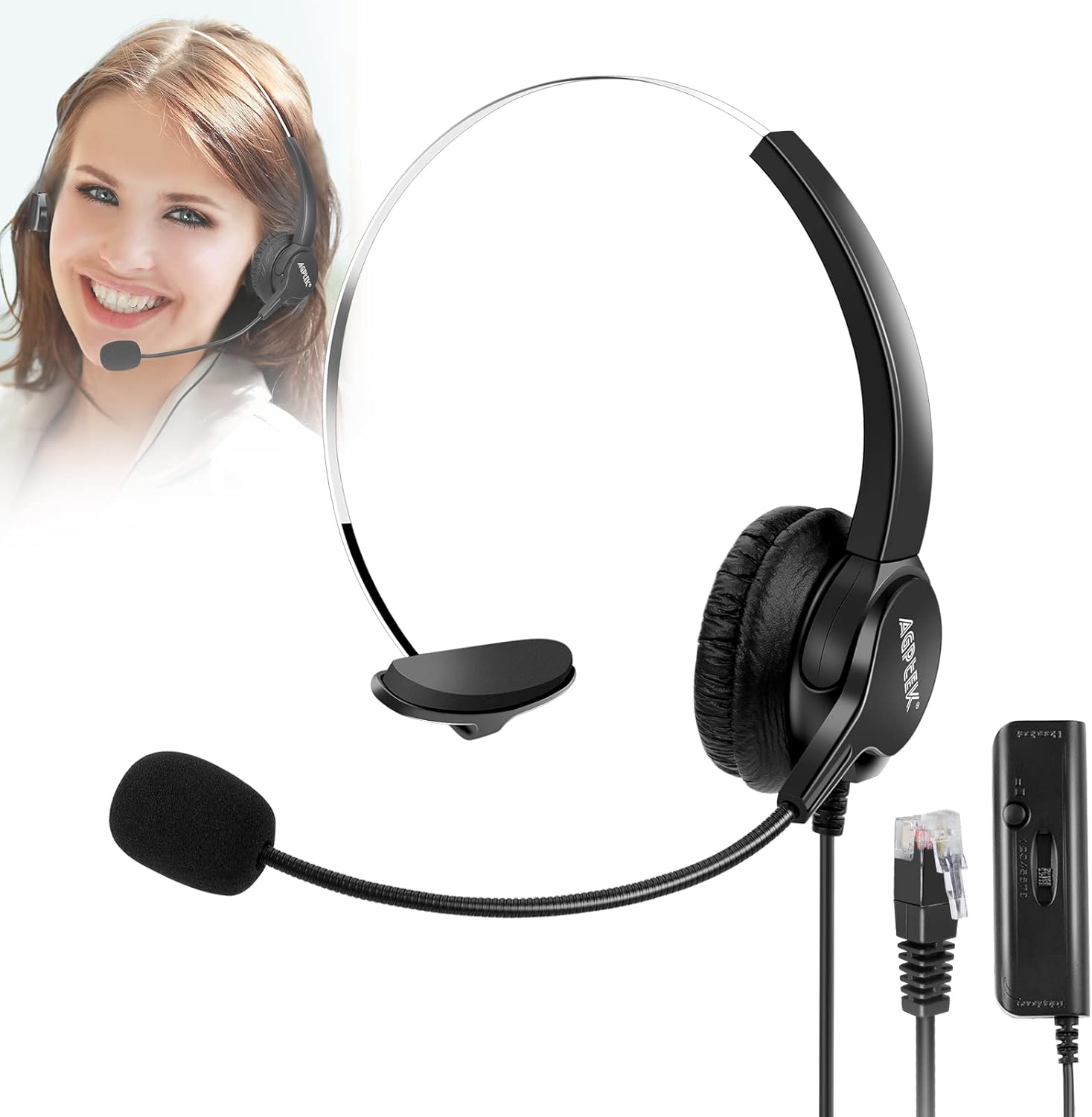
Figure 2.1: AGPTEK Monaural Headset components.
2.1 耳機功能
- 可調節頭帶: The headband can be adjusted to fit various head sizes, ensuring a secure and comfortable fit.
- Soft Ear Pad with Memory Foam: The earpad is designed with memory foam for enhanced comfort during long periods of use.
- 330°可旋轉麥克風: The microphone boom can be rotated 330 degrees, allowing you to position it optimally for voice pickup or move it out of the way when not in use.

Figure 2.2: Detailed features of the headset, including adjustable headband and rotatable microphone.
2.2 Inline Control Box
The inline control box provides convenient access to essential functions:
- 靜音按鈕: 按可使麥克風靜音或取消靜音。
- 音量滑塊: 調節收聽音量。
- 8 Channels Switch: This switch allows you to select the correct channel for compatibility with various desk telephone systems.

Figure 2.3: The inline control box with its features.
3. 設定
This headset is designed for direct connection to desk telephones equipped with an RJ9 jack. It is not compatible with computers or mobile phones.
- 連接耳機: Plug the RJ9 crystal head connector from the inline control box into the headset port (RJ9 jack) on your desk telephone. Ensure it clicks securely into place.
- Select the Correct Channel: The inline control box features an 8-channel switch. Different telephone models may require different channel settings for proper audio and microphone function. Slide the switch through the 8 available channels (1-8) until you find the one that provides clear incoming and outgoing audio.

Figure 3.1: Headset connection to a landline phone.
Video 3.1: Demonstrates the setup and key features of the AGPTEK headset, including microphone flexibility, adjustable headband, memory foam earpads, and the control box functions.
4. 操作說明
4.1 配戴耳機
Place the headset over your head with the earpad resting comfortably on one ear. Adjust the headband to ensure a snug yet comfortable fit. Position the microphone boom so that the microphone is approximately 1-2 inches from your mouth for optimal voice pickup.

Figure 4.1: Proper wearing and comfort of the headset in a professional setting.
4.2 使用麥克風
The microphone features noise-cancelling technology to minimize background noise, ensuring clear conversations. The 330° rotatable design allows you to easily adjust the microphone's position or swing it upwards when not speaking.

Figure 4.2: The noise-cancelling microphone in action.
4.3 線上控制功能
- 沉默的: Press the mute button on the inline control box to temporarily disable the microphone. Press it again to unmute.
- 音量調整: Use the volume slider on the inline control box to increase or decrease the listening volume.
Video 4.1: Demonstrates the headset's features, including the flexible microphone, adjustable headband, and the functionality of the inline control box with mute and channel selection.
5、維護保養
Proper care will extend the life of your AGPTEK headset.
- 打掃: Wipe the headset and control box with a soft, dry cloth. For the earpads, use a slightly damp cloth if necessary, and allow them to air dry completely before use. Avoid using harsh chemicals or abrasive cleaners.
- 貯存: 請將耳機存放在乾淨乾燥的地方,避免極端溫度和陽光直射。
- 電纜護理: Avoid sharp bends or excessive pulling on the cable to prevent internal damage. The helical design of the cable helps prevent tangling.
6。 故障排除
| 問題 | 可能的原因 | 解決方案 |
|---|---|---|
| 沒有聲音或聲音失真 | Incorrect channel setting; loose connection; telephone compatibility issue. |
|
| 麥克風不工作 | Microphone muted; incorrect channel setting; microphone not positioned correctly. |
|
| 通話期間的迴聲或回饋 | Incorrect channel setting; volume too high. |
|
If you continue to experience issues after trying these solutions, please refer to the support information in Section 8.
7. 規格
| 特徵 | 細節 |
|---|---|
| 型號名稱 | language _ tag |
| 連接技術 | 有線 |
| 包含的組件 | 耳機 |
| 年齡範圍(描述) | 成人 |
| 材料 | 塑膠、金屬 |
| 產品的具體用途 | 呼喚 |
| 產品推薦用途 | 呼喚 |
| 相容設備 | 電話 |
| 控制類型 | 語音控制 |
| 電纜特性 | 可伸縮 |
| 物品重量 | 7 盎司 |
| 頻率範圍 | 20赫茲-20千赫 |
| 客戶包裹類型 | 標準包裝 |
| 單位數量 | 1.0 計數 |
| 風格 | 經典的 |
| 控制方式 | 觸碰 |
| 商品數量 | 1 |
| 聽筒形狀 | 貼耳式 |
| 系列號 | 21 |
| 統一產品程式碼 | 700697077810 700697068122 757440654361 |
| 全球貿易識別號 | 00700697077810 |
| 製造商 | AGPtEK |
| 包裝尺寸 | 7.56 x 5.55 x 1.46 英寸 |
| 產品型號 | HA0021H |
| 已被製造商停產 | 不 |
| 材料類型 | 塑膠、金屬 |
| 尺寸 | 單耳耳機 |
| 製造商零件號 | HA0021H-MB1 |
| ASIN | B00OUKCSEM |
| 首次可用日期 | 24 年 2014 月 XNUMX 日 |
| 品牌 | 愛普泰克 |
| 顏色 | 單耳耳機 |
| 耳朵放置 | 貼耳式 |
| 外形尺寸 | 貼耳式 |
| 噪音控制 | 主動降噪 |
8. 保固和支持
AGPTEK offers a 30-day return policy for this headset. If you are unsatisfied with the product, you may return it within 30 days of purchase.
For technical support, troubleshooting assistance beyond what is provided in this manual, or warranty inquiries, please contact the seller or AGPTEK customer service directly. Refer to your purchase documentation for specific contact details.
Ask a question about this manual
Ask about setup, troubleshooting, compatibility, parts, safety, or missing instructions. Manuals+ will review the question and use this page’s manual context to help answer it.