
介紹
The BenQ SP890 is a high-performance Full HD 1080p projector designed for conference rooms and large venues. It delivers exceptional brightness and resolution, ensuring clear and vibrant presentations. This manual provides essential information for setting up, operating, maintaining, and troubleshooting your BenQ SP890 projector.

Image: The BenQ SP890 projector displaying a large, detailed image of a cathedral interior with stained glass windows, demonstrating its high-resolution projection capabilities suitable for large-scale presentations.
主要特點
- Premium Full HD 1080p Resolution: Delivers crisp and detailed images with 1920 x 1080 resolution.
- Brilliant Visual Performance: Features 4000 ANSI lumen brightness and a 50,000:1 contrast ratio for vivid and clear projections.
- Hollywood Quality Video (HQV) Image Quality: Advanced processing enhances both HD and standard definition content to true 1080p quality.
- Vivid Color with BrilliantColor Technology: Boosts mid-tone colors and overall brightness for a more lifelike picture.
- VIDI Lamp 技術: Collaborates with Philips and Texas Instruments to dynamically control lamp brightness for optimal color ratios across different scenes.

Image: A side-by-side comparison illustrating the enhanced color and vibrancy achieved by the projector's advanced color technologies, with the right image showing improved visual quality.
包裝內容
拆箱後,請檢查所有物品是否齊全:
- BenQ SP890 Projector
- 電源線
- VGA Cable (D-Sub 15pin)
- 帶電池的遙控器
- 使用者手冊光碟
- 快速入門指南
- 保固卡
設定
1. 投影機擺放位置
Place the projector on a stable, flat surface or mount it securely to the ceiling. Ensure there is adequate ventilation around the projector to prevent overheating. Position the projector at an appropriate distance from the screen to achieve the desired image size.
2.連接設備
The BenQ SP890 offers various connectivity options. Refer to the diagram below for port identification.

Image: The rear connection panel of the BenQ SP890 projector, detailing all available input and output ports for various devices, labeled for easy identification.
- A: IR Receiver - For remote control signals.
- B: AC Power Input - Connect the power cord here.
- C: LAN Port - For network control and monitoring.
- D: Security Slot - For attaching a security cable.
- E: HDMI Input - Connect HDMI-enabled devices (e.g., Blu-ray player, laptop).
- F: Video Input - Composite video connection.
- G: S-Video Input - S-Video connection.
- H: USB Port - For service or firmware updates.
- I: RS232 Port - For serial control.
- J: 12V Trigger - For automated screen control.
- K: Component Video Input - For high-quality analog video.
- L: PC Input (VGA) - Connect a computer via VGA cable.
- M: Monitor Out (VGA) - Output signal to an external monitor.
- N: Audio In - Connect audio from external sources.
- O: Audio Out - Output audio to external speakers.
Connect your desired video and audio sources to the corresponding ports. For optimal quality, use the HDMI input for Full HD content.
3. 開機
- Connect the power cord to the projector's AC input (B) and then to a power outlet.
- Press the Power button on the projector's control panel or the remote control. The power indicator light will turn on.
- Allow a few moments for the projector lamp to warm up and display the image.
操作投影機
1. 基本控制
Use the control panel on the projector or the remote control to navigate menus and adjust settings. Common buttons include Power, Menu, Exit, Arrow keys, and Source.
2. 選擇輸入來源
Press the "Source" button on the remote or control panel to cycle through available input sources (HDMI, PC, Video, S-Video, Component). Select the input corresponding to your connected device.
3. 影像調整
- 對焦環: 旋轉投影機鏡頭上的對焦環,直到影像清晰銳利為止。
- 變焦環: 調整變焦環即可改變影像大小,無需移動投影機。
- 梯形校正: 如果影像呈梯形,請使用梯形校正功能(通常在 OSD 選單中找到)將影像校正為正方形。
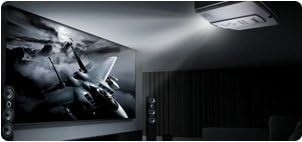
Image: The BenQ SP890 projector, ceiling-mounted, projecting a large, high-definition image of a jet fighter onto a screen in a dark room, illustrating its powerful projection and image quality.
4. 影像模式
The projector offers various picture modes optimized for different content and environments. Access the "Picture" menu in the On-Screen Display (OSD) to select modes such as Presentation, Cinema, Dynamic, or User-defined settings.
維護
1.Lamp 替代品
投影儀 lamp 具有有限的使用壽命。當 lamp 指示燈亮起或影像變暗,就該更換燈泡了。amp有關詳細信息,請參閱完整的用戶手冊。amp replacement instructions. Always allow the projector to cool down completely before attempting lamp 替代品。
2。清潔空氣過濾器
Regularly clean the air filter to ensure proper ventilation and prevent dust buildup, which can affect performance and lamp life. The filter location is typically on the side or bottom of the projector. Use a soft brush or vacuum cleaner to remove dust.
3. Cleaning the Lens and Casing
Use a soft, lint-free cloth and a mild lens cleaning solution to gently clean the projector lens. For the casing,請使用柔軟的乾布擦拭。避免使用研磨性清潔劑或溶劑。
故障排除
| 問題 | 可能的原因 | 解決方案 |
|---|---|---|
| 沒有圖像顯示 |
|
|
| 圖像模糊 |
|
|
| 影像呈梯形 |
|
|
| 沒有聲音 |
|
|
規格
| 特徵 | 細節 |
|---|---|
| 型號 | SP890 |
| 顯示解析度 | 1920 x 1080(全高清) |
| 亮度 | 4000 ANSI Lumens (from product description) |
| 對比 | 50,000:1 (from product description) |
| 連接技術 | HDMI, VGA, Component, S-Video, Composite, LAN, RS232, USB |
| 產品尺寸 | 16.9 x 13.6 x 6.1 英寸 |
| 物品重量 | 15.9磅 |
| 特別報道 | Portable (as listed in specifications) |
保固和支持
For warranty information, please refer to the warranty card included in your product package. For technical support, service, or further inquiries, please visit the official BenQ web請造訪網站或聯絡他們的客戶服務部門。尋求協助時,請準備好您的購買收據和產品序號。
Official BenQ Web地點: 明基網站