
一、簡介
This manual provides essential instructions for the safe and effective use of your Nikon Coolpix S3000 digital camera. The Coolpix S3000 is a compact 12.0-megapixel camera featuring a 4x wide-angle Zoom-NIKKOR glass lens, a bright 2.7-inch LCD, and a 4-way VR Image Stabilization System, designed for capturing high-quality photos and 640 x 480 movies with sound.
Please read this manual thoroughly before using the camera to ensure proper operation and to maximize your photographic experience.
2. 設定
2.1 開箱和初步檢查
Carefully unpack all items from the box. Ensure all components are present and undamaged. If any items are missing or damaged, contact your retailer.
2.2 插入電池
- 找到相機底部的電池倉蓋。
- Slide the cover latch to open the battery chamber.
- Insert the supplied rechargeable battery, ensuring the correct orientation as indicated inside the chamber.
- Close the battery chamber cover until it clicks securely into place.

圖 2.2.1:正面 view of the Nikon Coolpix S3000 digital camera in green. This image shows the lens, flash, and the Nikon Coolpix branding.
2.3 插入記憶卡
此相機支援SD和SDHC記憶卡。儲存照片和影片需要使用記憶卡。
- Open the battery/memory card chamber cover.
- 將記憶卡插入插槽,標籤朝向正確的方向(通常朝向相機正面),直到聽到喀嚓聲為止。
- 牢固地關閉蓋子。
2.4 電池充電
Connect the camera to the supplied AC adapter using the USB cable. The charging indicator will illuminate. Charging is complete when the indicator turns off.
2.5 Initial Power On and Date/Time Settings
按 開/關 button to power on the camera. The first time you power on, you will be prompted to set the date, time, and time zone. Use the multi-selector to navigate and the OK 按鈕確認。
3. 操作相機
3.1 相機控制view
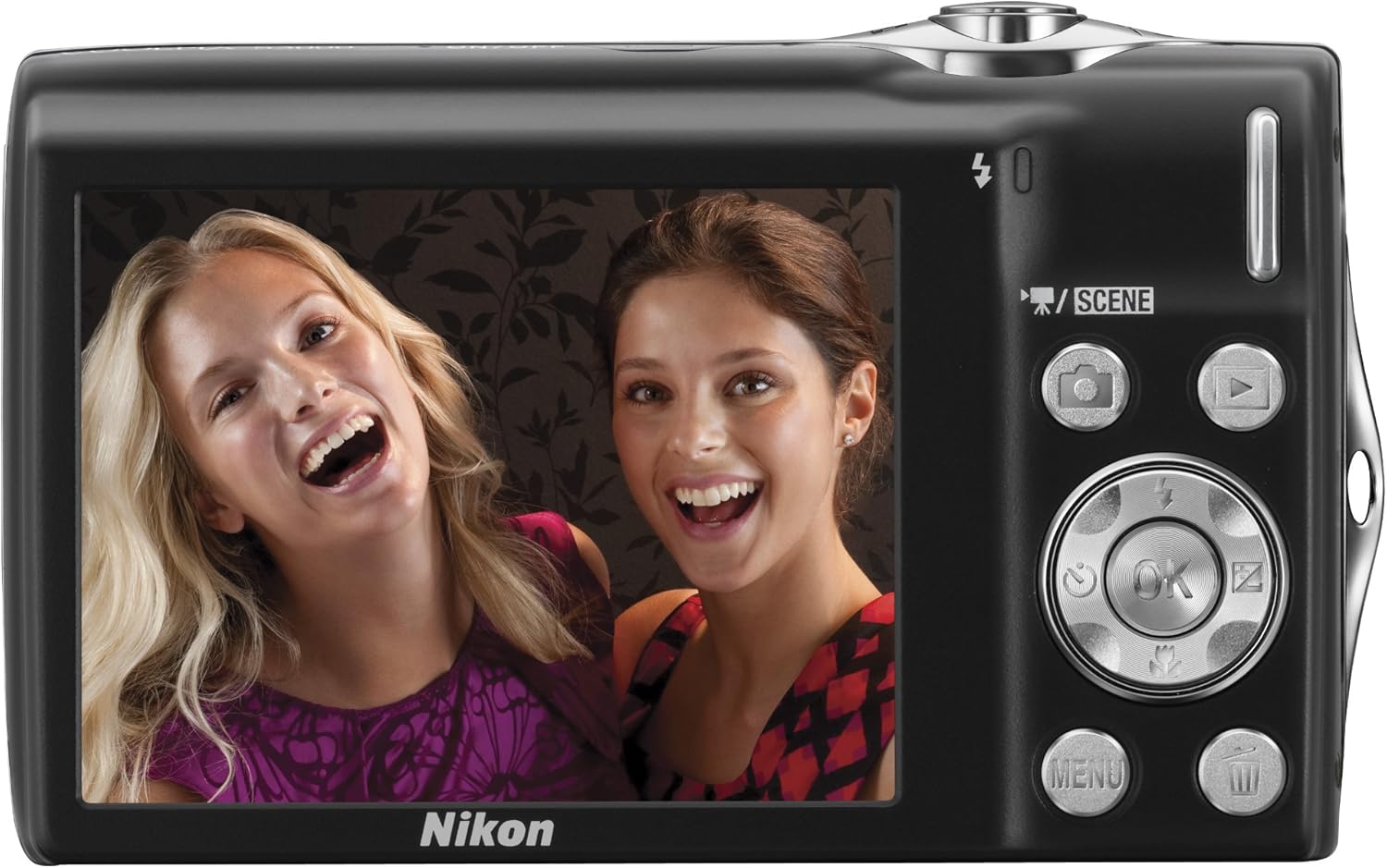
圖 3.1.1:背面 view of the Nikon Coolpix S3000, showing the 2.7-inch LCD screen, multi-selector, and various control buttons like the camera, playback, menu, and OK buttons.
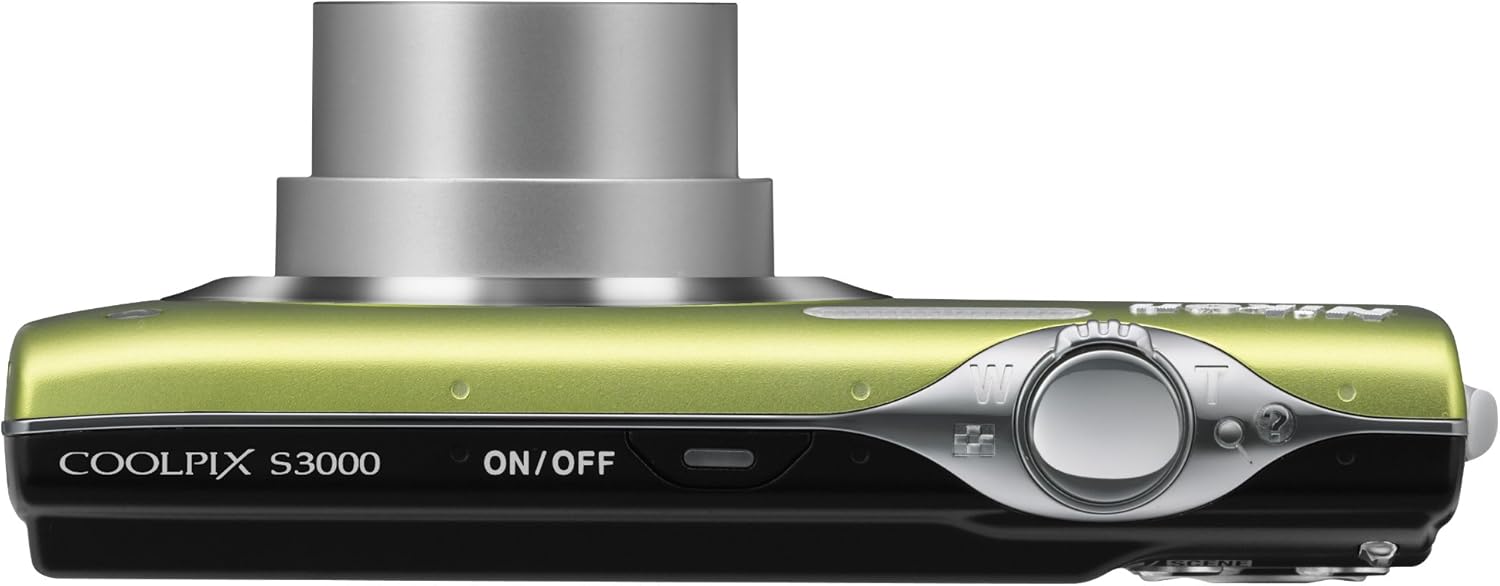
圖 3.1.2:頂部 view of the Nikon Coolpix S3000, highlighting the ON/OFF button and the shutter release button with zoom control.
3.2 拍照
- 開機: 按 開/關 按鈕。
- 選擇模式: 使用 場景 button or navigate through the menu to select a shooting mode (e.g., Auto, Scene modes like Portrait, Landscape, Night Portrait).
- 構圖你的鏡頭: 使用液晶顯示器構圖。
- 飛漲: 使用快門按鈕周圍的變焦桿來調整光學變焦(4倍)。
- 重點: 半按快門鈕進行對焦。對焦完成後,對焦指示燈會亮起。
- 捕獲: 完全按下快門按鈕即可拍照。

圖 3.2.1:正面 view of the Nikon Coolpix S3000 with its 4x optical zoom lens extended, ready for shooting.
3.3 錄製視頻
The Coolpix S3000 can record videos at 640 x 480 resolution at 30 frames per second with sound.
- Switch to video recording mode (refer to the camera's menu or dedicated video button if available).
- 按快門按鈕開始錄製。
- 再次按下快門按鈕停止錄製。
3.4 回放模式
按 回放 button (often indicated by a triangle icon) to view your captured photos and videos. Use the multi-selector to scroll through images. Press the zoom buttons to zoom in on photos or view 同時顯示多張圖片。
3.5 菜單導航
按 選單 button to access camera settings. Use the multi-selector to navigate through options and the OK button to confirm selections. Settings include image quality, white balance, ISO sensitivity, and more.
4、維護保養
4.1 清潔相機
- 鏡片: 請使用專為相機鏡頭設計的柔軟無絨布。以打圈的方式輕輕擦拭。避免用手指觸摸鏡頭。
- 液晶顯示器: Wipe gently with a soft, dry cloth. Do not apply pressure.
- 相機機身: 用柔軟的乾布擦拭灰塵和污漬。若要頑固污漬,可輕輕擦拭。ampen the cloth with water and wipe, then dry thoroughly.
- Avoid using organic solvents like alcohol or benzene.
4.2 電池保養
- Always use the genuine Nikon battery and charger.
- 請勿將電池暴露在極端溫度下。
- 如果長時間不使用相機,請取出電池。
4.3 儲存
Store the camera in a cool, dry, well-ventilated area, away from direct sunlight, high humidity, and strong electromagnetic fields. Use a camera case for protection during transport.
5。 故障排除
| 問題 | 可能的原因/解決方案 |
|---|---|
| 相機無法開啟。 | 電池電量不足或安裝不正確。請確保電池已充電並正確安裝。 |
| 影像模糊。 | Camera shake: Hold the camera steady or use a tripod. Subject movement: Use a faster shutter speed. Lens is dirty: Clean the lens. |
| “記憶卡錯誤”訊息。 | Memory card is damaged, full, or incorrectly inserted. Reinsert the card, try a different card, or format the card (this will erase all data). |
| 閃光燈不閃光。 | Flash is set to "Off" or "Red-eye reduction" mode. Ensure flash is set to "Auto" or "Fill-flash". Subject may be too far away. |
| 無法錄製影片。 | Insufficient memory card space. Camera may be in photo mode. |
如果嘗試這些方法後問題仍然存在,請聯絡尼康客戶支援。
6. 規格
| 特徵 | 細節 |
|---|---|
| 型號名稱 | Nikon Coolpix S3000 |
| 光電感測器分辨率 | 12 議員 |
| 光學變焦 | 4x |
| 數碼變焦 | 2x |
| 螢幕尺寸 | 2.7英寸 |
| 影像穩定 | 4-way VR Image Stabilization System |
| 視訊解析度 | 640 x 480 (30 fps) |
| 支援 File 格式 | JPEG |
| 記憶體型 | SD/SDHC memory cards, Internal |
| 連接技術 | USB |
| 物品重量 | 4.16 盎司 |
7. 保固和支持
7.1 保固信息
Your Nikon Coolpix S3000 camera is covered by a limited warranty. Please refer to the warranty card included with your product for specific terms and conditions, including warranty period and coverage details. Keep your proof of purchase for warranty claims.
7.2 客戶支持
如需技術支援、服務或更多信息,請訪問尼康官方支援網站。 website or contact their customer service department. You can find contact details and FAQs on the 亞馬遜上的尼康商店 or the official Nikon global web地點。