
一、簡介
感謝您的購買asing the JVC KW-AVX810 Vehicle Multimedia Receiver. This unit is designed to provide advanced audio and video entertainment in your vehicle, featuring a 7-inch touch panel monitor, DVD playback, USB connectivity for iPod/iPhone, and Bluetooth readiness. This manual provides essential information for the proper installation, operation, and maintenance of your new multimedia receiver.
2. 安全訊息
- 專業安裝推薦: 由於車輛電氣系統非常複雜,強烈建議由專業人員進行安裝,以防止對設備或車輛造成損壞。
- 電源供應: This unit is designed for 12V DC negative ground electrical systems. Ensure correct wiring to avoid short circuits or damage.
- 駕駛安全: Do not operate the unit's advanced features or watch videos while driving. Always prioritize safe driving practices.
- 可拆卸面板: Handle the detachable faceplate with care. Avoid exposing it to direct sunlight or high temperatures for extended periods.
- 通風: 確保設備周圍通風良好,防止過熱。請勿堵塞通風口。
3. 包裝內容
請檢查包裹內所有物品是否齊全:
- JVC KW-AVX810 Multimedia Receiver
- 可拆卸面板
- 線束
- 安裝硬體
- 遙控器(如果包含)
- 用戶手冊(本文檔)
4. 設定和安裝
4.1 接線連接
Refer to the wiring diagram below for proper connection of the power, speaker, and auxiliary cables. Incorrect wiring can cause damage to the unit or vehicle electrical system.
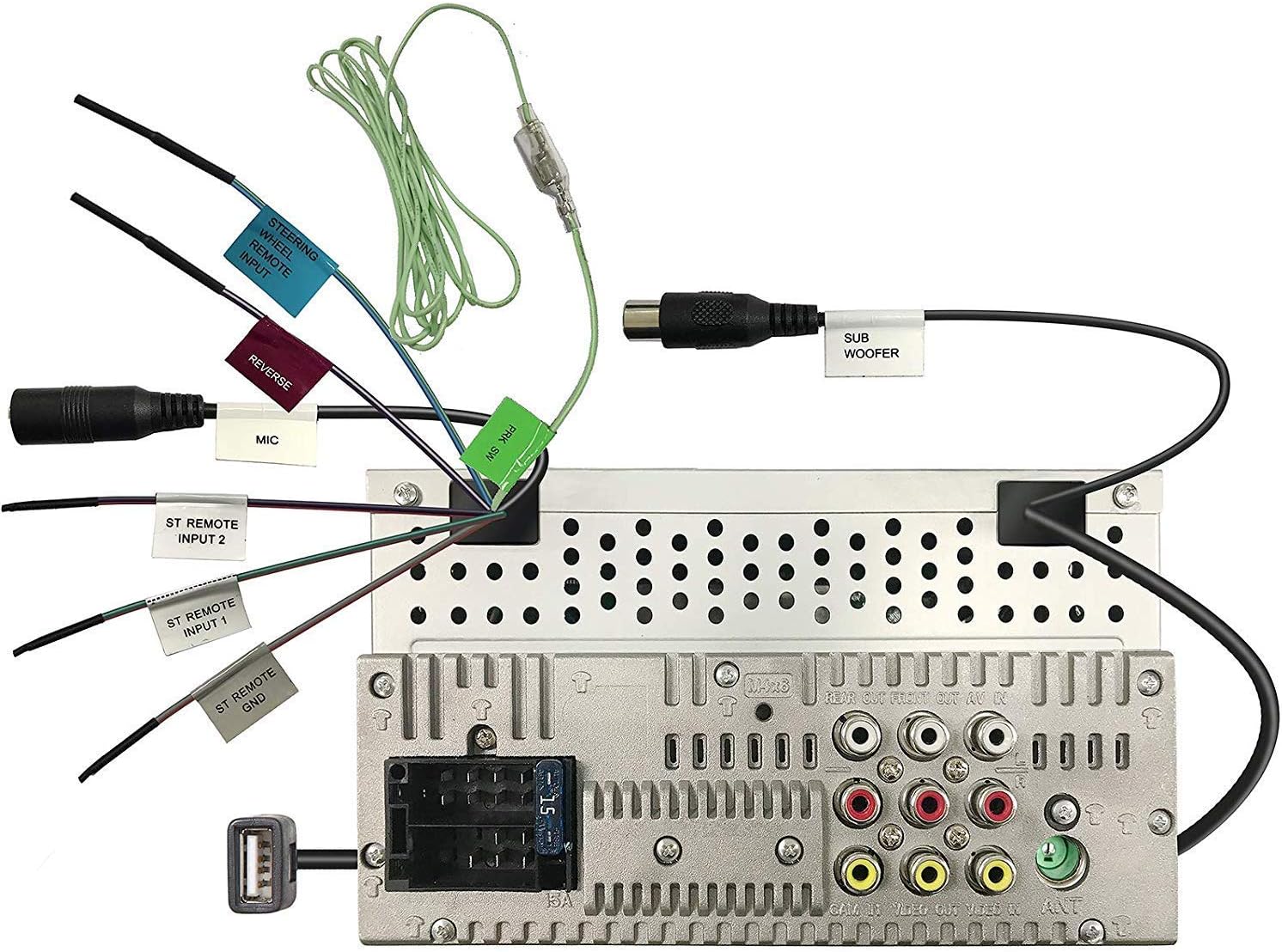
Figure 4.1: Rear panel wiring connections. This image displays the back of the JVC KW-AVX810 unit, illustrating various input and output ports. Key connections include the main power harness, speaker outputs, RCA pre-outs for front, rear, and subwoofer, video input/output, USB port, microphone input, and steering wheel remote input. Each connection is clearly labeled for identification.
- 電源連接: 將黃線連接到 12V 常電,將紅線連接到 12V 電源,將黑線連接到良好的機殼接地。
- 揚聲器連接: Connect the speaker wires to the corresponding vehicle speakers, ensuring correct polarity.
- USB輸入 The USB port allows connection of compatible devices like iPods/iPhones for audio and video playback, and charging.
- RCA 輸出: 這些用於連接外部設備 amp前置、後置和重低音聲道擴大機。
- 視頻輸入/輸出: For connecting external video sources or monitors.
- 方向盤遙控輸入: Connect to a compatible steering wheel control interface (sold separately) for integrated control.
4.2 安裝單元
The KW-AVX810 is a double-DIN unit. Ensure your vehicle's dashboard opening is compatible. Secure the unit using the provided mounting brackets and screws. After mounting, connect all wiring harnesses before reassembling the dashboard.
5. 操作說明
5.1 基本控制和顯示
The unit features a 7-inch touch panel monitor for intuitive control. The main interface provides access to various functions.

Figure 5.1: Front panel and display. This image shows the JVC KW-AVX810's 7-inch touch panel display, featuring a graphical user interface with icons for various functions such as Tuner, Mirroring, AV-IN, Phone, BT Audio, and Settings. Volume controls and power button are visible on the left bezel. The current time is displayed prominently in the center.
- 電源開/關: Press the power button (usually located on the left bezel) to turn the unit on or off.
- 音量控制: Use the volume up/down buttons or the on-screen controls to adjust the audio level.
- 來源選擇: Tap the desired source icon (e.g., Tuner, DVD, USB, BT Audio, AV-IN) on the touch screen to switch between functions.
- 可拆卸面板: To detach the faceplate, press the release button (refer to the unit's specific mechanism). Always detach the faceplate when leaving the vehicle to deter theft.
5.2 媒體播放
- DVD/CD 播放: Insert a disc into the slot. The unit will automatically switch to DVD/CD mode. Use the touch screen for playback controls (play, pause, skip, menu).
- USB/iPod/iPhone: Connect your device to the USB port. The unit will detect the device and allow you to browse and play media files. The KS-U20 cable (sold separately) may be required for iPod video functionality.
- 藍牙音頻: Pair your Bluetooth-enabled device with the KW-AVX810. Once paired, you can stream audio wirelessly.
- 收音機調諧器: Select the Tuner source. Use the touch screen to scan for stations, save presets, and switch between AM/FM bands.
5.3 設定和自訂
Access the 'Settings' menu from the main screen to customize various aspects of the unit, including:
- 音訊設定: Adjust equalizer (7-Band iEQ), balance, fader, subwoofer levels, and sound effects (Dolby 5.1 headphone surround sound).
- 顯示設置: Adjust brightness, contrast, and background.
- 系統設定: Language, time, and other general preferences.
- 藍牙設置: 管理已配對裝置和連線選項。
6、維護保養
- 清潔顯示屏: Use a soft, dry cloth to wipe the touch screen. For stubborn smudges, lightly damp用清水或電子產品專用螢幕清潔劑擦拭抹布。請勿使用研磨性清潔劑。
- 清潔面板: Wipe the detachable faceplate with a soft, dry cloth. Avoid harsh chemicals.
- 光碟護理: 拿取光碟時請握住邊緣。保持光碟清潔,避免刮傷。不使用時,請將光碟存放在光碟盒中。
- 一般護理: 保持設備清潔乾燥,避免灰塵和潮濕。避免極端溫度。
7。 故障排除
If you encounter problems with your KW-AVX810, refer to the following common issues and solutions:
| 問題 | 可能的原因 | 解決方案 |
|---|---|---|
| 沒電 | 線路連接錯誤;保險絲燒斷;車輛電池故障。 | Check power connections (yellow, red, black wires). Inspect the unit's fuse and vehicle's fuse box. Ensure vehicle battery is charged. |
| 沒有聲音 | 音量過低;靜音已啟用;揚聲器接線錯誤; Amp利器問題。 | Increase volume. Check if mute is on. Verify speaker connections. If using external amp檢查功放的電源和連接。 |
| 顯示器不工作 | Faceplate not properly attached; Display settings. | Ensure faceplate is securely attached. Check display brightness/contrast settings. |
| USB/iPod not recognized | Incompatible format; Loose connection; Device issue. | 確保媒體 files are in a supported format. Reconnect the USB device. Try a different USB device. Update iPod/iPhone software if necessary. |
| 藍牙連線問題 | 設備未處於配對模式;受到干擾;已與其他設備配對。 | 確保兩台裝置都已啟用藍牙並處於配對模式。刪除先前的配對記錄並重新配對。靠近設備。 |
如果嘗試這些方法後問題仍然存在,請聯絡 JVC 客戶支援或合格的維修技術人員。
8. 規格
- 產品尺寸: 18.39 x 17.81 x 10.01 公分; 2.6公斤
- 產品型號: KWM150BT+XV95BK+MAGNET
- 品牌: 合資公司
- 連接技術: 藍牙、USB
- 控制器類型: Android(相容)
- 特點: Built-In Bluetooth, FM Tuner, Subwoofer Pre-out
- 相容設備: 智慧型手機
- HDMI 端口總數: 1 (Note: This may refer to an internal component or specific model variant, as the main description does not highlight HDMI)
- 連接器類型: USB
- 音頻輸出模式: 環繞
- 環繞聲通道配置: 4.1
- 製造商: 合資公司
9.保修與支持
9.1 保固信息
The JVC KW-AVX810 Vehicle Multimedia Receiver comes with a warranty. For Mobile Products, the warranty covers 1 年零件和人工 from the date of purchase. Please retain your proof of purchase for warranty claims. The warranty does not cover damage caused by improper installation, accident, misuse, abuse, or unauthorized modification.
9.2 客戶支持
For technical assistance, service, or warranty inquiries, please contact JVC customer support. Refer to the official JVC web請造訪網站或查看產品包裝以取得最新聯絡資訊。