
一、簡介
The Sigma SD14 is a 14-megapixel Digital Single-Lens Reflex (DSLR) camera designed for advanced photographers. It features the Foveon X3 direct-image sensor, which captures full RGB color information at each pixel layer, aiming for high-definition images with rich gradation. This manual provides essential information for setting up, operating, and maintaining your SD14 camera.
Key features include a 2.5-inch LCD monitor, a durable shutter mechanism rated for over 100,000 cycles, a 5-point autofocus system, and continuous shooting capabilities. The camera supports both RAW and JPEG image recording formats and includes Sigma Photo Pro 3.0 software for RAW image processing.

圖 1.1:正面 view of the Sigma SD14 Digital SLR Camera, showing the lens mount and body design.
2. 包裝內容
Verify that all the following items are included in your Sigma SD14 package:
- Sigma SD14 Digital SLR Camera Body
- Lithium-ion Power Battery BP-21
- Battery Charger BC-21
- USB 線
- 視頻線
- 頸帶
- Eye Cap
- 機身蓋
- 目鏡帽
- SIGMA Photo Pro 3.0 CD-ROM
- SD14 Instruction Manual (this document)
3. 設定
3.1 電池的充電與安裝
- Insert the Lithium-ion Battery BP-21 into the Battery Charger BC-21.
- 將充電器連接到電源插座。充電指示燈將會亮起。
- Charging typically takes approximately 120 minutes for a full charge.
- 充滿電後,從充電器中取出電池。
- Open the battery compartment cover on the camera body.
- Insert the charged battery into the compartment, ensuring correct orientation.
- 關緊電池盒蓋。
A fully charged BP-21 battery can capture approximately 500 images.
3.2.插入記憶卡
The SD14 uses CompactFlash (CF) Type I/II cards. Ensure the card is formatted in the camera before first use.
- 打開相機側面的CF卡插槽蓋。
- Insert the CF card with the correct orientation until it clicks into place.
- Close the CF card slot cover securely.
3.3. 安裝鏡頭
The Sigma SD14 uses the Sigma SA Bayonet mount. Only Sigma SA mount lenses are directly compatible.
- 取下相機的機身蓋,取下鏡頭的後鏡頭蓋。
- Align the red index mark on the lens with the red index mark on the camera body's lens mount.
- 將鏡頭順時針旋轉安裝到位,直到聽到喀嚓聲鎖定到位。
- 若要卸下鏡頭,請按下相機機身上的鏡頭釋放鈕,然後逆時針旋轉鏡頭。
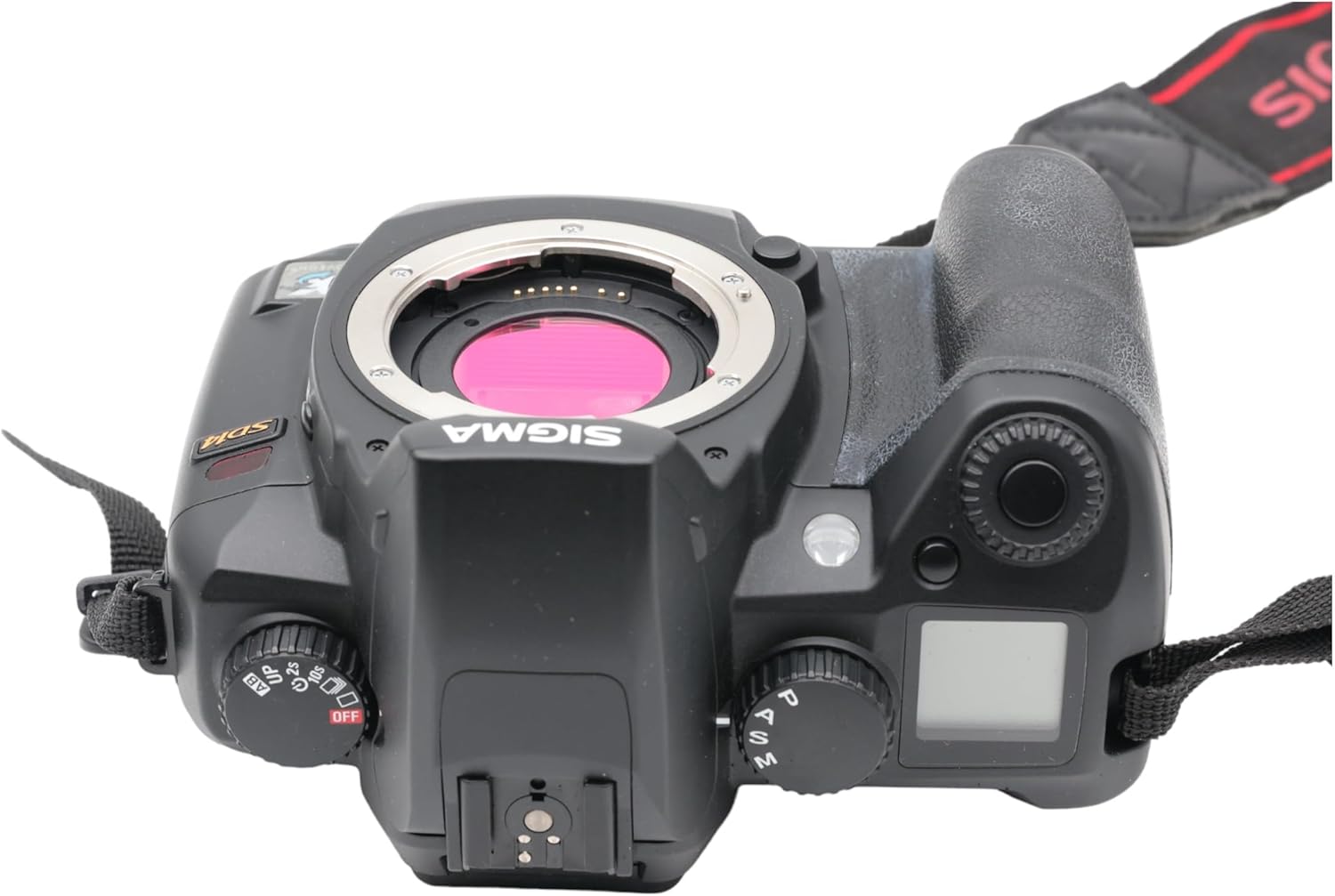
圖 3.1:頂部 view of the Sigma SD14, illustrating the lens mount and mode dials.
4. 操作
4.1. 開機/關機
Rotate the power switch to the ON position to turn on the camera. Rotate it to OFF to power down.
4.2. 基本控制和顯示
The SD14 features a 2.5-inch LCD monitor for reviewing images and navigating menus, and a pentaprism viewfinder for composing shots. The top LCD panel displays key settings such as resolution, metering mode, battery status, and remaining shots.

圖 4.1:背面 view of the Sigma SD14, showing the LCD monitor, view查找器和控制按鈕。
Key buttons include MENU, ISO, WB (White Balance), and a 4-way controller with an OK button for navigation. The INFO button displays shutter speed, aperture, and other settings on the LCD.
4.3. 聚焦
The camera utilizes a 5-point autofocus (AF) system (center, left, right, up, and down). The center AF point features a cross-type sensor for enhanced precision. AF point selection can be automatic or manual.
4.4. 計量模式
The SD14 offers three metering modes:
- 8-segment Evaluative Metering: Analyzes the entire scene for balanced exposure.
- Center Area Metering: Prioritizes the central area of the frame.
- Center Weighted Average Metering: Measures the entire frame but gives more weight to the central area.
Exposure compensation and auto bracketing functions are available for fine-tuning exposure.
4.5. 影像記錄
The camera supports both RAW (X3F) and JPEG formats. JPEG recording offers four sizes (Super High, High, Medium, Low) and three quality settings (Fine, Normal, Basic).
- Super High (4608 x 3072 pixels): Suitable for A3 or larger prints.
- High (2640 x 1760 pixels): Suitable for A4 prints.
- Medium (1776 x 1184 pixels): Suitable for regular size prints.
- Low (1296 x 864 pixels): 適合於 web pages and email.
4.6.連拍
The SD14 can shoot continuously at 3 frames per second. The number of frames captured in a burst depends on the resolution setting:
- 高的: 6幀
- 中等的: 12幀
- 低的: 24幀
These figures apply to both RAW and JPEG modes.
4.7 內建閃光燈
The built-in flash has a guide number of 11 (ISO 100) and covers a 17mm lens angle (28mm equivalent on 35mm format). It supports S-TTL automatic flash metering and can synchronize with shutter speeds up to 1/180 second.
4.8. Mirror Lock-up
Activate the mirror lock-up mechanism to prevent camera shake caused by mirror movement during exposure. This is particularly useful for macro photography, long telephoto shots, or scientific applications. For best results, use with a remote controller or cable release (sold separately).
4.9. Sigma Photo Pro 3.0 Software
The included Sigma Photo Pro 3.0 software is a RAW image developer. It allows for quick conversion of RAW data and offers three adjustment modes: X3F Mode (original settings), Auto Adjustment Mode, and Custom Mode for manual adjustments (exposure, contrast, shadow, highlight, saturation, sharpness, fill-light). The software supports 8-bit TIFF, 16-bit TIFF, and JPEG file formats, and sRGB, Apple RGB, Adobe RGB, and ColorMatch RGB color spaces.
5、維護保養
5.1. Image Sensor Dust Protector
The SD14 features a dust protector positioned in front of the image sensor. This design prevents dust from adhering directly to the sensor, minimizing its impact on image quality. If dust accumulates on the protector, it will be out of focus and generally not visible in images.
5.2. 清潔相機機身和鏡頭
- 使用柔軟、不起毛的布擦拭相機機身。若要頑固污漬,可輕輕擦拭。amp用水或溫和的清潔溶液擦拭布。
- For lenses, use a lens brush to remove loose dust, then a lens cleaning solution and a microfiber cloth. Avoid touching the lens surface with your fingers.
- 切勿使用油漆稀釋劑或苯等有機溶劑清潔相機或鏡頭。
5.3. 電池保養
- 不使用時,將電池存放在陰涼、乾燥的地方。
- 避免頻繁完全放電電池以延長其使用壽命。
- 如果長時間不使用相機,請取出電池。
6。 故障排除
| 問題 | 可能的原因 | 解決方案 |
|---|---|---|
| 相機無法開機。 | 電池電量耗盡或插入不正確。 | 將電池充滿電並確保正確插入。 |
| 影像模糊。 | 對焦不正確、相機震動或鏡頭髒污。 | 確保對焦準確。使用更快的快門速度或三腳架。清潔鏡頭。 |
| 圖片太暗或太亮。 | Incorrect exposure settings or metering mode. | Adjust exposure compensation. Select an appropriate metering mode for the scene. |
| Color blotching in underexposed areas. | Characteristic of the Foveon sensor when severely underexposed. | Aim to slightly overexpose images (e.g., +.7 EV) to retain shadow detail and avoid this effect. |
| 無法錄製影像。 | Memory card is full, locked, or not inserted correctly. | Insert an empty card, unlock the card, or reinsert it correctly. Format the card if necessary (this will erase all data). |
| 相機凍結或無響應。 | 暫時的軟體故障。 | 取出並重新插入電池以重置相機。 |
For more detailed troubleshooting or error codes, please refer to the comprehensive instruction manual included with your camera or visit the Sigma support web地點。
7. 規格
| 特徵 | 細節 |
|---|---|
| 型號名稱 | SD14 |
| 光電感測器分辨率 | 14 MP (Foveon X3 direct-image sensor) |
| 光電感測器尺寸 | APS-C |
| 兼容的安裝 | Sigma SA Bayonet |
| 支援 File 格式 | JPEG, RAW (X3F), TIFF |
| 螢幕尺寸 | 2.5 Inches (150,000 pixels) |
| View發現者 | Optical Pentaprism (98% coverage, 0.9x magnification) |
| 自動對焦點 | 5-point (Phase Detection) |
| 連拍速度 | 每秒 3 幀 |
| 最大快門速度 | 1/4000秒 |
| 最低快門速度 | 30秒 |
| 擴展的 ISO 範圍 | 100 - 1600 |
| 測光模式 | 8-segment Evaluative, Center Area, Center Weighted Average |
| Built-in Flash Guide Number | 11(ISO 100) |
| 儲存媒體 | Compact Flash (CF) Type I/II |
| 電源 | Lithium-ion Battery BP-21 |
| 連接性 | USB接口,視訊輸出 |
| 物品重量 | 1.65 磅(約748公克) |
| 型號 | C23900 |
| 統一產品程式碼 | 085126924416 |
7.1. 選購配件(另售)
- Sigma Lenses (over 40 compatible models)
- Flashguns: EF-500 DG SUPER, EF-500 DG ST, EM-140 DG
- Power Grip PG-21
- Cable Release CR-21
- Remote Controller RS-31
- AC Adapter SAC-21
8.保修與支持
8.1. 保固信息
For detailed warranty terms and conditions, please refer to the warranty card included with your product or visit the official Sigma web網站。保固範圍通常包括自購買之日起特定期限內的材料和工藝缺陷。
8.2. 客戶支持
If you encounter any issues or have questions not covered in this manual, please contact Sigma customer support. Contact information can usually be found on the official Sigma web網站或保固文件中。
線上資源: 造訪 Sigma 官方網站 website for product registration, firmware updates, FAQs, and additional support resources.